
1. ఉత్పత్తి ముగిసిందిview
The Blukar K9187 Rechargeable LED Flashlight is a versatile and powerful lighting tool designed for various outdoor activities and emergency situations. It features a main LED light with adjustable focus and two color temperatures (white and warm), a COB side light with white and red modes, and a 5000mAh rechargeable battery that also functions as a power bank. Its durable, IP67 waterproof design ensures reliable performance in challenging environments.
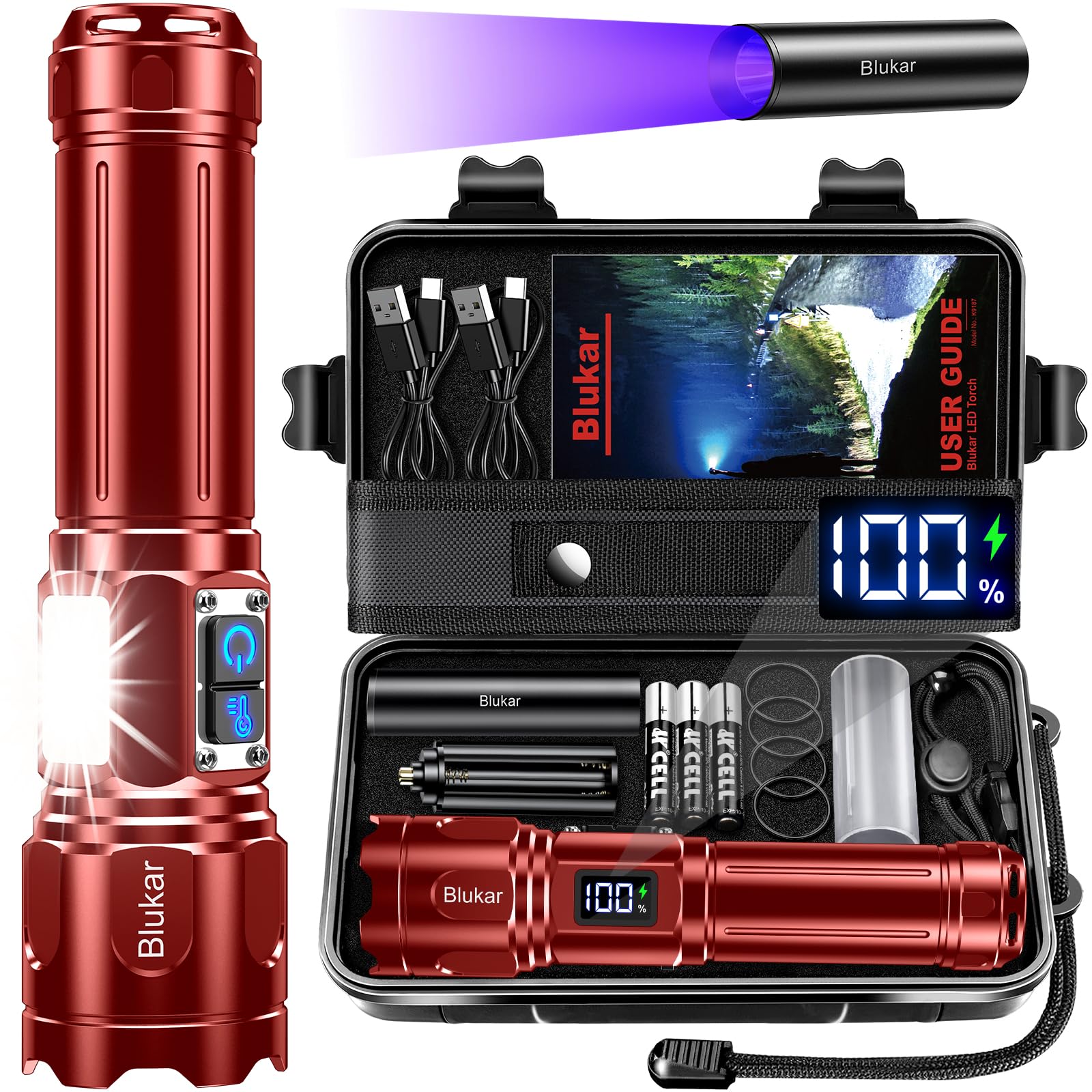
Image: Blukar K9187 Rechargeable LED Flashlight, showcasing దాని దృఢమైన డిజైన్.
2. ప్యాకేజీ విషయాలు
క్రింద జాబితా చేయబడిన అన్ని వస్తువులు మీ ప్యాకేజీలో చేర్చబడ్డాయని ధృవీకరించండి:
- 1 × Blukar Rechargeable Flashlight (K9187)
- 1 × Mini UV Flashlight
- 3 × AAA Batteries (for mini UV flashlight)
- 1 × 5000mAh Rechargeable Battery (pre-installed in main flashlight)
- 1 × AAA Battery Holder (for main flashlight, as backup)
- 1 × AAA Battery Tube (for main flashlight, for AAA battery use)
- 2 × USB-C ఛార్జింగ్ కేబుల్స్
- 1 × నిల్వ పెట్టె
- 1 × Flashlight Pouch
- 4 × Waterproof Rings (spare)
- 1 × లాన్యార్డ్
3. సెటప్ మరియు ఛార్జింగ్
3.1 ప్రారంభ ఛార్జింగ్
Before first use, fully charge the main flashlight. The 5000mAh battery provides up to 24 hours of continuous illumination in low brightness mode.
- ఫ్లాష్లైట్పై USB-C ఛార్జింగ్ పోర్ట్ను గుర్తించండి.
- Connect one end of the provided USB-C cable to the flashlight and the other end to a compatible USB power adapter (not included) or a computer's USB port.
- The LED digital display will show the charging progress. A full charge is indicated by "100%".
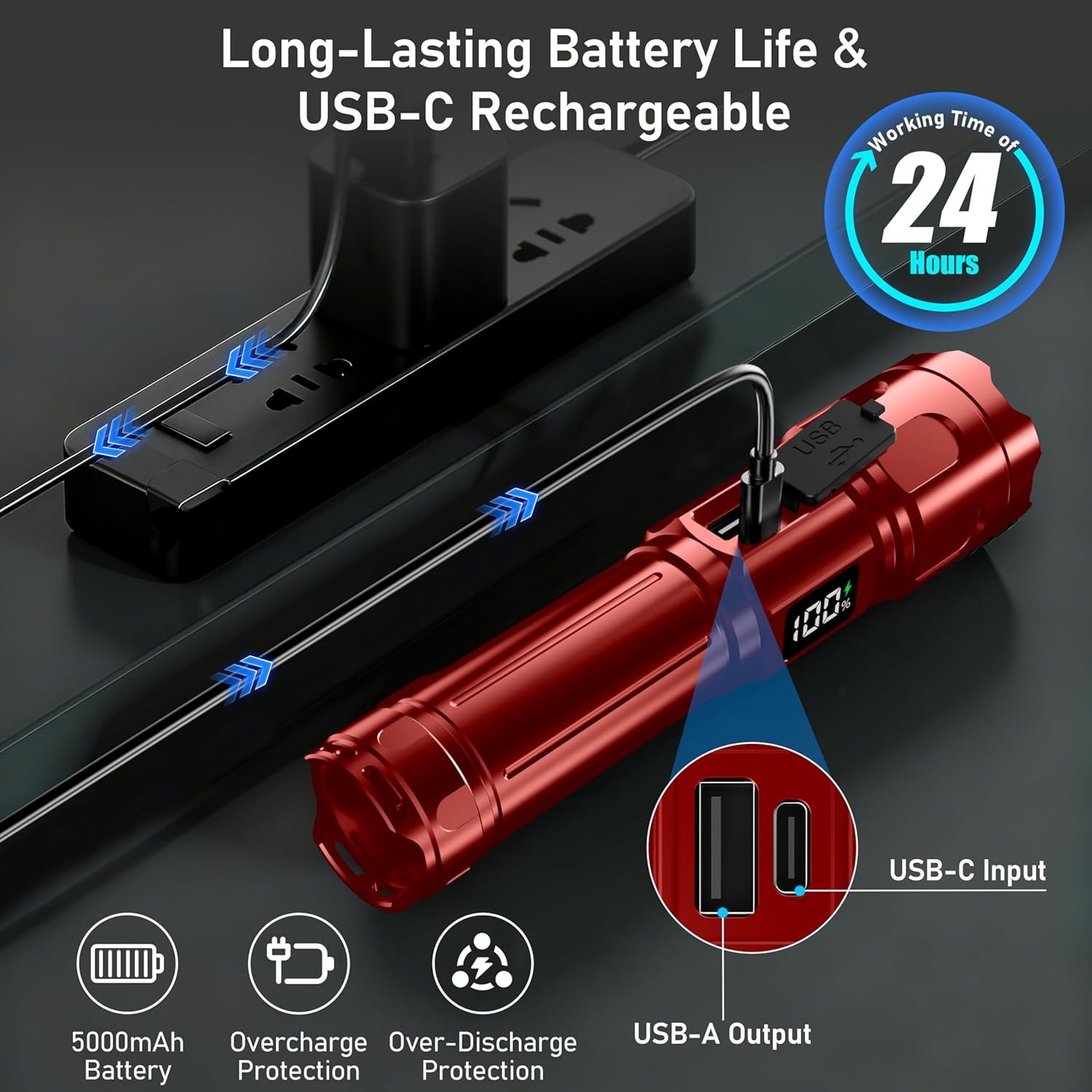
Image: The Blukar K9187 flashlight connected to a USB-C charger, illustrating the charging process and the digital battery display.
3.2 Battery Installation (AAA Backup)
In emergencies, if the rechargeable battery is depleted, you can use AAA batteries as a backup.
- ఫ్లాష్లైట్ యొక్క టెయిల్ క్యాప్ను విప్పు.
- Remove the pre-installed 5000mAh rechargeable battery.
- Insert three AAA batteries into the provided AAA battery holder.
- Place the loaded AAA battery holder into the flashlight, ensuring correct polarity.
- టెయిల్ క్యాప్ను తిరిగి సురక్షితంగా స్క్రూ చేయండి.
4. ఆపరేటింగ్ సూచనలు
4.1 Power On/Off and Main Light Modes
The flashlight features 7 lighting modes, including 4 main light modes and 3 side light modes.
- పవర్ ఆన్/ఆఫ్: Press the ON/OFF button to turn the flashlight on or off.
- స్విచింగ్ మోడ్లు:
- From OFF, press the ON/OFF button once to activate the main light.
- Press the ON/OFF button again within 8 seconds to cycle through the main light modes: వైట్ లైట్ → వెచ్చని కాంతి → White Side Light → Red Side Light → Red Side SOS.
- సక్రియం చేయడానికి White Main Light SOS or Warm Main Light SOS, double-click the ON/OFF button when the main light is active.
- If the flashlight remains in one mode for more than 8 seconds, a single press of the ON/OFF button will turn it off.

Image: Diagram illustrating the 7 lighting modes of the Blukar K9187 flashlight, including main white, warm, and side COB white, red, and SOS modes.
4.2 రంగు ఉష్ణోగ్రత మరియు ప్రకాశాన్ని సర్దుబాటు చేయడం
The main light offers two color temperatures and stepless dimming.
- మారుతున్న రంగు ఉష్ణోగ్రతలు: When the main light is on, short press the "Color Temperature Button" (located near the ON/OFF button) to switch between white and warm light.
- స్టెప్లెస్ డిమ్మింగ్: When the main light is on, long press the "Color Temperature Button" to continuously adjust the brightness from 100% down to 30%. Release the button to set the desired brightness.

Image: Illustration showing the two color temperatures (warm and white light) and the controls for switching between them and performing stepless dimming.
4.3 Adjustable Focus (Zoom Function)
The main light features an adjustable focus mechanism to switch between spotlight and floodlight.
- స్పాట్లైట్: Extend the head of the flashlight forward to narrow the beam for a long-range spotlight effect.
- అతి ప్రకాశవంతమైన దీపం: Retract the head of the flashlight backward to widen the beam for a broad floodlight effect, ideal for close-range illumination.
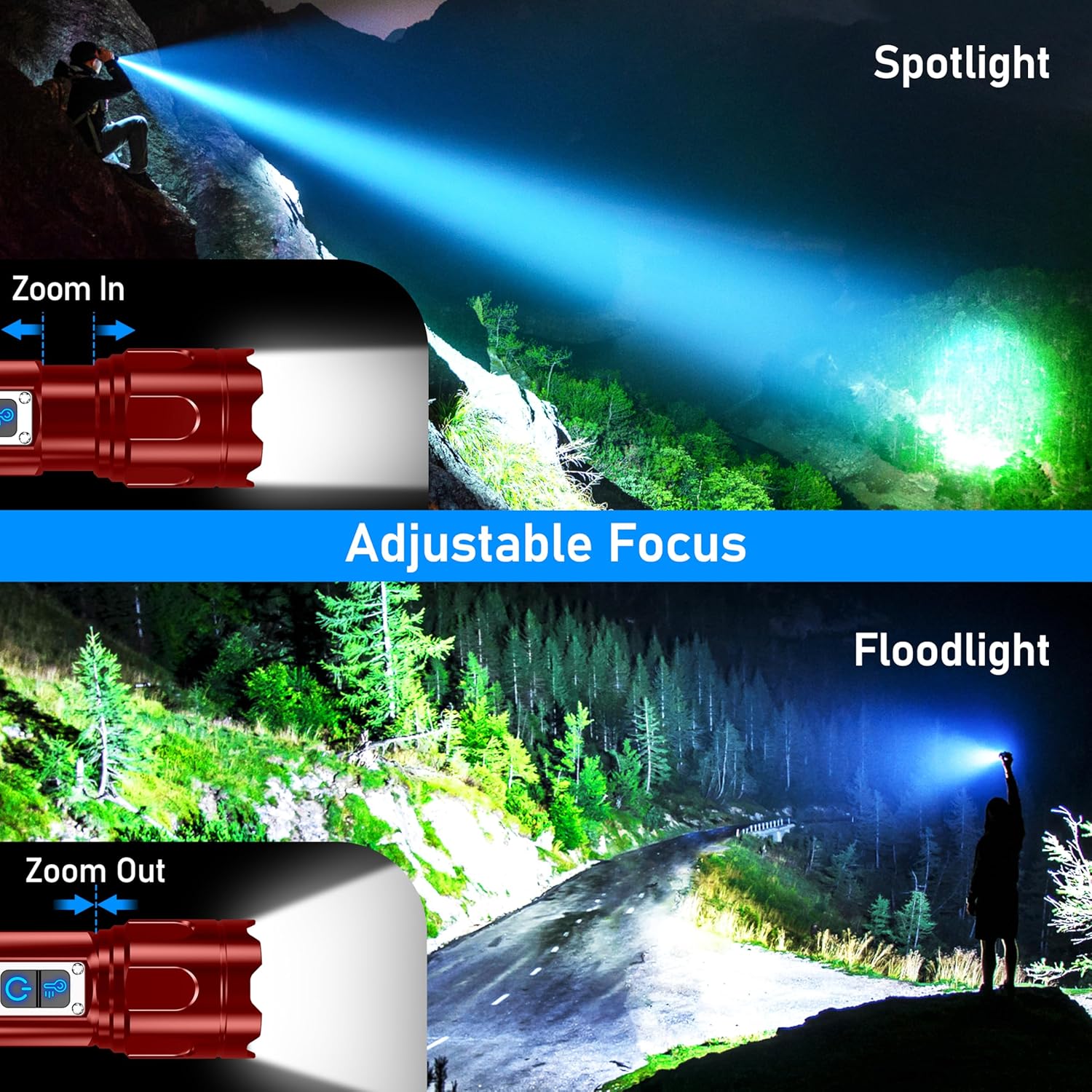
Image: Visual demonstration of the flashlight's adjustable focus, showing how to zoom in for a spotlight and zoom out for a floodlight.
4.4 పవర్ బ్యాంక్ ఫంక్షన్
The Blukar K9187 can be used as an emergency power bank to charge other devices.
- Locate the USB-A output port on the flashlight.
- Connect your device's charging cable to the USB-A output port.
- ఫ్లాష్లైట్ మీ పరికరాన్ని ఛార్జ్ చేయడం ప్రారంభిస్తుంది.
Note: Using the power bank function will consume the flashlight's battery. Monitor the LED digital display for remaining battery life.
5 కీ ఫీచర్లు
- Ultra-Bright & Long Range: Equipped with high-quality LED chips for a powerful beam.
- COB సైడ్ లైట్: Provides soft, close-range illumination, ideal for work light or emergency situations. Includes white, red, and red SOS modes.
- Digital Power Display: An LED screen clearly shows the remaining battery percentage, preventing unexpected power loss.
- IP67 జలనిరోధిత: Constructed from high-quality aluminum alloy, making it durable, wear-resistant, and waterproof for outdoor activities.
- Safety Hammer: Integrated safety hammer for emergency glass breaking.
- Mini UV Flashlight: Included for detecting fluorescent materials, pet stains, or verifying currency.

Image: The Blukar K9187 flashlight demonstrating its ultra-bright and long-range beam, capable of reaching up to 1524 meters (5000 feet).

Image: The Blukar K9187 flashlight being exposed to water, highlighting its IP67 waterproof rating and durable construction with thickened sealing rings.
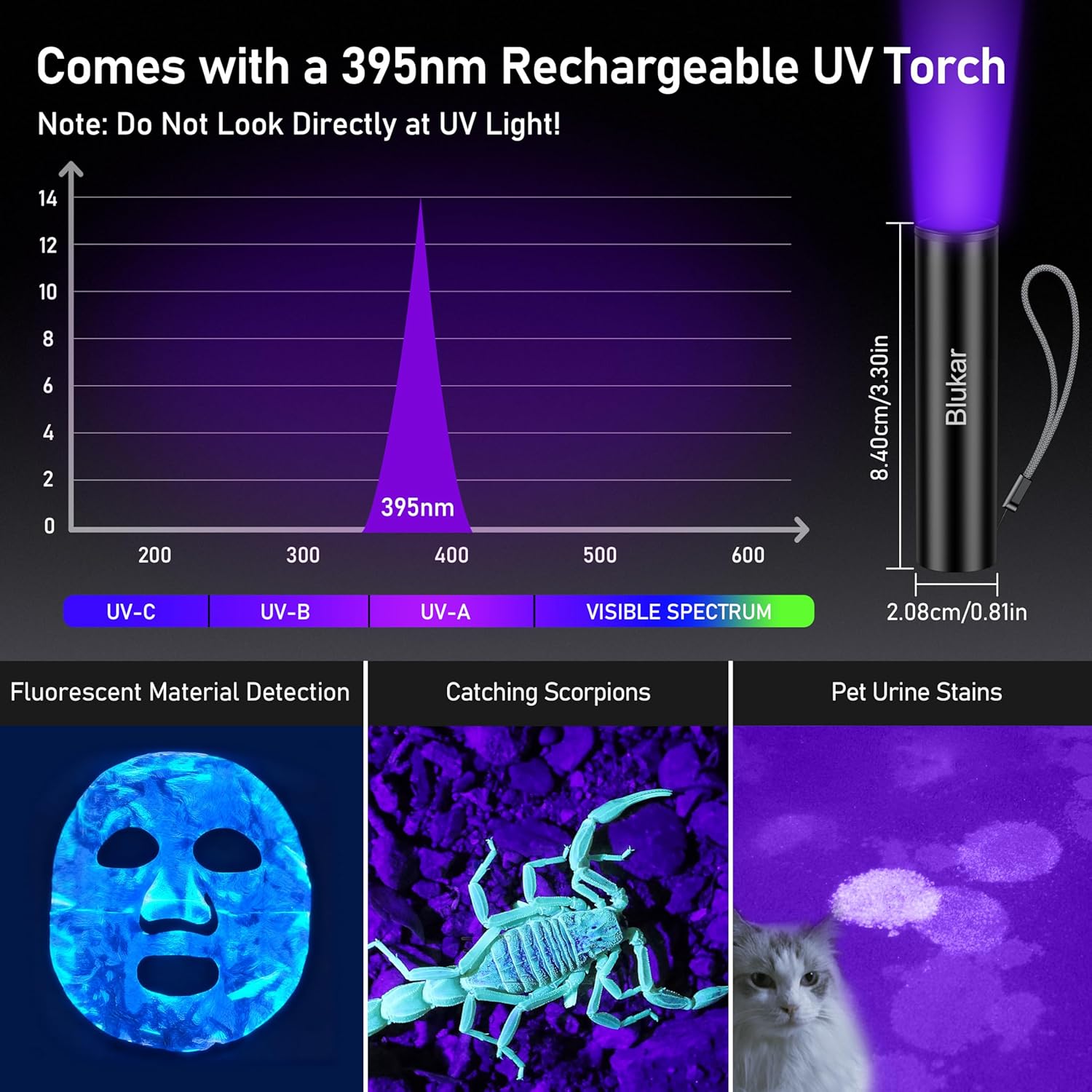
Image: The included 395nm rechargeable UV torch, demonstrating its use for fluorescent material detection, catching scorpions, and identifying pet urine stains.

Image: Detailed diagram of the Blukar K9187 flashlight components, including the COB side light, ON/OFF button, color temperature button, safety hammer, zoomable head, LED digital power display, and anti-loss lanyard.
6. నిర్వహణ
- శుభ్రపరచడం: ఫ్లాష్లైట్ను మృదువైన, డితో తుడవండిamp గుడ్డ. రాపిడి క్లీనర్లు లేదా ద్రావకాలు ఉపయోగించవద్దు.
- జలనిరోధిత రింగ్స్: Periodically inspect the waterproof rings (O-rings) for wear and tear. Replace them with the provided spare rings if necessary to maintain IP67 water resistance.
- బ్యాటరీ సంరక్షణ: If storing the flashlight for an extended period, charge the battery to approximately 50% and recharge every 3-6 months to prolong battery life.
- నిల్వ: ప్రత్యక్ష సూర్యకాంతి మరియు తీవ్రమైన ఉష్ణోగ్రతల నుండి దూరంగా చల్లని, పొడి ప్రదేశంలో ఫ్లాష్లైట్ను నిల్వ చేయండి.
7. ట్రబుల్షూటింగ్
| సమస్య | సాధ్యమైన కారణం | పరిష్కారం |
|---|---|---|
| ఫ్లాష్లైట్ ఆన్ అవ్వడం లేదు. | బ్యాటరీ క్షీణించింది. బ్యాటరీ సరిగ్గా చొప్పించబడలేదు. తప్పు బ్యాటరీ. | ఫ్లాష్లైట్ను ఛార్జ్ చేయండి. Check battery polarity and ensure it's securely inserted. Try using AAA backup batteries. |
| కాంతి మసకగా లేదా మిణుకుమిణుకుమంటుంది. | తక్కువ బ్యాటరీ. వదులుగా ఉన్న కనెక్షన్. | ఫ్లాష్లైట్ని రీఛార్జ్ చేయండి. Ensure battery cap is tightened. |
| మోడ్లను మార్చలేరు. | బటన్ ప్రెస్ క్రమం తప్పు. | Refer to Section 4.1 for correct mode switching instructions. |
| పవర్ బ్యాంక్ ఫంక్షన్ పనిచేయడం లేదు. | Flashlight battery is too low. Cable or device issue. | Ensure flashlight has sufficient charge (above 20%). వేరే USB కేబుల్ లేదా పరికరాన్ని ప్రయత్నించండి. |
8. స్పెసిఫికేషన్లు
| బ్రాండ్ | బ్లుకర్ |
| మోడల్ సంఖ్య | K9187 |
| కొలతలు (L x W x H) | 17 x 4.19 x 3.36 సెం.మీ (6.69 x 1.65 x 1.32 అంగుళాలు) |
| బరువు | 274 గ్రాములు (9.66 oz) |
| బ్యాటరీ రకం | 5000mAh Lithium-ion (main flashlight), 3 x AAA (mini UV flashlight / backup for main) |
| శక్తి మూలం | బ్యాటరీ పవర్డ్ (USB-C రీఛార్జబుల్) |
| జలనిరోధిత రేటింగ్ | IP67 |
| రంగు | బోర్డియక్స్ |
| చేర్చబడిన భాగాలు | USB-C Cable, Mini UV Flashlight, AAA Batteries, Storage Box, Pouch, Lanyard, Spare O-rings |
9. భద్రతా సమాచారం
- Do not look directly into the flashlight beam or the UV light. It can cause temporary vision impairment or eye damage.
- పిల్లలకు దూరంగా ఉంచండి.
- ఫ్లాష్లైట్ను విడదీయవద్దు లేదా సవరించవద్దు.
- Avoid exposing the flashlight to extreme temperatures or open flames.
- Use only the provided charging cables or certified equivalents.
- నీటి నిరోధకతను నిర్వహించడానికి బ్యాటరీ కంపార్ట్మెంట్ సరిగ్గా మూసివేయబడిందని నిర్ధారించుకోండి.
- స్థానిక నిబంధనల ప్రకారం బ్యాటరీలను పారవేయండి.
10. వారంటీ మరియు మద్దతు
Specific warranty information is not provided in the product details. For warranty claims or technical support, please contact Blukar customer service through the retailer where the product was purchased or visit the official Blukar webసైట్.
You can visit the Blukar store on Amazon: Blukar Store