
పరిచయం
This manual provides detailed instructions for the setup, operation, and maintenance of your Tivoli Audio PAL BT (Gen 3) Portable Bluetooth FM Radio. Please read this manual thoroughly before using your device to ensure proper function and longevity.

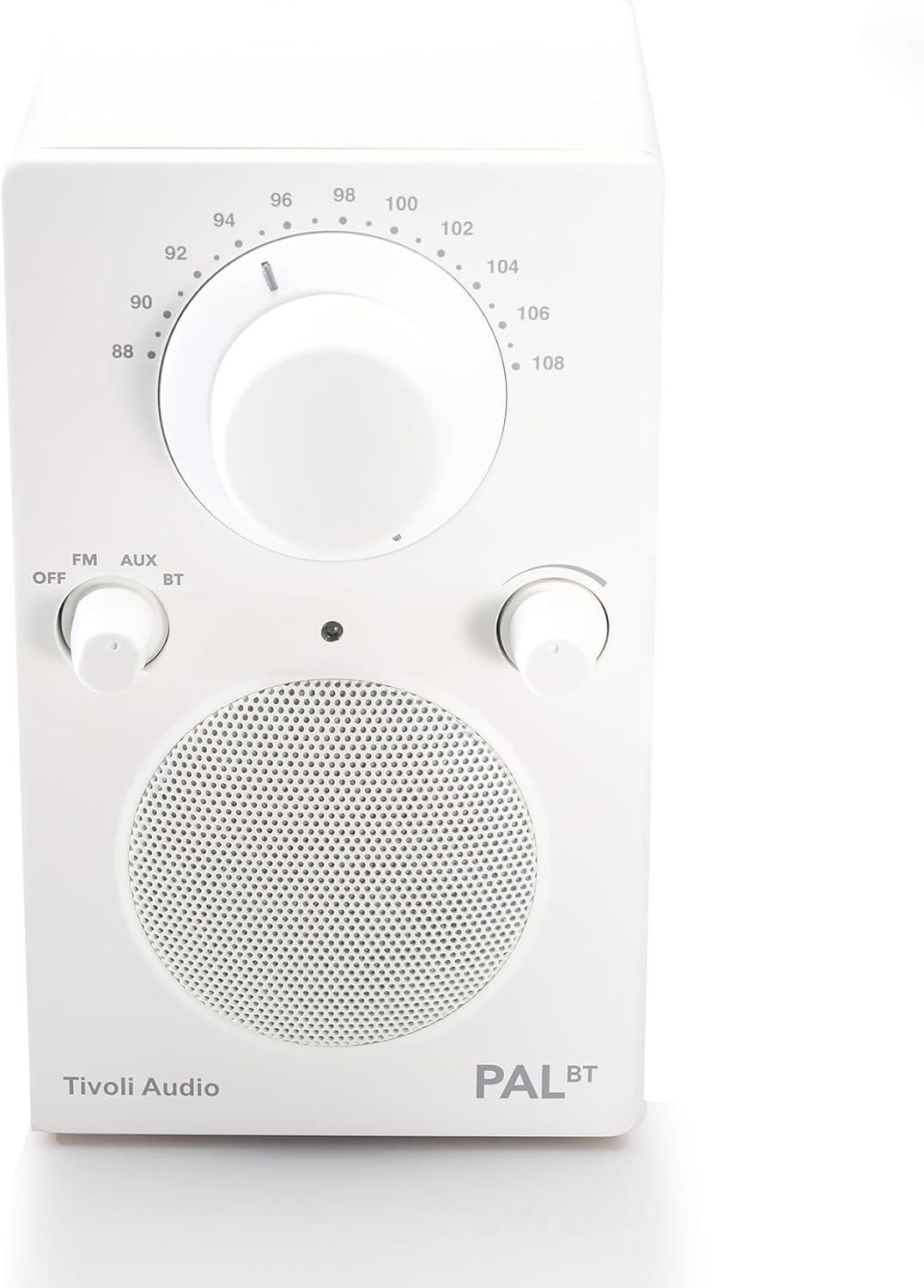
Image: The Tivoli Audio PAL BT (Gen 3) radio, showcasing its compact design and front controls.
ప్యాకేజీ విషయాలు
మీ ప్యాకేజీలో అన్ని అంశాలు ఉన్నాయని ధృవీకరించండి:
- Tivoli Audio PAL BT (Gen 3) Portable Bluetooth FM Radio
- USB-C ఛార్జింగ్ కేబుల్
- యజమాని మాన్యువల్ (ఈ పత్రం)
సెటప్
1 బ్యాటరీని ఛార్జ్ చేస్తోంది
The PAL BT (Gen 3) features a built-in rechargeable battery. Before first use, fully charge the device.
- Locate the USB-C charging port on the back or side of the unit.
- Connect the provided USB-C cable to the radio and to a compatible USB power adapter (not included) or a powered USB port.
- The charging indicator light will illuminate. Allow several hours for a full charge. A full charge provides over 14 hours of playback.
చిత్రం: వైపు view of the Tivoli Audio PAL BT (Gen 3), illustrating its portable design and potential location for the USB-C charging port.
2. పవర్ చేయడం ఆన్/ఆఫ్
Use the multi-function knob on the front of the unit to control power and source selection.
- To power on, rotate the knob from "OFF" to "FM", "AUX", or "BT".
- To power off, rotate the knob to "OFF".
ఆపరేటింగ్ సూచనలు
1. నియంత్రణలుview
The PAL BT (Gen 3) features three main control knobs:
- Source/Power Knob: Selects between OFF, FM, AUX, and Bluetooth (BT) modes.
- ట్యూనింగ్ నాబ్: Adjusts the FM radio frequency.
- వాల్యూమ్ నాబ్: ఆడియో అవుట్పుట్ స్థాయిని నియంత్రిస్తుంది.

చిత్రం: ముందు భాగం view of the PAL BT (Gen 3) highlighting the control knobs and FM frequency dial.
2. FM రేడియో ఆపరేషన్
- Rotate the Source/Power knob to "FM".
- సరైన రిసెప్షన్ కోసం టెలిస్కోపిక్ యాంటెన్నాను విస్తరించండి.
- Rotate the Tuning knob to select your desired FM station.
- Adjust the Volume knob to your preferred listening level.
3. Bluetooth (BT) Pairing
The PAL BT (Gen 3) uses Bluetooth 5.0 for wireless audio streaming.
- Rotate the Source/Power knob to "BT". The Bluetooth indicator light will begin to flash, indicating it is in pairing mode.
- మీ బ్లూటూత్-ఎనేబుల్డ్ పరికరంలో (ఉదా. స్మార్ట్ఫోన్, టాబ్లెట్), దాని బ్లూటూత్ సెట్టింగ్లకు వెళ్లి బ్లూటూత్ను ఎనేబుల్ చేయండి.
- కోసం వెతకండి available devices. You should see "Tivoli PAL BT" or similar in the list.
- Select "Tivoli PAL BT" to connect. Once paired, the Bluetooth indicator light on the radio will glow solid.
- You can now stream audio from your device to the PAL BT (Gen 3).
4. సహాయక ఇన్పుట్
Connect external audio sources using the auxiliary input.
- Rotate the Source/Power knob to "AUX".
- Connect a 3.5mm audio cable (not included) from your external audio device's headphone jack or line-out to the AUX input port on the PAL BT (Gen 3).
- మీ బాహ్య పరికరం నుండి ఆడియోను ప్లే చేయండి.
- Adjust the Volume knob on the PAL BT (Gen 3) and your external device for optimal sound.
5. హెడ్ఫోన్ అవుట్పుట్
For private listening, connect headphones to the dedicated output.
- Plug a standard 3.5mm headphone jack into the headphone output port.
- The internal speaker will mute automatically.
- Adjust the Volume knob for comfortable listening.
నిర్వహణ
క్లీనింగ్
To maintain the appearance of your PAL BT (Gen 3):
- శుభ్రపరిచే ముందు ఎల్లప్పుడూ యూనిట్ను అన్ప్లగ్ చేయండి.
- Use a soft, dry cloth to wipe the surfaces.
- Avoid using abrasive cleaners, solvents, or strong detergents, as these can damage the finish.
బ్యాటరీ సంరక్షణ
బ్యాటరీ జీవితాన్ని పెంచడానికి:
- బ్యాటరీని తరచుగా పూర్తిగా డిశ్చార్జ్ చేయడాన్ని నివారించండి.
- యూనిట్ను ఎక్కువ కాలం నిల్వ చేస్తే, ప్రతి కొన్ని నెలలకు దాదాపు 50% వరకు ఛార్జ్ చేయండి.
- Do not expose the unit to extreme temperatures.
వాతావరణ నిరోధకత
The PAL BT (Gen 3) is designed with a weather-resistant housing, making it suitable for outdoor use. However, it is not waterproof. Avoid submerging the unit in water or exposing it to heavy rain for prolonged periods.
ట్రబుల్షూటింగ్
| సమస్య | సాధ్యమైన కారణం | పరిష్కారం |
|---|---|---|
| శక్తి లేదు | Battery discharged; Unit not turned on. | Charge the battery using the USB-C cable; Rotate the Source/Power knob to an active source (FM, AUX, BT). |
| శబ్దం లేదు | వాల్యూమ్ చాలా తక్కువగా ఉంది; తప్పు మూలం ఎంచుకోబడింది; హెడ్ఫోన్లు కనెక్ట్ చేయబడ్డాయి. | Increase volume; Select correct source; Disconnect headphones. |
| FM రిసెప్షన్ పేలవంగా ఉంది | యాంటెన్నా విస్తరించబడలేదు; సిగ్నల్ బలహీనంగా ఉంది. | Fully extend the telescopic antenna; Reposition the radio for better signal. |
| బ్లూటూత్ జత చేయడం లేదు | Radio not in pairing mode; Device too far; Previously paired device connected. | Ensure radio is in BT mode and indicator is flashing; Move device closer; Disconnect from other devices or forget "Tivoli PAL BT" on your device and re-pair. |
స్పెసిఫికేషన్లు
- మోడల్ సంఖ్య: PALBT3-3059-NA
- కనెక్టివిటీ: Bluetooth 5.0, FM Tuner, Auxiliary Input
- శక్తి మూలం: బ్యాటరీ పవర్డ్ (USB-C ఛార్జింగ్)
- బ్యాటరీ లైఫ్: Over 14 hours (playback)
- కొలతలు (L x W x H): 3.6" x 4.5" x 6"
- ప్రత్యేక లక్షణాలు: Portable, Weather-Resistant Housing
- చేర్చబడిన భాగాలు: యజమాని మాన్యువల్
వారంటీ సమాచారం
The Tivoli Audio PAL BT (Gen 3) comes with a 2 సంవత్సరాల వారంటీ from the date of purchase. This warranty covers manufacturing defects and workmanship under normal use. Please retain your proof of purchase for warranty claims. For full warranty terms and conditions, please visit the official Tivoli Audio webసైట్ లేదా కస్టమర్ సపోర్ట్ని సంప్రదించండి.
కస్టమర్ మద్దతు
If you encounter any issues not covered in this manual or require further assistance, please contact Tivoli Audio customer support:
- Webసైట్: www.tivoliaudio.com/support
- ఇమెయిల్: Refer to the Tivoli Audio webసంప్రదింపు సమాచారం కోసం సైట్.
- ఫోన్: Refer to the Tivoli Audio webసంప్రదింపు సమాచారం కోసం సైట్.
When contacting support, please have your product model number (PAL BT (Gen 3)) and purchase information ready.