
పరిచయం
Thank you for choosing the Vention Open Ear Openbeat O12 Wireless Sport Headphones. These headphones are designed to provide a comfortable and secure audio experience during physical activities, allowing you to stay aware of your surroundings. This manual provides essential information for setting up, operating, maintaining, and troubleshooting your device.
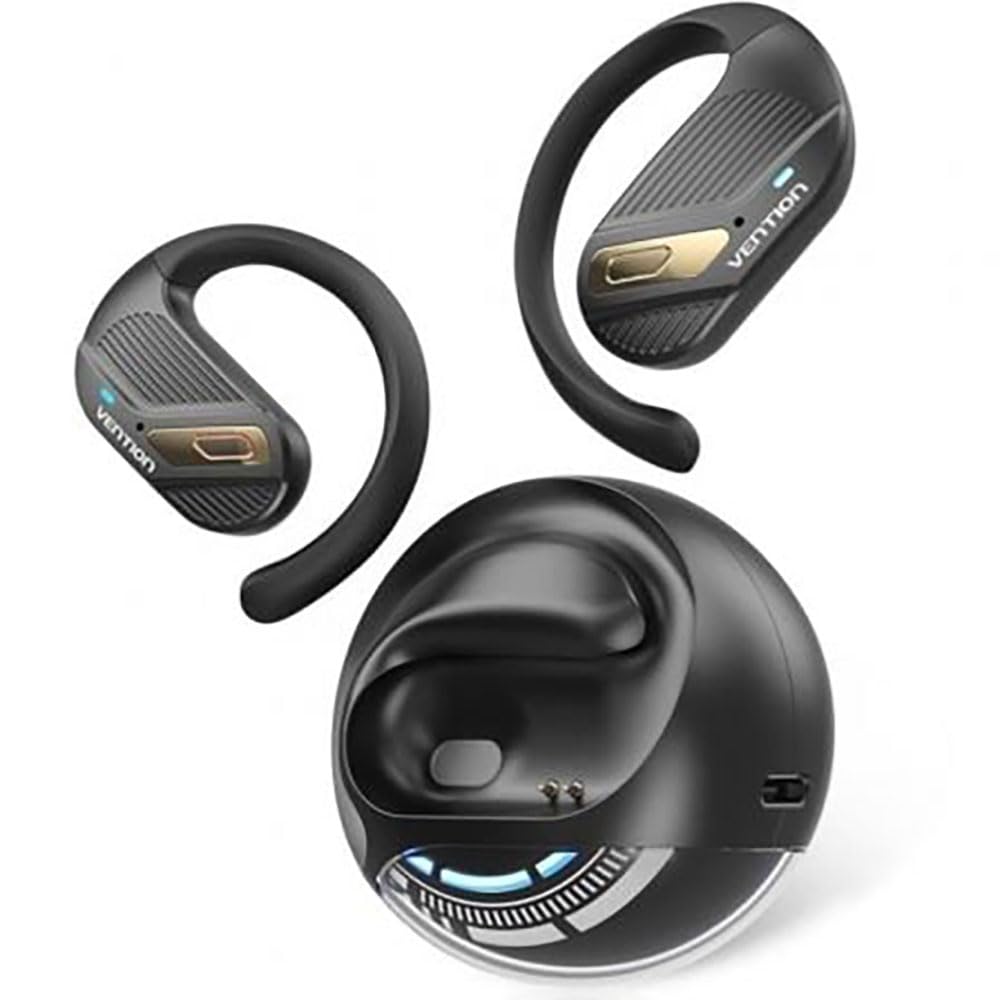
Image: Vention Open Ear Openbeat O12 Wireless Sport Headphones, showcasing the open-ear design and ergonomic fit.
సెటప్
1. ప్యాకేజీ విషయాలు
దయచేసి ఈ క్రింది అంశాల కోసం ప్యాకేజీని తనిఖీ చేయండి:
- Vention Open Ear Openbeat O12 Wireless Sport Headphones
- USB-C ఛార్జింగ్ కేబుల్
- వినియోగదారు మాన్యువల్
2. హెడ్ఫోన్లను ఛార్జ్ చేయడం
- USB-C ఛార్జింగ్ కేబుల్ను హెడ్ఫోన్లలోని ఛార్జింగ్ పోర్ట్కు కనెక్ట్ చేయండి.
- కేబుల్ యొక్క మరొక చివరను USB పవర్ అడాప్టర్ (5V/1A సిఫార్సు చేయబడింది) లేదా కంప్యూటర్ యొక్క USB పోర్ట్కి కనెక్ట్ చేయండి.
- The LED indicator will glow red during charging and turn blue or off when fully charged.
- పూర్తిగా ఛార్జ్ చేయడానికి సాధారణంగా 1.5 నుండి 2 గంటలు పడుతుంది.
3. బ్లూటూత్ పెయిరింగ్
- ప్రారంభ వినియోగానికి ముందు హెడ్ఫోన్లు పూర్తిగా ఛార్జ్ అయ్యాయని నిర్ధారించుకోండి.
- పవర్ ఆన్: Press and hold the Multi-function Button (MFB) for 3-5 seconds until the LED indicator flashes blue and red alternately, indicating pairing mode.
- బ్లూటూత్ని యాక్టివేట్ చేయండి: On your smartphone or audio device, enable Bluetooth.
- పరికరాన్ని ఎంచుకోండి: కోసం వెతకండి "Vention Openbeat O12" in the list of available Bluetooth devices and select it.
- ధృవీకరణ: Once successfully paired, the LED indicator will flash blue slowly, and you will hear an audible confirmation.
- పరికరం యొక్క బ్లూటూత్ యాక్టివ్గా ఉండి, పరిధిలో ఉంటే, హెడ్ఫోన్లు పవర్ ఆన్ చేసినప్పుడు చివరిగా జత చేసిన పరికరానికి స్వయంచాలకంగా తిరిగి కనెక్ట్ అవుతాయి.
ఆపరేటింగ్ సూచనలు
1. పవర్ ఆన్/ఆఫ్
- పవర్ ఆన్: MFBని 3 సెకన్ల పాటు నొక్కి పట్టుకోండి.
- పవర్ ఆఫ్: MFBని 5 సెకన్ల పాటు నొక్కి పట్టుకోండి.
2. మ్యూజిక్ ప్లేబ్యాక్
- ప్లే/పాజ్: MFBని ఒకసారి నొక్కండి.
- తదుపరి ట్రాక్: వాల్యూమ్ + బటన్ను 2 సెకన్ల పాటు నొక్కి పట్టుకోండి.
- మునుపటి ట్రాక్: వాల్యూమ్ - బటన్ను 2 సెకన్ల పాటు నొక్కి పట్టుకోండి.
- ధ్వని పెంచు: వాల్యూమ్ + బటన్ను ఒకసారి నొక్కండి.
- వాల్యూమ్ డౌన్: వాల్యూమ్ - బటన్ను ఒకసారి నొక్కండి.
3. కాల్ నిర్వహణ
- సమాధానం/ముగింపు కాల్: MFBని ఒకసారి నొక్కండి.
- కాల్ని తిరస్కరించండి: MFBని 2 సెకన్ల పాటు నొక్కి పట్టుకోండి.
- వాయిస్ అసిస్టెంట్: Triple-press the MFB to activate your device's voice assistant (e.g., Siri, Google Assistant).
4. హెడ్ఫోన్లు ధరించడం
Position the headphones so that the ear hooks rest comfortably over your ears and the transducers sit just outside your ear canal. Adjust the band for a secure and stable fit during activity. The open-ear design ensures ambient sound awareness.
నిర్వహణ
1. శుభ్రపరచడం
- Wipe the headphones with a soft, dry, or slightly damp గుడ్డ.
- రాపిడి క్లీనర్లు, ఆల్కహాల్ లేదా రసాయన ద్రావకాలను ఉపయోగించవద్దు.
- ఛార్జింగ్ చేయడానికి ముందు ఛార్జింగ్ పోర్ట్ పొడిగా ఉందని నిర్ధారించుకోండి.
2. నిల్వ
- హెడ్ఫోన్లను చల్లని, పొడి ప్రదేశంలో, ప్రత్యక్ష సూర్యకాంతి మరియు తీవ్రమైన ఉష్ణోగ్రతలకు దూరంగా నిల్వ చేయండి.
- హెడ్ఫోన్లపై బరువైన వస్తువులను ఉంచడం మానుకోండి.
3. బ్యాటరీ సంరక్షణ
- Charge the headphones regularly, even if not in use, to maintain battery health.
- బ్యాటరీని తరచుగా పూర్తిగా డిశ్చార్జ్ చేయడాన్ని నివారించండి.
ట్రబుల్షూటింగ్
| సమస్య | పరిష్కారం |
|---|---|
| హెడ్ఫోన్లు పవర్ ఆన్ చేయవు. |
|
| పరికరంతో జత చేయడం సాధ్యం కాదు. |
|
| శబ్దం లేదు లేదా తక్కువ వాల్యూమ్ ఉంది. |
|
| అడపాదడపా కనెక్షన్. |
|
స్పెసిఫికేషన్లు
- మోడల్: Openbeat O12
- బ్లూటూత్ వెర్షన్: 5.3
- వైర్లెస్ పరిధి: 10 మీటర్లు (33 అడుగులు) వరకు
- బ్యాటరీ కెపాసిటీ: 150mAh
- ప్లేబ్యాక్ సమయం: 8 గంటల వరకు (60% వాల్యూమ్ వద్ద)
- ఛార్జింగ్ సమయం: దాదాపు 1.5 - 2 గంటలు
- ఛార్జింగ్ పోర్ట్: USB-C
- ఫ్రీక్వెన్సీ రెస్పాన్స్: 20 హెర్ట్జ్ - 20 కిలోహెర్ట్జ్
- నీటి నిరోధకత: IPX4 (చెమట మరియు స్ప్లాష్ నిరోధకం)
- బరువు: సుమారు 25గ్రా
వారంటీ మరియు మద్దతు
Vention products are designed and manufactured to the highest quality standards. For detailed warranty information and customer support, please refer to the warranty card included in your product packaging or visit the official Vention webవారంటీ క్లెయిమ్ల కోసం దయచేసి మీ కొనుగోలు రుజువును మీ వద్ద ఉంచుకోండి.
For technical assistance or inquiries, please contact Vention customer support through the channels provided on our official webసైట్.