
1. పరిచయం
The Ulefone RugKing 2 Pro is a rugged smartphone designed for durability and performance in challenging environments. It features an octa-core processor, 8GB RAM, 128GB storage, a 4500mAh battery, and runs on Android 15. This device is built to withstand water, dust, and drops, making it suitable for outdoor adventures and demanding work conditions. This manual provides essential information for setting up, operating, maintaining, and troubleshooting your device.

Image: The Ulefone RugKing 2 Pro rugged phone, showcasing దాని దృఢమైన డిజైన్.
2. పెట్టెలో ఏముంది
Upon opening your Ulefone RugKing 2 Pro package, you should find the following items:
- 1x Ulefone RugKing 2 Pro Phone
- 1x AC Power Charger (100~240V)
- 1x USB-A to Type-C Data Cable (100cm)
- 1x Pre-installed Protective Film
- 1x టెంపర్డ్ గ్లాస్ స్క్రీన్ ప్రొటెక్టర్
- 1x Pry Opener
- 1x లాన్యార్డ్
- 1x బహుళ భాషా వినియోగదారు మాన్యువల్

Image: A visual representation of the Ulefone RugKing 2 Pro phone and its included accessories.
3. సెటప్
3.1. SIM కార్డ్ మరియు మైక్రో SD కార్డ్ ఇన్స్టాలేషన్
The Ulefone RugKing 2 Pro supports dual Nano SIM cards and one MicroSD card for expandable storage up to 2TB. To install:
- ఫోన్ పక్కన సిమ్ కార్డ్ ట్రేని గుర్తించండి.
- Use the provided pry opener to carefully open the SIM card tray cover.
- Insert your Nano SIM cards and/or MicroSD card into the designated slots on the tray. Ensure they are correctly oriented.
- Gently push the tray back into the phone until it is flush with the device body. Ensure the cover is securely closed to maintain water and dust resistance.
Video: Ulefone RugKing 2 Pro Unboxing Video, demonstrating SIM card installation and initial setup.
3.2. ప్రారంభ ఛార్జింగ్
Before first use, it is recommended to fully charge your Ulefone RugKing 2 Pro. Connect the provided USB-A to Type-C data cable to the AC power charger and then to the phone's USB-C port. Alternatively, you can use the optional Desk Charging Dock for convenient charging.

Image: The Ulefone RugKing 2 Pro placed in its optional Desk Charging Dock.
3.3. పవర్ ఆన్/ఆఫ్
To power on, press and hold the Power button located on the side of the device until the Ulefone logo appears. To power off, press and hold the Power button, then select 'Power off' from the options on the screen.
4. మీ పరికరాన్ని ఆపరేట్ చేయడం
4.1. డిస్ప్లే ఫీచర్లు
The RugKing 2 Pro features a 5.45-inch HD+ display with Corning Gorilla Glass for enhanced durability. It offers a 90Hz refresh rate and 650 nits peak brightness for a clear and smooth viewing అనుభవం.

Image: The Ulefone RugKing 2 Pro displaying vibrant content on its 5.45-inch HD+ screen.
4.2. కెమెరా విధులు
Capture moments with the 13MP rear camera and take selfies with the 5MP front camera. The camera interface provides various modes and settings for different photography needs.

Image: Close-up of the Ulefone RugKing 2 Pro's rear camera module and a sample photo taken with the front camera.
4.3. బ్యాటరీ నిర్వహణ
The 4500mAh battery provides extended usage. In addition to standard charging, the device supports 5W wired reverse charging, allowing you to charge other devices. The optional Desk Charging Dock offers a convenient way to power up.

Image: Visualizing the 4500mAh battery capacity and the convenience of dock charging and OTG reverse charging.
4.4. అంతర్నిర్మిత ఫ్లాష్లైట్
The RugKing 2 Pro includes a powerful 110 Lumens flashlight, accessible via a dedicated button or quick settings, useful for various outdoor activities.

Image: The Ulefone RugKing 2 Pro's powerful flashlight illuminating a dark environment.
4.5. Water-Lock Mode
Activate Water-Lock mode to disable touchscreen input when using the phone in wet conditions, preventing accidental touches and ensuring usability.

Image: The Ulefone RugKing 2 Pro mounted on a bicycle in the rain, demonstrating Water-Lock Mode.
4.6. AI Assistant (Gemini)
The device integrates Ulefone AI Pro, offering features like AI Recording Summary, AI Writing Assist, Ulefone Screen Search, and AI Calculator. It also supports Google Gemini, ChatGPT, and Grok for advanced AI functionalities.
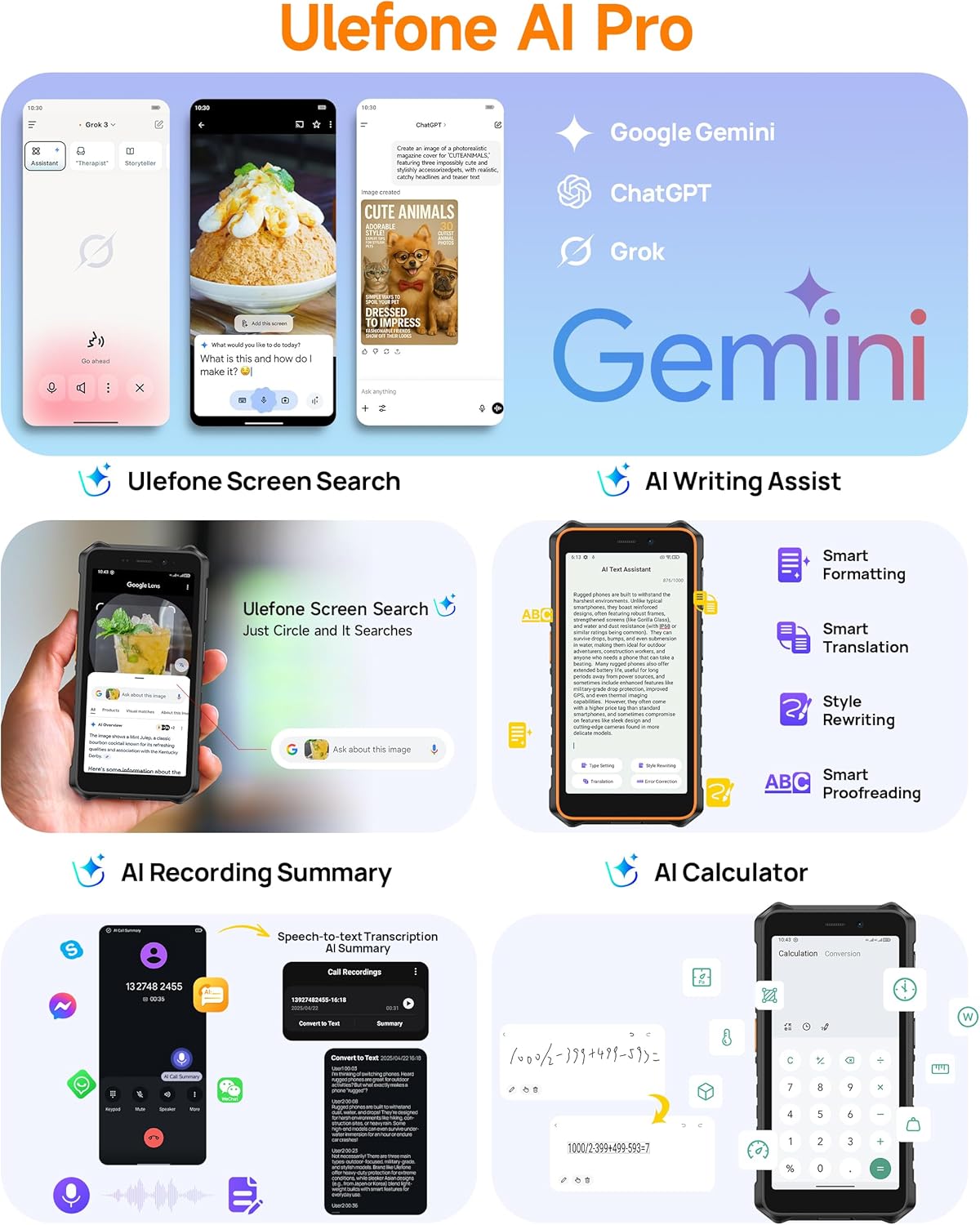
Image: Screenshots illustrating the various AI features available on the Ulefone RugKing 2 Pro, including Google Gemini integration.
4.7. ఇతర ఫీచర్లు
- డ్యూయల్ 4G: Supports two 4G SIM cards simultaneously.
- NFC: కాంటాక్ట్లెస్ చెల్లింపులు మరియు డేటా బదిలీ కోసం.
- హెడ్సెట్ రహిత FM రేడియో: Listen to FM radio without needing a headset as an antenna.
- అనుకూల కీ: A programmable button for quick access to functions or apps.
- అవుట్డోర్ టూల్బాక్స్: Includes various utility tools for outdoor use.
- GPS: ఖచ్చితమైన నావిగేషన్ కోసం GPS, GLONASS, Beidou మరియు Galileo లకు మద్దతు ఇస్తుంది.
- గ్లోవ్స్ మోడ్: Increases touchscreen sensitivity for use with gloves.
- ఫేస్ అన్లాక్: ముఖ గుర్తింపును ఉపయోగించి మీ పరికరాన్ని సురక్షితంగా అన్లాక్ చేయండి.
5. మన్నిక లక్షణాలు
The Ulefone RugKing 2 Pro is engineered for extreme durability, certified with IP68/IP69K ratings and MIL-STD-810H compliance. This means it is highly resistant to water, dust, and drops.
- Waterproof (IP68/IP69K): Can withstand immersion in water up to 2 meters for 30 minutes and high-pressure, high-temperature water jets.
- Dustproof (IP68/IP69K): దుమ్ము ప్రవేశించకుండా పూర్తిగా రక్షించబడింది.
- Drop Resistance (MIL-STD-810H): Designed to survive drops from up to 2 meters onto hard surfaces.
- Corning Gorilla Glass: Provides enhanced scratch and impact resistance for the display.
Video: Ulefone RugKing 2 Pro Rugged Phone, showcasing its resistance to drops and water.

Image: The Ulefone RugKing 2 Pro being dropped onto roots, demonstrating its MIL-STD-810H certified drop resistance.
6. ఉపకరణాలు
Enhance your RugKing 2 Pro experience with a range of optional accessories:
- Armor Case: Provides additional protection and often includes a belt clip or carabiner attachment.
- Desk Charging Dock: A convenient stand for charging your phone.
- Floating Tray: Allows you to safely use your phone and other items while in water.
- Bike Mount: Securely attaches your phone to a bicycle handlebar.
- Car Mount: For hands-free use in vehicles.
Video: Ulefone RugKing 2 Pro Accessory Ecosystem Showcase, demonstrating various accessories.


Images: Various accessories for the Ulefone RugKing 2 Pro, including the Desk Charging Dock, Protective Case, Bike Mount, and Car Mount.
7. స్పెసిఫికేషన్లు
| ఫీచర్ | స్పెసిఫికేషన్ |
|---|---|
| బ్రాండ్ | ఉలేఫోన్ |
| ఆపరేటింగ్ సిస్టమ్ | ఆండ్రాయిడ్ 15 |
| RAM మెమరీ ఇన్స్టాల్ చేయబడిన పరిమాణం | 8 GB (4GB భౌతిక + 4GB వర్చువల్) |
| మెమరీ స్టోరేజ్ కెపాసిటీ | 128 GB (Expandable up to 2TB with Micro SD card) |
| స్క్రీన్ పరిమాణం | 5.45 అంగుళాలు |
| డిస్ప్లే రిజల్యూషన్ గరిష్టం | 720 x 1440 పిక్సెల్లు |
| రిఫ్రెష్ రేట్ | 90 Hz |
| మోడల్ పేరు | RugKing 2 Pro |
| వైర్లెస్ క్యారియర్ | అన్లాక్ చేయబడింది |
| సెల్యులార్ టెక్నాలజీ | 4G |
| రంగు | Green (variant shown) |
| సిమ్ కార్డ్ స్లాట్ కౌంట్ | డ్యూయల్ సిమ్ |
| కనెక్టర్ రకం | USB టైప్ C |
| ఫారమ్ ఫ్యాక్టర్ | టచ్ స్క్రీన్ |
| సిమ్ కార్డ్ పరిమాణం | నానో |
| నీటి నిరోధక స్థాయి | Waterproof (IP68/IP69K) |
| అదనపు ఫీచర్లు | Built-In Flashlight, Dual SIM, Rugged Body, Waterproof |
| బ్యాటరీ కెపాసిటీ | 4500 మిల్లీamp గంటలు |
| అంశం కొలతలు | 6.26 x 3.15 x 0.62 అంగుళాలు |
| ఫోన్ టాక్ టైమ్ | 20 గంటలు |
| వీడియో క్యాప్చర్ రిజల్యూషన్ | 1080p |
| మద్దతు ఉన్న ఉపగ్రహ నావిగేషన్ సిస్టమ్ | BeiDou, GLONASS, GPS, Galileo |
| కనెక్టివిటీ టెక్నాలజీ | బ్లూటూత్, NFC, USB, Wi-Fi |
8. నిర్వహణ
To ensure the longevity and optimal performance of your Ulefone RugKing 2 Pro, follow these maintenance guidelines:
- శుభ్రపరచడం: Regularly wipe the phone with a soft, damp cloth. For stubborn dirt, use a mild soap solution. Ensure all port covers are securely closed before cleaning with liquids.
- పోర్ట్ కవర్లు: Always ensure the USB-C port cover and SIM tray cover are tightly sealed to maintain the device's waterproof and dustproof integrity.
- విపరీతమైన ఉష్ణోగ్రతలను నివారించండి: Do not expose the phone to excessively high or low temperatures, as this can affect battery life and internal components.
- స్క్రీన్ రక్షణ: While the phone features Corning Gorilla Glass, using the provided tempered glass screen protector can offer an additional layer of defense against scratches.
- ఛార్జింగ్: Use only the original charger and cable or certified accessories to prevent damage to the battery and device.
9. ట్రబుల్షూటింగ్
If you encounter issues with your Ulefone RugKing 2 Pro, try the following common troubleshooting steps:
- పరికరం స్పందించడం లేదు: రీస్టార్ట్ చేయమని బలవంతం చేయడానికి పవర్ బటన్ను దాదాపు 10-15 సెకన్ల పాటు నొక్కి పట్టుకోండి.
- ఛార్జింగ్ సమస్యలు: Ensure the charging cable and adapter are securely connected. Try a different outlet or charging accessory. Check the charging port for any debris.
- నెట్వర్క్ కనెక్టివిటీ సమస్యలు: Check if your SIM card is properly inserted. Restart the phone. Go to Settings > Network & internet > Mobile network and ensure mobile data is enabled and the correct network type is selected.
- యాప్ క్రాష్లు/ఫ్రీజ్లు: Close the problematic app and reopen it. If the issue persists, clear the app's cache and data (Settings > Apps > [App Name] > Storage > Clear cache/Clear data).
- నెమ్మదిగా పనితీరు: Close unnecessary background apps. Clear cache regularly. Consider uninstalling unused apps.
- Water-Lock Mode Stuck: If the touchscreen is unresponsive after being in water, ensure the phone is dry, then try restarting the device.
- ఫ్యాక్టరీ రీసెట్: As a last resort, if software issues persist, you may perform a factory reset (Settings > System > Reset options > Erase all data). హెచ్చరిక: ఇది మీ ఫోన్లోని మొత్తం డేటాను తొలగిస్తుంది. కొనసాగే ముందు ముఖ్యమైన సమాచారాన్ని బ్యాకప్ చేయండి.
10. వారంటీ మరియు మద్దతు
The Ulefone RugKing 2 Pro comes with a 12-month manufacturer warranty service in the US. For any questions about the product, technical support, or warranty claims, please refer to the contact information provided in your multi-language user manual or visit the official Ulefone support webసైట్.
Ulefone is committed to providing reliable products and customer service. We are always happy to help with any inquiries you may have.