పరిచయం
This manual provides comprehensive instructions for the setup, operation, and maintenance of your Generic Wireless Indoor Outdoor Weather Station. This device offers a 7.5-inch VA display, atomic clock functionality, and monitors temperature and humidity with multiple remote sensors. Please read this manual thoroughly before using the product to ensure correct operation and to maximize its features.
భద్రతా సమాచారం
- Do not expose the main unit or sensors to extreme temperatures, direct sunlight, or moisture.
- పరికరాన్ని వదలడం లేదా బలమైన ప్రభావాలకు గురిచేయడం మానుకోండి.
- Use only the specified power adapter or batteries. Incorrect power sources may damage the device.
- పరికరాన్ని పిల్లలకు అందుబాటులో లేకుండా ఉంచండి.
- యూనిట్ను మీరే విడదీయడానికి లేదా మరమ్మతు చేయడానికి ప్రయత్నించవద్దు. సహాయం కోసం కస్టమర్ సపోర్ట్ను సంప్రదించండి.
- స్థానిక నిబంధనల ప్రకారం ఉపయోగించిన బ్యాటరీలను బాధ్యతాయుతంగా పారవేయండి.
ప్యాకేజీ విషయాలు
మీ ప్యాకేజీలో అన్ని అంశాలు ఉన్నాయని ధృవీకరించండి:
- Weather Station Main Unit
- 3 Remote Sensors
- పవర్ అడాప్టర్
- వినియోగదారు మాన్యువల్ (ఈ పత్రం)
ఉత్పత్తి ముగిసిందిview
The Generic Wireless Weather Station provides comprehensive environmental monitoring with a clear VA display and multiple remote sensors.

చిత్రం 1: The main weather station display unit shown with its three accompanying wireless remote sensors. The display shows various weather parameters, time, and date.
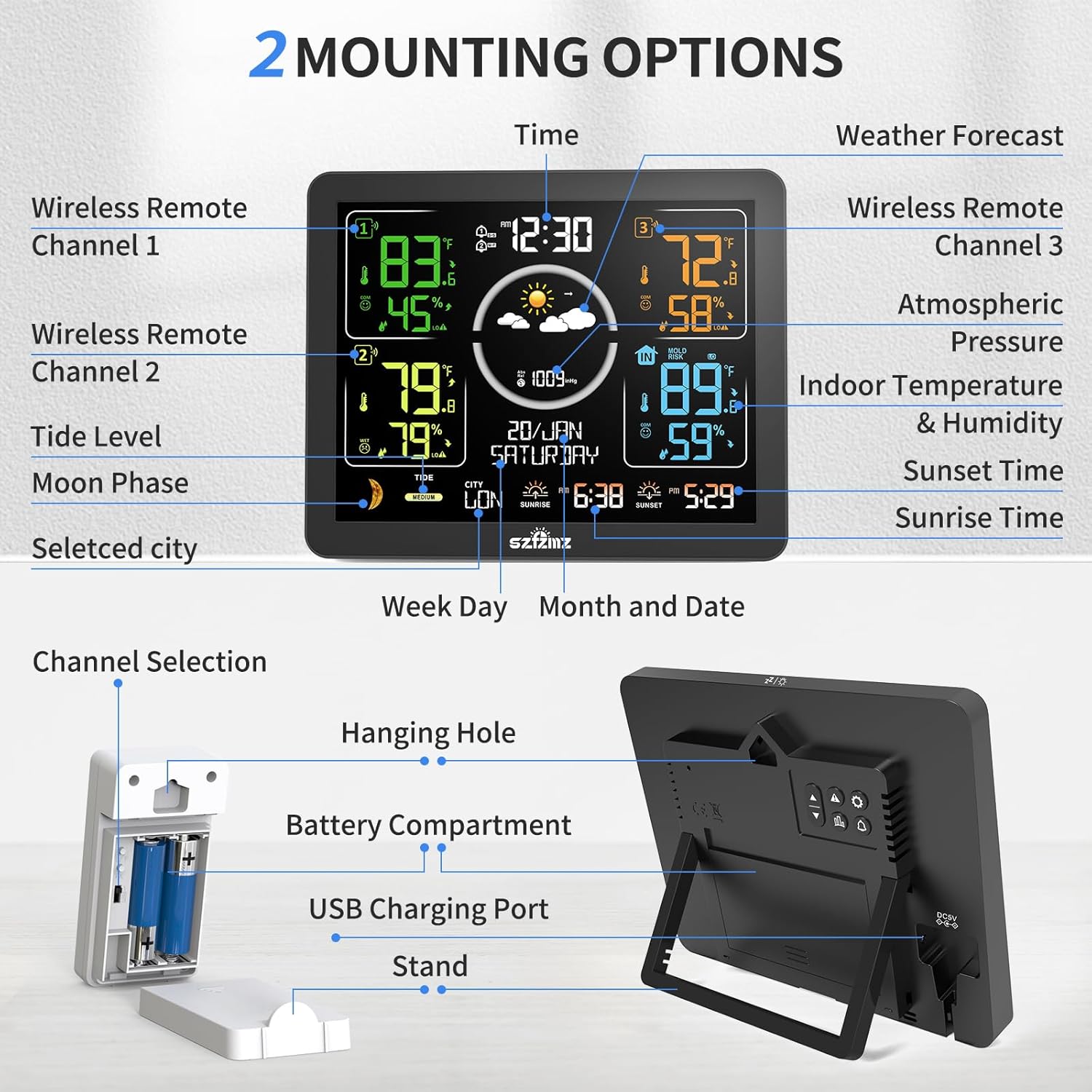
చిత్రం 2: A detailed diagram illustrating the various components and features of the weather station, including the main display, remote sensors, power options, and mounting choices. Key features like wireless remote channels, tide level, moon phase, selected city, week day, month and date, channel selection, hanging hole, battery compartment, USB charging port, and stand are labeled.
సెటప్ సూచనలు
1. ప్రధాన యూనిట్కు శక్తినివ్వడం
The main unit can be powered by either the included DC adapter or batteries (not included).
- DC అడాప్టర్: Connect the DC adapter to the power port on the back of the main unit and plug it into a standard wall outlet. The backlight will remain constantly bright with 4 adjustable levels.
- బ్యాటరీలు: Open the battery compartment on the back of the main unit and insert 2 x LR03 AAA batteries (not included), observing polarity. When using battery power, the screen will light up for 15 seconds upon touching the top and then automatically turn off to save power.
2. Installing Batteries in Remote Sensors
Each remote sensor requires batteries for operation.
- Open the battery compartment on the back of each remote sensor.
- Insert 2 x AA batteries (not included) into each sensor, ensuring correct polarity.
- బ్యాటరీ కంపార్ట్మెంట్ను సురక్షితంగా మూసివేయండి.
3. Setting Sensor Channels
To monitor temperature and humidity from multiple locations, assign a unique channel to each sensor.
- On the back of each remote sensor, locate the channel selection switch (1, 2, or 3).
- Set each sensor to a different channel (e.g., Sensor 1 to Channel 1, Sensor 2 to Channel 2, Sensor 3 to Channel 3).
4. సెన్సార్ ప్లేస్మెంట్
Place the remote sensors in desired locations within the transmission range (up to 200 feet/60 meters in open areas). For optimal performance, avoid placing sensors near large metal objects, electrical appliances, or in direct sunlight/rain.

చిత్రం 3: This image demonstrates the versatility of the three remote sensors, showing them placed in a baby's room (CH1), a living area (CH2), and a kitchen (CH3), highlighting their use for monitoring conditions in up to four different places.
5. ప్రారంభ సమకాలీకరణ
After powering on both the main unit and the sensors, the main unit will automatically search for and connect to the remote sensors. This process may take a few minutes. Ensure sensors are within range during initial setup.
ఆపరేటింగ్ సూచనలు
1. పైగా ప్రదర్శించుview
The 7.5-inch VA color display presents various information clearly.

చిత్రం 4: ఒక క్లోజప్ view of the weather station's upgraded colorful VA display, emphasizing its deeper black levels and better overall contrast for improved readability of temperature, humidity, time, and weather forecast icons.
2. Atomic Clock Function
The weather station features an atomic clock that automatically or manually searches for WWVB signals to calibrate the time, ensuring accuracy.

చిత్రం 5: The weather station display showing the current time and date, with an icon indicating the radio control time function is active, ensuring accurate time synchronization.
3. Setting Time Zone
It is crucial to set the correct time zone for your location (AST, EST, CST, MST, PST, AKT, HST, HAT) for accurate time display and sunrise/sunset calculations. Refer to the manual's specific section for time zone adjustment.
4. అలారం క్లాక్ ఫంక్షన్
The weather station includes two independent alarm settings with a snooze function.

చిత్రం 6: The weather station display showing two alarm clock icons, indicating the dual alarm functionality, which helps users manage their daily schedule.
5. బ్యాక్లైట్ సర్దుబాటు
When powered by the DC adapter, the backlight has 4 adjustable brightness levels (100%, 75%, 50%, 25%) and an off option. Press the designated button (refer to your specific unit's button layout) to cycle through brightness levels.

చిత్రం 7: This image illustrates the five adjustable brightness levels of the weather station's backlight, ranging from 100% to off, allowing users to customize visibility.
6. Max/Min Temperature & Humidity Records
The station records maximum and minimum temperature and humidity values for all monitored locations.
- Press the "▼" button once to display maximum values.
- Press the "▼" button twice to display minimum values.
- Press the "▼" button three times to return to current readings.

చిత్రం 8: A series of three weather station displays showing the current temperature and humidity, followed by the maximum recorded values, and then the minimum recorded values, demonstrating the MAX/MIN record feature.
7. వాతావరణ సూచన
The station calculates a weather forecast for the next 12 hours based on barometric pressure trends, displayed by 6 intuitive icons.

చిత్రం 9: A visual representation of the six weather forecast icons used by the station: Sunny, Slightly Cloudy, Cloudy, Rainy, Stormy, and Snowy, indicating the predicted weather for the next 12 hours.
8. కంఫర్ట్ ఇండికేటర్
Three facial icons indicate the comfort level based on indoor temperature and humidity. This feature is displayed when temperature is between 68.0-82.4°F and humidity is 40-70%.

చిత్రం 10: The weather station display illustrating the three comfort level icons: Dry (Humidity <40%), Comfort (40% ≤ Humidity ≤ 70% and 68.0°F ≤ Temperature ≤ 82.4°F), and Wet (Humidity >70%).
9. Moon Phases & Tide Indicator
The display shows 12 different moon phases and 3 kinds of tide phases (High, Medium, Low) according to the set calendar.

చిత్రం 11: This image displays the weather station's moon phase indicator, showing 12 different phases from New Moon to Waning Half-Moon, alongside a tide indicator with High, Medium, and Low settings.
10. Sunrise & Sunset Time
After selecting a city or setting a custom city, the sunrise and sunset times are automatically calculated and displayed.

చిత్రం 12: The weather station display showing the sunrise and sunset times for a selected city, automatically calculated based on location, time zone, and current time.
11. Temperature & Humidity Alerts
The weather station allows for customizable extreme temperature and humidity alerts. It will notify you if readings hit predefined high or low levels.

చిత్రం 13: The weather station display showing alert icons for high temperature (HI), low temperature (LO), and frost/ice conditions (ICE), indicating customizable extreme temperature and humidity alerts.
నిర్వహణ
- శుభ్రపరచడం: Wipe the main unit and sensors with a soft, damp గుడ్డ. రాపిడి క్లీనర్లు లేదా ద్రావకాలు ఉపయోగించవద్దు.
- బ్యాటరీ భర్తీ: Replace batteries in the main unit and sensors when the low battery indicator appears on the display. Ensure to use fresh batteries of the correct type and polarity.
- సెన్సార్ ప్లేస్మెంట్: Periodically check the outdoor sensors for debris or obstructions that might affect readings.
ట్రబుల్షూటింగ్
1. No Display on Main Unit
- Check if the DC adapter is securely plugged in or if batteries are correctly inserted and not depleted.
- If using batteries, tap the top of the unit to activate the display.
2. Remote Sensor Not Connecting/Displaying Data
- Ensure batteries are correctly installed and not depleted in the sensor.
- Verify that the sensor's channel switch matches the channel selected on the main unit for that sensor.
- Move the sensor closer to the main unit to rule out range issues or interference.
- Restart both the main unit and the sensor by removing and reinserting batteries.
3. Inaccurate Temperature/Humidity Readings
- Ensure sensors are not in direct sunlight, near heat sources, or in areas with poor air circulation.
- Allow the sensors and main unit to stabilize for at least 3 hours after initial setup or relocation.
- Our sensors meet industry standards of ±1°C (±1.8°F) / ±5% RH tolerance. If variations exceed these ranges after 3-hour co-location testing, please contact customer support for calibration guidance or replacement under warranty.
4. Atomic Clock Not Synchronizing
- Ensure the main unit is placed away from electronic devices that may cause interference.
- Verify that the correct time zone is set.
- The backlight automatically turns off during WWVB signal receiving mode.
స్పెసిఫికేషన్లు
| ఫీచర్ | స్పెసిఫికేషన్ |
|---|---|
| ఉత్పత్తి కొలతలు | 1"D x 7.9"W x 5.1"H (Main Unit) |
| బరువు | 1.34 పౌండ్లు |
| రంగు | నలుపు |
| మెటీరియల్ | యాక్రిలోనిట్రైల్ బుటాడిన్ స్టైరీన్ (ABS) |
| కనెక్టివిటీ టెక్నాలజీ | వైర్లెస్ |
| శక్తి మూలం | Battery Powered and AC Adapter |
| ప్రత్యేక లక్షణాలు | Adjustable Brightness, Alarm, Clock, Customizable Alert, Wireless |
| సిఫార్సు చేసిన ఉపయోగాలు | హోమ్ |
| నిర్దిష్ట ఉపయోగాలు | Date, Humidity, Moon Phase, Pressure, Temperature |
| సెన్సార్ ఖచ్చితత్వం | ±1°C (±1.8°F) / ±5% RH tolerance |
వారంటీ మరియు మద్దతు
This product comes with a warranty. For specific warranty details, please refer to the documentation included with your purchase or contact the seller directly. If you encounter any issues or require assistance with your weather station, please reach out to customer support for guidance or replacement under warranty.