
1. పరిచయం
The SilverStone RM4A is a 4U rackmount server chassis designed for professional users requiring high performance and reliability. This chassis offers extensive liquid cooling compatibility and flexible expansion options, making it suitable for diverse and demanding server applications. This manual provides essential information for the proper installation, operation, and maintenance of your RM4A chassis.
2. భద్రతా సమాచారం
- Always disconnect the power supply from the wall outlet before performing any installation, maintenance, or troubleshooting procedures.
- Wear an anti-static wrist strap when handling internal components to prevent electrostatic discharge (ESD) damage.
- Ensure proper grounding of the chassis and all connected components.
- Do not operate the chassis in environments with excessive dust, humidity, or extreme temperatures.
- Refer to the manuals of your motherboard, power supply, and other components for specific installation instructions and safety guidelines.
- Handle sharp edges and components with care to avoid injury.
3. ప్యాకేజీ విషయాలు
మీ ప్యాకేజీలో అన్ని భాగాలు ఉన్నాయని ధృవీకరించండి:
- SilverStone RM4A 4U Rackmount Server Chassis
- Accessory kit (screws, standoffs, cable ties, etc.)
- వినియోగదారు మాన్యువల్ (ఈ పత్రం)
4 కీ ఫీచర్లు
- Supports up to SSI-EEB motherboards (12" x 13"), SSI-CEB (12" x 10.5"), and E-ATX (12" x 13").
- Accommodates 360mm liquid cooling radiators and two 80mm rear fans for enhanced heat dissipation.
- Features eight standard-size PCI/PCIe expansion slots.
- Includes a unique card retention bracket to secure graphics and expansion cards.
- Equipped with a convenient USB Type-C interface and two USB 3.0 ports on the front panel.
- Supports hard drive mounting on the expansion card retainer.
- Compatible with PS2 (ATX) and Mini Redundant power supplies.
5. సెటప్ మరియు ఇన్స్టాలేషన్
5.1 ఛాసిస్ ఓవర్view
Familiarize yourself with the external and internal layout of the RM4A chassis.

మూర్తి 5.1: ముందు view of the RM4A chassis, showing the perforated front panel and handles.

చిత్రం 5.2: వెనుక view of the RM4A chassis, showing expansion slots, fan mounts, and PSU cutout.

Figure 5.3: Internal layout of the RM4A chassis, illustrating component placement such as motherboard, fans, and expansion cards.
5.2 మదర్బోర్డ్ సంస్థాపన
The RM4A supports SSI-EEB, SSI-CEB, and E-ATX motherboards. Install the necessary standoffs for your motherboard form factor before securing the motherboard with screws.

Figure 5.4: Motherboard compatibility and layout within the chassis.
5.3 ఎక్స్పాన్షన్ కార్డ్ ఇన్స్టాలేషన్
The chassis provides eight full-height expansion slots. Remove the slot covers, insert your PCI/PCIe cards, and secure them using the provided screws and the expansion card retention bracket.
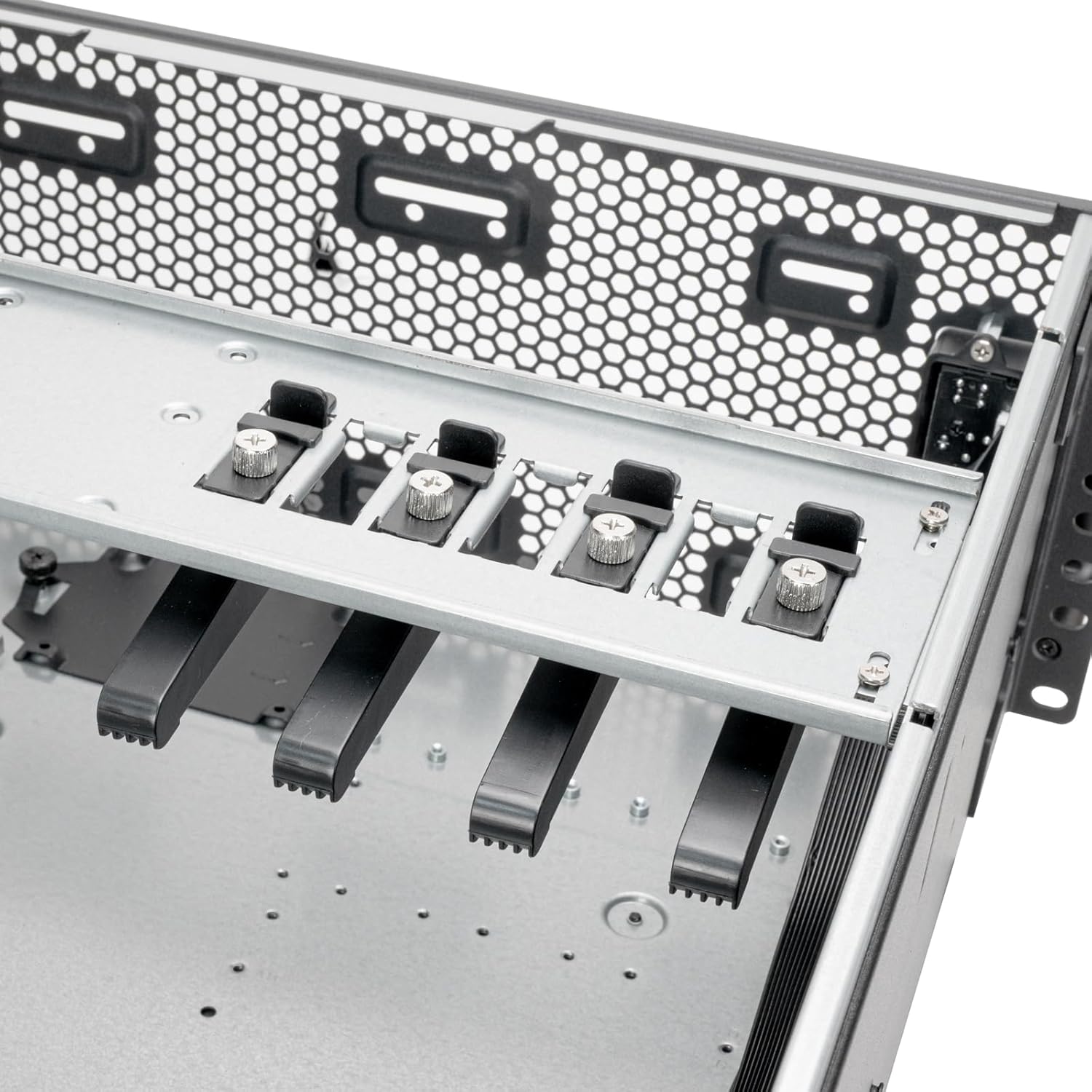
Figure 5.5: Expansion card retention bracket for securing PCI/PCIe cards.
5.4 నిల్వ పరికర సంస్థాపన
The RM4A supports 2.5" SSDs and 3.5" HDDs. Mount 2.5" SSDs in the designated trays and 3.5" HDDs on the expansion card retainer if applicable.

Figure 5.6: Storage mounting locations, including SSD trays and HDD mounting on the expansion card retainer.
5.5 శీతలీకరణ వ్యవస్థ సంస్థాపన
Install up to a 360mm liquid cooling radiator at the front and two 80mm fans at the rear for optimal airflow. Ensure fans are oriented correctly for intake and exhaust.

Figure 5.7: Cooling system support for 360mm radiators and 80mm rear fans.
5.6 విద్యుత్ సరఫరా యూనిట్ (PSU) సంస్థాపన
Install your PS2 (ATX) or Mini Redundant power supply into the designated bay at the rear of the chassis. Secure it with screws.

Figure 5.8: Power supply mounting area.
5.7 ఫ్రంట్ ప్యానెల్ కనెక్షన్లు
Connect the front panel cables (USB Type-C, USB 3.0, Power, Reset, LED indicators) to the corresponding headers on your motherboard. Refer to your motherboard manual for header locations.

Figure 5.9: Front panel I/O, including USB Type-C, USB 3.0 ports, and power/reset buttons.
6. ఆపరేటింగ్ సూచనలు
After completing all hardware installations and connections, connect the power cable to the PSU and a wall outlet. Press the power button on the front panel to turn on the system. The LED indicators will illuminate to show system status.
- పవర్ ఆన్/ఆఫ్: Press the power button to turn the system on or off. A short press typically initiates a soft shutdown, while a long press forces a power off.
- సిస్టమ్ రీసెట్: Use the reset button for a system restart if needed.
- USB పోర్ట్లు: Utilize the front USB Type-C and USB 3.0 ports for connecting peripherals and external storage devices.
7. నిర్వహణ
Regular maintenance helps ensure the longevity and optimal performance of your RM4A chassis and its components.
- దుమ్ము శుభ్రపరచడం: Periodically clean dust from the chassis interior, fan filters, and cooling fins using compressed air or a soft brush. Dust accumulation can impede airflow and lead to overheating.
- కేబుల్ నిర్వహణ: Ensure internal cables are neatly routed and secured to prevent obstruction of airflow and potential damage.
- ఫ్యాన్ తనిఖీ: Check fans for proper operation and clean any dust buildup on blades. Replace noisy or malfunctioning fans.
- కాంపోనెంట్ తనిఖీలు: Occasionally inspect all installed components for secure connections and proper seating.
8. ట్రబుల్షూటింగ్
If you encounter issues with your RM4A chassis, consider the following basic troubleshooting steps:
- శక్తి లేదు:
- Verify that the power cable is securely connected to both the PSU and the wall outlet.
- PSU స్విచ్ 'ఆన్' స్థానంలో ఉందని నిర్ధారించుకోండి.
- PSU నుండి మదర్బోర్డ్ మరియు భాగాలకు ఉన్న అన్ని విద్యుత్ కనెక్షన్లను తనిఖీ చేయండి.
- సిస్టమ్ బూట్ అవ్వడం లేదు:
- Confirm that the CPU, RAM, and graphics card (if applicable) are properly seated.
- Check all motherboard power connectors (24-pin ATX, 8-pin EPS).
- Ensure front panel power switch cable is correctly connected to the motherboard.
- వేడెక్కడం:
- Ensure all fans are spinning and free of obstructions.
- Clean any dust buildup from fans and radiator fins.
- Verify proper thermal paste application on the CPU cooler.
- పనిచేయని USB పోర్టులు:
- Check the internal USB header connections from the front panel to the motherboard.
- Ensure motherboard USB drivers are installed.
9. స్పెసిఫికేషన్లు
| బ్రాండ్ | సిల్వర్స్టోన్ |
| మోడల్ సంఖ్య | RM4A |
| ఫారమ్ ఫ్యాక్టర్ | 4U ర్యాక్మౌంట్ |
| మెటీరియల్ | మెటల్ |
| రంగు | నలుపు |
| కొలతలు (పరిమాణం) | 4U x 17" x 24" |
| మదర్బోర్డు మద్దతు | SSI-EEB, SSI-CEB, E-ATX |
| విస్తరణ స్లాట్లు | 8 x PCI/PCIe |
| శీతలీకరణ మద్దతు | Front: 360mm radiator; Rear: 2 x 80mm fans |
| ఫ్రంట్ I / O పోర్ట్స్ | 1 x USB Type-C, 2 x USB 3.0, Power On/Off, System Reset, LED Status Indicators |
| విద్యుత్ సరఫరా మద్దతు | PS2 (ATX) / మినీ రిడండెంట్ |
| UPC | 844761029500 |
10. వారంటీ & సపోర్ట్
10.1 వారంటీ సమాచారం
The SilverStone RM4A chassis comes with a 1 సంవత్సరాల తయారీదారు వారంటీ. Please retain your proof of purchase for warranty claims. The warranty covers defects in materials and workmanship under normal use. It does not cover damage caused by misuse, accident, modification, or unauthorized repair.
10.2 సాంకేతిక మద్దతు
For technical assistance, troubleshooting, or further inquiries, please visit the official SilverStone webసైట్కు వెళ్లండి లేదా వారి కస్టమర్ మద్దతును సంప్రదించండి. మీరు ఇక్కడ మరిన్ని సమాచారం మరియు వనరులను కనుగొనవచ్చు SilverStone Store on Amazon లేదా వారి అధికారిక కార్పొరేట్ webసైట్.