
1. పరిచయం
The FOXWELL NT201 is an On-Board Diagnostics II (OBDII) and European On-Board Diagnostics (EOBD) scanner designed to diagnose engine-related issues in vehicles. This device allows users to read and clear diagnostic trouble codes (DTCs), view live data streams, perform I/M readiness tests, and more. This manual provides detailed instructions for the proper use and maintenance of your NT201 scanner and its accompanying portable carrying case.
2. భద్రతా సమాచారం
వాహనంపై పనిచేసేటప్పుడు ఎల్లప్పుడూ భద్రతా జాగ్రత్తలను పాటించండి. డయాగ్నస్టిక్ సాధనాలను సరిగ్గా ఉపయోగించకపోవడం వల్ల వ్యక్తిగత గాయం లేదా వాహనానికి నష్టం వాటిల్లవచ్చు. దయచేసి ఈ మార్గదర్శకాలను చదివి అనుసరించండి:
- వాహనం పార్కింగ్ బ్రేక్ వేసి, చదునైన ఉపరితలంపై పార్క్ చేయబడిందని నిర్ధారించుకోండి.
- తగిన కంటి రక్షణను ధరించండి.
- Keep clothing, hair, hands, tools, and test equipment away from moving engine parts.
- Operate the vehicle in a well-ventilated area to prevent carbon monoxide poisoning.
- జ్వలన ఆన్లో ఉన్నప్పుడు లేదా ఇంజిన్ నడుస్తున్నప్పుడు పరీక్ష పరికరాలను కనెక్ట్ చేయవద్దు లేదా డిస్కనెక్ట్ చేయవద్దు.
- Keep the scanner dry and clean. Avoid exposure to extreme temperatures.
3. ప్యాకేజీ విషయాలు
మీ ప్యాకేజీలో అన్ని అంశాలు ఉన్నాయని ధృవీకరించండి:
- FOXWELL NT201 OBD2 Scanner Unit
- Integrated OBDII Cable
- పోర్టబుల్ క్యారీయింగ్ కేస్
- వినియోగదారు మాన్యువల్ (ఈ పత్రం)
4. ఉత్పత్తి ముగిసిందిview
The NT201 scanner features a clear display and intuitive button layout for easy navigation and operation.

మూర్తి 4.1: ముందు view of the FOXWELL NT201 OBD2 Scanner. This image displays the scanner's screen, which shows 'I/M Readiness' status indicators, and the control buttons including ESC, UP, DOWN, and ENTER, along with the I/M readiness hotkey.
4.1 పరికర లేఅవుట్
- LCD డిస్ప్లే: Shows test results, menu options, and operational information.
- ESC బటన్: Exits current screen or returns to the previous menu.
- పైకి/క్రింది బటన్లు: Navigates through menu options or data.
- ఎంటర్ బటన్: ఎంపికను నిర్ధారిస్తుంది లేదా మెనూలోకి ప్రవేశిస్తుంది.
- I/M Readiness Hotkey: Provides quick access to the I/M Readiness status.
- OBDII కనెక్టర్: Connects the scanner to the vehicle's Data Link Connector (DLC).
5. సెటప్
To begin using your NT201 scanner, follow these steps:
- వాహనం యొక్క 16-పిన్ డేటా లింక్ కనెక్టర్ (DLC)ని గుర్తించండి. ఇది సాధారణంగా డ్రైవర్ వైపు డాష్బోర్డ్ కింద ఉంటుంది.
- వాహనం యొక్క ఇగ్నిషన్ను 'ఆన్' స్థానానికి (ఇంజన్ ఆఫ్) మార్చండి.
- Plug the NT201's OBDII connector into the vehicle's DLC. The scanner will power on automatically.
- The scanner will perform a system check and display the main menu.
6. ఆపరేటింగ్ సూచనలు
6.1. Read and Clear Fault Codes
This function allows you to retrieve Diagnostic Trouble Codes (DTCs) from the vehicle's engine control unit (ECU) and clear them after repairs.
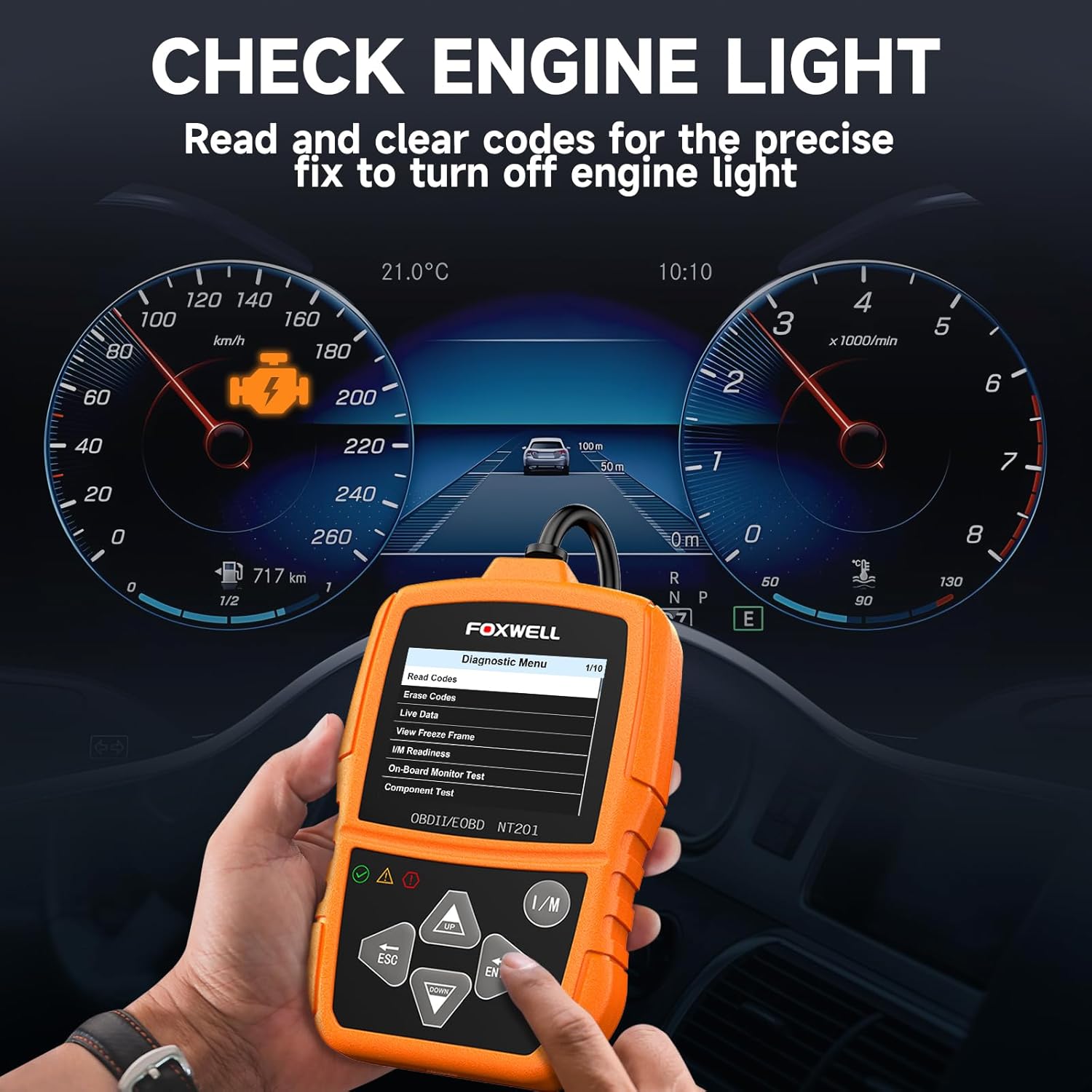
మూర్తి 6.1: The FOXWELL NT201 scanner in use, displaying the diagnostic menu with 'Read Codes' highlighted. A vehicle dashboard is visible in the background, showing the check engine light illuminated.
- From the main menu, use the పైకి/క్రిందికి buttons to select "Diagnostic Menu" and press నమోదు చేయండి.
- Select "Read Codes" to view current, pending, and permanent DTCs. The scanner will display the codes and their definitions.
- After addressing the underlying issue, select "Erase Codes" from the Diagnostic Menu and press నమోదు చేయండి. Confirm the action when prompted. This will turn off the Malfunction Indicator Lamp (MIL) or 'Check Engine Light'.
6.2. లైవ్ డేటా స్ట్రీమ్
View real-time operational parameters of the vehicle's engine, such as engine RPM, vehicle speed, coolant temperature, and more.

మూర్తి 6.2: The FOXWELL NT201 scanner displaying a live data stream. The screen shows various parameters like Engine RPM and Vehicle Speed Sensor data, presented both numerically and graphically, with a car interior visible in the background.
- From the Diagnostic Menu, select "Live Data" and press నమోదు చేయండి.
- మీరు చెయ్యగలరు view data in text format or graphical format. Use the పైకి/క్రిందికి buttons to scroll through parameters.
- నొక్కండి నమోదు చేయండి to select a parameter for detailed viewing or graphing.
6.3. వన్-కీ I/M సంసిద్ధత పరీక్ష
Quickly check the vehicle's emission readiness status to determine if it's ready for an emissions test.

మూర్తి 6.3: The FOXWELL NT201 scanner with its 'I/M' hotkey prominently displayed and highlighted, indicating its function for a quick smog check. An exhaust pipe is visible in the background, suggesting emissions testing.
- With the scanner connected and powered on, press the dedicated I/M హాట్కీ.
- The scanner will display the status of various emission-related monitors (e.g., MIL, MIS, FUE, CCM, CAT, O2S, EGR).
- Green indicates the monitor has completed its test, Yellow indicates pending, and Red indicates not ready or a fault.
6.4. O2 Sensor Test
This function retrieves O2 sensor monitor test results for the most recently completed tests from the vehicle's on-board computer. This helps in diagnosing fuel efficiency and emission-related issues.
- From the Diagnostic Menu, select "O2 Sensor Test" and press నమోదు చేయండి.
- ఆన్-స్క్రీన్ ప్రాంప్ట్లను అనుసరించండి view పరీక్ష ఫలితాలు.
7. నిర్వహణ
7.1. స్కానర్ను శుభ్రపరచడం
ఒక మృదువైన ఉపయోగించండి, డిamp cloth to clean the scanner's exterior. Do not use abrasive cleaners or solvents. Keep the screen free of dust and smudges for optimal visibility.
7.2. నిల్వ
When not in use, store the NT201 scanner in its portable carrying case to protect it from dust, moisture, and physical damage. Store in a cool, dry place away from direct sunlight.

మూర్తి 7.1: An open portable carrying case designed for the FOXWELL NT201 scanner, showing the scanner and its cable neatly organized within the case's compartments. The case provides organized protection for the device.

మూర్తి 7.2: A diagram illustrating the dimensions of the portable carrying case, showing its length, width, and height. This case is suitable for the FOXWELL NT201 and similar diagnostic tools.
8. ట్రబుల్షూటింగ్
మీ NT201 స్కానర్తో మీరు సమస్యలను ఎదుర్కొంటే, ఈ క్రింది సాధారణ సమస్యలు మరియు పరిష్కారాలను చూడండి:
| సమస్య | సాధ్యమైన కారణం | పరిష్కారం |
|---|---|---|
| స్కానర్ పవర్ ఆన్ అవ్వదు. | Loose connection to DLC; Vehicle ignition not ON; Vehicle battery low. | Ensure the OBDII cable is securely connected. Turn vehicle ignition to 'ON'. Check vehicle battery voltage. |
| వాహనంతో కమ్యూనికేషన్ లోపం. | Incorrect protocol; Faulty DLC; Vehicle not OBDII compliant. | Verify vehicle is OBDII compliant (1996 or newer for most regions). Check DLC for damage. Try on another compliant vehicle. |
| Screen display is dim or unreadable. | Environmental conditions; Screen damage. | Move to a better lit area. If damaged, contact support. |
9. స్పెసిఫికేషన్లు
- ప్రదర్శన: బ్యాక్లిట్ LCD
- ఆపరేటింగ్ ఉష్ణోగ్రత: 0 నుండి 60°C (32 నుండి 140°F)
- నిల్వ ఉష్ణోగ్రత: -20 నుండి 70°C (-4 నుండి 158°F)
- బాహ్య శక్తి: వాహన బ్యాటరీ ద్వారా 8.0 నుండి 18.0 V విద్యుత్ అందించబడుతుంది.
- మద్దతు ఉన్న ప్రోటోకాల్లు: KWP2000, J1850 VPW, ISO9141, J1850 PWM, CAN
- అనుకూలత: Most 1996 and newer OBDII compliant vehicles (cars, light trucks, SUVs, minivans, hybrids). Does not support electric vehicles or 24V heavy-duty trucks.
10. వారంటీ మరియు మద్దతు
For warranty information or technical support, please refer to the FOXWELL official webసైట్ లేదా వారి కస్టమర్ సర్వీస్ను నేరుగా సంప్రదించండి. వారంటీ క్లెయిమ్ల కోసం మీ కొనుగోలు రసీదును ఉంచండి.
FOXWELL Official Webసైట్: www.foxwelltech.com