
1. పరిచయం
This manual provides essential information for setting up, operating, maintaining, and troubleshooting your Lenovo ThinkPad E16 Business Laptop. Please read this manual thoroughly to ensure proper usage and to maximize the performance and longevity of your device.

Figure 1.1: Lenovo ThinkPad E16 Business Laptop
2. సెటప్
2.1 అన్ప్యాకింగ్ మరియు ప్రారంభ తనిఖీ
Carefully remove all components from the packaging. Verify that all items listed in the 'What's in the Box' section are present and undamaged. If any items are missing or damaged, contact your vendor immediately.
2.2 పవర్కు కనెక్ట్ చేస్తోంది
- Connect the power adapter to the laptop's USB-C power port.
- పవర్ అడాప్టర్ను గ్రౌన్దేడ్ ఎలక్ట్రికల్ అవుట్లెట్లోకి ప్లగ్ చేయండి.
- ప్రారంభ వినియోగానికి ముందు కనీసం 30 నిమిషాలు లేదా బ్యాటరీ సూచిక తగినంత ఛార్జ్ చూపించే వరకు బ్యాటరీని ఛార్జ్ చేయడానికి అనుమతించండి.
2.3 ప్రారంభ బూట్-అప్ మరియు Windows 11 ప్రో సెటప్
Press the power button to turn on your laptop. Follow the on-screen instructions to complete the Windows 11 Pro setup, including language selection, network connection, and user account creation.
2.4 కనెక్ట్ పెరిఫెరల్స్
Your ThinkPad E16 offers various ports for connecting external devices:
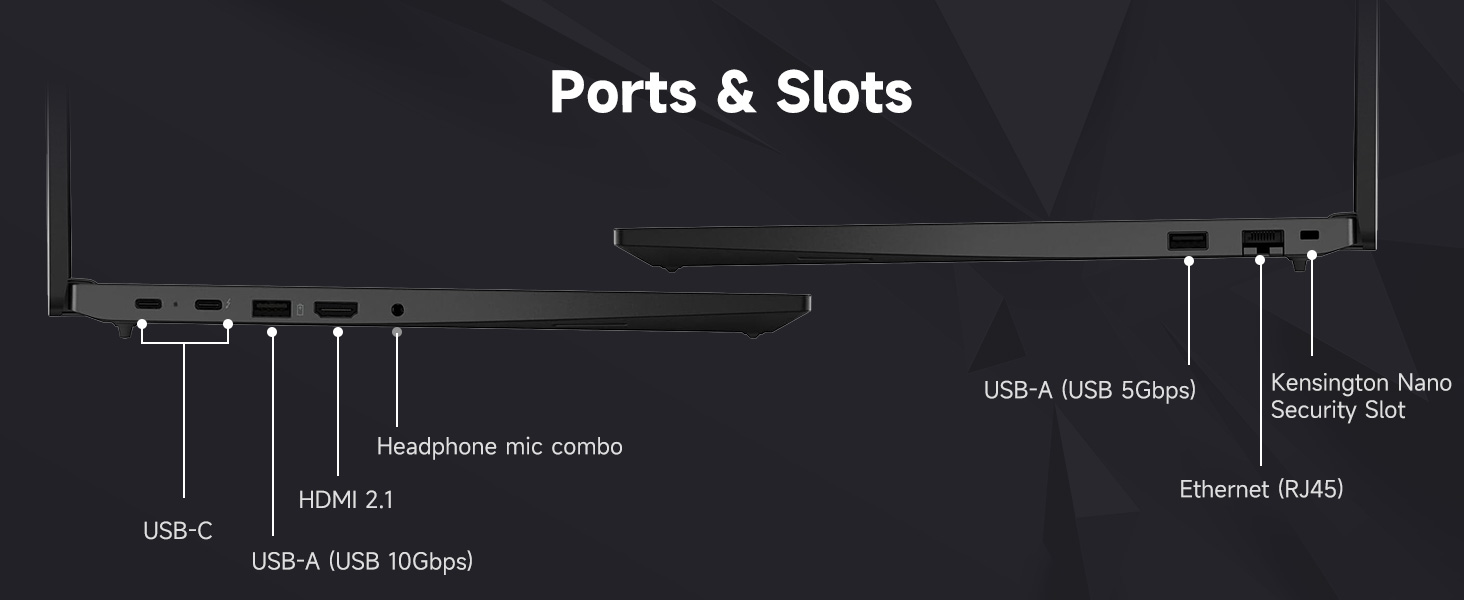
Figure 2.1: Laptop Ports and Slots
- USB-A (USB 5Gbps, USB 10Gbps): Connect USB devices such as the bundled wireless mouse receiver, external hard drives, or printers.
- USB-C (USB 5Gbps, PD / DP 1.4, USB 10Gbps, PD / DP 1.4): For power delivery, data transfer, and display output.
- ఈథర్నెట్ (RJ45): వైర్డు నెట్వర్క్ కనెక్షన్ కోసం.
- HDMI2.1: బాహ్య మానిటర్ లేదా టీవీకి కనెక్ట్ చేయండి.
- Headphone / mic combo (3.5mm): ఆడియో ఇన్పుట్/అవుట్పుట్ కోసం.
- Kensington Nano Security Slot: For physical security locking.
2.5 Wi-Fi 6 Connection
During Windows setup, you will be prompted to connect to a Wi-Fi network. Select your network and enter the password. Your laptop supports Wi-Fi 6 for fast and reliable wireless connectivity.
2.6 ఫింగర్ప్రింట్ రీడర్ సెటప్
To enhance security, set up the integrated fingerprint reader through Windows Hello in your system settings. This allows for quick and secure login.
2.7 Bundled Accessories
Your laptop includes an A-DATA UC310 64GB USB Flash Drive and a Thunderobot ML101 Wireless Mouse. The USB drive provides additional storage and data transfer capabilities. The wireless mouse connects via a USB nano receiver for convenient navigation.

Figure 2.2: A-DATA UC310 64GB USB Flash Drive
3. మీ ల్యాప్టాప్ను ఆపరేట్ చేయడం
3.1 కీబోర్డ్ మరియు ఇన్పుట్ పరికరాలు
The ThinkPad E16 features a backlit keyboard for comfortable typing in various lighting conditions. Utilize the TrackPoint Quick Menu and Tap-to-Select features for efficient navigation. The larger touchpad also enhances user interaction.

Figure 3.1: Keyboard and Touchpad Features
3.2 డిస్ప్లే ఫీచర్లు
The 16-inch FHD+ (1920x1200) IPS anti-glare touchscreen display offers clear visuals. Its 16:10 aspect ratio provides more vertical screen space, beneficial for productivity. The 300-nit brightness and TÜV Low Blue Light certification contribute to reduced eye strain during extended use.

చిత్రం 3.2: డిస్ప్లే స్పెసిఫికేషన్లు
3.3 Audio and Visuals
Experience Harman- and Dolby-optimized audio for enhanced sound quality. The AI-based noise cancellation feature improves clarity during video conferences and multimedia consumption.

Figure 3.3: Audiovisual Experience
3.4 పనితీరు
Powered by the AMD Ryzen 7 7735U processor with 8 cores and 16 threads, the laptop delivers responsive performance for everyday productivity, multitasking, and business workflows. The 32GB DDR5 RAM ensures smooth operation across multiple applications, and the 1TB PCIe NVMe M.2 Solid State Drive provides fast boot-up times and quick data access.

Figure 3.4: AMD Ryzen 7 Processor
4. నిర్వహణ
4.1 మీ ల్యాప్టాప్ను శుభ్రపరచడం
- మెత్తని, మెత్తని బట్టను ఉపయోగించండి డిampడిస్ప్లేను శుభ్రం చేయడానికి నీరు లేదా స్క్రీన్ క్లీనర్తో నింపండి.
- కీబోర్డ్ మరియు ఛాసిస్ను కొద్దిగా d తో తుడవండిamp వస్త్రం. అధిక తేమను నివారించండి.
- కఠినమైన రసాయనాలు, ద్రావకాలు లేదా రాపిడి క్లీనర్లను ఉపయోగించవద్దు.
4.2 సాఫ్ట్వేర్ నవీకరణలు
ఆపరేటింగ్ సిస్టమ్ నవీకరణలు (విండోస్ నవీకరణ) మరియు డ్రైవర్ నవీకరణలు (లెనోవా వాన్) కోసం క్రమం తప్పకుండా తనిఖీ చేసి ఇన్స్టాల్ చేయండి.tage లేదా Lenovo మద్దతు webసైట్) సరైన పనితీరు మరియు భద్రతను నిర్ధారించడానికి.
4.3 బ్యాటరీ సంరక్షణ
- బ్యాటరీని తరచుగా పూర్తిగా డిశ్చార్జ్ చేయడాన్ని నివారించండి.
- ల్యాప్టాప్ను ఎక్కువసేపు ఉపయోగించనప్పుడు చల్లని, పొడి ప్రదేశంలో నిల్వ చేయండి.
- For optimal battery health, avoid continuous charging at 100% for long durations.
4.4 భద్రతా లక్షణాలు
The ThinkPad E16 incorporates several security features to protect your data:
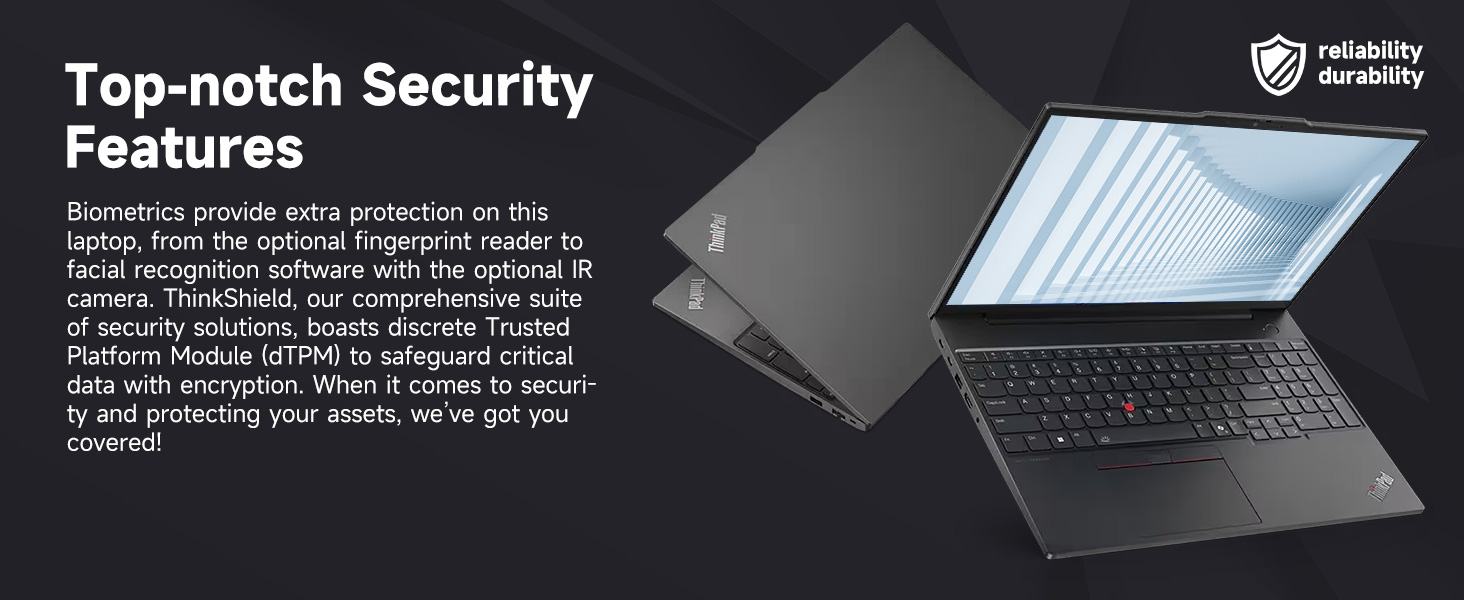
Figure 4.1: Top-notch Security Features
- ThinkShield Security Suite: A comprehensive suite of security solutions.
- వేలిముద్ర రీడర్: బయోమెట్రిక్ ప్రామాణీకరణ కోసం.
- dTPM (Discrete Trusted Platform Module): Safeguards critical data with encryption.
- Webకామ్ ప్రైవసీ షట్టర్: Physically blocks the webగోప్యత కోసం కామ్.
5. ట్రబుల్షూటింగ్
This section addresses common issues you might encounter with your ThinkPad E16. For more detailed troubleshooting, refer to the Lenovo support webసైట్.
5.1 విద్యుత్ సమస్యలు
- ల్యాప్టాప్ ఆన్ అవ్వడం లేదు: Ensure the power adapter is securely connected and the outlet is functional. Check the battery charge level.
- బ్యాటరీ ఛార్జింగ్ కాదు: Verify the power adapter is working. Try a different outlet.
5.2 ప్రదర్శన సమస్యలు
- No display or blank screen: ల్యాప్టాప్ డిస్ప్లేలో సమస్య ఉందో లేదో తనిఖీ చేయడానికి బాహ్య మానిటర్ను కనెక్ట్ చేయండి. బ్రైట్నెస్ సెట్టింగ్లను సర్దుబాటు చేయండి.
- మినుకుమినుకుమనే స్క్రీన్: గ్రాఫిక్స్ డ్రైవర్లను నవీకరించండి. బాహ్య మానిటర్ ఉపయోగిస్తుంటే డిస్ప్లే కేబుల్ కనెక్షన్లను తనిఖీ చేయండి.
5.3 కనెక్టివిటీ సమస్యలు
- Wi-Fi కనెక్ట్ కావడం లేదు: Ensure Wi-Fi is enabled. Restart your router and laptop. Re-enter Wi-Fi password.
- USB పరికరాలు గుర్తించబడలేదు: వేరే USB పోర్ట్ని ప్రయత్నించండి. USB డ్రైవర్లను అప్డేట్ చేయండి.
5.4 పనితీరు సమస్యలు
- నెమ్మది పనితీరు: అనవసరమైన అప్లికేషన్లను మూసివేయండి. నేపథ్య ప్రక్రియల కోసం తనిఖీ చేయండి. తగినంత ఉచిత నిల్వ స్థలాన్ని నిర్ధారించుకోండి.
- వేడెక్కడం: వెంటిలేషన్ వెంట్లు స్పష్టంగా ఉన్నాయని నిర్ధారించుకోండి. ల్యాప్టాప్ను గట్టి, చదునైన ఉపరితలంపై ఉపయోగించండి.
6. స్పెసిఫికేషన్లు
| ఫీచర్ | స్పెసిఫికేషన్ |
|---|---|
| బ్రాండ్ | లెనోవో |
| మోడల్ పేరు | థింక్ప్యాడ్ E16 |
| ప్రాసెసర్ | AMD రైజెన్ 7 7735U (8 కోర్లు, 16 థ్రెడ్లు, 4.75 GHz వరకు) |
| గ్రాఫిక్స్ | AMD రేడియన్ గ్రాఫిక్స్ (ఇంటిగ్రేటెడ్) |
| RAM | 32GB DDR5 RAM (5600 MHz) |
| నిల్వ | 1TB PCIe NVMe M.2 SSD |
| ప్రదర్శించు | 16-inch FHD+ (1920x1200) IPS Touchscreen, Anti-glare, 16:10 aspect ratio, 300nit, TÜV Low Blue Light certified, 60 Hz Refresh Rate |
| ఆపరేటింగ్ సిస్టమ్ | Windows 11 ప్రో |
| కనెక్టివిటీ | Wi-Fi 6 (802.11ax), Ethernet (RJ45) |
| ఓడరేవులు | 2x USB-A (5Gbps, 10Gbps), 2x USB-C (5Gbps, 10Gbps, PD/DP 1.4), 1x HDMI 2.1, 1x Headphone/Mic Combo, 1x Kensington Nano Security Slot |
| ప్రత్యేక లక్షణాలు | Backlit Keyboard, Fingerprint Reader, Numeric Keypad, HD 720p RGB Webగోప్యతా షట్టర్తో క్యామ్ |
| రంగు | నలుపు |
| కొలతలు (L x W x మందం) | 12.32" x 8.63" x 0.71" |
7. వారంటీ మరియు మద్దతు
7.1 వారంటీ సమాచారం
Your Lenovo ThinkPad E16 comes with a 1-year manufacturer's warranty. Additionally, for upgraded RAM/SSD components, a 1-year warranty is provided by PCOnline US. Please retain your proof of purchase for warranty claims.
7.2 సాంకేతిక మద్దతు
సాంకేతిక సహాయం, డ్రైవర్ డౌన్లోడ్లు లేదా తదుపరి ట్రబుల్షూటింగ్ కోసం, దయచేసి అధికారిక Lenovo సపోర్ట్ను సందర్శించండి. website or contact their customer service. For issues related to the upgraded components, contact PCOnline US support.