
పరిచయం
This manual provides essential instructions for the safe and effective operation of your xo poppy InstaPrint Digital Camera. Please read this manual thoroughly before using the device and retain it for future reference.
The InstaPrint Digital Camera combines photography, instant thermal printing, and entertainment features. It includes 16X digital zoom, 1080p video recording, a 2.4-inch display, built-in games, and an MP3 player.

Image 1: InstaPrint Digital Camera. This image shows the front of the InstaPrint Digital Camera, highlighting its compact design and the instant print output.
ప్యాకేజీ విషయాలు
ప్యాకేజీలో అన్ని అంశాలు ఉన్నాయని నిర్ధారించుకోండి:
- InstaPrint Digital Camera
- 3 Photo Rolls
- 3 Label Rolls
- 256MB SD Card
- USB కేబుల్
కెమెరా ఓవర్view
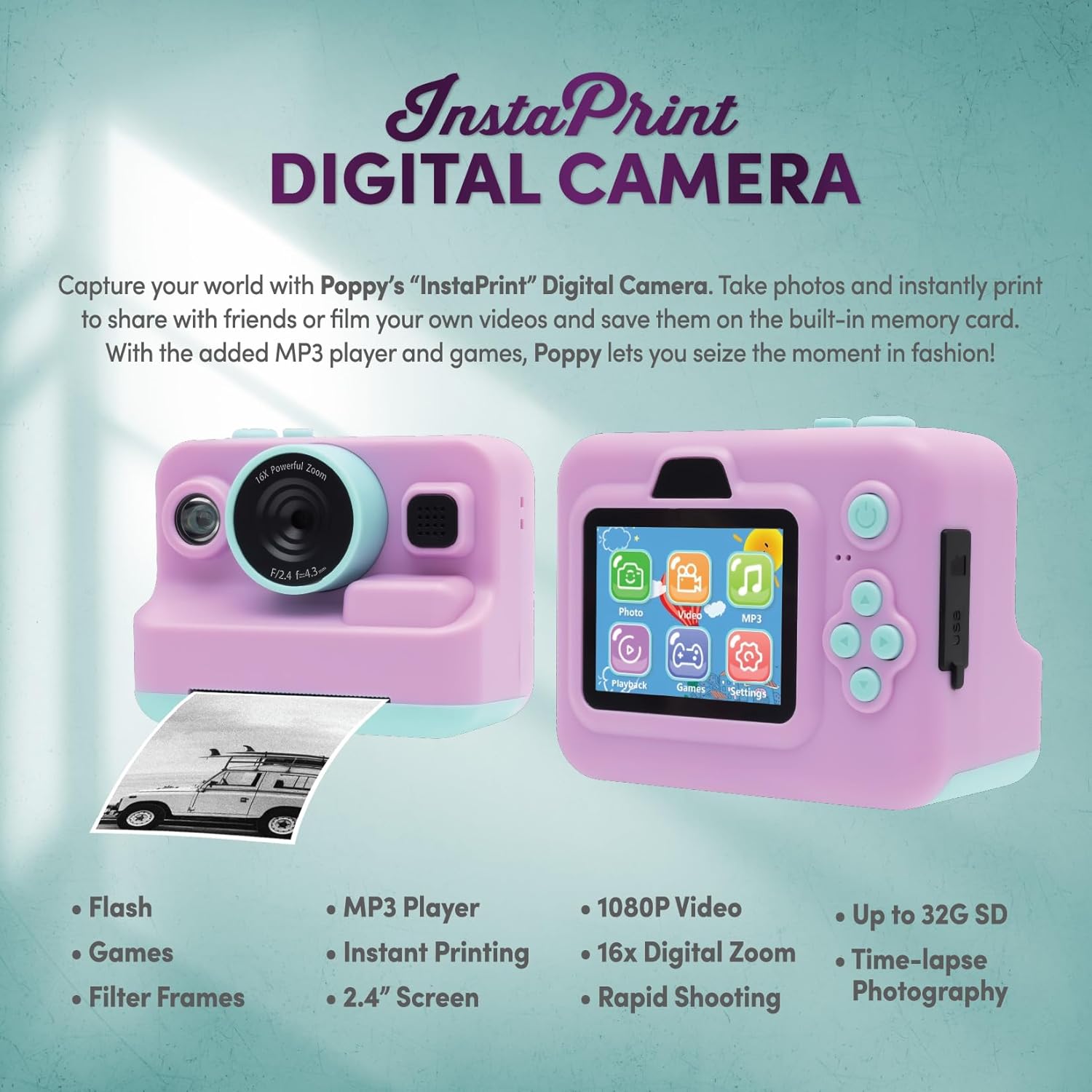
Image 2: Camera Features and Controls. This image displays the front and back of the InstaPrint Digital Camera, pointing out key components such as the 16x Digital Zoom lens, flash, cutter, instant thermal printing slot, photo/label rolls, picture button, power button, SD port, USB port, control buttons, MP3 player, digital display, built-in games, video function, and photo effects.
సెటప్
1. కెమెరాను ఛార్జ్ చేయడం
Before first use, fully charge the camera battery. Connect the included USB cable to the camera's USB port and the other end to a compatible USB power adapter (not included) or a computer USB port. The charging indicator will show the charging status.
2. SD కార్డ్ చొప్పించడం
Locate the SD card slot on the camera. Insert the included 256MB SD card into the slot until it clicks into place. Ensure the card is inserted in the correct orientation to avoid damage. The camera supports up to 32GB SD cards for expanded storage.
3. Loading Thermal Paper Rolls

Image 3: Instant Printing in Action. This image shows the camera in use, with a photo being instantly printed, demonstrating the thermal printing capability.
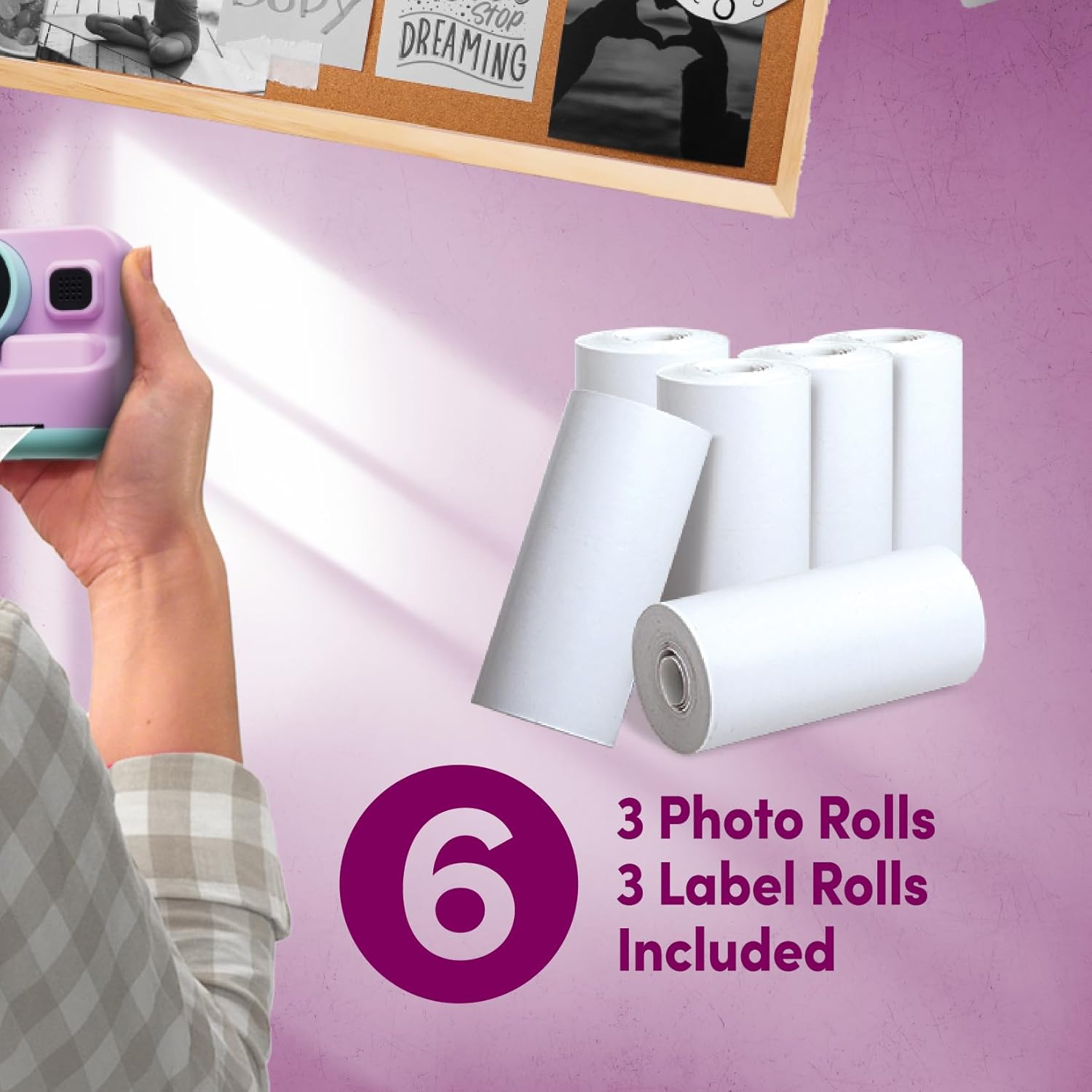
Image 4: Included Thermal Paper Rolls. This image displays the six thermal paper rolls included with the camera: three for photos and three for labels, ready for use with the instant printing function.
- Open the paper compartment cover on the camera.
- Place one of the thermal paper rolls (photo or label) into the compartment, ensuring the paper feeds out correctly.
- Close the cover securely. A small portion of the paper should extend from the printing slot.
ఆపరేటింగ్ సూచనలు
పవర్ ఆన్/ఆఫ్
Press and hold the Power Button to turn the camera on or off.
ఫోటోలు తీయడం
- కెమెరాను ఆన్ చేయండి.
- Frame your shot using the 2.4-inch digital display.
- Use the control buttons to adjust settings or apply photo effects if desired.
- Press the Picture Button to capture the photo.
వీడియోలను రికార్డ్ చేస్తోంది
- Navigate to the video mode using the control buttons.
- Press the Picture Button to start recording.
- Press the Picture Button again to stop recording. Videos are recorded in 1080p resolution.
తక్షణ ముద్రణ
After taking a photo, you can choose to print it instantly. Select the print option from the camera's menu. The thermal printer will produce a black and white print. Use the built-in cutter mechanism for a clean tear.
డిజిటల్ జూమ్
The camera features 16X digital zoom. Use the zoom controls (typically marked with 'W' for wide and 'T' for telephoto) to adjust the zoom level before capturing a photo or video.
Built-in Games and MP3 Player
Access the Games and MP3 Player functions through the main menu on the digital display. Use the control buttons to navigate and select options. Load MP3 files onto the SD card to use the MP3 player.
నిర్వహణ
కెమెరాను శుభ్రపరచడం
Use a soft, dry cloth to clean the camera body and screen. For the lens, use a specialized lens cleaning cloth. Avoid using liquid cleaners or abrasive materials.
బ్యాటరీ సంరక్షణ
To prolong battery life, avoid exposing the camera to extreme temperatures. Recharge the battery regularly, even if the camera is not in frequent use.
నిల్వ
When not in use, store the camera in a cool, dry place, away from direct sunlight and moisture. Remove the SD card if storing for extended periods.
ట్రబుల్షూటింగ్
| సమస్య | సాధ్యమైన కారణం | పరిష్కారం |
|---|---|---|
| కెమెరా పవర్ ఆన్ అవ్వదు. | Low battery; faulty battery. | Charge the camera. Ensure the battery is properly inserted. |
| ఫోటోలు/వీడియోలు తీయలేరు. | SD card full or not inserted correctly. | SD కార్డ్ చొప్పించడాన్ని తనిఖీ చేయండి. అనవసరమైన వాటిని తొలగించండి. fileలు లేదా SD కార్డ్ను భర్తీ చేయండి. |
| Prints are blank or faded. | Thermal paper loaded incorrectly; paper roll empty. | Ensure thermal paper is loaded with the thermal side facing the print head. Replace paper roll if empty. |
| కెమెరా స్తంభించిపోయింది. | సాఫ్ట్వేర్ లోపం. | Press and hold the Power Button for 10 seconds to force a restart. |
స్పెసిఫికేషన్లు
- మోడల్ పేరు: PY-DGCMP-ALV
- బ్రాండ్: xo గసగసాల
- ఉత్పత్తి కొలతలు: 2 x 4 x 3 అంగుళాలు
- వస్తువు బరువు: 1 పౌండ్లు
- ఫోటో సెన్సార్ టెక్నాలజీ: CMOS
- మద్దతు ఇచ్చారు File ఫార్మాట్: JPEG
- చిత్ర స్థిరీకరణ: డిజిటల్
- గరిష్ట ఫోకల్ పొడవు: 35 మిల్లీమీటర్లు
- ఆప్టికల్ జూమ్: 1x
- గరిష్టం Webకెమెరా చిత్రం రిజల్యూషన్: 5 ఎంపీ
- ఫోటో సెన్సార్ పరిమాణం: 1/3.2-అంగుళాల
- ఎక్స్పోజర్ నియంత్రణ రకం: ఆటోమేటిక్
- బ్యాటరీలు: 1 ప్రామాణికం కాని బ్యాటరీ (చేర్చబడింది)
- వీడియో రిజల్యూషన్: 1080p
- డిజిటల్ జూమ్: 16x
- ప్రదర్శన: 2.4-అంగుళాల LCD
- నిల్వ: 256MB SD card included, supports up to 32GB
- కనెక్టివిటీ: USB
- ఫీచర్లు: Instant Thermal Printing, Built-in Games, MP3 Player, Flash, Speaker, Microphone, Digital Photo Effects, Cutter Mechanism
ముఖ్యమైన భద్రతా సమాచారం
- కెమెరాను మీరే విడదీయవద్దు లేదా రిపేర్ చేయడానికి ప్రయత్నించవద్దు.
- Keep the camera away from water and excessive moisture.
- కెమెరాను కింద పడేయడం లేదా బలమైన దెబ్బలకు గురిచేయడం మానుకోండి.
- ఛార్జింగ్ కోసం అందించిన USB కేబుల్ను మాత్రమే ఉపయోగించండి.
- స్థానిక నిబంధనల ప్రకారం బ్యాటరీలు మరియు ఎలక్ట్రానిక్ భాగాలను బాధ్యతాయుతంగా పారవేయండి.
వారంటీ సమాచారం
Specific warranty details are not provided in the product information. Please refer to the retailer or manufacturer's official webవారంటీ నిబంధనలు మరియు షరతుల కోసం సైట్.
కస్టమర్ మద్దతు
For technical assistance or product inquiries, please contact xo poppy customer support through their official channels. Contact information is typically available on the product packaging or the manufacturer's webసైట్.
Related Video Content
Video 5: Digital Camera Overview. This short video provides a visual overview of a digital camera, demonstrating its flip screen and general operation. While not specific to the InstaPrint model, it illustrates common digital camera features.