
1. పరిచయం
This manual provides detailed instructions for the proper use and maintenance of your ANCEL MT500 Plus Motorcycle Scanner. Please read this manual thoroughly before operating the device to ensure correct usage and to prevent damage.
2. ఉత్పత్తి ముగిసిందిview
The ANCEL MT500 Plus is a comprehensive OBD2 diagnostic tool designed for motorcycles, ATVs, UTVs, scooters, dirt bikes, and snowmobiles. It offers dealer-level diagnostics, service reset functions, and active testing capabilities.
2.1 ముఖ్య లక్షణాలు
- పూర్తి-వ్యవస్థ విశ్లేషణలు: Access and diagnose Engine, ABS, TPMS, Suspension, Ignition, ECU, Battery, LED lights, and more.
- Service Reset Functions: Perform oil reset, idle speed adjustment, AFR reset, ABS bleeding (for specific brands), and CO adjustment.
- Active Testing: Conduct bi-directional tests for components like fuel pump, cooling fan, headlights, and injectors.
- విస్తృత కవరేజ్: Supports various motorcycle and powersports brands from 2003–2022, including BMW, Honda, Yamaha, Ducati, KTM, Kawasaki, Suzuki, and Triumph.
- రక్షణ కేసు: Includes a durable hard protective case for storage and transport.

Image: The ANCEL MT500 Plus displaying its OE-level full system diagnosis capabilities, highlighting various systems like Engine, ABS, TPMS, and ECU on a motorcycle diagram.
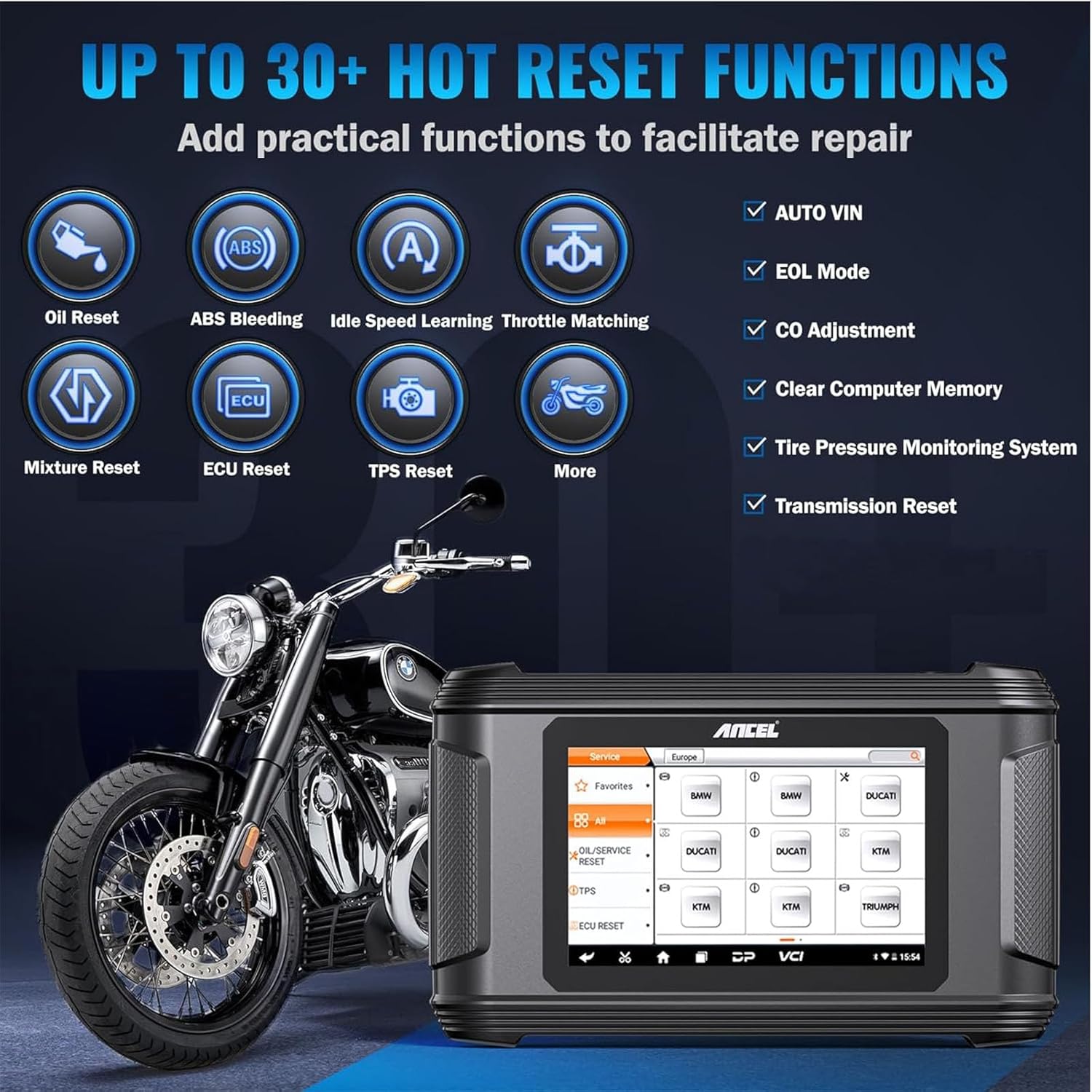
Image: The ANCEL MT500 Plus interface illustrating over 30 hot reset functions, including Oil Reset, ABS Bleeding, Idle Speed Learning, and CO Adjustment, alongside a motorcycle.

Image: The ANCEL MT500 Plus demonstrating its wide motorcycle compatibility, featuring logos for BMW, Yamaha, Honda, Kawasaki, Suzuki, KTM, Ducati, and Triumph.

Image: The ANCEL hard protective case with dimensions labeled as 12.6 inches (length), 8.66 inches (width), and 4.72 inches (height).
3. సెటప్
3.1 అన్ప్యాకింగ్ మరియు ప్రారంభ తనిఖీ
- Carefully unpack all components from the protective case.
- Verify that all items listed in the packing list are present and undamaged.
- Inspect the scanner and cables for any visible signs of damage. If any damage is found, contact customer support immediately.
3.2 పరికరాన్ని ఆన్ చేయడం
- The MT500 Plus can be powered via the motorcycle's OBD port or an external power adapter (if included).
- స్క్రీన్ వెలిగే వరకు పవర్ బటన్ను నొక్కి పట్టుకోండి.
3.3 Connecting to a Motorcycle
- Locate the diagnostic port on your motorcycle. Refer to your motorcycle's service manual for the exact location.
- Select the appropriate adapter cable from the included set for your motorcycle brand.
- Connect one end of the adapter cable to the MT500 Plus and the other end to the motorcycle's diagnostic port.
- Turn the motorcycle's ignition to the ON position (engine off).
4. ఆపరేటింగ్ సూచనలు
The ANCEL MT500 Plus features an intuitive touchscreen interface. Navigate through menus by tapping on icons or using the directional buttons (if available).
4.1 ప్రధాన మెనూ ముగిసిందిview
Upon startup, the main menu typically displays options such as:
- మోటో డయాగ్: For performing diagnostic functions.
- సేవ: For accessing service reset functions.
- వ్యక్తిగత కేంద్రం: For user settings and device information.
- డేటా నిర్వహణ: తిరిగిview సేవ్ చేసిన డేటా.
- మద్దతు: For technical assistance and feedback.
- సెట్టింగ్లు: To configure device preferences.
- అప్గ్రేడ్: సాఫ్ట్వేర్ నవీకరణల కోసం.
4.2 డయాగ్నోస్టిక్స్ చేయడం
- ప్రధాన మెను నుండి, ఎంచుకోండి మోటో డయాగ్.
- Choose your motorcycle's brand and model.
- The system will automatically identify the vehicle or prompt for VIN entry.
- ఎంచుకోండి Full System Scan or choose a specific system (e.g., Engine, ABS).
- The scanner will read Diagnostic Trouble Codes (DTCs) and display live data.
- కోడ్లను క్లియర్ చేయడానికి, DTC లను క్లియర్ చేయండి అంతర్లీన సమస్యను పరిష్కరించిన తర్వాత ఎంపిక.

Image: The ANCEL MT500 Plus conducting a full OBD test, showing live data stream, VIN info retrieval, DTC lookup, and freeze frame data on its screen.
4.3 Using Service Reset Functions
- ప్రధాన మెను నుండి, ఎంచుకోండి సేవ.
- Choose the desired service function (e.g., Oil Reset, ABS Bleeding).
- Follow the on-screen prompts to complete the procedure. Ensure all safety precautions are observed.
4.4 Active Testing
- Within the diagnostic menu for a specific system, look for the యాక్టివ్ టెస్ట్ or ద్వి దిశాత్మక నియంత్రణ ఎంపిక.
- Select the component you wish to test (e.g., fuel pump, cooling fan).
- Follow the instructions to activate or deactivate the component and observe its response.
4.5 Software Updates and Support
Regularly check for software updates to ensure optimal performance and compatibility with new vehicle models. Updates can typically be performed via Wi-Fi through the అప్గ్రేడ్ చేయండి menu. For technical assistance, use the మద్దతు or అభిప్రాయం ఎంపికలు.

Image: The ANCEL MT500 Plus demonstrating advanced technical support features, including one-click updates, data record and replay, online feedback, and data management.
5. నిర్వహణ
5.1 పరికరాన్ని శుభ్రపరచడం
- ఒక మృదువైన ఉపయోగించండి, డిamp cloth to clean the screen and exterior of the scanner.
- రాపిడి క్లీనర్లు లేదా ద్రావకాలను ఉపయోగించడం మానుకోండి, ఎందుకంటే ఇవి పరికరాన్ని దెబ్బతీస్తాయి.
- Ensure no liquids enter the ports or openings.
5.2 సాఫ్ట్వేర్ నవీకరణలు
Periodically connect the device to a Wi-Fi network and check for software updates via the అప్గ్రేడ్ చేయండి menu. Keeping the software updated ensures access to the latest features and vehicle compatibility.
5.3 నిల్వ
When not in use, store the ANCEL MT500 Plus in its protective hard case in a cool, dry place, away from direct sunlight and extreme temperatures.

Image: A person carrying the ANCEL protective case, demonstrating its portable design.
6. ట్రబుల్షూటింగ్
6.1 పరికరం ఆన్ కావడం లేదు
- Ensure the device is properly connected to the motorcycle's diagnostic port or an external power source.
- Check the motorcycle's battery voltage.
- If using an external power adapter, verify the power outlet is functional.
6.2 వాహనంతో కమ్యూనికేషన్ లోపం
- Verify that the ignition is in the ON position (engine off).
- Ensure the correct adapter cable is used for your motorcycle model and is securely connected.
- Check for any blown fuses in the motorcycle's diagnostic circuit.
- Confirm that the motorcycle's battery has sufficient charge.
- Try selecting a different protocol or manually entering vehicle information if automatic detection fails.
6.3 Screen Freezes or Device is Unresponsive
- Press and hold the power button for approximately 10 seconds to force a shutdown.
- Restart the device. If the issue persists, ensure the software is up to date.
7. స్పెసిఫికేషన్లు
| ఫీచర్ | వివరణ |
|---|---|
| ఆపరేటింగ్ సిస్టమ్ | ఆండ్రాయిడ్ 5.1.1 OS |
| స్క్రీన్ | 8-inch, 800*480 Screen Pixels, 5.0" Touchscreen |
| ROM | 13G ROM |
| SD కార్డ్ | 32G SD కార్డ్ |
| కనెక్టివిటీ | Wi-Fi |
| భాషలు | 8 Languages Supported |
| కేస్ కొలతలు | 13.38*8.68*4.33 inches (approx. 34 x 22 x 11 cm) |

Image: Diagram illustrating the optimized hardware and software configuration of the ANCEL MT500 Plus, detailing Android OS, 8-inch screen, 13G ROM, 32G SD Card, Wi-Fi, 8 languages, and 5.0" touchscreen.
8. వారంటీ మరియు మద్దతు
The ANCEL MT500 Plus comes with a manufacturer's warranty. For specific warranty terms and conditions, please refer to the warranty card included with your product or visit the official ANCEL website. For technical support, product inquiries, or to report issues, please contact ANCEL customer service through their official channels.
గమనిక: వారంటీ క్లెయిమ్ల కోసం కొనుగోలు రుజువుగా మీ కొనుగోలు రసీదును ఉంచండి.