
1. పరిచయం
ధన్యవాదాలు, ధన్యవాదాలు.asing the Romicta S-188 Pro 2.1 Channel Stereo Audio Ampప్రాణాలను బలిగొంటాడు. ఈ amplifier is designed to provide high-fidelity audio for your home theater or stereo system, featuring Bluetooth 5.0, USB, and AUX inputs, along with dedicated controls for bass, treble, and subwoofer output. Please read this manual carefully before use to ensure proper operation and to maximize your audio experience.

Image: The Romicta S-188 Pro amplifier integrated into a home audio setup.
2. భద్రతా సమాచారం
విద్యుత్ షాక్, అగ్ని ప్రమాదం లేదా యూనిట్కు నష్టం జరగకుండా నిరోధించడానికి, దయచేసి ఈ క్రింది భద్రతా జాగ్రత్తలను గమనించండి:
- ఈ యూనిట్ను వర్షం లేదా తేమకు బహిర్గతం చేయవద్దు.
- సి ని తెరవవద్దుasing. అన్ని సర్వీసింగ్లను అర్హత కలిగిన సిబ్బందికి సూచించండి.
- యూనిట్ చుట్టూ సరైన వెంటిలేషన్ ఉండేలా చూసుకోండి. వెంటిలేషన్ ఓపెనింగ్లను బ్లాక్ చేయవద్దు.
- అందించిన పవర్ అడాప్టర్ను మాత్రమే ఉపయోగించండి.
- యూనిట్ను ఉష్ణ వనరులు, ప్రత్యక్ష సూర్యకాంతి మరియు బలమైన అయస్కాంత క్షేత్రాల నుండి దూరంగా ఉంచండి.
- యూనిట్ ఎక్కువ కాలం ఉపయోగించబడకపోతే వాల్ అవుట్లెట్ నుండి పవర్ అడాప్టర్ను డిస్కనెక్ట్ చేయండి.
3. ప్యాకేజీ విషయాలు
ప్యాకేజీలో అన్ని అంశాలు ఉన్నాయని నిర్ధారించుకోండి:
- Romicta S-188 Pro 2.1 Channel Stereo Audio Ampజీవితకాలం
- రిమోట్ కంట్రోల్
- 12V 5A DC పవర్ అడాప్టర్
- సూచనల మాన్యువల్ (ఈ పత్రం)

Image: All components included in the Romicta S-188 Pro package.
4. ఉత్పత్తి ముగిసిందిview
ముందు ప్యానెల్ నియంత్రణలు
- SUB VOL Knob: Adjusts the volume level of the connected subwoofer.
- మోడ్ బటన్: Switches between input modes (Bluetooth, USB, AUX).
- మునుపటి/తదుపరి బటన్లు: Navigates tracks in USB/SD card mode.
- ప్లే/పాజ్ బటన్: Plays or pauses audio in USB/SD card mode.
- USB ఇన్పుట్: Connects USB flash drives for audio playback.
- డిస్ప్లే స్క్రీన్: Shows current input mode and track information.
- BASS నాబ్: Adjusts the bass level of the main speakers.
- TREBLE నాబ్: Adjusts the treble level of the main speakers.
- వాల్యూమ్ నాబ్: Master volume control for all outputs.
వెనుక ప్యానెల్ కనెక్షన్లు
- AUX1 Input (RCA): Connects external audio sources via RCA cables.
- AUX2 Input (3.5mm Jack): Connects external audio sources via a 3.5mm audio cable.
- LINE Output (RCA): Provides a line-level audio output.
- FR/FL Speaker Outputs: Connects passive right and left speakers.
- సబ్ అవుట్పుట్: Connects a passive subwoofer.
- 12V 5A Power Input: Connects the DC power adapter.

Image: Front and rear panel layout of the Romicta S-188 Pro ampజీవితకాలం.
5. సెటప్
5.1 స్పీకర్ కనెక్షన్లు
The S-188 Pro supports both passive speakers and subwoofers, as well as active subwoofers.
- నిష్క్రియ స్పీకర్లు: Connect your passive left (FL) and right (FR) speakers to the corresponding speaker terminals on the rear panel using speaker wire. Ensure correct polarity (+ to + and - to -).
- Passive Subwoofer: Connect a passive subwoofer to the 'SUB' terminals on the rear panel using speaker wire.
- యాక్టివ్ సబ్ వూఫర్: Connect an active (powered) subwoofer to the 'LINE Output' RCA ports on the rear panel using an RCA cable.
5.2 ఆడియో ఇన్పుట్ కనెక్షన్లు
- బ్లూటూత్: For wireless audio streaming from your smartphone, tablet, or computer.
- USB: ఆడియోను కలిగి ఉన్న USB ఫ్లాష్ డ్రైవ్ను చొప్పించండి files into the front panel USB port.
- AUX (RCA): Connect devices like CD players, TVs, or PCs to the 'AUX1 Input' RCA ports.
- ఆగ్జిలరీ (3.5మిమీ): Connect devices with a 3.5mm audio output to the 'AUX2 Input' 3.5mm jack.

Image: Connectivity options for the Romicta S-188 Pro ampజీవితకాలం.
5.3 పవర్ కనెక్షన్
Connect the provided 12V 5A DC power adapter to the '12V 5A Power Input' on the rear panel of the amplifier, then plug the adapter into a wall outlet.
6. ఆపరేటింగ్ సూచనలు
6.1 పవర్ ఆన్/ఆఫ్
Turn the master VOLUME knob clockwise until the unit powers on and the display illuminates. To turn off, rotate the VOLUME knob counter-clockwise until it clicks off.
6.2 ఇన్పుట్ ఎంపిక
Press the 'MODE' button on the front panel or the remote control to cycle through available input sources: Bluetooth (BT), USB, and AUX.
6.3 బ్లూటూత్ జత చేయడం
- మారండి amplifier to Bluetooth mode (display shows 'BT').
- మీ పరికరంలో (స్మార్ట్ఫోన్, టాబ్లెట్), బ్లూటూత్ను ప్రారంభించి, అందుబాటులో ఉన్న పరికరాల కోసం శోధించండి.
- Select 'S-188 Pro' from the list to pair. A confirmation sound will indicate successful pairing.
- You can now stream audio wirelessly to the ampజీవితకాలం.

Image: Bluetooth 5.0 connectivity for seamless music streaming.
6.4 USB ప్లేబ్యాక్
Insert a USB flash drive into the USB port. The amplifier will automatically switch to USB mode and begin playing supported audio files. Use the Previous/Next and Play/Pause buttons on the front panel or remote to control playback.
6.5 ఆడియో సర్దుబాట్లు
- వాల్యూమ్: Use the large VOLUME knob to adjust the overall output level.
- BASS/TREBLE: Use the BASS and TREBLE knobs to fine-tune the low and high frequencies of your main speakers.
- సబ్ వోల్: Use the SUB VOL knob to independently adjust the volume of the connected subwoofer.
6.6 రిమోట్ కంట్రోల్ విధులు
చేర్చబడిన రిమోట్ కంట్రోల్ వివిధ ఫంక్షన్లకు అనుకూలమైన యాక్సెస్ను అందిస్తుంది:
- ఆన్/ఆఫ్: యూనిట్ను ఆన్ లేదా ఆఫ్ చేయండి.
- DIRECTIONS: ఇన్పుట్ మూలాలను మార్చండి.
- CH+/CH-: Navigate tracks (USB/SD).
- EQ: Cycle through equalizer presets (if available).
- వాల్యూమ్ +/-: మాస్టర్ వాల్యూమ్ను సర్దుబాటు చేయండి.
- సంఖ్య బటన్లు: Direct track selection (USB/SD).
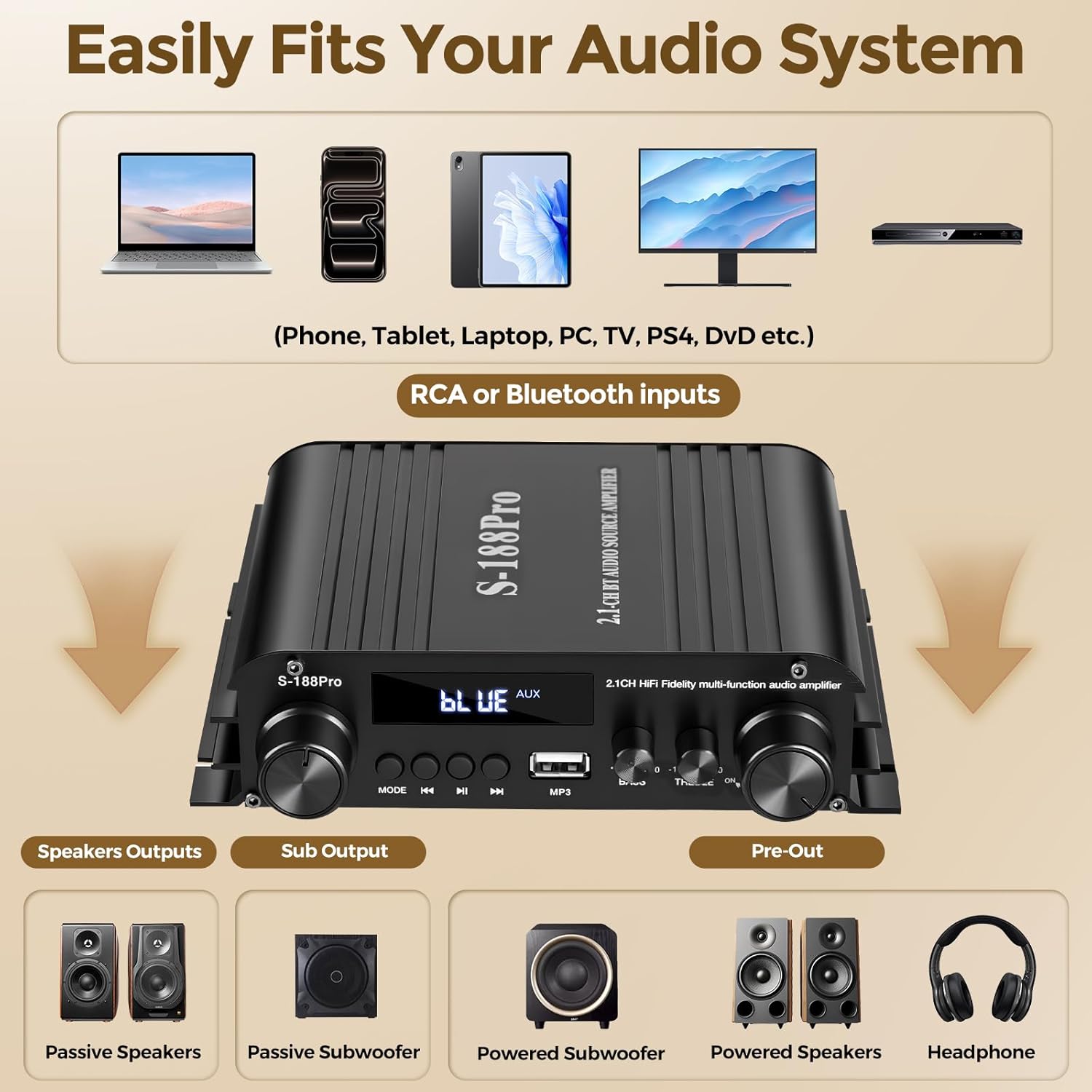
Image: Remote control for the Romicta S-188 Pro ampజీవితకాలం.
7. ట్రబుల్షూటింగ్
మీరు సమస్యలను ఎదుర్కొంటే, ఈ క్రింది సాధారణ సమస్యలు మరియు పరిష్కారాలను చూడండి:
| సమస్య | సాధ్యమైన కారణం | పరిష్కారం |
|---|---|---|
| శక్తి లేదు | Power adapter not connected; power outlet not active; VOLUME knob off. | Ensure power adapter is securely connected and plugged into a live outlet. Turn VOLUME knob clockwise to power on. |
| సౌండ్ అవుట్పుట్ లేదు | Incorrect input mode; speaker wires loose; volume too low; incorrect source connection. | Select correct input mode. Check speaker wire connections and polarity. Increase VOLUME. Verify audio source is properly connected to the correct input. |
| బ్లూటూత్ జత చేయడం విఫలమైంది | Amplifier not in BT mode; device Bluetooth off; too far from ampజీవితకాలం. | నిర్ధారించండి amplifier is in BT mode. Enable Bluetooth on your device. Move device closer to the amplifier (within 50 feet). |
| వక్రీకరించిన ధ్వని | Volume too high; incorrect impedance speakers; poor source quality. | Reduce volume. Ensure speakers match the amplifier's impedance (4-8 Ohm). Use high-quality audio sources. |
8. స్పెసిఫికేషన్లు
| మోడల్ సంఖ్య | S-188 Pro |
| ఛానెల్లు | 2.1 ఛానెల్ |
| రేట్ చేయబడిన పవర్ అవుట్పుట్ | 50W x 2 (main speakers) + 60W (subwoofer) |
| పీక్ పవర్ అవుట్పుట్ | 300W x 2 (main speakers) + 360W (subwoofer) |
| కనెక్టివిటీ టెక్నాలజీ | Bluetooth 5.0, USB, AUX (RCA, 3.5mm Jack) |
| స్పీకర్ ఇంపెడెన్స్ | 4-8 ఓం |
| విద్యుత్ సరఫరా | DC 12V 5A |
| ప్రత్యేక లక్షణాలు | Dedicated Subwoofer Control, Bass/Treble Control, Remote Control |
| చట్రం మెటీరియల్ | పూర్తిగా లోహంతో తయారు చేయబడినది |
9. నిర్వహణ
మీ దీర్ఘాయువు మరియు సరైన పనితీరును నిర్ధారించడానికి ampజీవితకాలం:
- శుభ్రపరచడం: Use a soft, dry cloth to wipe the exterior of the unit. Do not use liquid cleaners or solvents.
- వెంటిలేషన్: వెంటిలేషన్ ఓపెనింగ్లను దుమ్ము మరియు అడ్డంకులు లేకుండా ఉంచండి.
- నిల్వ: ఎక్కువ కాలం ఉపయోగంలో లేనప్పుడు, నిల్వ చేయండి ampప్రత్యక్ష సూర్యకాంతి మరియు విపరీతమైన ఉష్ణోగ్రతలకు దూరంగా చల్లని, పొడి ప్రదేశంలో లైఫైయర్.
10. వారంటీ మరియు మద్దతు
Romicta products are designed for reliability and performance. For warranty information or technical support, please refer to the contact details provided with your purchase or visit the official Romicta webవారంటీ క్లెయిమ్ల కోసం కొనుగోలు రుజువుగా మీ కొనుగోలు రసీదును ఉంచండి.