
1. ఉత్పత్తి ముగిసిందిview
The DDPAI N5 Dual is a screenless dash camera system designed for vehicles, offering both front and rear recording capabilities. It captures high-definition video footage to provide evidence for accident disputes and insurance claims. The system includes a front camera, a rear camera, and a 64GB SD card for storage.

Image: The DDPAI N5 Dual dash camera, showcasing its compact design and connectivity with a smartphone application for viewing మరియు నియంత్రణ.
ముఖ్య లక్షణాలు:
- ద్వంద్వ రికార్డింగ్: Captures 2160P (4K) video from the front camera and 1080P video from the rear camera.
- Screenless Design: Compact form factor without an integrated screen, managed via a smartphone app.
- అంతర్నిర్మిత నిల్వ: Features 32GB built-in eMMC storage for data security.
- విస్తరించదగిన నిల్వ: Supports an external TF card up to 512GB (card not included, but a 64GB SD card is provided with this product).
- పార్కింగ్ మోడ్: Offers 72-hour parking monitoring with radar motion detection (requires optional radar module and hardwire kit).
- కనెక్టివిటీ: Equipped with 5GHz WiFi for fast data transfer to smartphones and built-in GPS for location tracking.
- అడ్వాన్స్డ్ డ్రైవర్-అసిస్టెన్స్ సిస్టమ్స్ (ADAS): Provides smart voice reminders for front vehicle movement and fatigue driving.
- రాత్రి దృష్టి: Utilizes AI ISP Night Vis 3.0 technology with F1.8 aperture and a 6-layer lens for enhanced low-light recording.
2. సెటప్ మరియు ఇన్స్టాలేషన్
2.1 డాష్ క్యామ్ను మౌంట్ చేయడం
- Clean the windshield area where the front camera will be mounted. Ensure it does not obstruct your view.
- Attach the front camera to the windshield using the provided adhesive mount.
- Route the power cable neatly along the windshield edge and down to the vehicle's power outlet (cigarette lighter or hardwire kit).
- వెనుక కెమెరాను వెనుక విండ్షీల్డ్పై అమర్చండి, స్పష్టంగా ఉండేలా చూసుకోండి view. Connect it to the front camera using the provided cable.

Image: Illustration of the dual recording capability, showing the wide-angle views of both the front (4K UHD) and rear (1080P) cameras.
2.2 పవర్ కనెక్షన్
- Connect the power cable to the dash cam and then to your vehicle's 12V power outlet.
- For 24-hour parking mode, a hardwire kit (ASIN: B0F21Z5V7D) is required and sold separately.
- For 72-hour parking mode with radar motion detection, an optional radar module (ASIN: B0D4YNL8R8) is also required and sold separately.
2.3 ప్రారంభ సెటప్ మరియు యాప్ కనెక్షన్
- Download the DDPAI app from your smartphone's app store (iOS or Android).
- Turn on your vehicle's ignition to power the dash cam.
- Open the DDPAI app and follow the on-screen instructions to connect to the dash cam's 5GHz WiFi network.
- కనెక్ట్ అయిన తర్వాత, మీరు చేయవచ్చు view లైవ్ ఫూtage, adjust settings, and download recordings.
3. ఆపరేటింగ్ సూచనలు
3.1 రికార్డింగ్ మోడ్లు
- లూప్ రికార్డింగ్: డాష్ క్యామ్ నిరంతరం రికార్డ్ చేస్తుంది, పురాతన ఫూను ఓవర్రైట్ చేస్తుందిtagనిల్వ నిండినప్పుడు.
- అత్యవసర రికార్డింగ్: The built-in G-sensor detects sudden impacts or collisions and automatically locks the current video segment to prevent it from being overwritten.
- పార్కింగ్ పర్యవేక్షణ: When properly hardwired and with optional radar module, the dash cam can monitor your vehicle while parked. Radar motion detection triggers recording when movement is detected around the vehicle.
3.2 GPS and ADAS Features
- GPS ట్రాకింగ్: The built-in GPS records your driving route, speed, and location data, which can be viewed via the DDPAI app.
- ADAS Voice Reminders: The system provides audio alerts for events such as the vehicle ahead starting to move (to prevent delayed starts) and fatigue driving reminders to enhance safety.
3.3 నిల్వ నిర్వహణ
The DDPAI N5 Dual features 32GB of built-in eMMC storage for enhanced data security and reliability. Additionally, it supports an external TF (microSD) card up to 512GB for extended recording capacity. A 64GB SD card is included with this product.
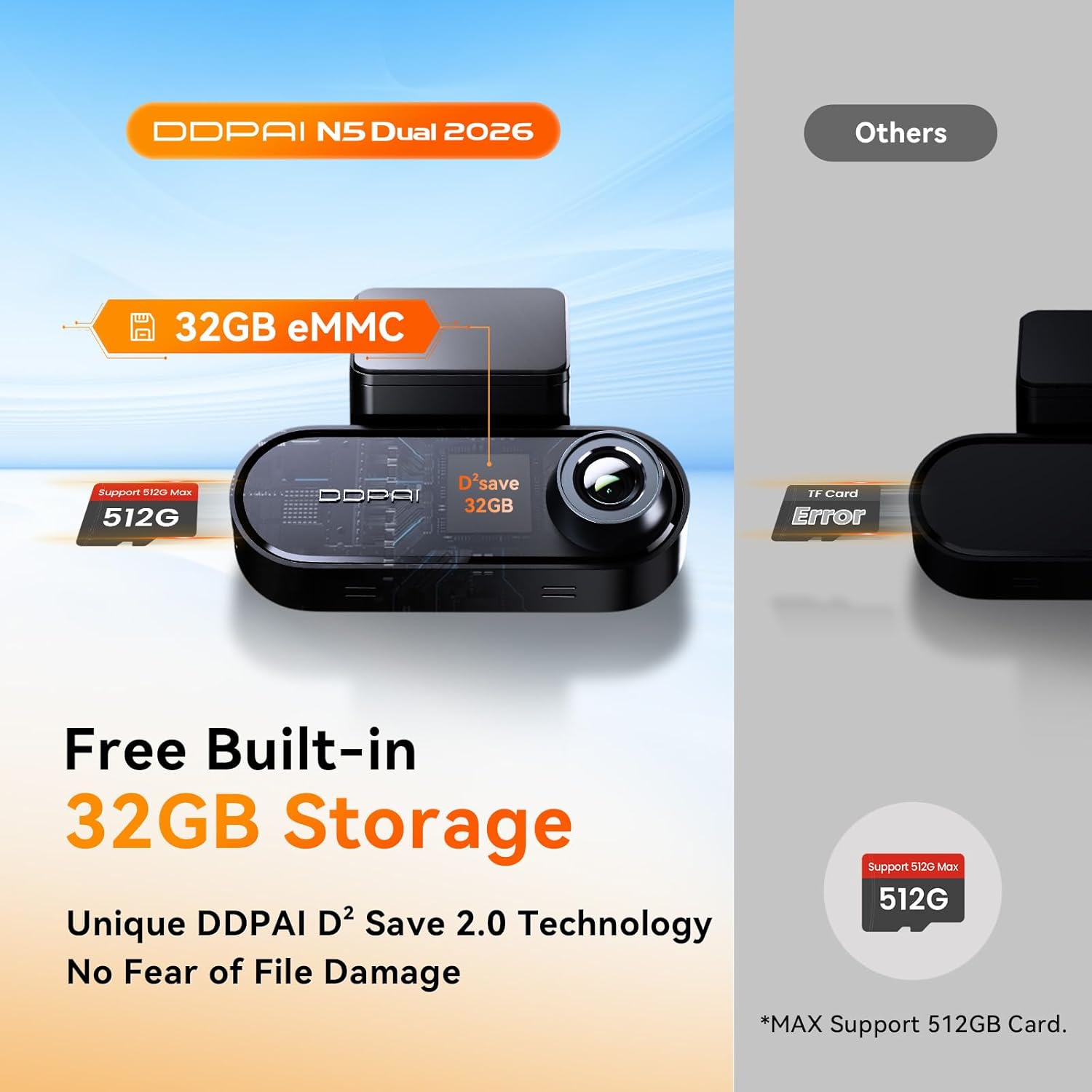
Image: Diagram illustrating the built-in 32GB eMMC storage and the capability to support an additional TF card up to 512GB.

Image: A 64GB SD card, which is included with the DDPAI N5 Dual dash cam for immediate use.
- To access or manage recordings, connect to the dash cam via the DDPAI app.
- ముఖ్యమైన foo ని క్రమం తప్పకుండా బ్యాకప్ చేయండిtagనష్టాన్ని నివారించడానికి.
- Format the TF card periodically (e.g., monthly) through the app to maintain optimal performance and prevent data corruption.
4. నిర్వహణ
4.1 శుభ్రపరచడం
- Wipe the camera lenses with a soft, lint-free cloth to ensure clear video quality.
- Keep the dash cam body clean and free from dust.
4.2 ఫర్మ్వేర్ నవీకరణలు
- Check for firmware updates regularly through the DDPAI app.
- Perform updates over-the-air (OTA) via the app to ensure your dash cam has the latest features and bug fixes.
4.3 Storage Card Care
- Use high-quality TF cards from reputable brands to ensure reliable recording.
- Format the TF card regularly (e.g., once a month) using the dash cam's app to prevent data errors and extend the card's lifespan.
5. ట్రబుల్షూటింగ్
- డాష్ క్యామ్ ఆన్ కావడం లేదు: Check the power cable connection to both the dash cam and the vehicle's power outlet. Ensure the vehicle's ignition is on.
- రికార్డింగ్ సమస్యలు: Ensure a TF card is inserted and properly formatted. Check if the storage is full; if so, format the card or replace it.
- వైఫై కనెక్షన్ సమస్యలు: Restart the dash cam and your smartphone. Ensure you are within range of the dash cam's WiFi signal.
- పేలవమైన వీడియో నాణ్యత: Clean the camera lenses. Ensure the dash cam is securely mounted and not vibrating. Check app settings for resolution.
- GPS పనిచేయకపోవడం: డాష్ కామ్ క్లియర్ గా ఉందని నిర్ధారించుకోండి view of the sky. GPS signal acquisition may take a few minutes after startup.
6. స్పెసిఫికేషన్లు
| ఫీచర్ | స్పెసిఫికేషన్ |
|---|---|
| బ్రాండ్ | DDPAI |
| మోడల్ | N5 ద్వంద్వ |
| ఫ్రంట్ కెమెరా రిజల్యూషన్ | 2160P (4K) |
| వెనుక కెమెరా రిజల్యూషన్ | 1080P |
| Front Camera Wide Angle | 140° |
| అంతర్నిర్మిత నిల్వ | 32GB eMMC |
| బాహ్య నిల్వ మద్దతు | Up to 512GB TF card |
| Included SD Card | 64GB SD కార్డ్ |
| వైఫై | 5GHz |
| GPS | అంతర్నిర్మిత |
| పార్కింగ్ మోడ్ | 72H (with optional radar module and hardwire kit) |
| ADAS | Yes (Voice Reminders) |
| నైట్ విజన్ | AI ISP Night Vis 3.0, F1.8 Aperture, 6-Layer Lens |
7. వారంటీ మరియు మద్దతు
For warranty information and technical support, please refer to the official DDPAI webసైట్లో లేదా వారి కస్టమర్ సర్వీస్ను నేరుగా సంప్రదించండి. వారంటీ క్లెయిమ్ల కోసం కొనుగోలు రుజువుగా మీ కొనుగోలు రసీదును ఉంచండి.