
పరిచయం
The V60XL PTZ camera is a professional-grade camera designed for broadcasting, conferencing, education, and AV integration. It features a 1/2.8" CMOS sensor, delivering Full HD 1080p video at 60fps. Key capabilities include a 20x optical zoom, a wide 60.7° horizontal field of view, and advanced AI-powered human tracking. The camera offers extensive pan-tilt ranges and multiple output options for versatile professional setups.
పెట్టెలో ఏముంది
- PTZ కెమెరా
- రిమోట్ కంట్రోల్
- పవర్ అడాప్టర్
- USB కేబుల్
- వినియోగదారు మాన్యువల్ (ఈ పత్రం)
భద్రతా సమాచారం
Please read and follow these safety instructions carefully to ensure safe operation and to prevent damage to the device.
- వర్షం లేదా తేమకు కెమెరాను బహిర్గతం చేయవద్దు.
- Do not disassemble the camera. Refer all servicing to qualified personnel.
- అందించిన పవర్ అడాప్టర్ను మాత్రమే ఉపయోగించండి.
- Ensure proper ventilation around the camera to prevent overheating.
- Avoid pointing the lens directly at extremely bright light sources for extended periods.
ఉత్పత్తి ముగిసిందిview
The V60XL PTZ camera is equipped with advanced features for professional video production.
కీ ఫీచర్లు
- ప్రొఫెషనల్ ఇమేజింగ్: Full HD 1080P60 with 1/2.8" CMOS sensor for crystal-clear 2.07MP resolution.
- అధునాతన జూమ్: 20x optical zoom with a 60.7° horizontal field of view.
- తెలివైన ట్రాకింగ్: AI-powered human tracking with automatic identification, smart framing, and privacy protection.
- బహుముఖ కనెక్టివిటీ: Multiple simultaneous outputs including HDMI 1.3, 3G-SDI, USB, and NDI|HB support for network streaming with ultra-low latency.
- Pan-Tilt Mechanism: Smooth pan-tilt with ±170° horizontal and -30° to +90° vertical rotation ranges.
కెమెరా భాగాలు
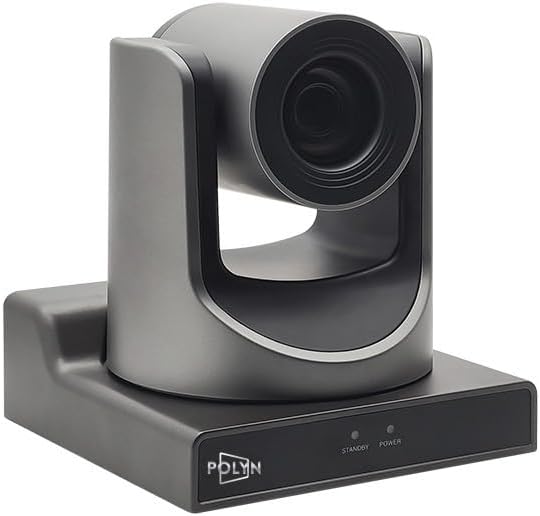
చిత్రం 1: ముందు మరియు వైపు view of the V60XL PTZ Camera, showing the lens and the pan-tilt mechanism.
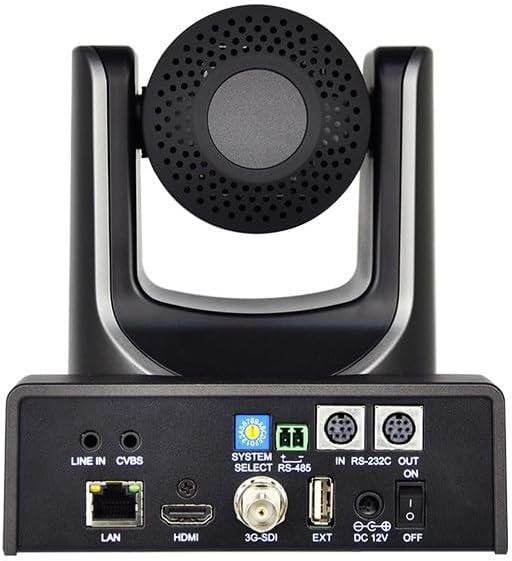
చిత్రం 2: వెనుక view of the V60XL PTZ Camera, highlighting the various input/output ports including LAN, HDMI, 3G-SDI, USB, RS-232, RS-485, and power input.

చిత్రం 3: పై నుండి క్రిందికి view of the V60XL PTZ Camera, showing the lens and the top of the camera head.
సెటప్
Follow these steps to set up your V60XL PTZ Camera.
- మౌంటు: Securely mount the camera on a stable surface or compatible mounting bracket. Ensure the camera has a clear line of sight to the desired capture area.
- పవర్ కనెక్షన్: Connect the provided power adapter to the DC 12V input port on the rear of the camera (refer to Figure 2). Plug the adapter into a suitable power outlet.
- వీడియో అవుట్పుట్:
- HDMI: Connect an HDMI cable from the camera's HDMI port to an HDMI display or capture device.
- 3G-SDI: Connect a 3G-SDI cable from the camera's 3G-SDI port to an SDI compatible device.
- USB: Connect a USB cable from the camera's USB port to a computer for use as a webcam or for video capture.
- LAN (NDI|HB): Connect an Ethernet cable from the camera's LAN port to your network switch or router for NDI|HB streaming and IP control.
- ఆడియో ఇన్పుట్: If external audio is required, connect an audio source to the LINE IN port.
- నియంత్రణ కనెక్షన్లు:
- ఆర్ఎస్-232/ఆర్ఎస్-485: Connect control cables to the RS-232 or RS-485 ports for external PTZ control systems.
- రిమోట్ కంట్రోల్: Ensure the provided remote control has batteries installed for wireless operation.
- పవర్ ఆన్: Flip the power switch on the rear of the camera to the "ON" position. The camera will perform a self-test and initialize.
ఆపరేటింగ్ సూచనలు
This section covers the basic operation of your V60XL PTZ Camera.
పాన్, టిల్ట్ మరియు జూమ్ కంట్రోల్
- Use the directional buttons on the remote control or your connected control system (RS-232/RS-485/IP) to pan (horizontal movement) and tilt (vertical movement) the camera.
- Adjust the optical zoom using the zoom in/out buttons on the remote or control interface. The camera supports 20x optical zoom.
- The camera offers a wide pan range of ±170° and a tilt range of -30° to +90°.
AI Tracking Function
The V60XL features AI-powered human tracking for automatic subject following.
- Activate Tracking: Refer to your remote control or IP control software for the specific button or menu option to enable AI tracking.
- Subject Identification: The camera will automatically identify and frame human subjects within its field of view.
- Smart Framing: The camera will adjust its pan, tilt, and zoom to keep the tracked subject centered and optimally framed.
- గోప్యతా రక్షణ: Specific settings may be available to manage privacy during tracking; consult the advanced settings menu if available.
Video Output and Settings
- The camera outputs Full HD 1080p video at 60 frames per second (1080P60).
- Access the camera's OSD (On-Screen Display) menu via the remote control or IP interface to adjust image parameters such as exposure, white balance, and color settings.
- For NDI|HB streaming, ensure your network is properly configured and use compatible NDI software or hardware.
నిర్వహణ
Proper maintenance ensures the longevity and optimal performance of your V60XL PTZ Camera.
- లెన్స్ శుభ్రపరచడం: Use a soft, dry, lint-free cloth to gently wipe the lens. For stubborn smudges, use a lens cleaning solution specifically designed for optical surfaces. Avoid abrasive materials.
- శరీరాన్ని శుభ్రపరచడం: Wipe the camera body with a soft, slightly damp గుడ్డ. బలమైన డిటర్జెంట్లు లేదా ద్రావకాలు ఉపయోగించవద్దు.
- దుమ్ము తొలగింపు: Regularly remove dust from the camera's vents and moving parts using a soft brush or compressed air.
- నిల్వ: When not in use for extended periods, store the camera in a clean, dry, and dust-free environment.
- ఫర్మ్వేర్ నవీకరణలు: తయారీదారుని తనిఖీ చేయండి webసరైన పనితీరును మరియు కొత్త ఫీచర్లకు యాక్సెస్ను నిర్ధారించడానికి ఫర్మ్వేర్ అప్డేట్ల కోసం కాలానుగుణంగా సైట్ను సందర్శించండి.
ట్రబుల్షూటింగ్
సాధారణ సమస్యలకు పరిష్కారాల కోసం ఈ విభాగాన్ని చూడండి.
| సమస్య | సాధ్యమైన కారణం | పరిష్కారం |
|---|---|---|
| శక్తి లేదు | Power adapter not connected; Power outlet faulty; Power switch off. | Ensure power adapter is securely connected. Test power outlet. Turn power switch to "ON". |
| వీడియో అవుట్పుట్ లేదు | Incorrect cable connection; Input source not selected on display; Camera output resolution incompatible. | Check HDMI/SDI/USB/LAN cable connections. Select correct input on display. Verify display supports 1080p60. |
| PTZ control not working | Remote control batteries low; Incorrect RS-232/RS-485 wiring; IP address conflict; Control software not configured. | Replace remote batteries. Check control cable wiring. Verify IP settings. Configure control software correctly. |
| AI tracking not engaging | Tracking feature disabled; Subject not clearly visible; Insufficient lighting. | Enable AI tracking via remote/menu. Ensure subject is well-lit and not obscured. Adjust lighting conditions. |
స్పెసిఫికేషన్లు
| మోడల్ పేరు | V60XL |
| సెన్సార్ రకం | 1/2.8" CMOS |
| ఎఫెక్టివ్ స్టిల్ రిజల్యూషన్ | 2.07 ఎంపీ |
| వీడియో క్యాప్చర్ రిజల్యూషన్ | 1080p (1920x1080p at 60fps) |
| ఆప్టికల్ జూమ్ | 20x |
| Viewing యాంగిల్ | 60.7 డిగ్రీలు (క్షితిజ సమాంతర) |
| పాన్ రేంజ్ | ±170° |
| టిల్ట్ పరిధి | -30° నుండి +90° |
| కనెక్టివిటీ టెక్నాలజీ | Ethernet (NDI|HB), HDMI, RS-232, SDI, USB |
| ప్రత్యేక లక్షణాలు | AI Tracking, Auto Exposure, Low Latency, Multiple Output Interfaces, Pan-tilt-zoom |
| వస్తువు బరువు | 3 పౌండ్లు |
| తయారీదారు | Polyn |
వారంటీ మరియు మద్దతు
వారంటీ సమాచారం మరియు సాంకేతిక మద్దతు కోసం, దయచేసి మీ కొనుగోలుతో అందించిన డాక్యుమెంటేషన్ను చూడండి లేదా విక్రేతను నేరుగా సంప్రదించండి. వారంటీ క్లెయిమ్ల కోసం మీ కొనుగోలు రుజువును ఉంచండి.
Manufacturer: Polyn