
పరిచయం
Thank you for choosing the Beuiouer I19 Pro Mini Mobile Phone. This manual provides essential information for setting up, operating, and maintaining your device. Please read it carefully to ensure proper use and to maximize the performance of your phone.
ప్యాకేజీ విషయాలు
అన్ప్యాక్ చేసిన తర్వాత, క్రింద జాబితా చేయబడిన అన్ని వస్తువులు ఉన్నాయని మరియు మంచి స్థితిలో ఉన్నాయని దయచేసి ధృవీకరించండి:
- 1 x Beuiouer I19 Pro Slide-cover Mini Phone
- 1 x డేటా కేబుల్
- 1 x Li-battery (1050 mAh)
Note: Other products shown in promotional images are not included.
ఉత్పత్తి ముగిసిందిview
Familiarize yourself with the key components of your Beuiouer I19 Pro phone.
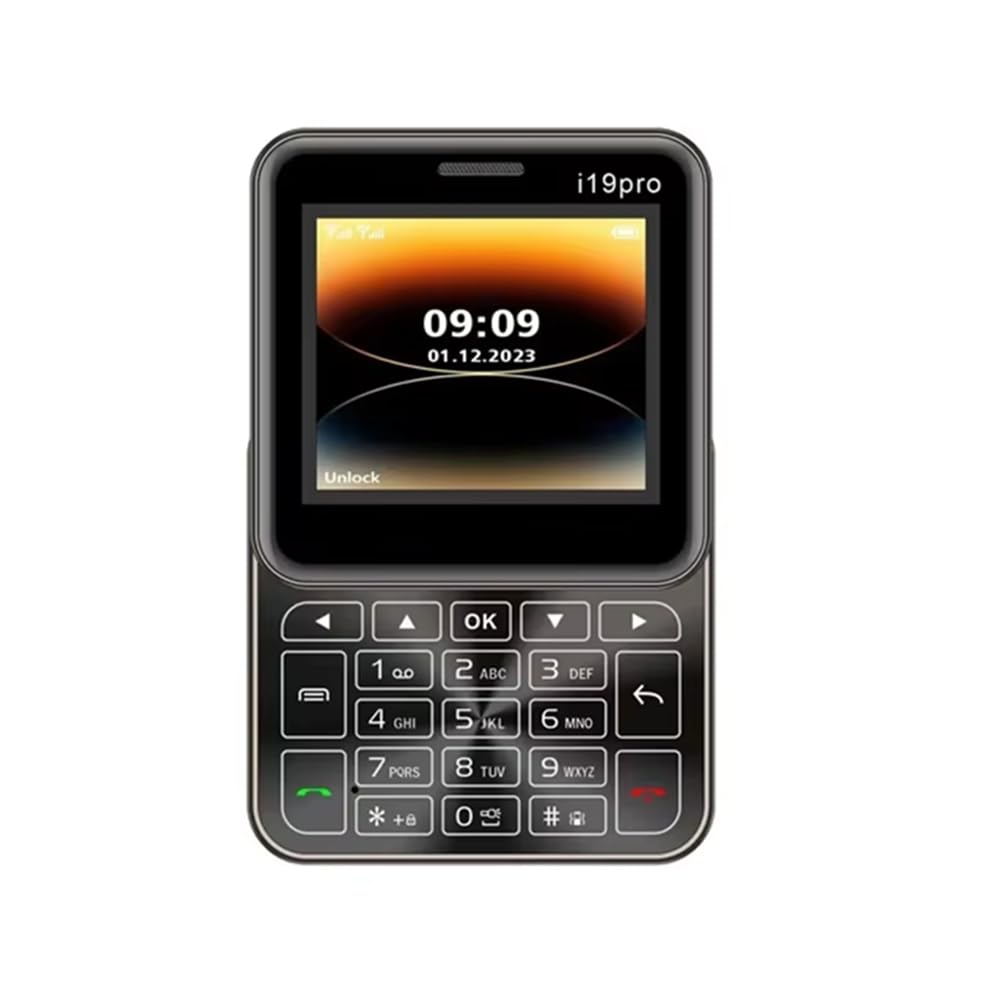
మూర్తి 1: బహుళ కోణం view of the Beuiouer I19 Pro Mini Mobile Phone, showing the front display with keypad, side profiles, and top/bottom edges.

మూర్తి 2: ముందు view of the Beuiouer I19 Pro Mini Mobile Phone with the slide mechanism open, revealing the full keypad and display.

మూర్తి 3: ముందు మరియు వెనుక view of the Beuiouer I19 Pro Mini Mobile Phone, highlighting the display, keypad, and the rear camera module.

మూర్తి 4: దిగువన view of the Beuiouer I19 Pro Mini Mobile Phone, showing the charging port.
సెటప్
1. సిమ్ కార్డ్(లు) మరియు బ్యాటరీని చొప్పించడం
- వెనుక కవర్ తెరవండి: Gently slide or pry open the back cover of the phone.
- సిమ్ కార్డ్(లు) చొప్పించండి: Locate the SIM card slots. This phone supports dual SIM cards. Carefully insert your 2G GSM SIM card(s) into the designated slots with the gold contacts facing down.
- బ్యాటరీని చొప్పించండి: Place the 1050 mAh Li-battery into the battery compartment, ensuring the contacts align correctly.
- Close Back Cover: వెనుక కవర్ సురక్షితంగా స్థానంలో క్లిక్ అయ్యే వరకు దాన్ని మార్చండి.
2 బ్యాటరీని ఛార్జ్ చేస్తోంది
- Connect the provided data cable to the charging port at the bottom of the phone (refer to Figure 4).
- Connect the other end of the data cable to a compatible USB power adapter (not included) or a computer's USB port.
- Allow the phone to charge fully before initial use. The battery indicator on the screen will show charging status.
3. పవర్ చేయడం ఆన్/ఆఫ్
- పవర్ ఆన్ చేయడానికి: Press and hold the Power/End Call button (usually marked with a red phone icon) until the screen lights up.
- పవర్ ఆఫ్ చేయడానికి: Press and hold the Power/End Call button until the power-off options appear, then select "Power Off" or confirm.
ఆపరేటింగ్ సూచనలు
1. ప్రాథమిక విధులు
- కాల్స్ చేయడం: Enter the phone number using the keypad and press the Call button (green phone icon).
- కాల్లకు సమాధానమివ్వడం: When an incoming call rings, press the Call button (green phone icon) to answer.
- SMS పంపుతోంది: Navigate to the "Messages" menu, select "New Message," enter the recipient's number and your message, then send.
- నావిగేషన్: Use the directional keys (up, down, left, right) and the "OK" button to navigate through menus and select options.
2. కెమెరా
The phone features a rear 0.08MP camera.
- కెమెరాను యాక్సెస్ చేస్తోంది: ప్రధాన మెనూ నుండి, "కెమెరా" అప్లికేషన్ను ఎంచుకోండి.
- ఫోటోలు తీస్కోడం: Frame your shot and press the "OK" button to capture an image.
3. బ్లూటూత్
Connect your phone to other Bluetooth-enabled devices such as headsets or other phones.
- Go to "Settings" > "Bluetooth".
- బ్లూటూత్ "ఆన్" చేయండి.
- కోసం వెతకండి అందుబాటులో ఉన్న పరికరాలు మరియు మీరు జత చేయాలనుకుంటున్న పరికరాన్ని ఎంచుకోండి.
- ప్రాంప్ట్ చేయబడితే పాస్కీని నమోదు చేయండి.
4. FM రేడియో
Enjoy your favorite radio stations on the go.
- Plug in a wired headset (acts as an antenna).
- Navigate to the "FM Radio" application from the main menu.
- స్టేషన్ల కోసం స్కాన్ చేయడానికి లేదా మాన్యువల్గా ట్యూన్ చేయడానికి నావిగేషన్ కీలను ఉపయోగించండి.
5. MP3 ప్లేయర్
Play your stored music files.
- మీకు సంగీతం ఉందని నిర్ధారించుకోండి. files stored on a TF card (if inserted) or the phone's internal memory.
- Access the "MP3 Player" from the main menu.
- Browse and select your desired music fileప్లేబ్యాక్ కోసం లు.
నిర్వహణ
1. బ్యాటరీ సంరక్షణ
- విపరీతమైన ఉష్ణోగ్రతలకు బ్యాటరీని బహిర్గతం చేయకుండా ఉండండి.
- బ్యాటరీని పంక్చర్ చేయవద్దు, విడదీయవద్దు లేదా సవరించవద్దు.
- ఛార్జింగ్ కోసం అందించిన డేటా కేబుల్ను మాత్రమే ఉపయోగించండి.
- If the phone will not be used for an extended period, charge it to about 50% and store it in a cool, dry place.
2. మీ ఫోన్ను శుభ్రపరచడం
- ఫోన్ స్క్రీన్ మరియు బాడీని తుడవడానికి మృదువైన, మెత్తటి బట్టను ఉపయోగించండి.
- కఠినమైన రసాయనాలు, శుభ్రపరిచే ద్రావకాలు లేదా రాపిడి పదార్థాలను ఉపయోగించడం మానుకోండి.
- ఛార్జింగ్ పోర్టును దుమ్ము మరియు చెత్త లేకుండా ఉంచండి.
ట్రబుల్షూటింగ్
- ఫోన్ ఆన్ కావడం లేదు: Ensure the battery is properly inserted and charged. Try charging for at least 30 minutes before attempting to power on again.
- నెట్వర్క్ సిగ్నల్ లేదు: Check if the SIM card is correctly inserted. Ensure you are in an area with 2G GSM network coverage.
- కాల్స్ చేయలేరు/స్వీకరించలేరు: Verify SIM card activation and sufficient balance (for prepaid). Check network settings.
- బ్లూటూత్ జత చేసే సమస్యలు: Ensure both devices are in pairing mode and within range. Check if the correct passkey is entered.
- Phone freezes or becomes unresponsive: బ్యాటరీని తీసివేసి, కొన్ని సెకన్లు వేచి ఉండి, సాఫ్ట్ రీసెట్ చేయడానికి దాన్ని తిరిగి చొప్పించండి.
స్పెసిఫికేషన్లు
| మోడల్ | I19 ప్రో |
| నెట్వర్క్ | 2G, GSM 850/900/1800/1900MHz |
| CPU | MTK6261D |
| SIM మద్దతు | Dual SIM card dual standby |
| ప్రదర్శించు | 2.4 Inch TFT screen, 128*160px |
| జ్ఞాపకశక్తి | RAM 32MB + ROM 32MB (Supports TF Card) |
| కెమెరా | వెనుక 0.08MP |
| బ్యాటరీ | 1050 mAh Li-battery |
| ఫీచర్లు | Bluetooth, MP3, FM Radio, Torch |
| మెటీరియల్ | ప్లాస్టిక్ |
| కొలతలు (పార్శిల్) | 10 x 10 x 5 సెం.మీ |
| బరువు (పార్శిల్) | 184 గ్రా |
| మూలం దేశం | చైనా |
వారంటీ మరియు మద్దతు
వారంటీ సమాచారం మరియు కస్టమర్ మద్దతు కోసం, దయచేసి మీ కొనుగోలుతో అందించిన డాక్యుమెంటేషన్ను చూడండి లేదా మీ రిటైలర్ను సంప్రదించండి. ఏవైనా వారంటీ క్లెయిమ్ల కోసం మీ కొనుగోలు రుజువును ఉంచండి.
Manufacturer: Beuiouer
Manufacturer Contact Information: Beuiouer