
1. పరిచయం
Thank you for choosing the Anmite 14 inch Portable Touch Monitor. This manual provides essential information for the proper setup, operation, and maintenance of your device. Please read this manual thoroughly before using the monitor to ensure optimal performance and to prevent damage.

The Anmite 14 inch Portable Touch Monitor, highlighting its touch screen capabilities and vibrant display.
2. భద్రతా సమాచారం
- మానిటర్ను వర్షం, తేమ లేదా తీవ్రమైన ఉష్ణోగ్రతలకు గురి చేయవద్దు.
- మానిటర్ను ఉష్ణ వనరుల దగ్గర లేదా ప్రత్యక్ష సూర్యకాంతిలో ఉంచకుండా ఉండండి.
- తయారీదారు అందించిన లేదా సిఫార్సు చేసిన పవర్ అడాప్టర్ మరియు కేబుల్లను మాత్రమే ఉపయోగించండి.
- మానిటర్ను మీరే విడదీయడానికి లేదా మరమ్మతు చేయడానికి ప్రయత్నించవద్దు. అన్ని సర్వీసింగ్లను అర్హత కలిగిన సిబ్బందికి సూచించండి.
- Clean the screen with a soft, lint-free cloth. Avoid using harsh chemicals or abrasive materials.
3. ప్యాకేజీ విషయాలు
ప్యాకేజీలో అన్ని అంశాలు ఉన్నాయని నిర్ధారించుకోండి:
- Anmite Portable Monitor x 1
- Mini-HDMI to HDMI cable x 1
- టైప్-సి నుండి టైప్-సి కేబుల్ x 1
- Type-C to USB-A cable x 1
- వినియోగదారు గైడ్ x 1

The Anmite portable monitor and its included accessories, as found in the product packaging.
4. ఉత్పత్తి ముగిసిందిview
4.1 భౌతిక కొలతలు

Detailed dimensions of the portable monitor, illustrating its compact size and weight for portability.
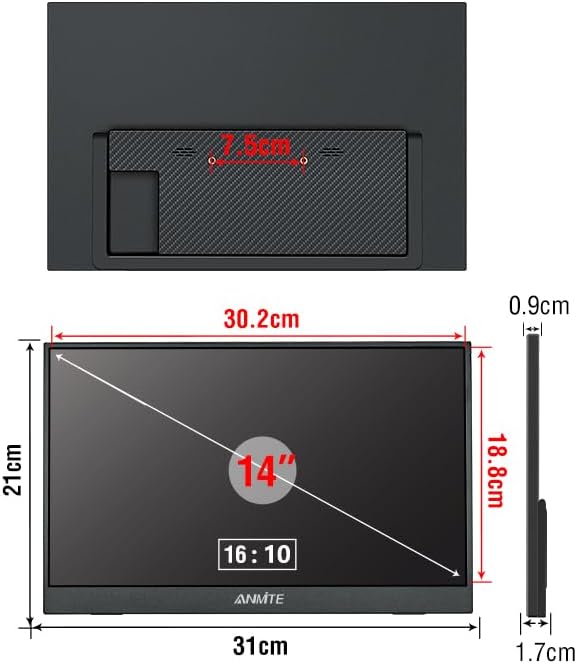
వెనుక view of the monitor, showing the integrated stand mechanism and overall dimensions.
4.2. పోర్ట్లు మరియు నియంత్రణలు
The monitor features various input and output ports for connectivity:
- Mini-HDMI: For video input from devices with HDMI output.
- Type-C (Full Function): For video, audio, data, and power input from compatible devices.
- టైప్-సి: Additional Type-C port, typically for power input.
- 3.5mm ఆడియో ఇంటర్ఫేస్: బాహ్య హెడ్ఫోన్లు లేదా స్పీకర్లను కనెక్ట్ చేయడానికి.
- అంతర్నిర్మిత స్పీకర్లు: ఆడియో అవుట్పుట్ కోసం.
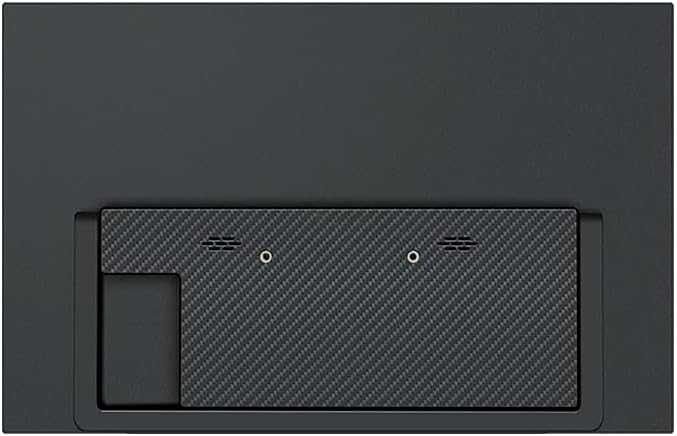
Rear panel detailing the various input ports (Mini-HDMI, Type-C) and built-in speaker locations.
5. సెటప్
5.1. Positioning the Monitor
The monitor includes an integrated stand for easy positioning. Extend the stand from the back of the monitor to achieve your desired viewing కోణం.

The monitor with its integrated stand deployed, demonstrating how it can be positioned for use.
5.2. పరికరానికి కనెక్ట్ చేస్తోంది
The monitor supports connectivity via Mini-HDMI and Type-C (Full Function) ports.
- For Type-C Connection: Use the provided Type-C to Type-C cable. Connect one end to the monitor's Full Function Type-C port and the other end to a compatible device's Full Function Type-C port. ముఖ్యమైన: Ensure your device's Type-C port supports video output. If it is only for charging, the monitor will not display an image.
- For HDMI Connection: Use the provided Mini-HDMI to HDMI cable. Connect the Mini-HDMI end to the monitor and the HDMI end to your device. You may need to use the Type-C to USB-A cable connected to the monitor's power-only Type-C port and a USB power source (e.g., a wall adapter or your device's USB port) for power.
After connecting, the monitor should automatically detect the signal. If not, you may need to adjust display settings on your connected device.
This video demonstrates the Anmite 14 inch Portable Monitor in use, showcasing its display quality and portability.
6. మానిటర్ను నిర్వహించడం
6.1. పవర్ ఆన్/ఆఫ్
The monitor typically powers on automatically when connected to a power source and a signal-providing device. To power off, disconnect the power cable.
6.2. Touch Screen Functionality
This version of the Anmite 14 inch monitor features a touch screen. When connected to a compatible device (e.g., Windows laptop, certain Android phones) via a Full Function Type-C cable, the touch input will be recognized. Ensure your operating system supports external touch displays.
6.3. ప్రదర్శన సెట్టింగ్లు
Display settings such as brightness, contrast, and color modes are typically controlled via the On-Screen Display (OSD) menu, accessed by buttons on the monitor (refer to physical overview for button locations). Advanced display settings, including resolution and refresh rate, are managed through the operating system settings of your connected device.
This video highlights the touch screen functionality and various connectivity options of the Anmite 14 inch Portable Touch Monitor.
7. నిర్వహణ
- స్క్రీన్ క్లీనింగ్: మృదువైన, పొడి, మెత్తటి బట్టతో స్క్రీన్ను సున్నితంగా తుడవండి. మొండి మరకల కోసం, తేలికగా dampen the cloth with water or a screen-cleaning solution designed for electronics. Do not spray liquids directly onto the screen.
- సి ని శుభ్రపరచడంasing: మానిటర్ యొక్క c ని తుడవడానికి మృదువైన, పొడి వస్త్రాన్ని ఉపయోగించండి.asing.
- నిల్వ: When not in use for extended periods, store the monitor in a cool, dry place, preferably in its original packaging or a protective sleeve to prevent dust and scratches.
8. ట్రబుల్షూటింగ్
| సమస్య | సాధ్యమైన కారణం | పరిష్కారం |
|---|---|---|
| డిస్ప్లే లేదు/"సిగ్నల్ లేదు" సందేశం |
|
|
| టచ్ స్క్రీన్ స్పందించడం లేదు |
|
|
| Flickering or unstable display |
|
|
9. స్పెసిఫికేషన్లు
| ఫీచర్ | వివరాలు |
|---|---|
| మోడల్ సంఖ్య | A140W05T |
| స్క్రీన్ పరిమాణం | 14 అంగుళాలు |
| ప్యానెల్ రకం | IPS |
| కారక నిష్పత్తి | 16:10 |
| రిజల్యూషన్ | 1920 x 1200 (UXGA Wide) |
| డిస్ప్లే రంగు | 16.7M |
| విజువల్ యాంగిల్ | H:178° V:178° |
| కాంట్రాస్ట్ రేషియో | 1000:1 |
| ప్రకాశం | 300 cd/m² |
| రంగు స్వరసప్తకం | 100% |
| రిఫ్రెష్ రేట్ | 60 Hz |
| ప్రతిస్పందన సమయం | 5 మిల్లీసెకన్లు |
| ఇన్పుట్ ఇంటర్ఫేస్ | Mini-HDMI, Type-C (Full Function), Type-C |
| అవుట్పుట్ ఇంటర్ఫేస్ | 3.5mm ఆడియో ఇంటర్ఫేస్ |
| వక్తలు | Built-in (1W*2) |
| విద్యుత్ వినియోగం | 12 వాట్స్ |
| వాల్యూమ్tage | 5 వోల్ట్లు (DC) |
| నికర బరువు | 0.6 kg (900 Milligrams) |
| కొలతలు (D x W x H) | 1.3"D x 9.33"W x 13.97"H (324*2.3*5-13 mm) |
| అదనపు ఫీచర్లు | Built-In Speakers, Portable, Touchscreen, HDR, FreeSync |
10. వారంటీ మరియు మద్దతు
For warranty information and technical support, please contact the manufacturer, Shenzhen Anmite Technology Co., Ltd., or your retailer. Keep your purchase receipt as proof of purchase.
For further assistance, you may refer to the contact information provided on the product packaging or the official Anmite webసైట్.

Product packaging labels showing manufacturer details, certifications, and energy efficiency information.