
1. పరిచయం
This manual provides detailed instructions for the installation, operation, and maintenance of your Vonets VAR1200-L High Performance Dual Band WiFi Repeater. The VAR1200-L is designed to extend your existing wireless network coverage, providing a stable and high-speed internet connection for various applications, including 4K video streaming and long-distance data transmission.
2. ఉత్పత్తి లక్షణాలు
- High-Performance Repeater: Engineered for optimal connectivity, delivering a robust wireless signal for seamless 4K video streaming and long-distance transmission in both 2.4G and 5G frequency bands.
- Dual-Band Compatibility: Effectively reduces interference and maximizes bandwidth, ideal for high-speed internet applications and ensuring reliable connections for multiple devices.
- POE Power Support: Equipped with Power over Ethernet (POE) capability, allowing for flexible installation without the need for additional power outlets, simplifying setup and enhancing convenience.
- కాంపాక్ట్ మరియు ఇన్స్టాల్ చేయడం సులభం: Designed to be both compact and powerful, this repeater can be effortlessly mounted or placed in various locations, ensuring a clutter-free environment while boosting network coverage.
3. ప్యాకేజీ విషయాలు
Upon unpacking your Vonets VAR1200-L Repeater, please verify that all items are present and in good condition. The standard package typically includes:
- Vonets VAR1200-L Repeater Unit
- Power Adapter (if POE injector not used)
- ఈథర్నెట్ కేబుల్
- త్వరిత సంస్థాపన గైడ్
- Internal Chip (as specified in product components)
Note: Specific contents may vary. If any items are missing or damaged, please contact customer support.
4. ఉత్పత్తి ముగిసిందిview
The Vonets VAR1200-L Repeater features a compact design with essential ports and indicators for easy setup and monitoring. Familiarize yourself with the device's physical components before proceeding with installation.
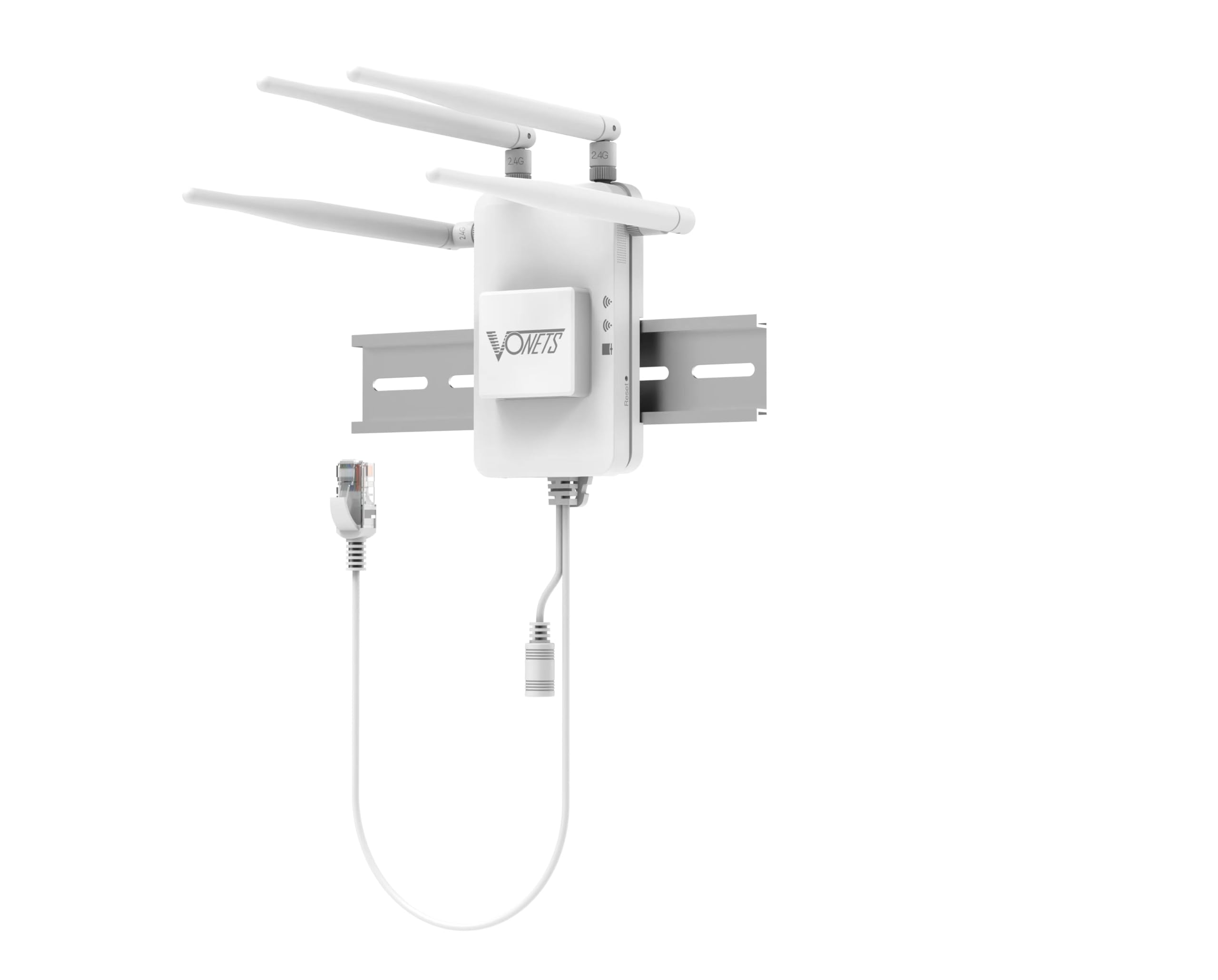
మూర్తి 1: ముందు view of the Vonets VAR1200-L Repeater. This image displays the compact design of the repeater, likely showing LED indicators for power, WiFi signal strength, and network activity, along with the Vonets brand logo.
సాధారణ భాగాలు:
- LED సూచికలు: For Power, WLAN (2.4G/5G), LAN, and WPS status.
- ఈథర్నెట్ పోర్ట్లు: For connecting to your router or wired devices.
- WPS బటన్: For quick and secure setup.
- రీసెట్ బటన్: To restore factory default settings.
- పవర్ ఇన్పుట్: For connecting the power adapter or POE injector.
5. సెటప్ సూచనలు
Follow these steps to set up your Vonets VAR1200-L Repeater:
- పవర్ ఆన్: Connect the repeater to a power outlet using the provided power adapter, or connect it via an Ethernet cable to a POE-enabled switch/injector. Wait for the power LED to stabilize.
- ప్లేస్మెంట్: Position the repeater between your main router and the area where you need improved WiFi coverage. Ensure it receives a good signal from your main router.
- Connection Method (Choose One):
- WPS సెటప్ (త్వరిత సెటప్ కోసం సిఫార్సు చేయబడింది):
- మీ ప్రధాన రౌటర్లోని WPS బటన్ను నొక్కండి.
- Within two minutes, press the WPS button on the VAR1200-L Repeater.
- Wait for the repeater's WLAN LED to indicate a successful connection (usually solid green or blue).
- Web బ్రౌజర్ సెటప్:
- Connect your computer or mobile device to the repeater's default WiFi network (e.g., "Vonets_VAR1200-L"). No password is required initially.
- తెరవండి a web బ్రౌజర్లోకి వెళ్లి డిఫాల్ట్ IP చిరునామాను నమోదు చేయండి (సాధారణంగా 192.168.1.253 or vonets.com). Refer to the quick installation guide for the exact address.
- Log in with the default username and password (typically "admin" for both).
- Follow the on-screen wizard to select your main WiFi network, enter its password, and configure the repeater's network name (SSID) and password.
- Save settings and restart the repeater if prompted.
- WPS సెటప్ (త్వరిత సెటప్ కోసం సిఫార్సు చేయబడింది):
- కనెక్షన్ని ధృవీకరించండి: Once set up, check the repeater's signal strength LEDs. Connect your devices to the repeater's extended WiFi network.
6. ఆపరేటింగ్ సూచనలు
After successful setup, the Vonets VAR1200-L Repeater operates automatically to extend your wireless network. Here are some operational considerations:
- నెట్వర్క్ ఎక్స్టెన్షన్: The repeater will broadcast an extended WiFi network, typically with a modified SSID (e.g., "YourNetwork_EXT" or the name you configured). Connect your wireless devices to this network for improved coverage.
- డ్యూయల్ బ్యాండ్ ఆపరేషన్: The VAR1200-L supports both 2.4GHz and 5GHz bands. Devices will automatically connect to the optimal band, or you can manually select the preferred band if separate SSIDs are configured.
- వైర్డు కనెక్టివిటీ: Use the Ethernet ports on the repeater to connect wired devices (e.g., smart TVs, gaming consoles, PCs) to your network, providing a stable wired connection in areas with weak WiFi.
- పర్యవేక్షణ స్థితి: Observe the LED indicators on the repeater to monitor its operational status. A stable WLAN LED indicates a good connection to the main router.
7. నిర్వహణ
Proper maintenance ensures the longevity and optimal performance of your Vonets VAR1200-L Repeater:
- శుభ్రముగా ఉంచు: పరికరాన్ని క్రమం తప్పకుండా మృదువైన, పొడి గుడ్డతో తుడవండి. లిక్విడ్ క్లీనర్లు లేదా ఏరోసోల్లను ఉపయోగించకుండా ఉండండి.
- వెంటిలేషన్: Ensure the repeater is placed in a well-ventilated area, away from direct sunlight, heat sources, and obstructions that could block airflow.
- ఫర్మ్వేర్ నవీకరణలు: Periodically check the Vonets official webఫర్మ్వేర్ అప్డేట్ల కోసం సైట్. ఫర్మ్వేర్ను అప్డేట్ చేయడం వల్ల పనితీరు మెరుగుపడుతుంది, కొత్త ఫీచర్లను జోడించవచ్చు మరియు బగ్లను పరిష్కరించవచ్చు.
- విపరీతమైన పరిస్థితులను నివారించండి: పరికరాన్ని తీవ్రమైన ఉష్ణోగ్రతలు, తేమ లేదా తినివేయు వాతావరణాలకు గురి చేయవద్దు.
- పవర్ సైకిల్: If the device experiences issues, try power cycling it by unplugging it from the power source for 10 seconds and then plugging it back in.
8. ట్రబుల్షూటింగ్
If you encounter issues with your Vonets VAR1200-L Repeater, refer to the following common problems and solutions:
- శక్తి లేదు:
- Ensure the power adapter is securely connected to the repeater and a working power outlet.
- If using POE, verify the POE injector/switch is powered on and the Ethernet cable is correctly connected.
- Cannot Connect to Repeater's WiFi:
- Verify the repeater is powered on and its WiFi LEDs are active.
- మీరు సరైన ఎక్స్టెండెడ్ నెట్వర్క్ పేరు (SSID)ని ఎంచుకుంటున్నారని మరియు సరైన పాస్వర్డ్ను నమోదు చేస్తున్నారని నిర్ధారించుకోండి.
- Try restarting the repeater and your device.
- No Internet Access Through Repeater:
- మీ ప్రధాన రౌటర్కు ఇంటర్నెట్ సదుపాయం ఉందో లేదో తనిఖీ చేయండి.
- Ensure the repeater is successfully connected to your main router (WLAN LED should be stable).
- Reposition the repeater closer to your main router to improve signal strength.
- Try reconfiguring the repeater using the web బ్రౌజర్ సెటప్ పద్ధతి.
- స్లో స్పీడ్:
- Move the repeater closer to your main router.
- Ensure there are no major obstructions (thick walls, metal objects) between the repeater and your main router or your devices.
- Reduce the number of devices connected to the repeater.
- ఇతర ఎలక్ట్రానిక్ పరికరాల నుండి జోక్యం కోసం తనిఖీ చేయండి.
- Repeater Keeps Disconnecting:
- Ensure the repeater is within the optimal range of your main router.
- Check for firmware updates for both the repeater and your main router.
- రిపీటర్పై ఫ్యాక్టరీ రీసెట్ చేసి, దాన్ని తిరిగి కాన్ఫిగర్ చేయండి.
- ఫ్యాక్టరీ రీసెట్: If all else fails, use a paperclip to press and hold the Reset button on the repeater for about 5-10 seconds until the LEDs flash. This will restore the device to its factory default settings, and you will need to reconfigure it.
9. స్పెసిఫికేషన్లు
| ఫీచర్ | వివరాలు |
|---|---|
| బ్రాండ్ | వోనెట్స్ |
| మోడల్ | VAR1200-L |
| వైర్లెస్ ప్రమాణాలు | IEEE 802.11ac/a/b/g/n |
| ఫ్రీక్వెన్సీ బ్యాండ్లు | 2.4GHz మరియు 5GHz |
| డేటా రేటు | Up to 1200Mbps (combined) |
| విద్యుత్ సరఫరా | DC Power Adapter or Power over Ethernet (POE) |
| చేర్చబడిన భాగాలు | చిప్ |
| తయారీదారు | Shenzhen Houtian Network Communication Technology Co.,Ltd |
| UPC | 767552409254 |
| ASIN | B0GD4SQ7J |
| GTIN | 767552409254 |
10. వారంటీ మరియు మద్దతు
Your Vonets VAR1200-L Repeater comes with a 1 సంవత్సరాల వారంటీ కొనుగోలు తేదీ నుండి, తయారీ లోపాలను కవర్ చేస్తుంది. వారంటీ క్లెయిమ్ల కోసం దయచేసి మీ కొనుగోలు రుజువును ఉంచుకోండి.
For technical assistance, troubleshooting, or warranty inquiries, Vonets offers dedicated customer support. You can typically find support contact information on the official Vonets webఉత్పత్తి స్థలంలో లేదా ఉత్పత్తి ప్యాకేజింగ్ లోపల.
Note: The warranty does not cover damage caused by misuse, accidents, unauthorized modifications, or natural disasters.