
పరిచయం
Thank you for choosing the OneOdio Studio Max 1 Wireless DJ Headphone and USB-C to 3.5 mm Adapter. This manual provides essential information for the proper setup, operation, and maintenance of your device. Please read it thoroughly before use and retain it for future reference.
ప్యాకేజీ విషయాలు
క్రింద జాబితా చేయబడిన అన్ని అంశాలు మీ ప్యాకేజీలో ఉన్నాయని నిర్ధారించుకోండి:
- OneOdio Studio Max 1 Wireless DJ Headphone
- USB-C to 3.5 mm Audio Adapter
- USB-C ఛార్జింగ్ కేబుల్
- 3.5 మిమీ ఆడియో కేబుల్
- వినియోగదారు మాన్యువల్ (ఈ పత్రం)
- Carrying Pouch (if included)
ఉత్పత్తి ముగిసిందిview
Familiarize yourself with the components of your OneOdio Studio Max 1 headphones and the USB-C adapter.
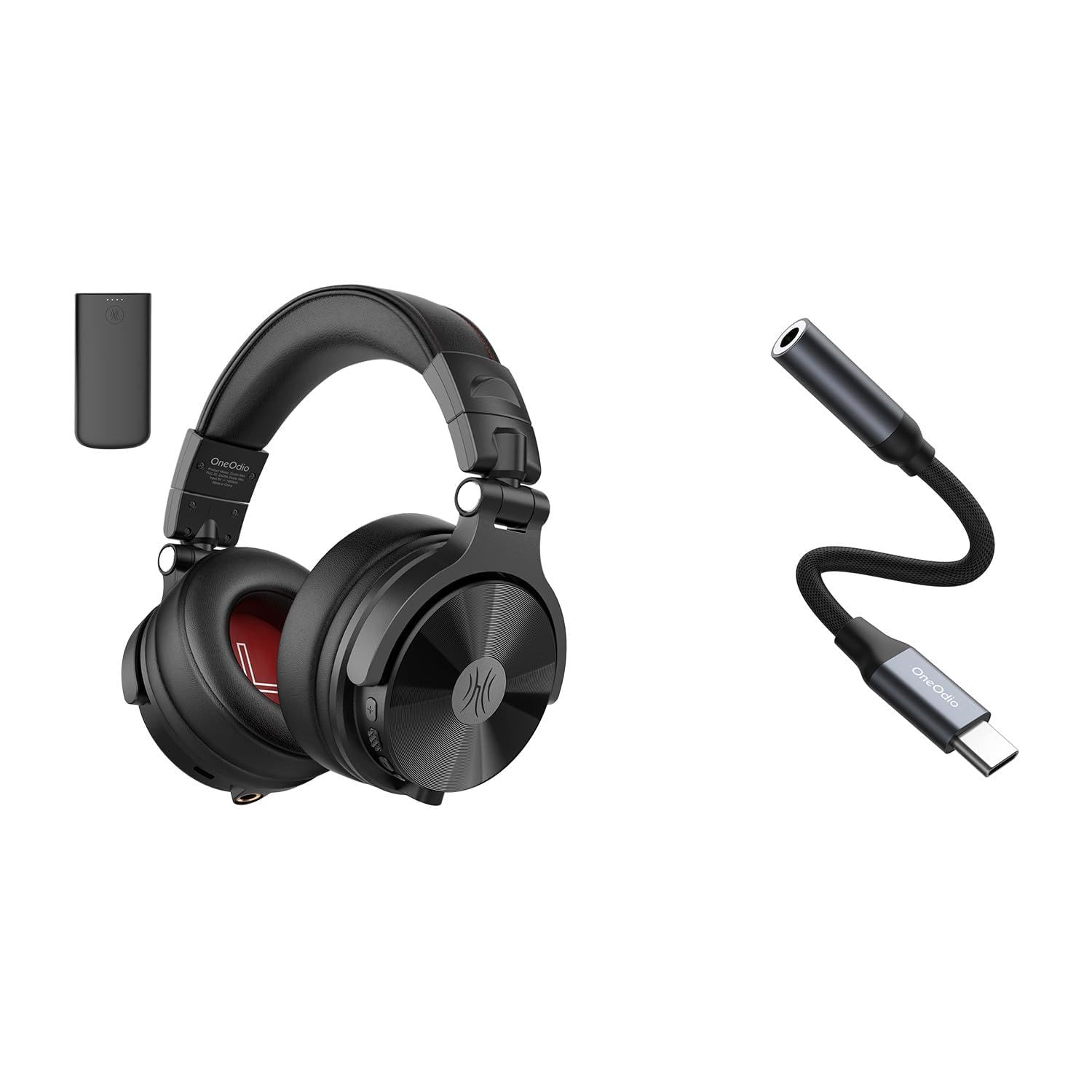
మూర్తి 1: OneOdio Studio Max 1 Wireless DJ Headphone and USB-C to 3.5 mm Adapter. This image displays the headphones in their folded state alongside the USB-C to 3.5 mm adapter and included cables, providing a general view of the product and its accessories.
హెడ్ఫోన్ భాగాలు
- పవర్ బటన్: On/Off, Play/Pause, Call Answer/End
- వాల్యూమ్ అప్ బటన్: Increase volume, Next track (long press)
- వాల్యూమ్ డౌన్ బటన్: Decrease volume, Previous track (long press)
- USB-C ఛార్జింగ్ పోర్ట్: For charging the headphones
- 3.5 మిమీ ఆడియో ఇన్పుట్: వైర్డు కనెక్షన్ కోసం
- మైక్రోఫోన్: హ్యాండ్స్-ఫ్రీ కాల్స్ కోసం
- LED సూచిక: Displays power, pairing, and charging status
USB-C to 3.5 mm Adapter Components
- USB-C కనెక్టర్: Connects to your device
- 3.5 మిమీ ఆడియో జాక్: Connects to headphones or other audio devices
- DAC చిప్: Provides high-resolution audio conversion
సెటప్
హెడ్ఫోన్లను ఛార్జ్ చేస్తోంది
Before initial use, fully charge the headphones.
- USB-C ఛార్జింగ్ కేబుల్ని హెడ్ఫోన్లలో USB-C ఛార్జింగ్ పోర్ట్కి కనెక్ట్ చేయండి.
- కేబుల్ యొక్క మరొక చివరను USB పవర్ సోర్స్కి కనెక్ట్ చేయండి (ఉదా. కంప్యూటర్ USB పోర్ట్, వాల్ అడాప్టర్).
- ఛార్జింగ్ చేస్తున్నప్పుడు LED సూచిక ఎరుపు రంగులో మెరుస్తుంది మరియు పూర్తిగా ఛార్జ్ అయినప్పుడు ఆపివేయబడుతుంది.
మూర్తి 2: Illustrates the USB-C charging port on the headphones. For charging, locate this port, typically on one of the earcups, and connect the provided USB-C cable.
బ్లూటూత్ జత చేయడం (వైర్లెస్ మోడ్)
- హెడ్ఫోన్లు ఆఫ్ చేయబడి ఉన్నాయని నిర్ధారించుకోండి.
- Press and hold the Power Button for approximately 5-7 seconds until the LED indicator flashes blue and red alternately. This indicates pairing mode.
- On your audio device (smartphone, tablet, computer), enable Bluetooth and search for available devices.
- Select "OneOdio Studio Max 1" from the list of found devices.
- జత చేసిన తర్వాత, LED సూచిక నెమ్మదిగా నీలం రంగులో మెరుస్తుంది.
Wired Connection (3.5 mm Audio Cable)
For a wired connection, you can use the included 3.5 mm audio cable.
- Connect one end of the 3.5 mm audio cable to the 3.5 mm audio input on the headphones.
- Connect the other end of the 3.5 mm audio cable to the 3.5 mm audio output on your device.
- హెడ్ఫోన్లు స్వయంచాలకంగా వైర్డు మోడ్కి మారుతాయి.
Using the USB-C to 3.5 mm Adapter
This adapter allows you to connect 3.5 mm audio devices to USB-C ports that lack a dedicated audio jack.
- Connect the USB-C end of the adapter to the USB-C port on your audio source device (e.g., smartphone, laptop).
- Connect your 3.5 mm headphones or other audio device to the 3.5 mm audio jack on the adapter.
- Ensure your device's audio output is set to the USB-C audio accessory if prompted.
మూర్తి 3: Depicts the USB-C to 3.5 mm adapter. To use, insert the USB-C connector into your device and plug your 3.5 mm audio cable into the adapter's audio jack.
ఆపరేటింగ్ సూచనలు
పవర్ ఆన్/ఆఫ్
- పవర్ ఆన్: Press and hold the Power Button for 2-3 seconds until the LED indicator flashes blue.
- పవర్ ఆఫ్: Press and hold the Power Button for 3-4 seconds until the LED indicator flashes red and then turns off.
Music Playback (Wireless Mode)
- ప్లే/పాజ్: పవర్ బటన్ను షార్ట్ ప్రెస్ చేయండి.
- ధ్వని పెంచు: వాల్యూమ్ అప్ (+) బటన్ను చిన్నగా నొక్కండి.
- వాల్యూమ్ డౌన్: వాల్యూమ్ డౌన్ (-) బటన్ను చిన్నగా నొక్కండి.
- తదుపరి ట్రాక్: వాల్యూమ్ అప్ (+) బటన్ను ఎక్కువసేపు నొక్కండి.
- మునుపటి ట్రాక్: వాల్యూమ్ డౌన్ (-) బటన్ను ఎక్కువసేపు నొక్కండి.
Call Management (Wireless Mode)
- సమాధానం/ముగింపు కాల్: పవర్ బటన్ను షార్ట్ ప్రెస్ చేయండి.
- కాల్ని తిరస్కరించండి: పవర్ బటన్ను ఎక్కువసేపు నొక్కండి.
- చివరి నంబర్ని మళ్లీ డయల్ చేయండి: పవర్ బటన్ను రెండుసార్లు నొక్కండి.
LDAC/LC3 Codec Support
The OneOdio Studio Max 1 supports LDAC and LC3 codecs for high-resolution wireless audio transmission. Ensure your source device also supports these codecs and that they are enabled in your device's Bluetooth settings for optimal audio quality.
నిర్వహణ మరియు సంరక్షణ
- Clean the headphones and adapter with a soft, dry cloth. Do not use abrasive cleaners or solvents.
- పరికరాలను తీవ్రమైన ఉష్ణోగ్రతలు, తేమ లేదా ప్రత్యక్ష సూర్యకాంతికి గురిచేయకుండా ఉండండి.
- Store the headphones in the included carrying pouch when not in use to protect them from dust and scratches.
- Do not attempt to disassemble or modify the headphones or adapter, as this will void the warranty.
- Keep away from water and liquids. If exposed, power off immediately and allow to dry completely before use.
ట్రబుల్షూటింగ్
| సమస్య | సాధ్యమైన కారణం | పరిష్కారం |
|---|---|---|
| హెడ్ఫోన్లు పవర్ ఆన్ చేయవు. | తక్కువ బ్యాటరీ. | హెడ్ఫోన్లను పూర్తిగా ఛార్జ్ చేయండి. |
| బ్లూటూత్ ద్వారా జత చేయడం సాధ్యం కాదు. | హెడ్ఫోన్లు జత చేసే మోడ్లో లేవు; పరికరంలో బ్లూటూత్ నిలిపివేయబడింది; పరికరం నుండి చాలా దూరంలో ఉంది. | Ensure headphones are in pairing mode (flashing red/blue). Enable Bluetooth on your device. Move headphones closer to the device (within 10 meters). |
| వైర్లెస్ మోడ్లో శబ్దం లేదు. | వాల్యూమ్ చాలా తక్కువగా ఉంది; హెడ్ఫోన్లు కనెక్ట్ కాలేదు; తప్పు ఆడియో అవుట్పుట్ ఎంచుకోబడింది. | హెడ్ఫోన్లు మరియు పరికరంలో వాల్యూమ్ను పెంచండి. హెడ్ఫోన్లను తిరిగి జత చేయండి. పరికరం యొక్క ఆడియో అవుట్పుట్ సెట్టింగ్లను తనిఖీ చేయండి. |
| వైర్డు మోడ్లో శబ్దం లేదు. | Cable not fully inserted; faulty cable; incorrect audio output selected. | Ensure 3.5 mm cable is fully inserted into both devices. Try a different 3.5 mm cable. Check device's audio output settings. |
| USB-C adapter not working. | Adapter not fully inserted; device incompatible; incorrect audio output selected. | Ensure adapter is fully inserted into the USB-C port. Verify your device supports USB-C audio output. Check device's audio output settings. |
స్పెసిఫికేషన్లు
- మోడల్: OneOdio Studio Max 1
- డ్రైవర్ వ్యాసం: 50 మి.మీ
- ఫ్రీక్వెన్సీ రెస్పాన్స్: 20 Hz - 40 kHz (Hi-Res Audio certified)
- ఇంపెడెన్స్: ౪౦ ఓం
- సున్నితత్వం: 110 dB ± 3 dB
- బ్లూటూత్ వెర్షన్: 5.2
- బ్లూటూత్ పరిధి: 10 మీటర్లు (33 అడుగులు) వరకు
- మద్దతు ఉన్న కోడెక్స్: LDAC, LC3, SBC, AAC
- USB-C Adapter Sampలింగ్ రేటు: 24-bit/96kHz HiFi audio
వారంటీ మరియు మద్దతు
OneOdio products come with a standard manufacturer's warranty. For detailed warranty information, please refer to the warranty card included in your package or visit the official OneOdio website. For technical support, troubleshooting assistance, or warranty claims, please contact OneOdio customer service through their official channels.
అధికారిక Webసైట్: www.oneodio.com
ఇమెయిల్ మద్దతు: support@oneodio.com