
పరిచయం
Thank you for choosing the CHiQ CW8728X Front Load Washing Machine. This manual provides essential information for the safe installation, operation, and maintenance of your appliance. Please read it thoroughly before use and keep it for future reference.
భద్రతా సమాచారం
అగ్ని ప్రమాదాలు, విద్యుత్ షాక్ లేదా గాయం ప్రమాదాన్ని తగ్గించడానికి విద్యుత్ ఉపకరణాలను ఉపయోగిస్తున్నప్పుడు ఎల్లప్పుడూ ప్రాథమిక భద్రతా జాగ్రత్తలను అనుసరించండి.
- ఉపకరణం సరిగ్గా గ్రౌండ్ చేయబడిందని నిర్ధారించుకోండి.
- పిల్లలు వాషింగ్ మెషీన్తో ఆడుకోవడానికి లేదా ఆపరేట్ చేయడానికి అనుమతించవద్దు.
- ప్యాకేజింగ్ మెటీరియల్స్ పిల్లలకు అందుబాటులో లేకుండా ఉంచండి.
- మండే లేదా పేలుడు పదార్థాలతో శుభ్రం చేయబడిన, ఉతికిన, నానబెట్టిన లేదా గుర్తించిన వస్తువులను ఉతకవద్దు.
- ఆపరేషన్ సమయంలో ఎప్పుడూ తలుపును బలవంతంగా తెరవకండి.
- ఉపకరణాన్ని శుభ్రం చేయడానికి లేదా ఏదైనా నిర్వహణ చేయడానికి ముందు దాన్ని అన్ప్లగ్ చేయండి.
- వాతావరణం లేదా గడ్డకట్టే ఉష్ణోగ్రతలకు గురయ్యే చోట ఉపకరణాన్ని ఇన్స్టాల్ చేయవద్దు లేదా నిల్వ చేయవద్దు.
ఉత్పత్తి ముగిసిందిview
The CHiQ CW8728X is an 8 KG front load washing machine designed for efficiency and convenience. It features a Pure Flat Design for seamless integration into modern living spaces.

Image: CHiQ CW8728X 8 KG Front Load Washing Machine in a modern setting, highlighting its Pure Flat Design.

Image: CHiQ CW8728X Washing Machine with its key dimensions: 850mm height, 600mm width, and 513mm depth.
సెటప్ మరియు ఇన్స్టాలేషన్
1. Unpacking and Removing Transport Bolts
Before using the washing machine, it is crucial to remove all transport bolts and brackets from the rear panel. Failure to do so can cause excessive vibrations and noise during operation, potentially damaging the appliance.
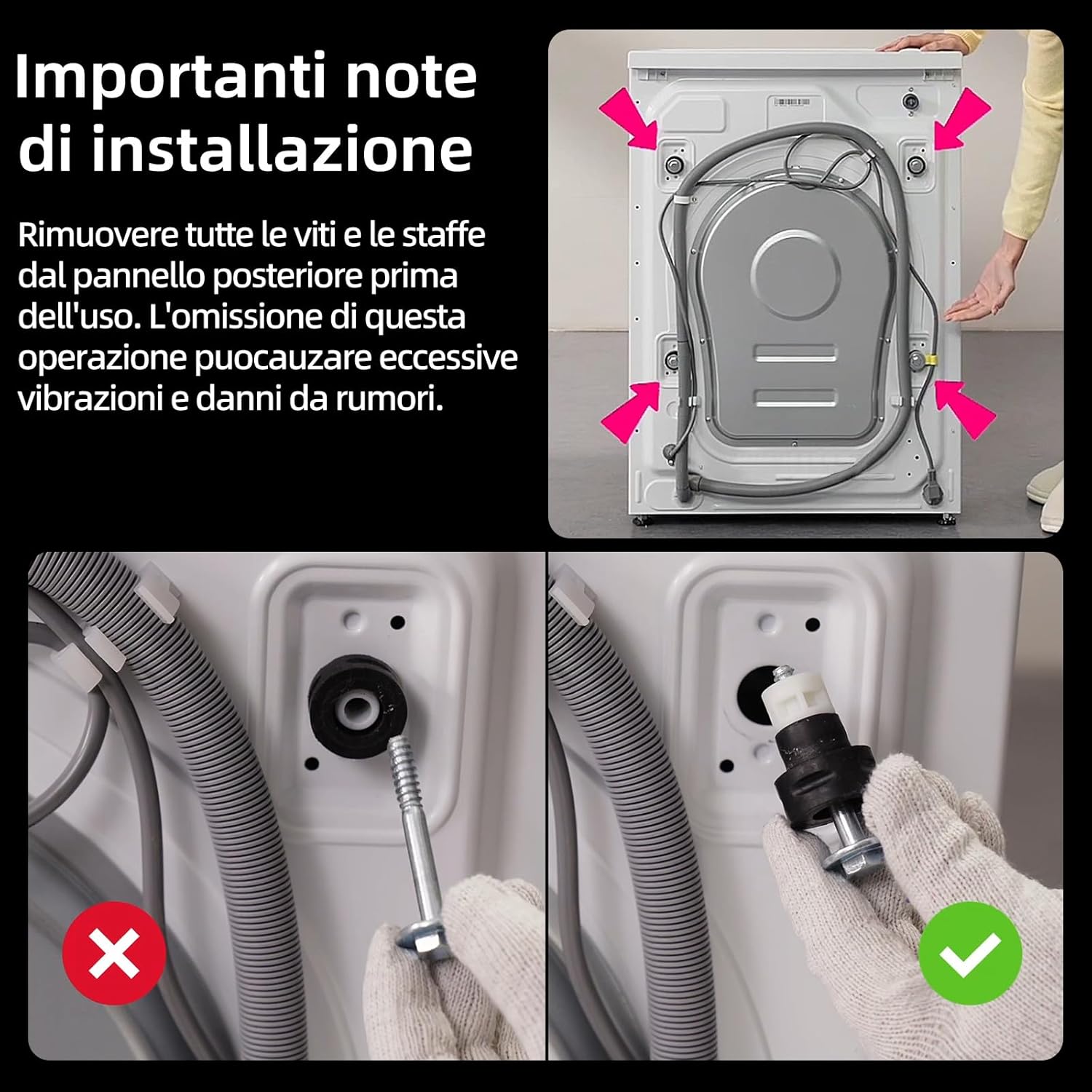
Image: Illustration showing the location of transport bolts on the rear of the washing machine and the correct method for removal.
- Locate the transport bolts on the rear of the machine.
- Using an appropriate wrench, loosen and remove all bolts.
- Remove any plastic spacers or brackets.
- అందించిన ప్లాస్టిక్ మూతలను రంధ్రాలలోకి చొప్పించండి.
2. యంత్రాన్ని సమం చేయడం
Proper leveling prevents excessive vibration and ensures stable operation. Adjust the leveling feet at the bottom of the machine until it is perfectly stable on the floor.
3. నీటి కనెక్షన్
Connect the water inlet hose to a cold water tap with a 3/4-inch thread. Ensure all connections are tight to prevent leaks.
4. డ్రెయిన్ హోస్ ఇన్స్టాలేషన్
Position the drain hose correctly into a standpipe or over the edge of a sink, ensuring it is securely fastened to prevent dislodgement during the wash cycle.
5. ఎలక్ట్రికల్ కనెక్షన్
పవర్ కార్డ్ను గ్రౌండ్ చేయబడిన ఎలక్ట్రికల్ అవుట్లెట్లోకి ప్లగ్ చేయండి. ఎక్స్టెన్షన్ కార్డ్లు లేదా అడాప్టర్లను ఉపయోగించవద్దు.
ఆపరేటింగ్ సూచనలు
1. కంట్రోల్ ప్యానెల్ ఓవర్view
The washing machine features an intuitive control panel with an ergonomic dial and touch buttons for program selection and settings adjustment.

Image: Close-up of the washing machine's control panel, showing the program dial, digital display, and touch-sensitive buttons.
2. లాండ్రీని లోడ్ చేస్తోంది
Open the door and load laundry into the drum. Do not overload the machine; ensure there is enough space for clothes to move freely. The extra-large 530mm drum is designed for optimal movement.

Image: Diagram illustrating the spacious 530mm drum interior, designed for effective stain removal and gentle fabric care.
3 డిటర్జెంట్ కలుపుతోంది
Pull out the detergent drawer and add the appropriate amount of detergent and fabric softener to the designated compartments. Refer to detergent packaging for dosage recommendations.
4. ప్రోగ్రామ్ ఎంపిక
Turn the program dial to select one of the 16 available wash programs. The display will show the default settings for the chosen program. You can adjust temperature and spin speed as needed.

Image: The control panel showing various wash programs and options, including Cotton, Mix, Anti-allergy, Wool, Baby Care, and Steam.
5. ప్రత్యేక విధులు
- Steam Care SPA: This function uses high-temperature steam to penetrate fabric fibers, effectively removing odors and keeping garments soft and pleasant to the touch. It provides gentle care without direct water usage.

Image: Visual representation of the Steam Care SPA feature, showing steam enveloping a white shirt inside the drum.
- One-Touch Smart Wash: The washing machine automatically detects the load size and optimizes water consumption and cycle duration for efficient cleaning. This simplifies program selection.

Image: The washing machine in a laundry room with an 'AI One Touch' icon, indicating the smart wash feature.
- స్మార్ట్ డిలే స్టార్ట్: Program your wash cycle to start up to 24 hours in advance, allowing you to take advantage of off-peak electricity rates or have laundry ready at a convenient time.

Image: The washing machine at night with a '24h' overlay, illustrating the delay start function.
- 15 నిమిషాల త్వరిత వాష్: Ideal for small loads of lightly soiled items or for when you need clothes quickly. This program completes a wash and rinse cycle in just 15 minutes.

Image: Dynamic graphic showing water and clothes inside the drum with a '15 MIN' timer, representing the quick wash cycle.
- Multi-Temperature Options: Select the ideal temperature for each fabric type or stain, from cold washes for delicate items to high temperatures for deep hygiene.

Image: A graph illustrating temperature progression during a wash cycle, highlighting multi-temperature capabilities.
- PureDrum Technology: Features plasma welding and a special droplet texture to significantly reduce fabric wear and fiber snagging, protecting garments with delicacy.

Image: Stylized representation of the PureDrum interior with water droplets, emphasizing its gentle washing action.
6. Starting a Wash Cycle
Press the 'Start/Pause' button to begin the selected wash cycle. The machine will automatically proceed through the washing, rinsing, and spinning phases.
నిర్వహణ
క్రమం తప్పకుండా నిర్వహణ సరైన పనితీరును నిర్ధారిస్తుంది మరియు మీ వాషింగ్ మెషీన్ యొక్క జీవితకాలాన్ని పొడిగిస్తుంది.
1. డిటర్జెంట్ డ్రాయర్ను శుభ్రపరచడం
Remove the detergent drawer and rinse it under running water to remove any detergent residue. Clean the housing of the drawer with a brush if necessary.
2. Dual Self-Cleaning
The machine features a dual self-cleaning function for both the drum and the door gasket. High-temperature, high-velocity water jets clean the inner and outer drum, preventing recontamination. High-pressure rinses during the cycle prevent mold formation on the door gasket.

Image: Diagram illustrating the dual self-cleaning process, showing water jets cleaning the drum and the door gasket.
3. పంప్ ఫిల్టర్ను శుభ్రపరచడం
Periodically clean the pump filter, usually located at the bottom front of the machine, to remove lint, coins, or other small objects that may have accumulated.
4. బాహ్య క్లీనింగ్
వాషింగ్ మెషీన్ బయటి భాగాన్ని మృదువైన, డి-ప్యాక్తో తుడవండి.amp గుడ్డ. రాపిడి క్లీనర్లు లేదా ద్రావకాలు ఉపయోగించవద్దు.
ట్రబుల్షూటింగ్
If you encounter any issues, refer to the table below for common problems and their solutions.
| సమస్య | సాధ్యమైన కారణం | పరిష్కారం |
|---|---|---|
| యంత్రం ప్రారంభం కాదు | పవర్ కార్డ్ అన్ప్లగ్ చేయబడింది; తలుపు సరిగ్గా మూసివేయబడలేదు; ప్రోగ్రామ్ ఎంచుకోబడలేదు; స్టార్ట్/పాజ్ బటన్ నొక్కబడలేదు. | Check power connection; Close door firmly; Select a program; Press Start/Pause. |
| అధిక కంపనం/శబ్దం | Transport bolts not removed; Machine not level; Overloaded drum; Laundry unevenly distributed. | Remove transport bolts; Adjust leveling feet; Reduce load size; Redistribute laundry. |
| నీటి లీకేజీ | Inlet/drain hose loose; Detergent drawer clogged; Too much detergent. | Tighten hose connections; Clean detergent drawer; Use less detergent. |
| నీరు పారడం లేదు | Drain hose kinked/blocked; Pump filter clogged. | Straighten drain hose; Clean pump filter. |
| తలుపు తెరవదు | Cycle still running; Water in drum; Child lock activated. | Wait for cycle to finish; Select drain program; Deactivate child lock. |
స్పెసిఫికేషన్లు
Technical details for the CHiQ CW8728X Washing Machine.
| ఫీచర్ | వివరాలు |
|---|---|
| మోడల్ పేరు | CW8728X |
| బ్రాండ్ | CHIQ |
| కెపాసిటీ | 8 కిలోలు |
| కొలతలు (DxWxH) | 51.3P x 60lx 85H సెం.మీ. |
| గరిష్ట స్పిన్ వేగం | నిమిషానికి 1400 విప్లవాలు |
| ఎనర్జీ ఎఫిషియెన్సీ క్లాస్ | ఎ-15% |
| మోటార్ రకం | BLDC ఇన్వర్టర్ మోటార్ |
| డ్రమ్ మెటీరియల్ | స్టెయిన్లెస్ స్టీల్ |
| బరువు | 60 కిలోలు |
| ప్రత్యేక లక్షణాలు | Delay Start, Child Lock, Steam Care, One-Touch Wash |
| సంస్థాపన రకం | స్వేచ్ఛగా నిలబడి |

Image: The official EU Energy Label for the CHiQ CW8728X, detailing its energy consumption, water usage, capacity, and noise levels.

Image: An illustration of the BLDC Inverter Motor, highlighting its internal components and emphasizing its quiet and efficient operation.
వారంటీ మరియు మద్దతు
వారంటీ సమాచారం
This CHiQ CW8728X Washing Machine comes with a 2 సంవత్సరాల తయారీదారు వారంటీ. Please retain your proof of purchase for any warranty claims. The motor is covered by a 12-year warranty.

Image: The CHiQ CW8728X washing machine displayed with a prominent '12 years motor warranty' emblem.
కస్టమర్ మద్దతు
For technical assistance, spare parts, or service requests, please contact CHiQ customer support. You can find contact details on the official CHiQ webసైట్ లేదా మీ రిటైలర్ ద్వారా.
Visit the official CHiQ store for more information: CHiQ Store