
Grenebo SGS02Z
Grenebo 3-in-1 Soil Moisture Meter Instruction Manual
Model: SGS02Z
1. ఉత్పత్తి ముగిసిందిview
The Grenebo 3-in-1 Soil Moisture Meter is designed to provide essential data for plant care. It measures soil moisture, ambient temperature, and sunlight intensity, offering a comprehensive view of your plant's environment.

Image: The meter displays soil moisture percentage, air temperature, and light intensity levels on its LCD screen.
ముఖ్య లక్షణాలు:
- 3-in-1 Monitoring: Provides real-time readings for soil moisture, ambient temperature, and sunlight intensity.
- పెద్ద LCD స్క్రీన్: Offers clear and intuitive digital readings for easy data interpretation.
- Instant & Automatic Updates: Press the button for immediate updates or rely on automatic updates every minute in low-power mode.
- బహుముఖ వినియోగం: Suitable for various environments including indoor plants, outdoor garden beds, lawns, and greenhouses.
- మన్నికైన ప్రోబ్: Features a 3.5-inch graduated probe for accurate depth insertion.
వీడియో: ఒక ఓవర్view of the Grenebo 3-in-1 Soil Moisture Meter's features and ease of use.
2. సెటప్
Before using your Grenebo 3-in-1 Soil Moisture Meter, you will need to install batteries.
బ్యాటరీ ఇన్స్టాలేషన్:
- పరికరం వెనుక బ్యాటరీ కంపార్ట్మెంట్ను గుర్తించండి.
- బ్యాటరీ కంపార్ట్మెంట్ కవర్ తెరవండి.
- రెండు (2) AAA బ్యాటరీలను చొప్పించండి, సరైన ధ్రువణతను (+/-) నిర్ధారించుకోండి. (బ్యాటరీలు చేర్చబడలేదు)
- బ్యాటరీ కంపార్ట్మెంట్ కవర్ను సురక్షితంగా మూసివేయండి.
పరికరం ఇప్పుడు ఉపయోగం కోసం సిద్ధంగా ఉంది.
3. ఆపరేటింగ్ సూచనలు
Follow these steps to obtain accurate readings from your soil moisture meter:

Image: Visual guide on operating the soil moisture meter.
- పవర్ ఆన్: Press and hold the button located on the front of the device for a few seconds until the LCD screen illuminates.
- ప్రోబ్ చొప్పించు: Gently insert the probe into the soil at least 2.7 inches (7 cm) deep. Ensure the probe is fully submerged in the soil for accurate moisture readings. Avoid forcing the probe into hard soil to prevent damage.
- డేటాను చదవండి: The LCD screen will display the soil moisture percentage, ambient temperature, and light intensity.
- నేలలో తేమ: శాతంగా ప్రదర్శించబడిందిtagఇ (0-100%).
- ఉష్ణోగ్రత: Displayed in Celsius (°C) or Fahrenheit (°F).
- కాంతి తీవ్రత: Displayed as a level (Low-, Low, Nor-, Nor, Hgh-, Hgh, Hgh+).
- Refresh Readings: For an instant update, briefly press the button. The device also updates automatically every minute in low-power mode.
- ఉష్ణోగ్రత యూనిట్లను మార్చండి: Briefly press the button to toggle between Celsius (°C) and Fahrenheit (°F) display for temperature.
- పవర్ ఆఫ్: Press and hold the button for a few seconds to turn off the device.
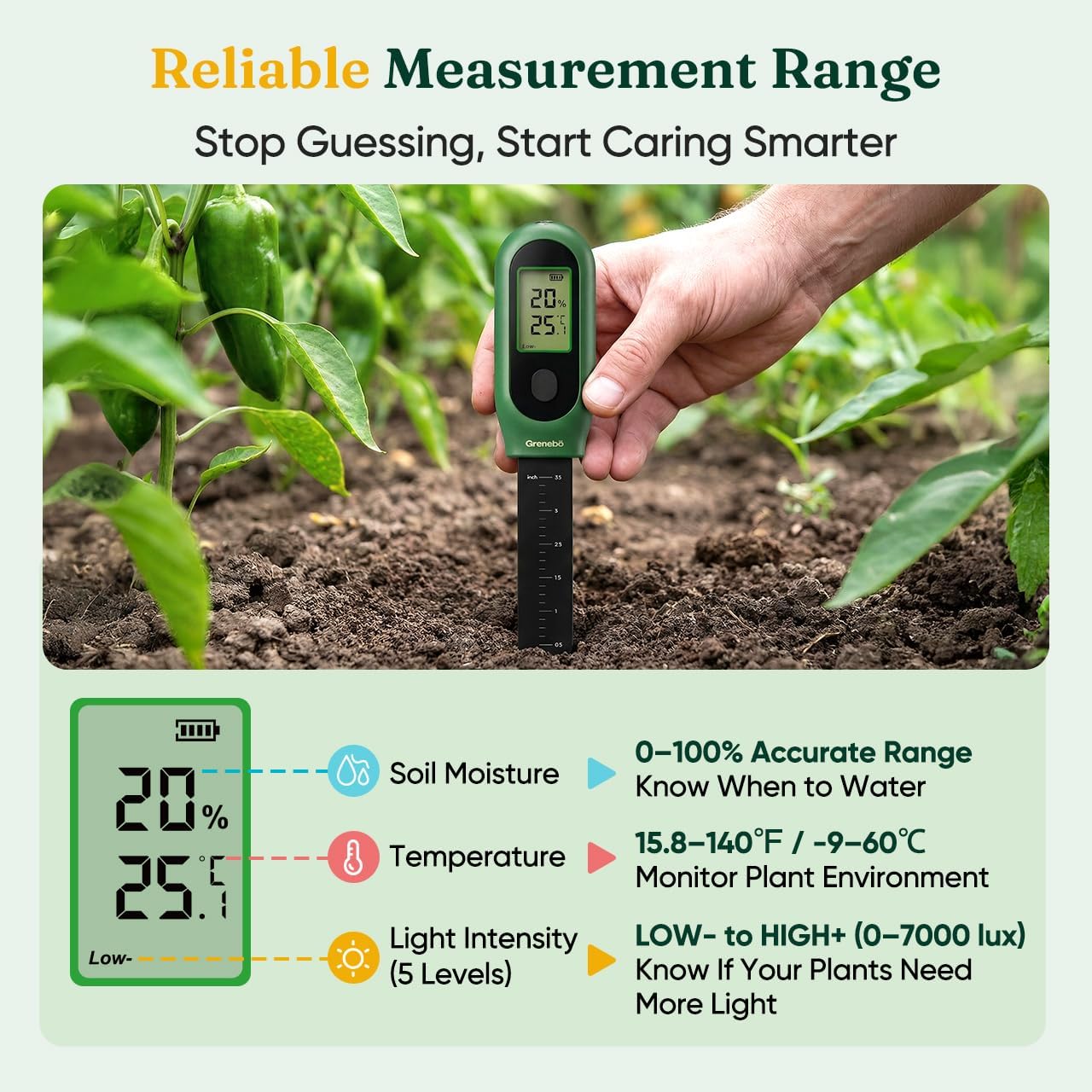
Image: The meter's reliable measurement ranges for soil moisture, temperature, and light intensity.
4. నిర్వహణ
Proper care and maintenance will ensure the longevity and accuracy of your Grenebo Soil Moisture Meter.

Image: Guidelines for proper use and care to maintain accuracy.
- ప్రతి ఉపయోగం తర్వాత శుభ్రం చేయండి: After taking readings, wipe the probe clean and dry with a soft cloth. This prevents residue buildup and extends the product's service life.
- నిల్వ: Do not leave the meter in soil for extended periods (over 5 minutes). Store it in a clean, dry place when not in use.
- ద్రవాలను నివారించండి: This device is designed for soil use only. Do not test water or other liquids.
- జాగ్రత్తగా నిర్వహించండి: Avoid inserting the probe into overly hard or rocky soil, as this can cause damage to the probe.
5. ట్రబుల్షూటింగ్
If you encounter issues with your Grenebo Soil Moisture Meter, refer to the following common solutions:
| సమస్య | సాధ్యమైన కారణం | పరిష్కారం |
|---|---|---|
| No display or weak display | తక్కువ లేదా క్షీణించిన బ్యాటరీలు; తప్పు బ్యాటరీ సంస్థాపన. | సరైన ధ్రువణతను నిర్ధారించుకోవడానికి, కొత్త AAA బ్యాటరీలతో భర్తీ చేయండి. |
| Inaccurate moisture readings | Probe not inserted deep enough; probe not clean; soil too sandy or loose; probe damaged. | Ensure probe is inserted at least 2.7 inches deep. Clean the probe thoroughly. Note that readings may be inaccurate in very sandy or loose growing media. Avoid hard soil to prevent probe damage. |
| Temperature unit not switching | బటన్ సరిగ్గా నొక్కబడలేదు. | Briefly press the button to toggle between °C and °F. Avoid long presses which may power off the device. |
6. స్పెసిఫికేషన్లు
| ఫీచర్ | వివరాలు |
|---|---|
| మోడల్ సంఖ్య | SGS02Z |
| ఉత్పత్తి కొలతలు | 7.28 x 1.38 x 3.07 అంగుళాలు |
| వస్తువు బరువు | 3.52 ఔన్సులు |
| శక్తి మూలం | 2 x AAA బ్యాటరీలు (చేర్చబడలేదు) |
| కొలత విధులు | Soil Moisture, Ambient Temperature, Sunlight Intensity |
| తేమ పరిధి | 0-100% |
| ఉష్ణోగ్రత పరిధి | 15.8-140°F / -9-60°C |
| ప్రోబ్ పొడవు | సుమారు 3.5 అంగుళాలు (9 సెం.మీ.) |
7. వారంటీ మరియు మద్దతు
Grenebo stands by the quality of its products.
- 1-సంవత్సరం భర్తీ: The product includes a 1-year replacement policy for manufacturing defects.
- కస్టమర్ మద్దతు: For any questions or concerns, 24/7 customer support is available. Please refer to the product packaging or manufacturer's webసంప్రదింపు వివరాల కోసం సైట్.
Ask a question about this manual
Ask about setup, troubleshooting, compatibility, parts, safety, or missing instructions. Manuals+ will review the question and use this page’s manual context to help answer it.