
1. పరిచయం
Thank you for choosing the SQUATZ 2-in-1 Walking Pad Treadmill with Handlebar & Vibration Plates. This versatile fitness equipment is designed to support both walking and light running, incorporating vibration plate technology for enhanced workouts. Its compact design and quiet operation make it suitable for various home and office environments. This manual provides essential information for safe operation, assembly, maintenance, and troubleshooting.
2. ముఖ్యమైన భద్రతా సమాచారం
దయచేసి ఈ ఉత్పత్తిని ఉపయోగించే ముందు అన్ని సూచనలను జాగ్రత్తగా చదవండి. భవిష్యత్తు సూచన కోసం ఈ మాన్యువల్ని ఉంచండి.
- బరువు పరిమితి: గరిష్ట వినియోగదారు బరువు 264 పౌండ్లు (120 కిలోలు) మించకూడదు.
- ప్లేస్మెంట్: Place the walking pad on a flat, stable surface. Ensure adequate clear space around the unit (at least 2 feet on all sides).
- శక్తి: Use only the provided power cable. Ensure the power outlet is properly grounded. Unplug the unit when not in use or before cleaning/maintenance.
- పిల్లలు మరియు పెంపుడు జంతువులు: ఆపరేషన్ సమయంలో పిల్లలు మరియు పెంపుడు జంతువులను వాకింగ్ ప్యాడ్ నుండి దూరంగా ఉంచండి.
- వైద్య పరిస్థితులు: ఏదైనా కొత్త వ్యాయామ కార్యక్రమాన్ని ప్రారంభించే ముందు వైద్యుడిని సంప్రదించండి, ప్రత్యేకించి మీకు ముందుగా ఉన్న వైద్య పరిస్థితులు ఉంటే.
- అత్యసవర నిలుపుదల: Familiarize yourself with the emergency stop function.
- హ్యాండిల్ బార్: Always ensure the handlebar is securely locked in place if using it for support.
- పాదరక్షలు: Always wear appropriate athletic footwear when using the walking pad.
- నిర్వహణ: సురక్షితమైన ఆపరేషన్ను నిర్ధారించడానికి ఈ మాన్యువల్లో వివరించిన విధంగా క్రమం తప్పకుండా నిర్వహణను నిర్వహించండి.
3. ప్యాకేజీ విషయాలు
ప్యాకేజీలో అన్ని భాగాలు ఉన్నాయని నిర్ధారించుకోండి:
- SQUATZ 2-in-1 Walking Pad Treadmill
- రిమోట్ కంట్రోలర్
- సిలికాన్ ఆయిల్
- L Spanner
- రెంచ్
- Power Cable with US / Canada Plug
4. సెటప్
The SQUATZ Walking Pad Treadmill arrives fully assembled. Follow these steps for initial setup:
- అన్ప్యాకింగ్: వాకింగ్ ప్యాడ్ను దాని ప్యాకేజింగ్ నుండి జాగ్రత్తగా తొలగించండి.
- ప్లేస్మెంట్: Position the walking pad on a firm, level surface. Ensure there is at least 2 feet of clear space behind and on both sides of the unit for safety.
- Handlebar (Optional): If using the handlebar, lift it into the upright position and secure it with the locking mechanisms on both sides. Ensure it clicks firmly into place.
- పవర్ కనెక్షన్: Connect the power cable to the walking pad's power port and then plug it into a grounded electrical outlet.
- ప్రారంభ తనిఖీ: Before first use, ensure the running belt is centered and free from any obstructions.

మూర్తి 4.1: The SQUATZ Walking Pad is compact and can be stored under furniture. Dimensions are approximately 42.5"D x 21.6"W x 4.3"H when folded flat.
5. ఆపరేటింగ్ సూచనలు
The SQUATZ Walking Pad offers multiple modes and features for your workout.
5.1 పవర్ ఆన్/ఆఫ్
- పవర్ ఆన్: Plug in the unit and press the power button on the main unit or the remote control. The LED display will illuminate.
- పవర్ ఆఫ్: Press and hold the power button on the remote or the main unit until the display turns off. Always unplug the unit from the wall when not in use.
5.2 ఆపరేషన్ మోడ్లు

మూర్తి 5.1: The walking pad supports both walking (0.5 MPH min) and running (3.7 MPH max) modes.
- నడక మోడ్: Ideal for low-intensity exercise or use under a desk. Speed range typically starts from 0.5 MPH.
- రన్నింగ్ మోడ్: For higher intensity workouts. The maximum speed is 3.7 MPH. Ensure the handlebar is in the upright position for added stability during running.
5.3 Vibration Plate Function
The integrated vibration plates can be used for warm-ups, balance training, or light recovery.
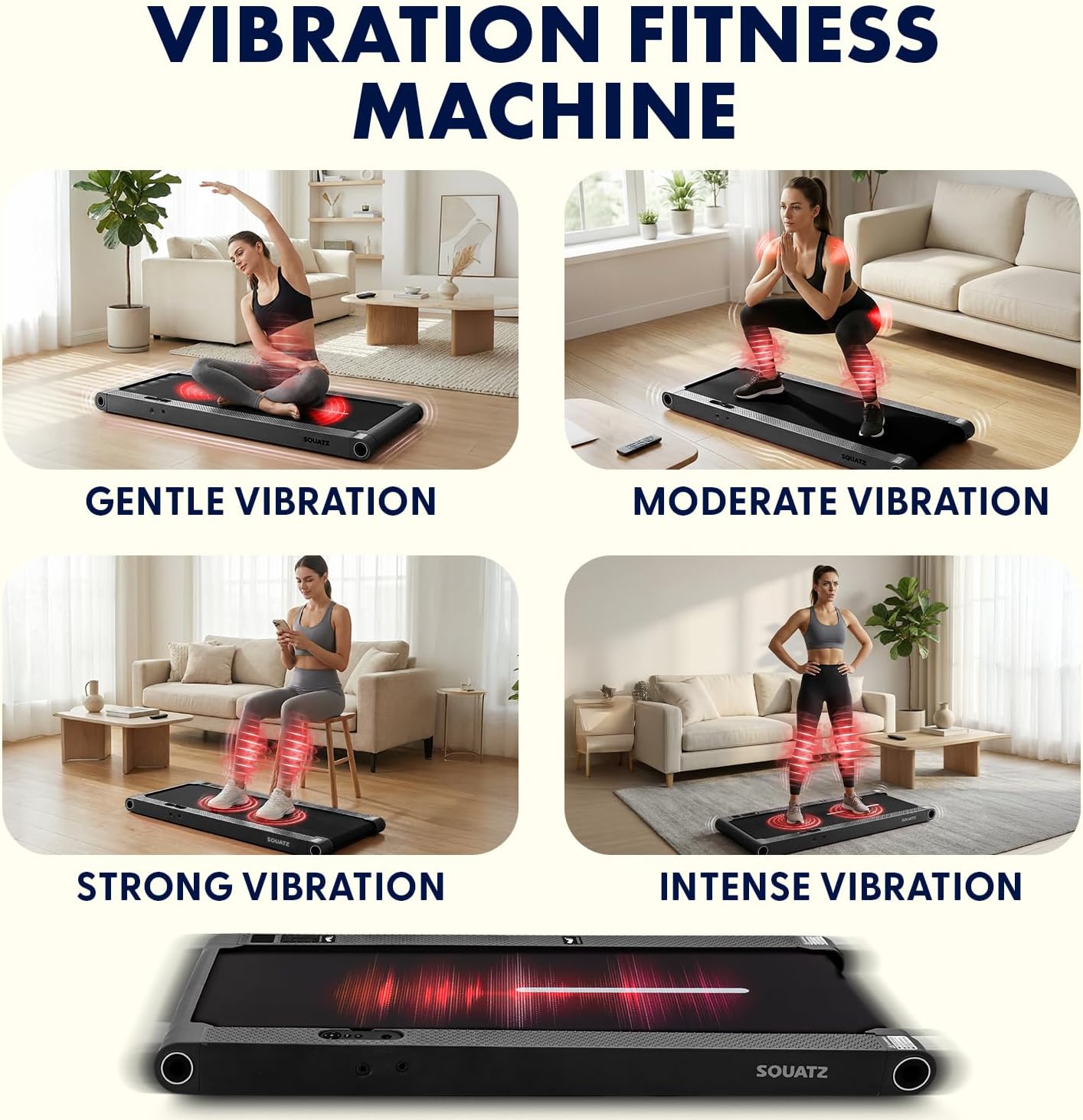
మూర్తి 5.2: The vibration plates offer four adjustable modes: Gentle, Moderate, Strong, and Intense.
- వైబ్రేషన్ని యాక్టివేట్ చేస్తోంది: Use the remote control to activate and adjust the vibration intensity.
- వైబ్రేషన్ మోడ్లు: There are 4 adjustable vibration modes (Gentle, Moderate, Strong, Intense) to suit your preference.
5.4 LED డిస్ప్లే మరియు రిమోట్ కంట్రోల్

మూర్తి 5.3: The LED display tracks time, speed, step count, distance, and vibration mode. The remote control allows for quick adjustments.
- LED డిస్ప్లే: The integrated LED panel shows real-time workout data including time, calories burned, speed, and distance. It also indicates the current vibration mode.
- రిమోట్ కంట్రోల్: Use the remote to power on/off, adjust speed, select preset programs, and control vibration intensity.
- ఆరంభ కార్యక్రమాలు: The walking pad features 12 preset programs designed to vary speed and intensity for a diverse workout experience. Refer to the remote control guide for program selection.
5.5 Bluetooth and App Integration

మూర్తి 5.4: Connect your walking pad via Bluetooth to a compatible fitness app for tracking goals and session statistics.
- బ్లూటూత్ కనెక్టివిటీ: The walking pad can connect to compatible fitness applications via Bluetooth.
- యాప్ ఫీచర్లు: The app allows you to track your workout goals, view session statistics (distance, time, calories, points), and potentially access additional training programs. Refer to the app's instructions for pairing and usage.
6. నిర్వహణ
Regular maintenance ensures the longevity and safe operation of your SQUATZ Walking Pad.
- శుభ్రపరచడం:
- శుభ్రపరిచే ముందు ఎల్లప్పుడూ యూనిట్ను అన్ప్లగ్ చేయండి.
- Wipe down the walking pad and display with a soft, damp గుడ్డ. రాపిడి క్లీనర్లు లేదా ద్రావకాలు ఉపయోగించవద్దు.
- Keep the area around the motor clean and free of dust.
- బెల్ట్ సరళత:
- The running belt requires periodic lubrication with the provided silicone oil to ensure smooth operation and prevent wear.
- Lift the edge of the running belt and apply a small amount of silicone oil evenly to the center of the deck.
- Run the walking pad at a low speed (e.g., 1 MPH) for 5 minutes to distribute the lubricant.
- Frequency of lubrication depends on usage; typically every 3-6 months for moderate use.
- బెల్ట్ సర్దుబాటు:
- రన్నింగ్ బెల్ట్ ఒక వైపుకు మారితే లేదా జారిపోతే, దానికి సర్దుబాటు అవసరం కావచ్చు.
- Use the L spanner and wrench provided to adjust the tension bolts at the rear of the walking pad.
- Turn the bolt clockwise to tighten the belt or move it to the right; turn counter-clockwise to loosen or move it to the left. Make small adjustments (quarter turns) and test.
- Ensure the belt is centered and has proper tension (you should be able to lift the edge of the belt about 2-3 inches in the middle).
- నిల్వ:
- When not in use, the walking pad can be stored flat under furniture due to its slim profile.
- Ensure the power is off and the unit is unplugged before storing.

మూర్తి 6.1: The multi-layer running belt is designed for durability and anti-slip performance. Regular lubrication is essential for its upkeep.
7. ట్రబుల్షూటింగ్
If you encounter issues with your SQUATZ Walking Pad, refer to the table below.
| సమస్య | సాధ్యమైన కారణం | పరిష్కారం |
|---|---|---|
| వాకింగ్ ప్యాడ్ పవర్ ఆన్ అవ్వదు. | Power cable not connected; power outlet issue; main power switch off. | Ensure power cable is securely plugged into the unit and a working outlet. Check the main power switch on the unit. |
| Running belt slips or stops. | బెల్ట్ చాలా వదులుగా ఉంది; తగినంత లూబ్రికేషన్ లేదు; మోటారు ఓవర్లోడ్. | Adjust belt tension (see Section 6). Apply silicone oil (see Section 6). Reduce user weight or speed. |
| Running belt shifts to one side. | బెల్ట్ అమరిక సమస్య. | Adjust belt alignment using the tension bolts (see Section 6). |
| ఆపరేషన్ సమయంలో అసాధారణ శబ్దం. | Lack of lubrication; loose components; foreign object. | Lubricate the belt. Check for loose screws or components. Inspect for any foreign objects under the belt. |
| రిమోట్ కంట్రోల్ పనిచేయడం లేదు. | Dead battery; remote not paired. | Replace remote control battery. Refer to pairing instructions (if applicable, usually automatic). |
ఈ పరిష్కారాలను ప్రయత్నించిన తర్వాత కూడా సమస్య కొనసాగితే, దయచేసి కస్టమర్ మద్దతును సంప్రదించండి.
8. స్పెసిఫికేషన్లు
Technical details for the SQUATZ 2-in-1 Walking Pad Treadmill (Model SQWPVH15BK):
- మోడల్ సంఖ్య: SQWPVH15BK
- బ్రాండ్: స్క్వాట్జ్
- ఉత్పత్తి కొలతలు (D x W x H): 42.5" x 21.6" x 41.34" (upright with handlebar)
- వస్తువు బరువు: 30.86 పౌండ్లు
- మెటీరియల్: Powder Coated Steel, PP
- గరిష్ట వేగం: గంటకు 3.7 మైళ్లు
- కనిష్ట వేగం: గంటకు 0.5 మైళ్లు
- మోటార్: 1.0 Horsepower (Brushless, ≤45 dB)
- గరిష్ట బరువు సిఫార్సు: 264 పౌండ్లు
- ప్రోగ్రామ్ల సంఖ్య: 12 ప్రీసెట్ ప్రోగ్రామ్లు
- Running Belt Dimensions: Approximately 39.3" x 14.9"
- ప్రత్యేక లక్షణాలు: Adjustable Speed, Foldable Handlebar, Vibration Plates (4 modes), LED Display, Device Holder, Remote Control, Bluetooth Connectivity
- అసెంబ్లీ అవసరం: లేదు (పూర్తిగా అమర్చబడి వస్తుంది)
- చేర్చబడిన భాగాలు: Walking Pad Treadmill, Remote Controller, Silicone Oil, L Spanner, Wrench, Power Cable
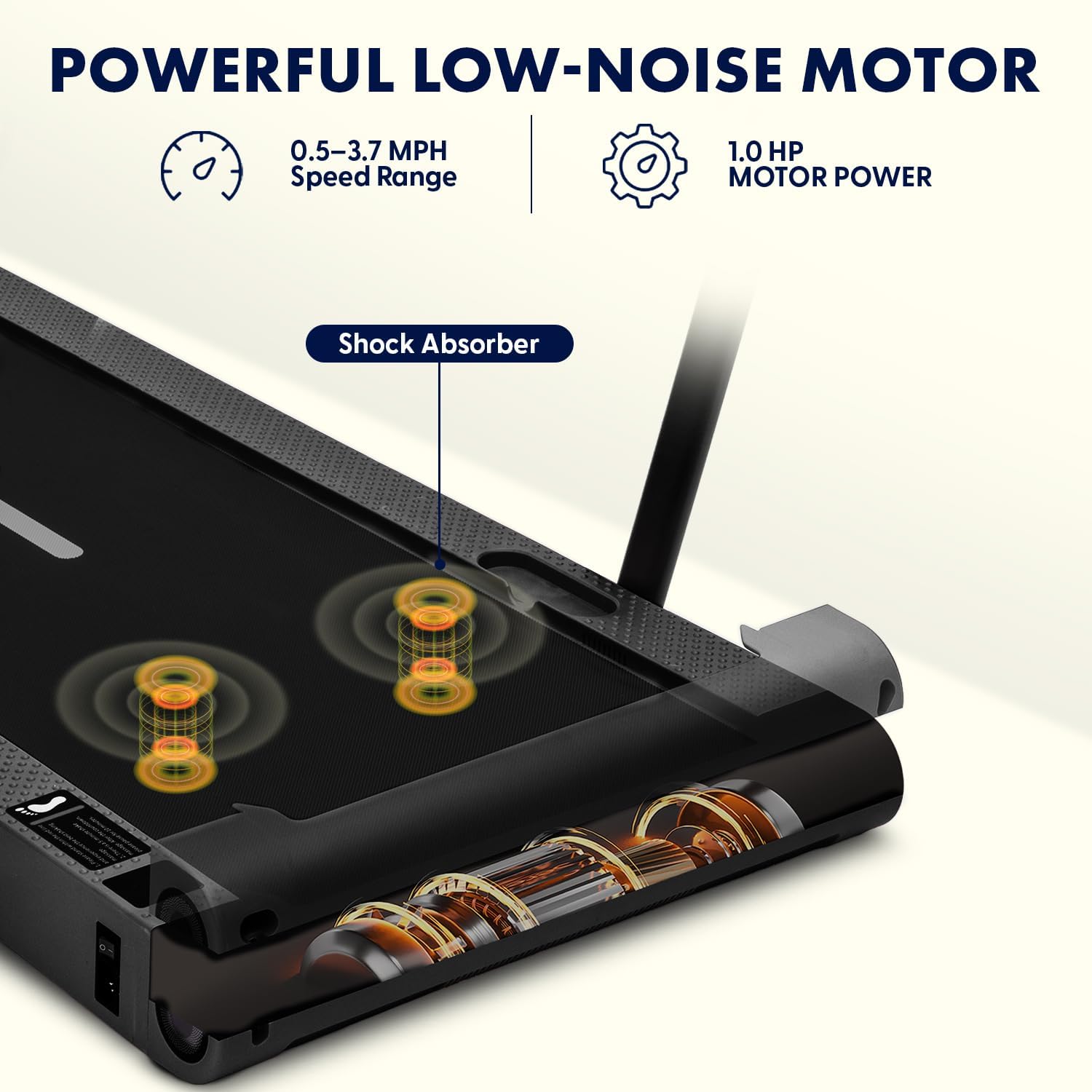
మూర్తి 8.1: The walking pad features a 1.0 HP low-noise brushless motor with a speed range of 0.5-3.7 MPH and shock absorption.
9. వారంటీ మరియు మద్దతు
- వారంటీ: This SQUATZ Walking Pad Treadmill comes with a 1 సంవత్సరం వారంటీ కొనుగోలు చేసిన తేదీ నుండి. ఈ వారంటీ సాధారణ ఉపయోగంలో తయారీ లోపాలను కవర్ చేస్తుంది. దుర్వినియోగం, ప్రమాదాలు, అనధికార మార్పులు లేదా సరికాని నిర్వహణ వల్ల కలిగే నష్టాన్ని ఇది కవర్ చేయదు.
- కస్టమర్ మద్దతు: For warranty claims, technical assistance, or any questions not covered in this manual, please contact SQUATZ customer support. Refer to the product packaging or the official SQUATZ webసంప్రదింపు సమాచారం కోసం సైట్.
- ఆన్లైన్ వనరులు: సందర్శించండి SQUATZ Store on Amazon అదనపు ఉత్పత్తి సమాచారం మరియు మద్దతు కోసం.