
SQUATZ SQWPVH15WH
Squatz 2-in-1 Walking Pad Treadmill with Handlebar & Vibration Plates User Manual
Model: SQWPVH15WH
ముఖ్యమైన భద్రతా సూచనలు
ఈ ఉపకరణాన్ని ఉపయోగించే ముందు అన్ని సూచనలను జాగ్రత్తగా చదవండి. భవిష్యత్తు సూచన కోసం ఈ మాన్యువల్ని ఉంచండి.
- ట్రెడ్మిల్ను ఎల్లప్పుడూ చదునైన, స్థిరమైన ఉపరితలంపై ఉంచండి.
- Ensure adequate clear space around the treadmill (at least 2 meters behind and 0.6 meters on each side).
- ఆపరేషన్ సమయంలో పిల్లలు మరియు పెంపుడు జంతువులను ట్రెడ్మిల్ నుండి దూరంగా ఉంచండి.
- ట్రెడ్మిల్కు దెబ్బతిన్న త్రాడు లేదా ప్లగ్ ఉంటే, లేదా అది సరిగ్గా పని చేయకపోతే దాన్ని ఆపరేట్ చేయవద్దు.
- తగిన అథ్లెటిక్ పాదరక్షలను ధరించండి. ట్రెడ్మిల్ను చెప్పులు లేకుండా లేదా సాక్స్లో ఉపయోగించవద్దు.
- గరిష్ట వినియోగదారు బరువు సామర్థ్యం 119.75 కిలోలు (264 పౌండ్లు). ఈ పరిమితిని మించకూడదు.
- ఏదైనా వ్యాయామ కార్యక్రమాన్ని ప్రారంభించే ముందు వైద్యుడిని సంప్రదించండి.
- ఉపయోగంలో లేనప్పుడు లేదా శుభ్రపరిచే ముందు ట్రెడ్మిల్ను పవర్ అవుట్లెట్ నుండి అన్ప్లగ్ చేయండి.
ఉత్పత్తి ముగిసిందిview
The Squatz 2-in-1 Walking Pad Treadmill with Handlebar & Vibration Plates is designed for versatile home or office fitness. It functions as both a walking pad and a vibration plate, offering options for walking, balance training, and light recovery. This model includes a foldable handlebar for stability and a device holder for convenience.
చేర్చబడిన భాగాలు:
- Squatz Walking Pad Treadmill
- రిమోట్ కంట్రోలర్
- Power Cable (US / Canada Plug)
- L Spanner
- సిలికాన్ ఆయిల్
సెటప్ సూచనలు
The Squatz 2-in-1 Walking Pad Treadmill arrives fully assembled, requiring minimal setup before first use.
- అన్ప్యాకింగ్: ట్రెడ్మిల్ను దాని ప్యాకేజింగ్ నుండి జాగ్రత్తగా తొలగించండి.
- ప్లేస్మెంట్: Place the treadmill on a firm, level surface. Ensure there is sufficient space around the unit for safe operation.
- హ్యాండిల్బార్ సెటప్: If using the handlebar, unfold it into the upright position until it locks securely. The device holder can be attached to the handlebar.
- పవర్ కనెక్షన్: Connect the power cable to the treadmill and then plug it into a grounded electrical outlet.
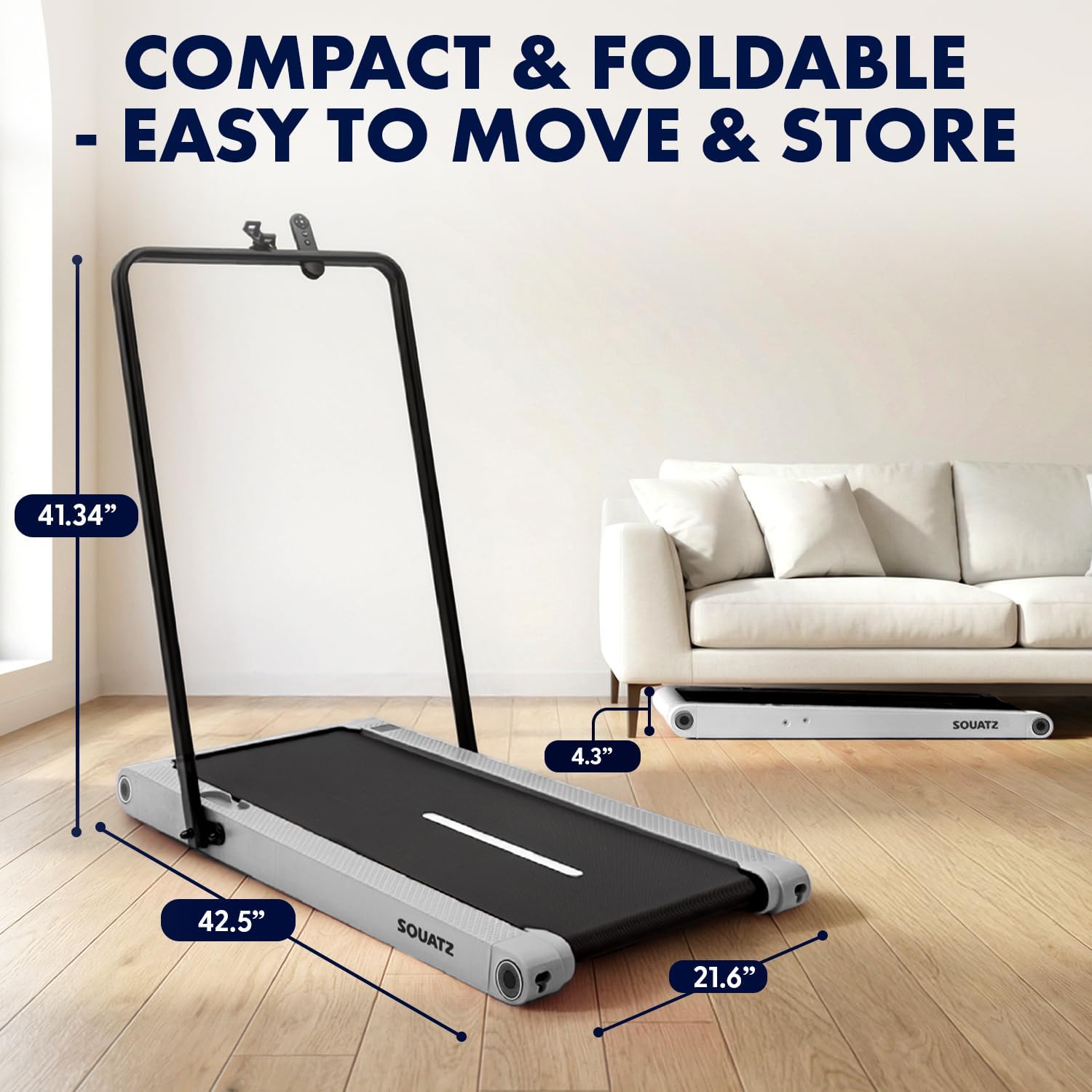
Image: The treadmill shown with its dimensions (42.5 inches length, 21.6 inches width, 4.3 inches height when flat, 41.34 inches height with handlebar up) and its compact storage capability under a sofa.
ఆపరేటింగ్ సూచనలు
పవర్ ఆన్/ఆఫ్
- To power on, plug in the treadmill and press the power button on the remote control or the unit.
- To power off, press the power button again. Always unplug the unit when not in use.
ఆపరేటింగ్ మోడ్లు

Image: Visual representation of the three primary operating modes: Walking Mode (0.5 MPH min. speed), Running Mode (3.7 MPH max. speed), and Vibration Mode (4 mode adjustable). A person is shown walking on the pad at a standing desk, another running with the handlebar, and a third performing squats on the pad in vibration mode.
- నడక మోడ్: Ideal for light activity, with a minimum speed of 0.5 MPH.
- రన్నింగ్ మోడ్: For more intense workouts, reaching a maximum speed of 3.7 MPH.
- వైబ్రేషన్ మోడ్: Activates built-in vibration plates for muscle activation, balance training, or recovery.
Vibration Training
The treadmill features integrated vibration plates with 4 adjustable modes.

చిత్రం: నలుగురు మాజీలుamples of vibration fitness: Gentle Vibration (person sitting), Moderate Vibration (person squatting), Strong Vibration (person standing with phone), and Intense Vibration (person standing with hands on hips). Red glowing areas indicate vibration.
- Use the remote control to select between Gentle, Moderate, Strong, and Intense vibration levels.
- Vibration training can be used independently or in conjunction with walking.
నియంత్రణలు మరియు ప్రదర్శన
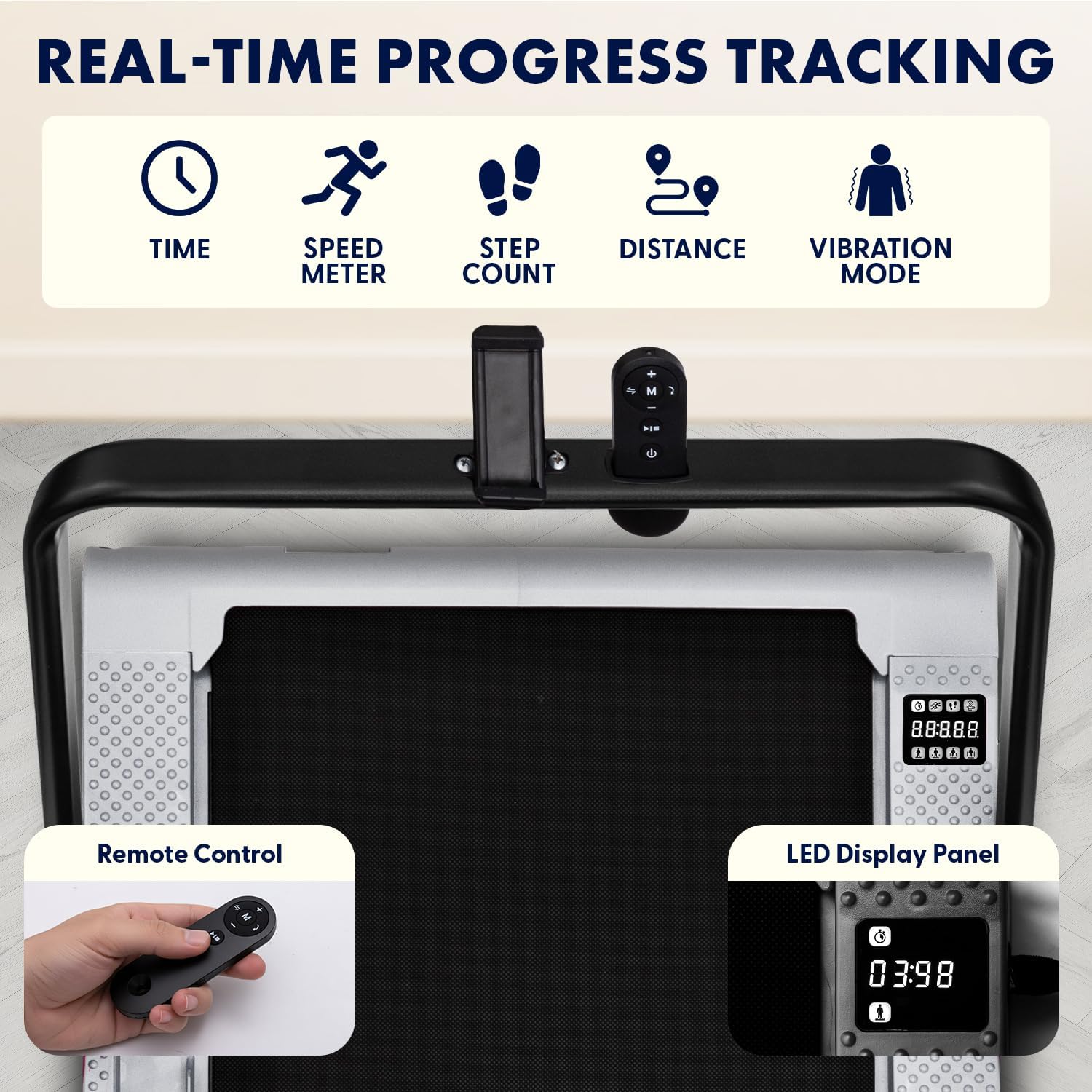
Image: Close-up of the treadmill's LED display panel showing time, speed, step count, distance, and vibration mode indicators. A remote control is also shown, featuring power, speed adjustment, and mode selection buttons.
- LED డిస్ప్లే ప్యానెల్: Tracks real-time data including time, calories burned, speed, and distance.
- రిమోట్ కంట్రోల్: Use the remote to power on/off, adjust speed, select operating modes, and choose from 12 preset programs.
- ఆరంభ కార్యక్రమాలు: The treadmill offers 12 pre-programmed workouts for varied training sessions. Refer to the remote control instructions for program selection.
Bluetooth and App Integration
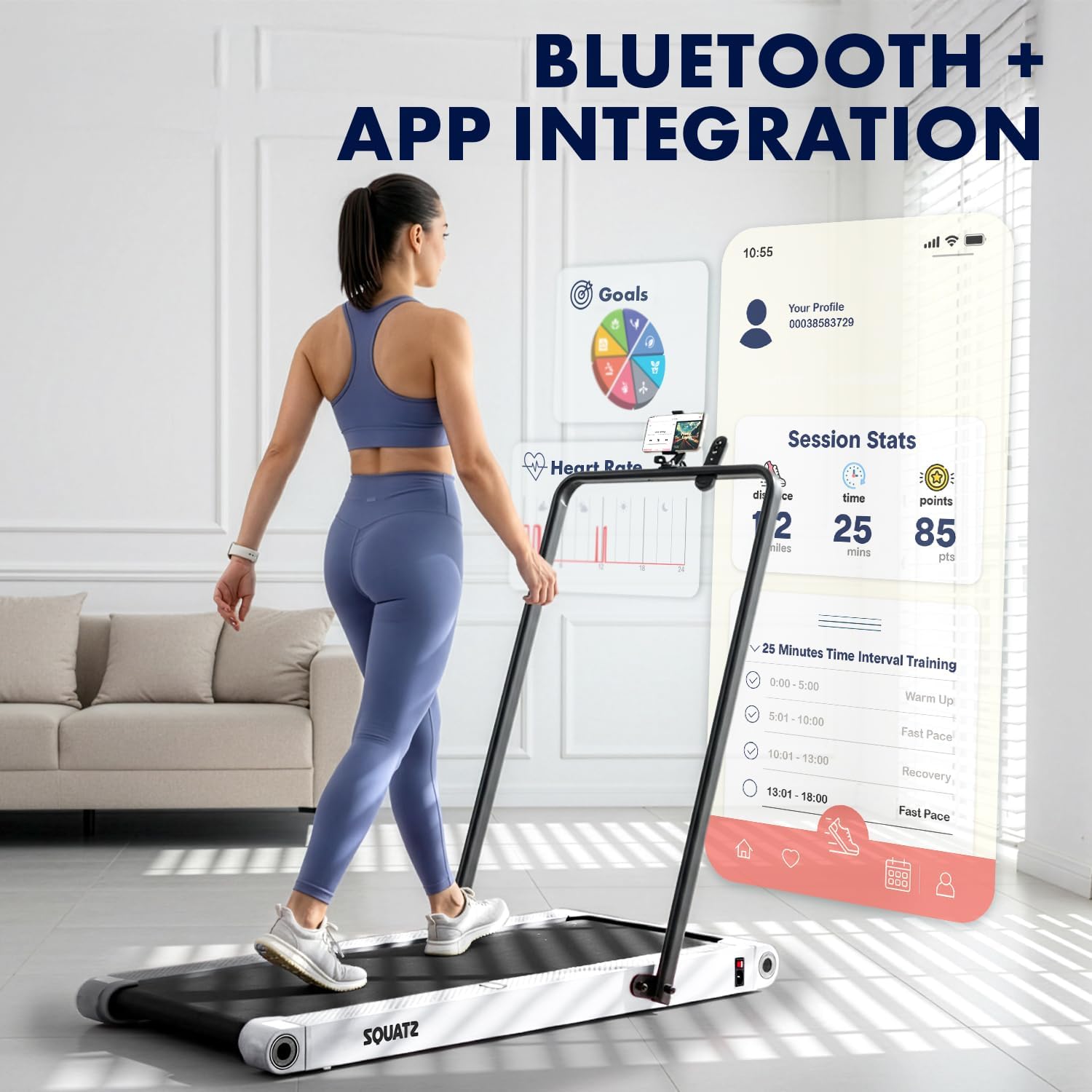
Image: A person walking on the treadmill while looking at a smartphone displaying a fitness app interface. The app shows session statistics like distance, time, and points, along with workout goals and interval training options.
- The treadmill supports Bluetooth connectivity for integration with a compatible fitness app.
- Download the official Squatz fitness app (if available) to track progress, set goals, and access additional workout features.
- Follow the app's instructions for pairing your device with the treadmill.
నిర్వహణ
క్రమం తప్పకుండా నిర్వహణ మీ ట్రెడ్మిల్ యొక్క దీర్ఘాయువు మరియు సరైన పనితీరును నిర్ధారిస్తుంది.
క్లీనింగ్
- శుభ్రం చేసే ముందు ఎల్లప్పుడూ ట్రెడ్మిల్ను అన్ప్లగ్ చేయండి.
- Wipe down the display and exterior surfaces with a soft, damp గుడ్డ. రాపిడి క్లీనర్లను నివారించండి.
- Periodically vacuum under the treadmill to remove dust and debris.
బెల్ట్ లూబ్రికేషన్
- The running belt requires periodic lubrication with the provided silicone oil to reduce friction and extend belt life.
- Refer to the specific instructions included with the silicone oil for application frequency and method. Generally, apply a small amount under the belt every few months, depending on usage.
ట్రబుల్షూటింగ్
మీ ట్రెడ్మిల్తో మీరు సమస్యలను ఎదుర్కొంటే, ఈ క్రింది సాధారణ సమస్యలు మరియు పరిష్కారాలను చూడండి:
| సమస్య | సాధ్యమైన కారణం | పరిష్కారం |
|---|---|---|
| ట్రెడ్మిల్ పవర్ ఆన్ చేయడం లేదు | Power cable not connected; Outlet issue; Power button not pressed | Ensure power cable is securely plugged into treadmill and a working outlet. Press the power button on the unit or remote. |
| Belt stops or slips during use | Belt requires lubrication; Belt tension is incorrect; Overload | Apply silicone oil to the belt. Check belt tension (refer to maintenance section). Ensure user weight does not exceed maximum capacity. |
| రిమోట్ కంట్రోల్ పనిచేయడం లేదు | Low battery; Obstruction; Not paired | Replace remote control battery. Ensure no obstructions between remote and treadmill. Re-pair remote if necessary (refer to remote instructions). |
| మోటారు నుండి అసాధారణ శబ్దం | Debris under belt; Motor issue | Unplug and carefully check for debris under the belt. If noise persists, contact customer support. |
If the problem persists after attempting these solutions, please contact Squatz customer support.
స్పెసిఫికేషన్లు

చిత్రం: కట్అవే view of the treadmill highlighting the 1.0 HP motor, shock absorber, and indicating a speed range of 0.5-3.7 MPH.

Image: Close-up of the treadmill's anti-slip, multi-layer running belt, showing its dimensions (39.3 inches length, 15 inches width) and indicating support for up to 264 lbs.
| ఫీచర్ | వివరాలు |
|---|---|
| మోడల్ సంఖ్య | SQWPVH15WH |
| ఉత్పత్తి కొలతలు (L x W x H) | 108D x 54.9W x 105H Centimetres (with handlebar up) |
| వస్తువు బరువు | 14 కిలోలు |
| మెటీరియల్ | Polypropylene (PP), Powder Coated Steel |
| మోటార్ హార్స్పవర్ | 1.0 HP (Brushless) |
| స్పీడ్ రేంజ్ | గంటకు 0.5 - 3.7 మైళ్ళు |
| గరిష్ట బరువు సిఫార్సు | 119.75 కిలోలు (264 పౌండ్లు) |
| శబ్దం స్థాయి | ≤45 dB |
| రన్నింగ్ బెల్ట్ కొలతలు | 39.3" x 14.9" |
| వైబ్రేషన్ ప్లేట్లు | Integrated, 4 adjustable modes |
| ప్రదర్శించు | LED (Time, Calories, Speed, Distance) |
| నియంత్రణ | రిమోట్ కంట్రోల్ |
| అసెంబ్లీ అవసరం | లేదు (పూర్తిగా అమర్చబడి వస్తుంది) |
| UPC | 842893184166 |
వారంటీ మరియు మద్దతు
వారంటీ సమాచారం
This Squatz Walking Pad Treadmill comes with a 1 సంవత్సరం వారంటీ from the date of purchase. This warranty covers manufacturing defects under normal use. It does not cover damage caused by misuse, accident, unauthorized modification, or improper maintenance.
కస్టమర్ మద్దతు
For technical assistance, warranty claims, or any questions regarding your Squatz product, please contact our customer support team. Have your model number (SQWPVH15WH) and proof of purchase ready when contacting support.
సంప్రదింపు సమాచారం: Please refer to the contact details provided on the Squatz official website or your purchase documentation for the most up-to-date support channels.
Ask a question about this manual
Ask about setup, troubleshooting, compatibility, parts, safety, or missing instructions. Manuals+ will review the question and use this page’s manual context to help answer it.