
1. ముఖ్యమైన భద్రతా సూచనలు
Please read all instructions carefully before using the Airversa RDX Smart Waterless Diffuser. Retain this manual for future reference.
- Use only the provided DC-12V/1A power adapter.
- Do not immerse the diffuser in water or any other liquid.
- పిల్లలు మరియు పెంపుడు జంతువులకు దూరంగా ఉంచండి.
- డిఫ్యూజర్ను స్థిరమైన, చదునైన ఉపరితలంపై ఉంచండి.
- పొగమంచు అవుట్లెట్ను నిరోధించవద్దు.
- Avoid direct contact with essential or fragrance oils, as they may cause irritation. In case of contact, rinse thoroughly with water.
- పరికరాన్ని శుభ్రం చేయడానికి ముందు లేదా ఎక్కువసేపు ఉపయోగంలో లేనప్పుడు దాన్ని అన్ప్లగ్ చేయండి.
- యూనిట్ను మీరే విడదీయడానికి లేదా మరమ్మతు చేయడానికి ప్రయత్నించవద్దు. సహాయం కోసం కస్టమర్ సపోర్ట్ను సంప్రదించండి.
2. ఉత్పత్తి ముగిసిందిview
The Airversa RDX Smart Waterless Diffuser utilizes advanced cold diffusion technology to disperse essential or fragrance oils into an ultra-fine dry mist without heat or water. This preserves the oil's purity and ensures a powerful, whisper-quiet scent experience for areas up to 1500 sq ft.
ముఖ్య లక్షణాలు:
- Waterless Cold Diffusion: Transforms oils into a fine mist without heat or water.
- యాప్ నియంత్రణ: Manage settings, schedules, and intensity via the Sleekpoint App (Bluetooth connection).
- పెద్ద సామర్థ్యం: 300 mL oil reservoir for extended use.
- విస్తృత కవరేజ్: Effectively scents spaces up to 1500 sq ft.
- ఇంటిగ్రేటెడ్ డిస్ప్లే: Visual countdown for diffusion and pause intervals.
- సర్దుబాటు చేయగల రాత్రి కాంతి: Embedded ambient light with adjustable brightness.
- మన్నికైన డిజైన్: Premium aluminum shell for longevity and aesthetic appeal.

Image: The Airversa RDX Diffuser in a living room, showcasing its main features and coverage area.

Image: Seamless App Control via Bluetooth, showing the Sleekpoint App interface and diffuser dimensions.

చిత్రం: వివరణాత్మకం view of the diffuser's control panel with touch buttons and visual indicators.
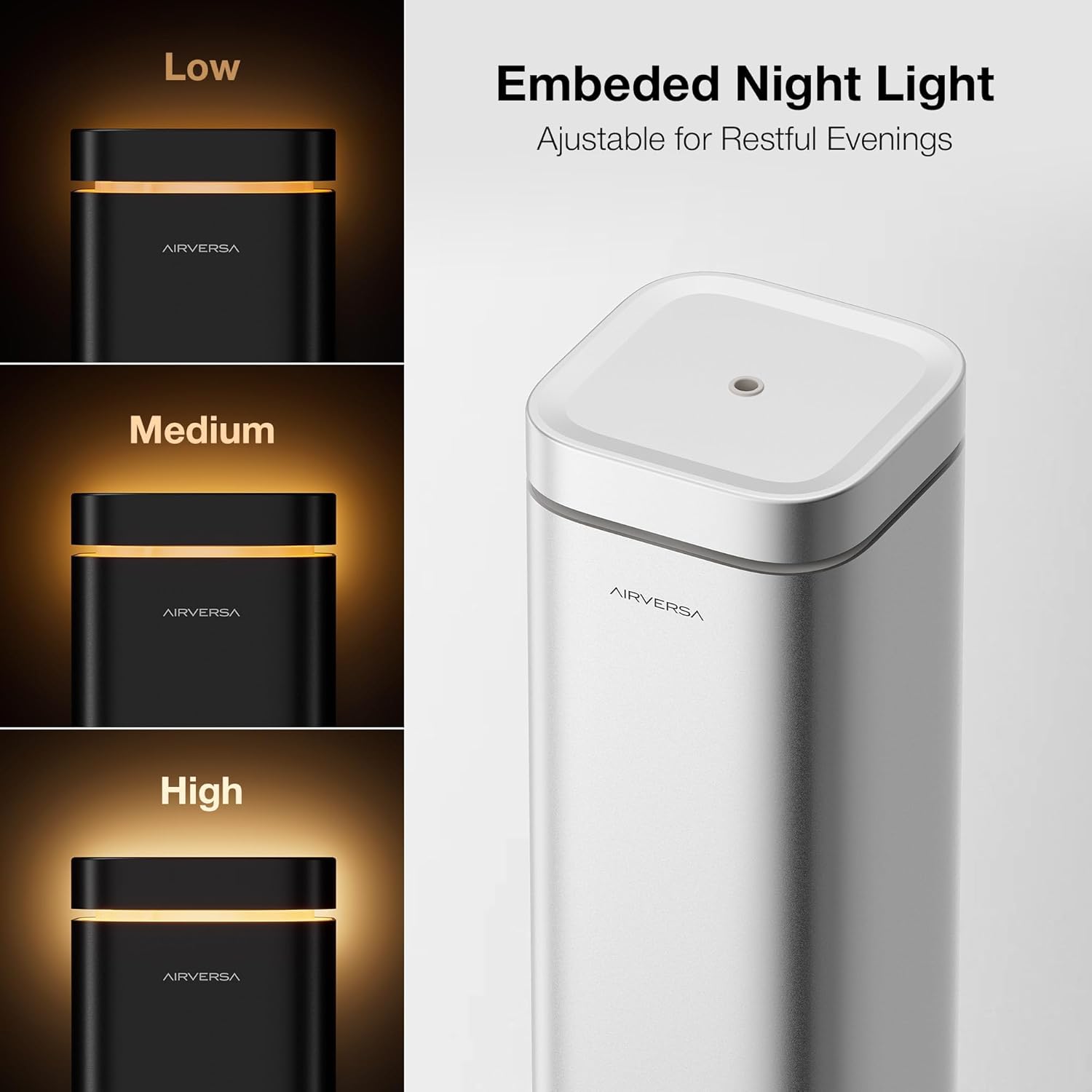
Image: The embedded night light with adjustable brightness levels (Low, Medium, High).

Image: The mistake-proof nozzle design ensuring intuitive one-way fit for oil bottles.
3. ప్యాకేజీ విషయాలు
మీ ప్యాకేజీలో అన్ని అంశాలు ఉన్నాయని ధృవీకరించండి:
- Airversa RDX Waterless Diffuser
- Charging Cable (DC-12V/1A Power Adapter)
- వినియోగదారు మాన్యువల్ (ఈ పత్రం)
4. సెటప్
4.1 ప్రారంభ నియామకం
Place the diffuser on a flat, stable surface in the desired area. Ensure it is away from direct sunlight, heat sources, and out of reach of children and pets.
4.2 ఆయిల్ రిజర్వాయర్ నింపడం
- Gently lift the nozzle assembly out of the top of the diffuser.
- Unscrew the cap from your essential or fragrance oil bottle. Carefully pour the oil into the diffuser's reservoir. Do not overfill.
- Align the nozzle assembly with the opening and push it back into place. The design ensures a one-way fit.

Image: Lift the nozzle out of the device.

Image: Fill the reservoir with your chosen oil.

Image: Push the nozzle back into place (One-way Fit).
4.3 పవర్ కనెక్షన్
Connect the provided charging cable to the diffuser and plug the adapter into a standard electrical outlet.
4.4 యాప్ డౌన్లోడ్ మరియు జత చేయడం
- డౌన్లోడ్ చేయండి Sleekpoint App from the Apple App Store (iOS) or Google Play Store (Android OS).
- మీ స్మార్ట్ఫోన్లో బ్లూటూత్ని ప్రారంభించండి.
- Open the Sleekpoint App and follow the on-screen instructions to pair with your Airversa RDX diffuser. The app will guide you through the connection process.
Video: A demonstration of setting up and controlling the Airversa RDX Smart Scent Diffuser using the mobile application.
5. ఆపరేషన్
5.1 పవర్ చేయడం ఆన్/ఆఫ్
- పవర్ ఆన్ చేయడానికి: Tap the Power Button (bottom button) on the diffuser's control panel.
- పవర్ ఆఫ్ చేయడానికి: Press and hold the Power Button for a few seconds.
5.2 కంట్రోల్ ప్యానెల్ ఉపయోగించడం
The diffuser features an intuitive touch control panel:
- విజువల్ కౌంట్డౌన్: The circular display shows a real-time countdown for diffusion and pause intervals.
- రాత్రి కాంతి బటన్: Tap to adjust the brightness of the ambient night light. Press and hold to turn it off.
- బ్లూటూత్ సూచిక: Shows the connection status with the Sleekpoint App.
చిత్రం: వివరణాత్మకం view of the diffuser's control panel with touch buttons and visual indicators.
5.3 యాప్ నియంత్రణ ఫీచర్లు
Once paired, the Sleekpoint App provides comprehensive control:
- షెడ్యూల్ చేయడం: Set up to 5 different schedules with specific diffusion and pause intervals. Toggle schedules on or off with a single tap.
- అనుకూలీకరణ: Adjust diffusion duration and pause intervals to match your room size and desired scent intensity.
- Oil Calculator: Simulate oil consumption and duration based on your settings.
- Refill Reminders: Set automated reminders to ensure continuous scenting.
Image: Seamless App Control via Bluetooth, showing the Sleekpoint App interface.
5.4 రాత్రి కాంతి ఆపరేషన్
The integrated night light can be adjusted via the control panel or the Sleekpoint App. Tap the Night Light button to cycle through brightness levels (Low, Medium, High) or press and hold to turn it off.
Image: The embedded night light with adjustable brightness levels.
6. నిర్వహణ
6.1 శుభ్రపరచడం
Regular cleaning helps maintain optimal performance. Unplug the diffuser before cleaning.
- ఒక మృదువైన, d తో బాహ్య తుడవడంamp గుడ్డ.
- To clean the nozzle and oil reservoir, remove the nozzle assembly. Empty any remaining oil. You may use a small amount of rubbing alcohol on a cotton swab to gently clean the nozzle and the inside of the reservoir. Allow to air dry completely before reassembling.
- రాపిడి క్లీనర్లు లేదా కఠినమైన రసాయనాలను ఉపయోగించవద్దు.
6.2 Oil Replacement
When the oil level is low, follow the steps in Section 4.2 to refill the reservoir. The Airversa RDX is compatible with most essential and fragrance oils on the market.

Image: The diffuser is compatible with most essential and fragrance oils.
7. ట్రబుల్షూటింగ్
If you encounter issues with your Airversa RDX diffuser, refer to the following common problems and solutions:
| సమస్య | సాధ్యమైన కారణం | పరిష్కారం |
|---|---|---|
| No mist is being diffused. | Oil reservoir is empty. ముక్కు మూసుకుపోయింది. పరికరం పవర్ ఆన్ చేయబడలేదు. | Refill the oil reservoir. Clean the nozzle as per Section 6.1. పరికరం ప్లగిన్ చేయబడిందని మరియు పవర్ ఆన్ చేయబడిందని నిర్ధారించుకోండి. |
| App cannot connect to the diffuser. | ఫోన్లో బ్లూటూత్ ఆఫ్లో ఉంది. Diffuser is out of range. యాప్ను పునఃప్రారంభించాలి. | బ్లూటూత్ ప్రారంభించబడిందని నిర్ధారించుకోండి. Move closer to the diffuser (within 20 feet). Close and reopen the Sleekpoint App. |
| Scent is too weak/strong. | Diffusion intervals need adjustment. | Adjust diffusion duration and pause intervals via the Sleekpoint App to suit your preference. |
If the problem persists after trying these solutions, please contact Airversa customer support.
8. స్పెసిఫికేషన్లు
| ఫీచర్ | వివరాలు |
|---|---|
| బ్రాండ్ | Airversa |
| మోడల్ పేరు | RDX |
| కెపాసిటీ | 300 Milliliters (10 fl oz) |
| కవరేజ్ ఏరియా | 1500 చదరపు అడుగుల వరకు |
| పవర్ ఇన్పుట్ | DC-12V / 1A |
| నియంత్రణ పద్ధతి | Sleekpoint App (Bluetooth), Touch Buttons |
| మెటీరియల్ | అల్యూమినియం |
| కొలతలు (L x W x H) | 4.4"లీ x 4.4"వా x 12.4"హ |
| ఆటోమేటిక్ షటాఫ్ | అవును |
| స్మార్ట్ హోమ్ అనుకూలత | Smart Home Compatible |
9. వారంటీ మరియు మద్దతు
Airversa products are manufactured to high-quality standards and come with a limited warranty. For detailed warranty information, product support, or to purchase accessories, please visit the official Airversa store or contact our customer service team.
Airversa Store: Visit the Airversa Store on Amazon