
పరిచయం
This manual provides essential information for setting up, operating, maintaining, and troubleshooting your new vivo V70 FE 5G smartphone. Please read this guide thoroughly to ensure optimal performance and longevity of your device. Keep this manual for future reference.
1. సెటప్
1.1 అన్బాక్సింగ్ మరియు ప్రారంభ తనిఖీ
Upon opening the package, verify that all components are present and undamaged. The box contents typically include:
- vivo V70 FE 5G Smartphone
- USB కేబుల్
- SIM ట్రే ఎజెక్టర్
- ఫోన్ కేసు
- పవర్ అడాప్టర్
- Screen Protector (pre-applied or in-box)
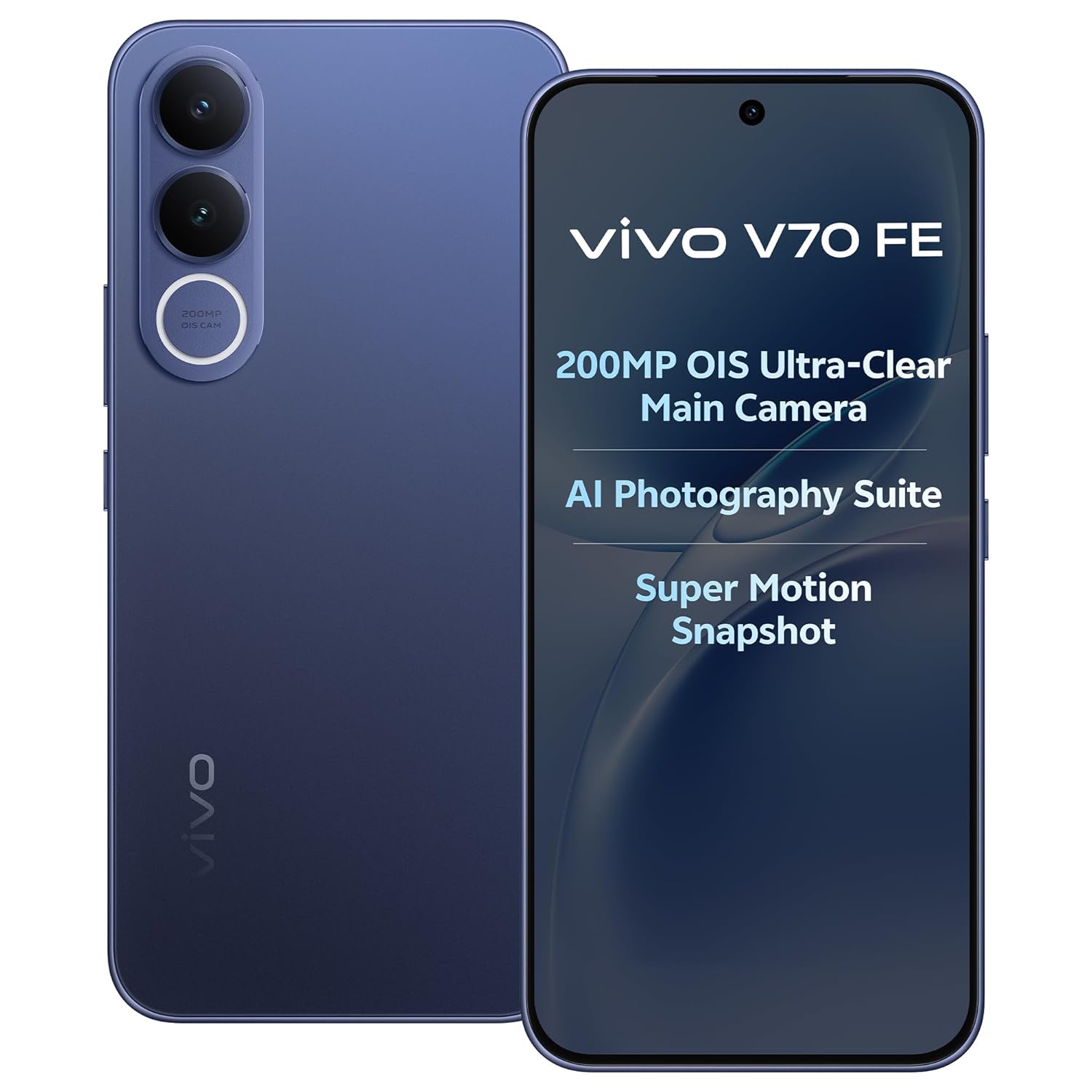
Image: The vivo V70 FE 5G smartphone in Monsoon Blue, showcasing దాని డిజైన్.
1.2 SIM కార్డ్ ఇన్స్టాలేషన్
- మీ పరికరం వైపున SIM కార్డ్ ట్రేని గుర్తించండి.
- ట్రే పక్కన ఉన్న చిన్న రంధ్రంలోకి సిమ్ ట్రే ఎజెక్టర్ సాధనాన్ని చొప్పించి, ట్రే బయటకు వచ్చే వరకు సున్నితంగా నొక్కండి.
- Place your Nano-SIM card(s) into the designated slots on the tray. This device supports Dual SIM functionality.
- ఫోన్లో సిమ్ ట్రేని జాగ్రత్తగా తిరిగి చొప్పించండి.
1.3 ప్రారంభ ఛార్జింగ్ మరియు పవర్ ఆన్
Before first use, it is recommended to fully charge your device. Connect the provided USB cable to the phone's USB Type-C port and the power adapter, then plug it into a power outlet. The device supports 90W FlashCharge for rapid charging of its 7000mAh battery.
To power on, press and hold the Power button located on the side of the phone until the vivo logo appears. Follow the on-screen instructions to complete the initial setup wizard, including language selection, Wi-Fi connection, and Google account setup.
2. మీ పరికరాన్ని ఆపరేట్ చేయడం
2.1 పరికరం ముగిసిందిview మరియు డిజైన్
The vivo V70 FE 5G features a minimalist design, crafted for a slim and clean aesthetic.

Image: The minimalist design of the vivo V70 FE 5G, emphasizing its sleek profile.
2.2 డిస్ప్లే మరియు యూజర్ ఇంటర్ఫేస్
Your device is equipped with a 17.35 cm (6.83-inch) 1.5K Ultra Clear AMOLED Display, offering a resolution of 2800 x 1260 pixels, a 120Hz refresh rate, and HDR10+ support for vibrant visuals and smooth scrolling.

Image: The 1.5K Ultra Clear OLED Display of the vivo V70 FE 5G, highlighting its key display specifications.
The phone runs on OriginOS 6, providing a user-friendly interface with features like Drag & Go for easy file management, One Tap Transfer for quick data migration, and vivo Office Kit for productivity.

Image: OriginOS features including Drag & Go, One Tap Transfer, and vivo Office Kit.
2.3 కెమెరా విధులు
The vivo V70 FE 5G is equipped with an advanced camera system:
- వెనుక కెమెరా: 200MP OIS Ultra-Clear Main Camera + 8MP 120° Wide-Angle Camera
- సెల్ఫీ కెమెరా: 50 MP HD Selfie Camera with Eye AF Group Selfie

చిత్రం: వివరణాత్మకం view of the 200MP OIS Ultra-Clear Main Camera system.
కీలక కెమెరా లక్షణాలు:
- 200MP Ultra-Clear Cropping: Capture a single high-resolution shot and crop it into multiple scenes without losing detail.

Image: Demonstration of 200MP Ultra-Clear Cropping, showing how one shot can yield multiple compositions.
- AI Magic Weather: AI adjusts the sky, light, and automatically removes unwanted objects in your photos.

చిత్రం: ఉదాamples of AI Magic Weather effects, transforming backgrounds from morning glow to twilight.
- AI Magic Landscape Mode: Enhance landscapes with AI, transforming scenes like deserts into islands or snow towns.

Image: Before and after comparisons using AI Magic Landscape Mode for various scenic transformations.
- 30X Superzoom with Telephoto Enhancement: Zoom in on distant subjects with clarity.

Image: Visual representation of 30X Superzoom, showing different levels of magnification.
- Super Motion Snapshot: Capture clear images of fast-moving subjects.

Image: Super Motion Snapshot in action, demonstrating its ability to capture clear images of moving subjects.
- 85 mm Close-Up Portrait: Achieve professional-looking portraits with various focal lengths.

చిత్రం: ఉదాamples of 85mm Close-Up Portrait mode, illustrating different portrait styles.
2.4 ఆడియో
Experience immersive sound with the Symmetrical Dual Stereo Speakers.

Image: Visual representation of the Symmetrical Dual Stereo Speaker system.
2.5 పనితీరు మరియు నిల్వ
The device is powered by a Mediatek Dimensity 7400 CPU, coupled with 8GB RAM and 128GB internal memory (UFS 3.1) for ultra-fast performance and efficient multitasking.

Image: Illustration of LPDDR5 RAM and UFS 3.1 storage for enhanced speed.
2.6 బ్యాటరీ మరియు ఛార్జింగ్
The vivo V70 FE 5G features a 7000mAh battery with 90W FlashCharge support. A full charge from 1% to 100% can be achieved in approximately 60 minutes. The battery provides up to 43.8 hours of YouTube video playback.

Image: Details on the 7000mAh battery capacity and 90W FlashCharge capabilities.
3. నిర్వహణ
3.1 మీ పరికరాన్ని శుభ్రపరచడం
To clean your phone, use a soft, lint-free cloth. Avoid using harsh chemicals, abrasive cleaners, or compressed air, as these can damage the screen or finish. For stubborn smudges, slightly dampte నీటితో వస్త్రం లేదా ఎలక్ట్రానిక్స్ కోసం ప్రత్యేకంగా రూపొందించిన స్క్రీన్ క్లీనర్.
3.2 బ్యాటరీ సంరక్షణ
To prolong battery life, avoid exposing your phone to extreme temperatures. While the 90W FlashCharge is efficient, avoid leaving the phone plugged in for extended periods after it's fully charged. For optimal battery health, try to keep the charge level between 20% and 80% when possible.
3.3 సాఫ్ట్వేర్ నవీకరణలు
Regularly check for and install software updates to ensure your device has the latest features, security patches, and performance improvements. You can usually find this option in your phone's Settings menu under 'System Update' or 'Software Update'.
3.4 నీరు మరియు ధూళి నిరోధకత
The vivo V70 FE 5G features IP68 & IP69 Top-Grade Dust and Water Resistance. This means it can withstand immersion in 1.5 meters of water for up to 120 minutes and offers 48 hours of rain resistance. However, water and dust resistance are not permanent conditions and may decrease over time with normal wear. Do not intentionally submerge the phone in water or expose it to liquids other than fresh water. Damage caused by liquid ingress is not covered under warranty.

Image: The vivo V70 FE 5G demonstrating its IP68 & IP69 dust and water resistance.
4. ట్రబుల్షూటింగ్
This section addresses common issues you might encounter with your vivo V70 FE 5G.
4.1 పరికరం ఆన్ కావడం లేదు
- బ్యాటరీ ఛార్జ్ అయ్యిందని నిర్ధారించుకోండి. ఫోన్ను ఛార్జర్కు కనెక్ట్ చేసి, దాన్ని మళ్లీ ఆన్ చేయడానికి ప్రయత్నించే ముందు కొన్ని నిమిషాలు వేచి ఉండండి.
- బలవంతంగా రీస్టార్ట్ చేయడానికి పవర్ బటన్ను కనీసం 10-15 సెకన్ల పాటు నొక్కి పట్టుకోండి.
4.2 ఛార్జింగ్ సమస్యలు
- Check if the USB cable and power adapter are securely connected to both the phone and the power outlet.
- Try using a different power outlet or a different compatible charger and cable to rule out faulty accessories.
- ఏదైనా చెత్త లేదా నష్టం కోసం ఛార్జింగ్ పోర్ట్ను తనిఖీ చేయండి.
4.3 నెట్వర్క్ కనెక్టివిటీ సమస్యలు
- మీ SIM కార్డ్ సరిగ్గా చొప్పించబడి, యాక్టివేట్ చేయబడిందని నిర్ధారించుకోండి.
- Check if Airplane Mode is disabled in your phone's Quick Settings or Settings menu.
- మీ ఫోన్ని రీస్టార్ట్ చేయండి.
- Go to Settings > Network & internet > Mobile network and ensure your preferred network type (e.g., 5G) is selected and data roaming is enabled if necessary.
4.4 App Crashes or Freezing
- Close and reopen the problematic application.
- యాప్ కాష్ మరియు డేటాను క్లియర్ చేయండి (సెట్టింగ్లు > యాప్లు > [యాప్ పేరు] > స్టోరేజ్ > కాష్ క్లియర్ చేయండి/డేటాను క్లియర్ చేయండి).
- యాప్ను Google Play Store నుండి దాని తాజా వెర్షన్కి అప్డేట్ చేశారని నిర్ధారించుకోండి.
- సమస్య కొనసాగితే, యాప్ను అన్ఇన్స్టాల్ చేసి, మళ్లీ ఇన్స్టాల్ చేయడాన్ని పరిగణించండి.
4.5 ఫ్యాక్టరీ రీసెట్
మీరు నిరంతరం సాఫ్ట్వేర్ సమస్యలను ఎదుర్కొంటుంటే, ఫ్యాక్టరీ రీసెట్ వాటిని పరిష్కరించవచ్చు. హెచ్చరిక: A factory reset will erase all data on your phone. Back up important data before proceeding.
- సెట్టింగ్లు > సిస్టమ్ > రీసెట్ ఎంపికలకు వెళ్లండి.
- 'మొత్తం డేటాను తొలగించు (ఫ్యాక్టరీ రీసెట్)' ఎంచుకోండి.
- మీ నిర్ణయాన్ని నిర్ధారించండి మరియు ప్రాంప్ట్ చేయబడితే మీ పిన్/పాస్వర్డ్ను నమోదు చేయండి.
5. స్పెసిఫికేషన్లు
| ఫీచర్ | స్పెసిఫికేషన్ |
|---|---|
| బ్రాండ్ | vivo |
| మోడల్ | V70 FE 5G |
| ఆపరేటింగ్ సిస్టమ్ | OriginOS 6 |
| RAM మెమరీ | 8 GB |
| అంతర్గత నిల్వ | 128 జిబి (యుఎఫ్ఎస్ 3.1) |
| CPU మోడల్ | మీడియాటెక్ డైమెన్సిటీ 7400 |
| ప్రదర్శన పరిమాణం | 17.35 సెం.మీ (6.83 అంగుళాలు) |
| ప్రదర్శన రకం | AMOLED |
| డిస్ప్లే రిజల్యూషన్ | 2800 x 1260 (Maximum: 1080 x 2400) |
| వెనుక కెమెరా | 200 MP (OIS Ultra-Clear Main) + 8 MP (120° Wide-Angle) |
| ఫ్రంట్ కెమెరా | 50 MP (HD Selfie) |
| బ్యాటరీ కెపాసిటీ | 7000 mAh |
| ఛార్జింగ్ | 90W ఫ్లాష్ఛార్జ్ |
| SIM కార్డ్ స్లాట్ | డ్యూయల్ సిమ్ |
| కనెక్టివిటీ | 5G, Bluetooth, Built-In GPS, USB Type C |
| నీటి నిరోధక స్థాయి | IP68 & IP69 (Not Water Resistant - see maintenance section) |
| అంశం కొలతలు | 16.4 x 7.6 x 0.8 సెంటీమీటర్లు |
| వస్తువు బరువు | 200 గ్రాములు |
| మోడల్ సంవత్సరం | 2026 |
6. వారంటీ సమాచారం
Your vivo V70 FE 5G comes with a 1-year manufacturer warranty for the device మరియు 6 months for in-box accessories, effective from the date of purchase. This warranty covers manufacturing defects under normal use. Please retain your proof of purchase for warranty claims. The warranty does not cover damage caused by misuse, accidents, unauthorized repairs, or liquid ingress.
7. మద్దతు
For further assistance, technical support, or service inquiries, please contact vivo customer support. You can find more information and contact details on the official vivo website or through the vivo store.
తయారీదారు: vivo Mobile India Pvt Ltd Plot No 08, Sector 24, Yamuna Expressway Area, Gautam Buddha Nagar, Uttar Pradesh, 201310
దిగుమతిదారు: Vivo Mobile India Pvt Ltd
ఆన్లైన్ స్టోర్: Visit the vivo Store on Amazon.in