
1. పరిచయం
The EcoVolt OUKITEL P2001E Pro is a high-capacity portable power station designed to provide reliable electricity for various applications, including home backup, outdoor adventures, and professional use. Featuring a 2048Wh LiFePO₄ battery and a 3200W AC output (6400W peak), it can power a wide range of devices and appliances. This manual provides essential information for safe and efficient operation, setup, maintenance, and troubleshooting.

Image: The OUKITEL P2001E Pro providing power in an outdoor camping సెట్టింగ్.
2. భద్రతా సూచనలు
Please read and understand all safety instructions before operating the OUKITEL P2001E Pro. Failure to follow these instructions may result in electric shock, fire, or serious injury.
- యూనిట్ను విడదీయడం, మరమ్మత్తు చేయడం లేదా సవరించడం చేయవద్దు.
- యూనిట్ను ఉష్ణ వనరులు, ప్రత్యక్ష సూర్యకాంతి మరియు మండే పదార్థాల నుండి దూరంగా ఉంచండి.
- యూనిట్ను నీరు లేదా ఇతర ద్రవాలకు బహిర్గతం చేయవద్దు.
- ఉపయోగం మరియు ఛార్జింగ్ సమయంలో సరైన వెంటిలేషన్ ఉండేలా చూసుకోండి.
- పిల్లలు మరియు పెంపుడు జంతువులకు దూరంగా ఉంచండి.
- ఒరిజినల్ లేదా సర్టిఫైడ్ ఛార్జింగ్ కేబుల్స్ మరియు యాక్సెసరీలను మాత్రమే ఉపయోగించండి.
- అగ్ని విషయంలో, డ్రై పౌడర్ మంటలను ఆర్పే యంత్రాన్ని ఉపయోగించండి.
3. ప్యాకేజీ విషయాలు
క్రింద జాబితా చేయబడిన అన్ని అంశాలు మీ ప్యాకేజీలో చేర్చబడ్డాయని ధృవీకరించండి. ఏవైనా అంశాలు తప్పిపోయినా లేదా దెబ్బతిన్నా, దయచేసి కస్టమర్ మద్దతును సంప్రదించండి.
- OUKITEL P2001E Pro Portable Power Station
- 1 x AC ఛార్జింగ్ కేబుల్
- 1 x సోలార్ ఛార్జింగ్ కేబుల్ (MC4 నుండి XT90 వరకు)
- 1 x వినియోగదారు మాన్యువల్
గమనిక: The solar panel (if purchased) and the power station are shipped separately. Please await the arrival of both packages.

Image: OUKITEL P2001E Pro and its accessories.
4. ఉత్పత్తి ముగిసిందిview
The OUKITEL P2001E Pro features a comprehensive array of input and output ports to meet diverse power needs. Familiarize yourself with the layout and functions of each component.

చిత్రం: పైగాview of the 13 output ports.
ముందు ప్యానెల్
- LCD డిస్ప్లే: బ్యాటరీ స్థాయి, ఇన్పుట్/అవుట్పుట్ పవర్ మరియు స్థితి సూచికలను చూపుతుంది.
- పవర్ బటన్: యూనిట్ని ఆన్/ఆఫ్ చేస్తుంది.
- DC అవుట్పుట్ పోర్ట్లు: 12V/10A car port, 12V/3A DC5521 ports.
- USB అవుట్పుట్ పోర్ట్లు: USB-A (QC3.0 18W), USB-C (PD 100W, PD 20W).
- AC అవుట్పుట్ పోర్ట్లు: 4 x 220-240V AC outlets (Pure Sine Wave).
వెనుక ప్యానెల్
- AC ఇన్పుట్ పోర్ట్: For charging via grid power.
- XT60 ఇన్పుట్ పోర్ట్: For solar panel charging.
- ఓవర్లోడ్ రక్షణ బటన్: Resets the system in case of overload.
Video: An unboxing and initial demonstration of the OUKITEL P2001E Pro, showing its components and basic operation.
5. సెటప్
Before first use, ensure the power station is fully charged. Place the unit on a stable, flat surface with adequate ventilation.
- అన్ప్యాక్: ప్యాకేజింగ్ నుండి పవర్ స్టేషన్ మరియు అన్ని ఉపకరణాలను జాగ్రత్తగా తొలగించండి.
- ప్రారంభ ఛార్జ్: Connect the power station to an AC outlet using the provided AC charging cable. Allow it to charge completely before first use.
- పవర్ ఆన్: Press and hold the main Power Button for a few seconds until the LCD display illuminates.
6. పవర్ స్టేషన్ ఛార్జింగ్
The OUKITEL P2001E Pro offers multiple charging options for flexibility.
ఎసి ఛార్జింగ్
- Connect the AC charging cable to the AC input port on the rear of the unit and then to a wall outlet.
- The unit can charge to 80% in approximately 55 minutes and fully charge in about 2 hours.
- The charging speed can be adjusted via the knob on the front panel (400W/800W/1200W/1800W) or through the mobile app.

Image: Super-fast AC charging capability.
సోలార్ ఛార్జింగ్
- Connect compatible solar panels (up to 500W) to the XT60 input port using the provided solar charging cable.
- Charging time varies depending on sunlight intensity and solar panel wattage.
కారు ఛార్జింగ్
- Connect the car charging cable (not included, but compatible with the DC input) to your vehicle's 12V/24V outlet.
Dual Charging (AC + Solar)
- Combine AC (1800W) and solar (500W) inputs for the fastest charging, achieving a full charge in approximately 1.2 hours.

Image: Multiple fast charging options.
7. విద్యుత్ కేంద్రాన్ని నిర్వహించడం
The OUKITEL P2001E Pro can power up to 13 devices simultaneously through its various output ports.
Using AC Outputs
- Press the AC Power Button to activate the AC outlets.
- Plug your devices into the AC outlets. The unit provides a rated output of 3200W (6400W peak).
- The LCD display will show the current AC output wattage.

Image: High power output for various appliances.
Using DC and USB Outputs
- Press the DC Power Button to activate the DC and USB ports.
- Connect your USB-powered devices to the USB-A or USB-C ports.
- Connect 12V devices to the car port or DC5521 ports.
UPS Function (Uninterruptible Power Supply)
- When connected to AC power, the P2001E Pro can act as an UPS. In the event of a power outage, it automatically switches to battery power within 0.01 seconds.
- This feature ensures continuous operation for sensitive electronics like computers, preventing data loss.

Image: UPS protection for continuous power.
8. స్మార్ట్ యాప్ కంట్రోల్
Manage and monitor your OUKITEL P2001E Pro remotely using the dedicated mobile app.
- అనువర్తనాన్ని డౌన్లోడ్ చేయండి: కోసం వెతకండి the "OUKITEL Power" app on your smartphone's app store.
- కనెక్ట్ చేయండి: Enable Bluetooth or Wi-Fi on your phone and follow the in-app instructions to connect to your power station.
- ఫీచర్లు: The app allows you to monitor battery status, adjust charging speed (AC and solar input), and control power output settings.

Image: Smart app for complete power control.
9. నిర్వహణ
సరైన నిర్వహణ మీ పవర్ స్టేషన్ యొక్క దీర్ఘాయువు మరియు సరైన పనితీరును నిర్ధారిస్తుంది.
- శుభ్రపరచడం: పొడి, మృదువైన గుడ్డతో యూనిట్ను తుడవండి. రాపిడి క్లీనర్లు లేదా ద్రావకాలను ఉపయోగించవద్దు.
- నిల్వ: Store the unit in a cool, dry place, away from direct sunlight and extreme temperatures. For long-term storage, charge the battery to 50-80% every 3-6 months.
- బ్యాటరీ సంరక్షణ: The LiFePO₄ battery is designed for over 3500 charge cycles, offering a lifespan of over 15 years. An integrated BMS (Battery Management System) protects against overvoltagఇ మరియు ఓవర్ కరెంట్.

Image: Long-lasting LiFePO₄ battery with BMS protection.
10. ట్రబుల్షూటింగ్
If you encounter issues with your OUKITEL P2001E Pro, refer to the following common problems and solutions:
- యూనిట్ ఆన్ చేయడం లేదు: Ensure the battery is charged. Press and hold the Power Button for a few seconds.
- No Output from AC/DC/USB Ports: Ensure the respective output buttons (AC/DC) are pressed to activate the ports. Check if the device connected is within the power station's output limits.
- ఓవర్లోడ్ సూచన: If an overload warning appears, disconnect some devices and press the Overload Protection Button on the rear panel to reset.
- నెమ్మదిగా ఛార్జింగ్: Verify that the charging speed adjustment knob is set to the desired wattage. Ensure solar panels are clean and receiving direct sunlight.
- యాప్ కనెక్టివిటీ సమస్యలు: Ensure Bluetooth/Wi-Fi is enabled on your phone and the power station. Restart both devices and try reconnecting.
నిరంతర సమస్యల కోసం, దయచేసి కస్టమర్ మద్దతును సంప్రదించండి.
11. స్పెసిఫికేషన్లు
| ఫీచర్ | స్పెసిఫికేషన్ |
|---|---|
| బ్రాండ్ | ఎకో వోల్ట్ |
| మోడల్ పేరు | P2001E Pro |
| బ్యాటరీ రకం | LiFePO₄ (లిథియం ఐరన్ ఫాస్ఫేట్) |
| కెపాసిటీ | 2048 Wh |
| AC అవుట్పుట్ పవర్ | 3200 W (Rated), 6400 W (Peak) |
| వాల్యూమ్tage | 230 వోల్ట్లు |
| AC ఇన్పుట్ పవర్ | 1800 W (గరిష్టంగా) |
| Solar Input (PV) | 12-60V, 1000W గరిష్టం |
| ఛార్జింగ్ సమయం (AC) | దాదాపు 2 గంటలు (పూర్తి ఛార్జ్) |
| ఛార్జింగ్ సమయం (AC + సోలార్) | దాదాపు 1.2 గంటలు (పూర్తి ఛార్జ్) |
| శబ్దం స్థాయి | 30 డిబి |
| AC అవుట్లెట్ల సంఖ్య | 4 |
| USB-C పోర్ట్లు | 4 (PD 100W, PD 20W) |
| USB-A పోర్ట్లు | 2 (QC3.0 18W) |
| DC అవుట్పుట్ పోర్ట్లు | 2 x DC5521 (12V/3A), 1 x Car Port (12V/10A) |
| UPS మారే సమయం | < 0.01 సెకన్లు |
| కొలతలు (L x W x H) | 39.9L x 28.6W x 32H సెం.మీ |
| బరువు | 22 కిలోలు |
| ప్రత్యేక లక్షణాలు | Extra-long autonomy, Digital display, Portable, Overload protection, Super quiet |
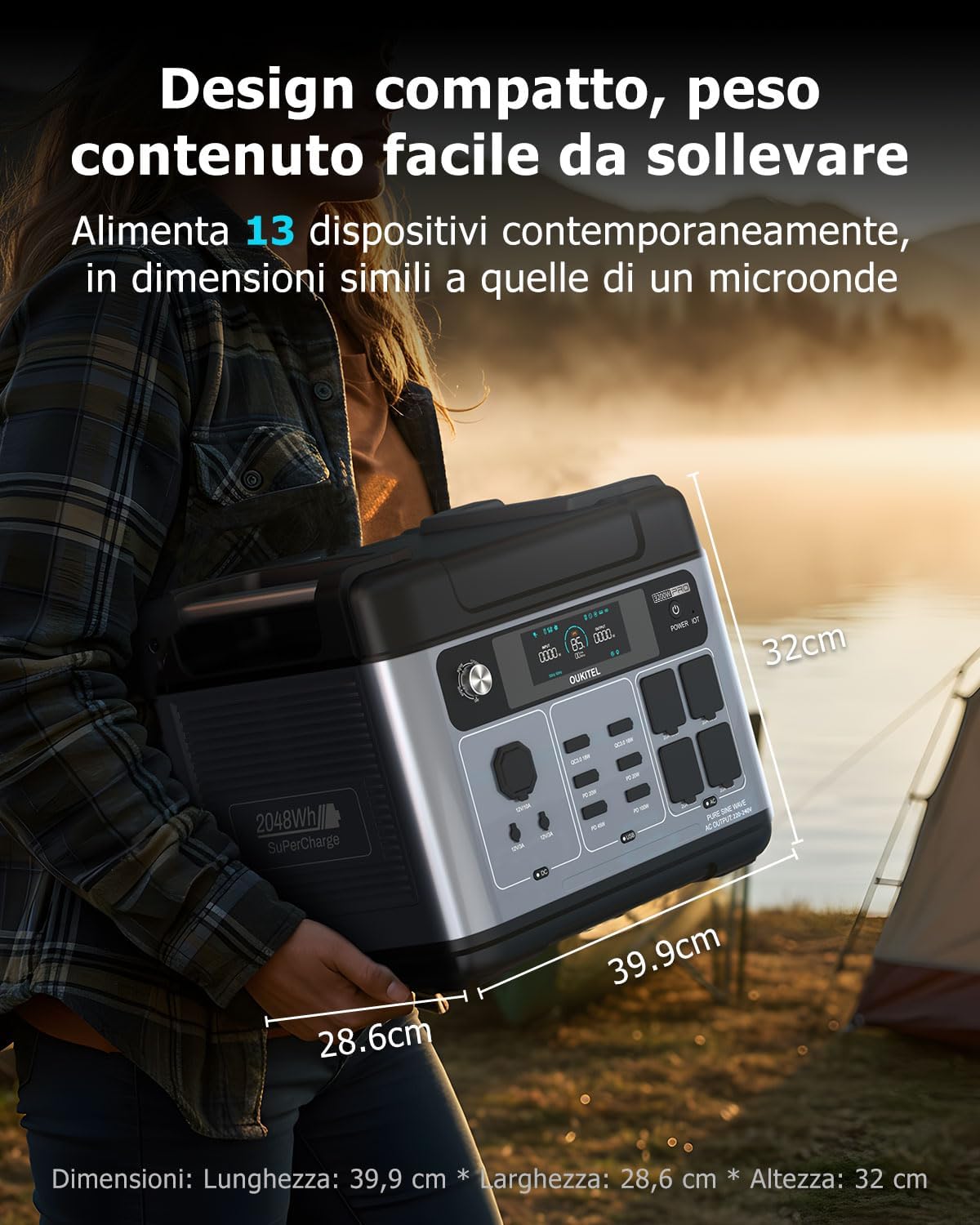
చిత్రం: ఉత్పత్తి కొలతలు.
12. వారంటీ మరియు మద్దతు
The OUKITEL P2001E Pro is built for durability and comes with comprehensive support.
- వారంటీ: The product includes a 5-year manufacturer's warranty.
- బ్యాటరీ జీవితకాలం: The integrated LiFePO₄ battery is designed for over 3500 charge cycles, providing an estimated lifespan of over 15 years.
- కస్టమర్ మద్దతు: A local service center is available in Germany. Our support team aims to respond within 8 hours, offering fast, professional, and reliable assistance.
For warranty claims or technical assistance, please refer to the contact information provided in your warranty card or visit the official EcoVolt webసైట్.