
1. పరిచయం
This manual provides detailed instructions for the Eyoyo 2D Barcode Scanner Bundle, which includes the EY-015P Mini Portable Barcode Scanner and a Back Clip 2D Barcode Scanner. Please read this manual carefully before using the devices to ensure proper operation and to maximize their lifespan.
2. EY-015P Mini Portable Scanner Overview
The Eyoyo EY-015P is a compact and lightweight 2D barcode scanner designed for portability and ease of use. It supports multiple connection modes and is compatible with various operating systems.
2.1 ముఖ్య లక్షణాలు
- Mini & Lightweight Design: Weighs approximately 30g (1.06 ounces) with dimensions of 85mm x 30mm x 20mm.
- మూడు కనెక్షన్ మోడ్లు: Supports Bluetooth, 2.4G Wireless, and USB Wired connections.
- Versatile Decoding: Capable of scanning most 1D, 2D, and QR barcodes from both paper and digital screens.
- విస్తృత అనుకూలత: Works with Windows XP/7/8/10, MacOS, Linux, and Windows Mobile, as well as mobile phones, tablets, POS systems, and laptops.
- కాన్ఫిగర్ చేయగల సెట్టింగ్లు: Offers instant upload mode, storage mode, sound/vibration toggle, custom prefixes/suffixes, character deletion, and keyboard hotkey combinations (e.g., TAB, CR&LF, Home).

Image: The Eyoyo EY-015P scanner, highlighting its mini size (85mm length, 30mm width, 20mm thickness) and light weight (32g/1.13oz). It is shown held in a hand and fitting into a pocket.
3. EY-015P Setup and Connection
3.1 స్కానర్ను ఛార్జ్ చేయడం
Before initial use, fully charge the EY-015P scanner. A full charge allows for approximately 10,000 scans. Connect the scanner to a USB power source using the provided USB cable.
3.2 కనెక్షన్ మోడ్లు
The EY-015P supports three distinct connection methods:

Image: A visual representation of the three connection options: Bluetooth (wireless to phone/tablet/laptop), 2.4G Wireless (via USB dongle to laptop/desktop), and USB Wired (direct cable connection to laptop/desktop).
- బ్లూటూత్ వైర్లెస్ కనెక్షన్:
- స్కానర్ను ఆన్ చేయండి.
- Activate Bluetooth on your host device (e.g., smartphone, tablet, laptop).
- కోసం వెతకండి available Bluetooth devices and select the Eyoyo scanner.
- Pair the devices. The scanner will indicate a successful connection.
The Bluetooth mode offers a transmission distance of up to 50 meters (164 feet) in an unobstructed environment and 20 meters (66 feet) with obstacles.
- 2.4G వైర్లెస్ కనెక్షన్:
- మీ కంప్యూటర్లో అందుబాటులో ఉన్న USB పోర్ట్లోకి 2.4G USB డాంగిల్ను ప్లగ్ చేయండి.
- స్కానర్ను ఆన్ చేయండి. ఇది స్వయంచాలకంగా డాంగిల్కి కనెక్ట్ కావాలి.
The 2.4G wireless mode provides a transmission distance of up to 30 meters (98 feet) in an unobstructed environment and 15 meters (49 feet) with obstacles.
- USB వైర్డు కనెక్షన్:
- Connect the scanner directly to your computer's USB port using the provided USB cable.
- The scanner will function as a plug-and-play device, requiring no additional drivers.

Image: Illustration of the wireless transmission ranges. 2.4G Wireless mode reaches 30m/98ft unobstructed and 15m/49ft with obstacles. Bluetooth mode reaches 50m/164ft unobstructed and 20m/66ft with obstacles.
4. EY-015P Operating Instructions
4.1 బార్కోడ్లను స్కాన్ చేయడం
To scan a barcode, point the scanner's window at the barcode and press the scan button. The scanner will emit a light beam to read the code. A successful scan is typically indicated by a beep or vibration (if enabled).

Image: The scanner is shown reading various barcode types including QR Code, Data Matrix, Maxicode, Aztec code, Hanxin, UPC/EAN, and PDF417. It demonstrates the scanner's ability to read codes from both paper and digital screens.

Image: This image further illustrates the scanner's robust decoding capabilities, showing it can easily scan various 1D and 2D barcodes, including those that are damaged, distorted, colorful, fuzzy, or reflective, from both paper and screen.
4.2 Scan Button Design
The EY-015P features a versatile scan button design, allowing comfortable operation with either the left or right hand.
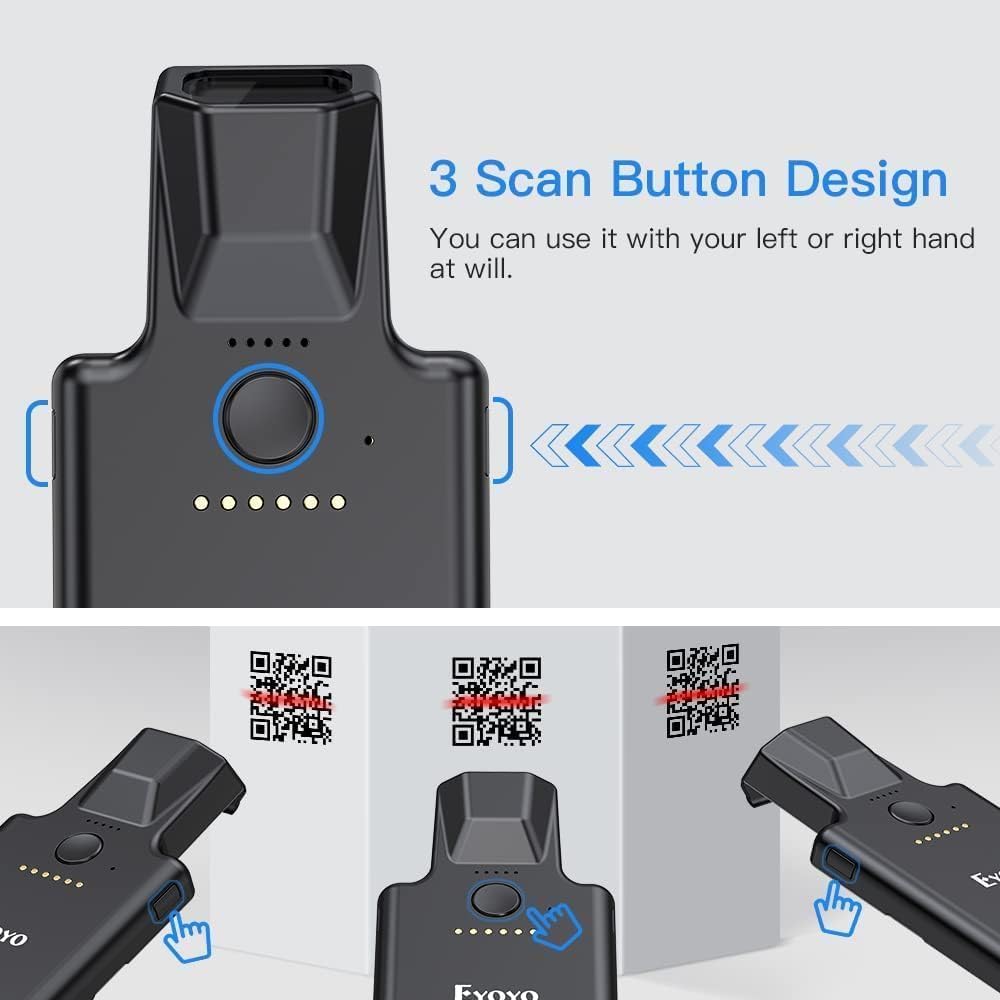
చిత్రం: పై నుండి క్రిందికి view of the scanner highlighting its main scan button and indicating that it can be operated with either the left or right hand, suggesting an ergonomic design.
4.3 కాన్ఫిగరేషన్ ఎంపికలు
The scanner offers multiple configuration options, typically set by scanning specific setup barcodes found in a separate configuration guide (not included in this manual). These options include:
- తక్షణ అప్లోడ్ మోడ్: Scanned data is immediately transmitted to the connected device.
- నిల్వ మోడ్: Scanned data is stored in the scanner's internal memory and can be uploaded later.
- Sound/Vibration Toggle: Enable or disable audible beeps and tactile vibrations for scan feedback.
- Custom Prefixes/Suffixes: Add specific characters before or after scanned data.
- Character Deletion: Remove unwanted characters from scanned data.
- కీబోర్డ్ హాట్కీలు: Add keyboard functions like TAB, CR&LF (Carriage Return & Line Feed), or Home to the end of scanned data for automated input.
5. Back Clip 2D Scanner Overview
The bundle also includes a Back Clip 2D Scanner, designed to attach to a smartphone, enhancing its barcode scanning capabilities. This scanner features robust construction and advanced scanning technology.

Image: A comparison of the newly upgraded Eyoyo Back Clip 2D Scanner (New Version) with an older version. The new version is described as having more powerful scanning technology and being stronger and less prone to damage. It is presented as an ideal partner for phones.
5.1 ముఖ్య లక్షణాలు
- మెరుగైన స్కానింగ్ టెక్నాలజీ: Provides efficient and accurate 2D barcode decoding.
- మన్నికైన నిర్మాణం: Designed to be robust and resistant to damage.
- స్మార్ట్ఫోన్ ఇంటిగ్రేషన్: Attaches to a smartphone to create a mobile scanning solution.
5.2 Setup and Operation
To use the Back Clip 2D Scanner, attach it securely to your smartphone. It typically connects via Bluetooth to your phone. Refer to the specific instructions provided with the Back Clip Scanner for detailed pairing and operation procedures, as these may vary.
6. నిర్వహణ
6.1 శుభ్రపరచడం
To clean the scanner, use a soft, dry, lint-free cloth. For stubborn dirt, slightly dampen the cloth with water or a mild, non-abrasive cleaner. Do not use harsh chemicals or abrasive materials, as these can damage the scanner's surface or optical components.
6.2 బ్యాటరీ సంరక్షణ
- బ్యాటరీని తరచుగా పూర్తిగా డిశ్చార్జ్ చేయడాన్ని నివారించండి.
- If storing the scanner for an extended period, ensure it is charged to approximately 50% and store it in a cool, dry place.
- Use only the provided charging cable or a compatible USB charger.
7. ట్రబుల్షూటింగ్
7.1 స్కానర్ కనెక్ట్ కావడం లేదు
- శక్తిని తనిఖీ చేయండి: Ensure the scanner is turned on and has sufficient battery charge.
- ధృవీకరణ మోడ్: Confirm the scanner is in the correct connection mode (Bluetooth, 2.4G, or USB) for your setup.
- తిరిగి జత చేయండి/తిరిగి కనెక్ట్ చేయండి: For Bluetooth, try unpairing and re-pairing the device. For 2.4G, ensure the dongle is securely plugged in. For USB, try a different USB port or cable.
- దూరం: Ensure the scanner is within the effective range of the host device.
7.2 స్కానర్ బార్కోడ్లను చదవడం లేదు
- బార్కోడ్ రకం: Ensure the barcode type is supported by the scanner (1D, 2D, QR).
- బార్కోడ్ నాణ్యత: Check if the barcode is damaged, smudged, or poorly printed.
- లైటింగ్: Ensure adequate lighting. Avoid direct glare or very dim conditions.
- దూరం/కోణం: స్కానర్ మరియు బార్కోడ్ మధ్య దూరం మరియు కోణాన్ని సర్దుబాటు చేయండి.
- స్క్రీన్ ప్రకాశం: If scanning from a screen, increase the screen's brightness.
7.3 డేటా ట్రాన్స్మిషన్ సమస్యలు
- Software Focus: Ensure the cursor is in the correct input field on your host device.
- మోడ్ సెట్టింగ్: If data is not appearing, check if the scanner is in storage mode instead of instant upload mode.
8. స్పెసిఫికేషన్లు
| ఫీచర్ | EY-015P Mini Portable Scanner | Back Clip 2D Scanner |
|---|---|---|
| మోడల్ | EY-015P | Not specified (Bundled Item) |
| కొలతలు (L x W x H) | 85mm x 30mm x 20mm (3.35in x 1.18in x 0.79in) | పేర్కొనబడలేదు |
| బరువు | సుమారు 30గ్రా (1.06 oz) | పేర్కొనబడలేదు |
| కనెక్టివిటీ | బ్లూటూత్, 2.4G వైర్లెస్, USB వైర్డ్ | Bluetooth (typically) |
| Wireless Range (Unobstructed) | Bluetooth: 50m (164ft) 2.4G: 30m (98ft) | పేర్కొనబడలేదు |
| Wireless Range (With Obstacles) | Bluetooth: 20m (66ft) 2.4G: 15m (49ft) | పేర్కొనబడలేదు |
| బార్కోడ్ రకాలు మద్దతు ఇవ్వబడ్డాయి | 1D, 2D, QR (QR Code, Data Matrix, Maxicode, Aztec code, Hanxin, UPC/EAN, PDF417) | 1D, 2D (as per product title) |
| Battery Life (EY-015P) | Approx. 10,000 scans per full charge | పేర్కొనబడలేదు |
| ఆపరేటింగ్ సిస్టమ్ అనుకూలత | Windows XP/7/8/10, MacOS, Linux, Windows Mobile | Smartphone OS (iOS, Android typically) |
9. వారంటీ మరియు మద్దతు
For warranty information and technical support, please refer to the documentation included with your purchase or contact the seller/manufacturer directly. Keep your proof of purchase for warranty claims.