
పరిచయం
Thank you for choosing the GOBOULT Y1 v2.0 Wireless Earbuds. This manual provides essential information for setting up, operating, and maintaining your earbuds to ensure optimal performance and longevity. Please read it carefully before use.
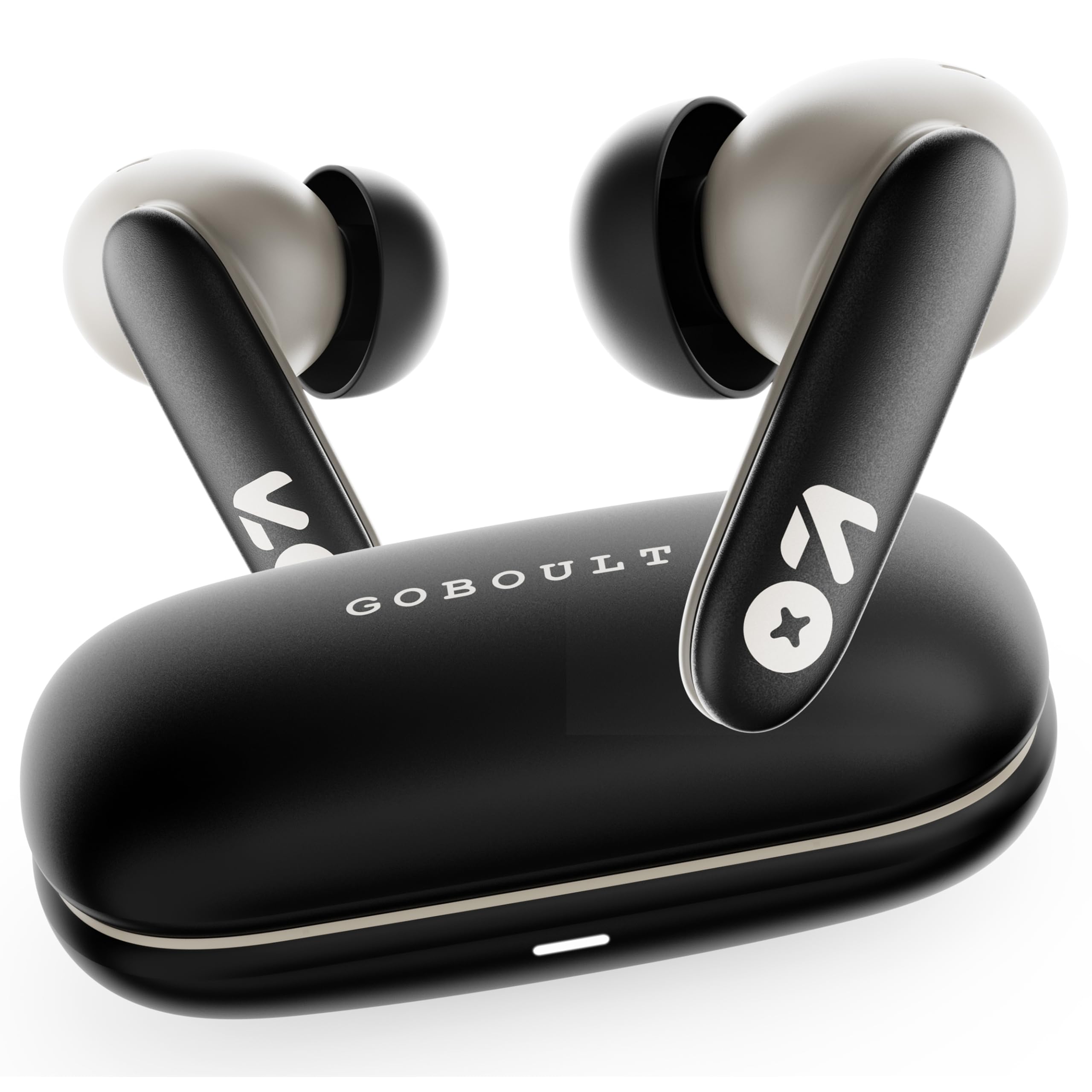
Image: GOBOULT Y1 v2.0 Wireless Earbuds and their charging case, showcasing సొగసైన డిజైన్.
పెట్టెలో ఏముంది
- GOBOULT Y1 v2.0 Wireless Earbuds
- ఛార్జింగ్ కేసు
- USB టైప్-సి ఛార్జింగ్ కేబుల్
- చెవి కుషన్లు (వివిధ పరిమాణాలు)
- వినియోగదారు మాన్యువల్
- వారంటీ కార్డ్
ఉత్పత్తి లక్షణాలు
The GOBOULT Y1 v2.0 earbuds are designed with advanced features for an enhanced audio experience:
- పొడిగించిన ప్లేటైమ్: ఛార్జింగ్ కేస్ తో మొత్తం ప్లేటైమ్ 60 గంటల వరకు.
- బ్లూటూత్ 6.0: Ensures fast, stable, and efficient wireless connectivity.
- Zen Quad Mic ENC: Environmental Noise Cancellation with four microphones for clear calls.
- తక్కువ జాప్యం: 45ms ultra-low latency for gaming and video synchronization.
- టచ్ కంట్రోల్: Intuitive touch sensors for managing music, calls, and voice assistant.
- ద్వంద్వ పరికర జత చేయడం: Connect and switch seamlessly between two devices.
- 13mm Bass Driver: Delivers powerful bass and clear audio.
- AMP యాప్ సపోర్ట్: Customize audio settings and controls via the dedicated application.
- IPX5 నీటి నిరోధకత: Protection against sweat and light splashes.
- ఫాస్ట్ ఛార్జింగ్: Type-C port for quick charging of the case.

చిత్రం: పైగాview of GOBOULT Y1 v2.0 features including sleek design, AMP App support, Bluetooth 6.0, 60 hours battery life, and dual device pairing.
సెటప్ గైడ్
1. ఇయర్బడ్లు మరియు కేస్ను ఛార్జ్ చేయడం
మొదటిసారి ఉపయోగించే ముందు, ఇయర్బడ్లు మరియు ఛార్జింగ్ కేసును పూర్తిగా ఛార్జ్ చేయండి.
- ఇయర్బడ్లను ఛార్జింగ్ కేసులో ఉంచండి. అవి సరిగ్గా అమర్చబడ్డాయని నిర్ధారించుకోండి.
- USB టైప్-C ఛార్జింగ్ కేబుల్ను కేస్లోని ఛార్జింగ్ పోర్ట్కు మరియు పవర్ సోర్స్కి కనెక్ట్ చేయండి.
- The LED indicator on the case will show charging status. A full charge typically takes approximately 1.5-2 hours.

Image: The GOBOULT Y1 v2.0 earbuds and charging case, highlighting the 60-hour battery life and Type-C fast charging capability.
2. Initial Pairing (Single Device)
- ఛార్జింగ్ కేస్ను తెరవండి. ఇయర్బడ్లు ఆటోమేటిక్గా జత చేసే మోడ్లోకి ప్రవేశిస్తాయి.
- మీ పరికరంలో (స్మార్ట్ఫోన్, టాబ్లెట్, మొదలైనవి), బ్లూటూత్ను ప్రారంభించండి.
- కోసం వెతకండి available Bluetooth devices and select "GOBOULT Y1 v2.0".
- కనెక్ట్ అయిన తర్వాత, మీరు నిర్ధారణ టోన్ వింటారు.
3. ద్వంద్వ పరికర జత చేయడం
The Y1 v2.0 supports connecting to two devices simultaneously.
- Pair the earbuds with your first device as described in "Initial Pairing".
- మొదటి పరికరంలో బ్లూటూత్ను నిలిపివేయండి. ఇయర్బడ్లు జత చేసే మోడ్లోకి తిరిగి ప్రవేశిస్తాయి.
- మీ రెండవ పరికరంతో ఇయర్బడ్లను జత చేయండి.
- మొదటి పరికరంలో బ్లూటూత్ను తిరిగి ప్రారంభించండి. ఇయర్బడ్లు రెండు పరికరాలకు స్వయంచాలకంగా కనెక్ట్ కావాలి.
- To switch between devices, simply play audio on the desired device.

Image: The GOBOULT Y1 v2.0 earbuds connected to both a laptop and a smartphone, illustrating the dual device pairing feature.
ఆపరేటింగ్ సూచనలు
1. టచ్ నియంత్రణలు
The earbuds feature intuitive touch controls on their stems:
| చర్య | ఫంక్షన్ |
|---|---|
| సింగిల్ ట్యాప్ (ఎడమ/కుడి) | సంగీతాన్ని ప్లే చేయండి/పాజ్ చేయండి, కాల్కు సమాధానం ఇవ్వండి/ముగించండి |
| రెండుసార్లు నొక్కండి (కుడివైపు) | తదుపరి ట్రాక్ |
| రెండుసార్లు నొక్కండి (ఎడమవైపు) | మునుపటి ట్రాక్ |
| ట్రిపుల్ ట్యాప్ (ఎడమ/కుడి) | వాయిస్ అసిస్టెంట్ని యాక్టివేట్ చేయండి |
| ఎక్కువసేపు నొక్కి ఉంచండి (ఎడమ/కుడి) | కాల్ని తిరస్కరించండి |
| (కుడివైపు) ఎక్కువసేపు నొక్కి ఉంచండి | వాల్యూమ్ అప్ |
| లాంగ్ ప్రెస్ (ఎడమ) | వాల్యూమ్ డౌన్ |

Image: Visual representation of touch controls for music playback and call management, along with the IPX5 water resistance rating.
2. వాయిస్ అసిస్టెంట్
Activate your device's voice assistant (Siri, Google Assistant) by triple-tapping either earbud. You can then issue commands like making calls or playing music.

Image: The GOBOULT Y1 v2.0 earbuds highlighting Bluetooth 6.0 for stable connection and integration with AI voice assistants like Siri and Google Assistant.
3. గేమింగ్ మోడ్ (తక్కువ జాప్యం)
For an optimized gaming experience, activate the 45ms ultra-low latency gaming mode. Refer to the AMP App or specific touch control gestures (if available) for activation.

Image: The GOBOULT Y1 v2.0 earbuds illustrating the 45ms ultra-low latency Gaming Mode.
4. AMP యాప్ మద్దతు
Download the GOBOULT AMP App to unlock advanced customization options:
- Adjust Equalizer (EQ) settings for personalized sound.
- టచ్ నియంత్రణలను అనుకూలీకరించండి.
- Access additional features like Water Ejection mode.

Image: Screenshot of the GOBOULT AMP App interface, demonstrating equalizer adjustments and other customization features.
నిర్వహణ
1. శుభ్రపరచడం
క్రమం తప్పకుండా శుభ్రపరచడం ధ్వని నాణ్యత మరియు పరిశుభ్రతను కాపాడుకోవడానికి సహాయపడుతుంది.
- ఇయర్బడ్లు మరియు ఛార్జింగ్ కేసును తుడవడానికి మృదువైన, పొడి, మెత్తటి బట్టను ఉపయోగించండి.
- Gently remove any earwax or debris from the ear tips and speaker mesh using a small brush or cotton swab.
- రాపిడి క్లీనర్లు, ఆల్కహాల్ లేదా రసాయన ద్రావకాలను ఉపయోగించవద్దు.
2. నీటి నిరోధకత (IPX5)
The GOBOULT Y1 v2.0 earbuds are rated IPX5 water resistant, meaning they are protected against low-pressure water jets from any direction. This makes them suitable for workouts and light rain.
- ఇయర్బడ్లను నీటిలో ముంచవద్దు.
- ఛార్జింగ్ కేసు నీటి నిరోధకత కాదు.
- ఇయర్బడ్లు దెబ్బతినకుండా ఉండటానికి వాటిని తిరిగి ఛార్జింగ్ కేసులో ఉంచే ముందు అవి పొడిగా ఉన్నాయని నిర్ధారించుకోండి.
ట్రబుల్షూటింగ్
| సమస్య | పరిష్కారం |
|---|---|
| ఇయర్బడ్లు జత చేయడం లేదు | ఇయర్బడ్లు ఛార్జ్ అయ్యాయని నిర్ధారించుకోండి. మీ పరికరంలో బ్లూటూత్ను ఆఫ్ చేసి ఆన్ చేయండి. బ్లూటూత్ సెట్టింగ్లలో పరికరాన్ని మర్చిపోయి తిరిగి జత చేయండి. |
| ఒక ఇయర్బడ్ మాత్రమే పని చేస్తోంది | Place both earbuds back in the case, close it, then open again. Ensure both are charged. Reset earbuds if issue persists. |
| తక్కువ వాల్యూమ్ లేదా పేలవమైన ధ్వని నాణ్యత | Clean earbud speaker mesh. Adjust volume on both earbuds and connected device. Try different ear tip sizes for a better seal. |
| ఛార్జింగ్ కేసు ఛార్జింగ్ కాదు | Check USB Type-C cable and power adapter. Ensure connections are secure. |
స్పెసిఫికేషన్లు
| ఫీచర్ | వివరాలు |
|---|---|
| బ్రాండ్ | గోబౌల్ట్ |
| మోడల్ పేరు | Y1 v2.0 (Airbass) |
| చెవి ప్లేస్మెంట్ | చెవిలో |
| నాయిస్ కంట్రోల్ | పర్యావరణ శబ్దం రద్దు (ENC) |
| బ్లూటూత్ వెర్షన్ | 6.0 |
| బ్లూటూత్ రేంజ్ | 10 మీటర్లు |
| బ్యాటరీ లైఫ్ (మొత్తం) | 60 గంటల వరకు |
| ఆడియో డ్రైవర్ పరిమాణం | 13 మిల్లీమీటర్లు |
| ఆడియో లాటెన్సీ | 45 మిల్లీసెకన్లు (గేమింగ్ మోడ్) |
| ఫ్రీక్వెన్సీ రెస్పాన్స్ | 20 హెర్ట్జ్ - 20,000 హెర్ట్జ్ |
| నీటి నిరోధక స్థాయి | IPX5 |
| నియంత్రణ పద్ధతి | టచ్ కంట్రోల్, యాప్ |
| అనుకూల పరికరాలు | Android, iOS, Desktops, Laptops, Tablets |
| వస్తువు బరువు | 50 గ్రాములు |

Image: A detailed comparison table showing the specifications of GOBOULT Y1 v2.0 versus the previous Y1 model, highlighting improvements.
వారంటీ మరియు మద్దతు
The GOBOULT Y1 v2.0 Wireless Earbuds come with a 1-సంవత్సరాల తయారీదారు వారంటీ కొనుగోలు చేసిన తేదీ నుండి. ఈ వారంటీ తయారీ లోపాలను కవర్ చేస్తుంది.
For warranty claims, technical support, or any product-related inquiries, please refer to the contact information provided on your warranty card or visit the official GOBOULT support webసైట్.