
పరిచయం
This manual provides essential information for the safe and efficient use of your ciciglow 4G Slide Phone. Please read these instructions carefully before operating the device and retain them for future reference. This phone combines a classic slide design with modern 4G connectivity and a touch screen interface.
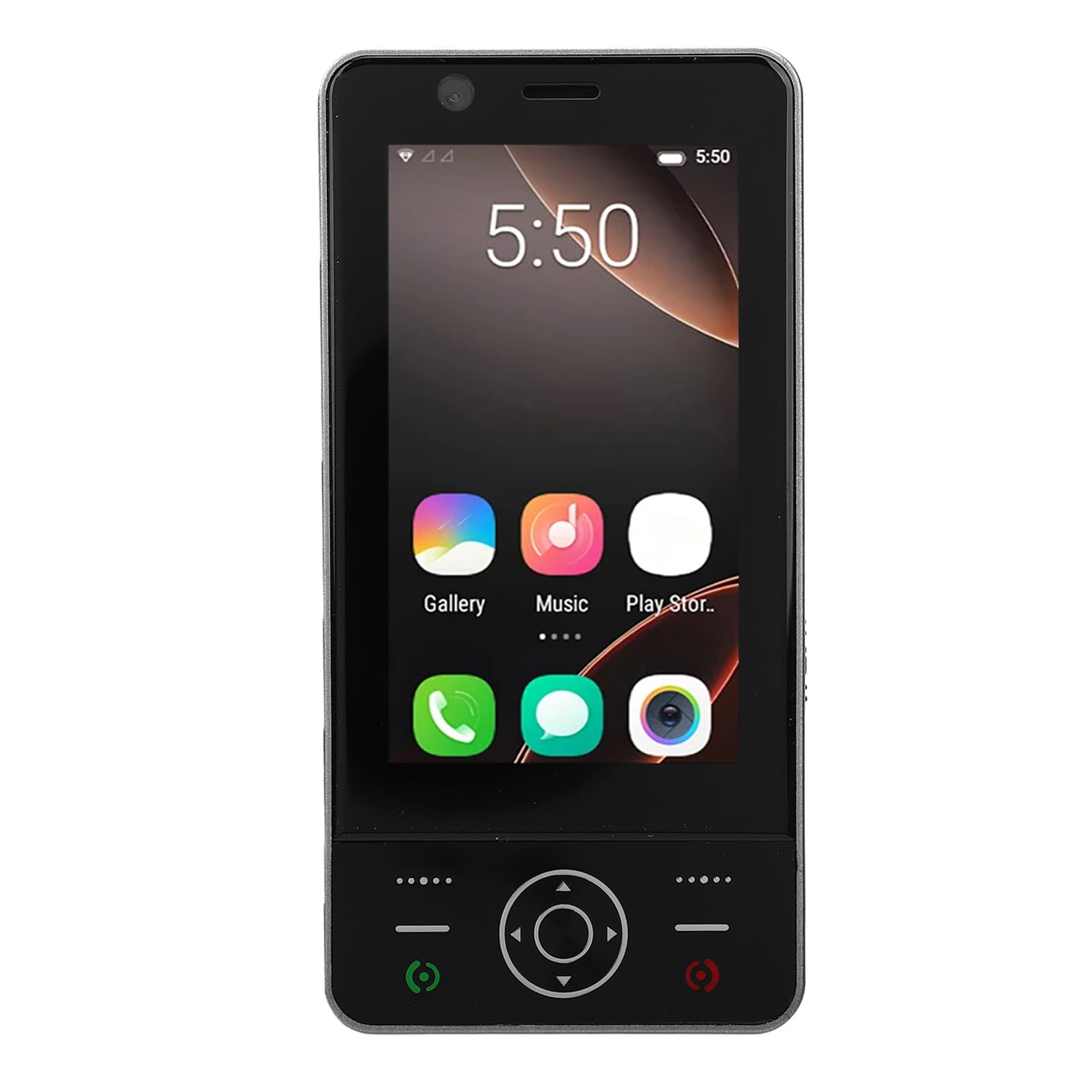
Image: The ciciglow 4G Slide Phone in its open position, displaying the touch screen interface and the physical keypad.
ఉత్పత్తి ముగిసిందిview
కీ ఫీచర్లు
- Slide Design: Compact and portable form factor with a sliding physical keypad.
- ప్రదర్శన: 3.0-inch touch screen for intuitive navigation.
- ఆపరేటింగ్ సిస్టమ్: Android 8.1 (non-upgradable).
- నెట్వర్క్ కనెక్టివిటీ: Supports 4G/3G/2G networks (GSM 850/900/1800/1900, WCDMA B1/B2/B4/B5/B8, FDD B1/2/3/5/7/8/20/28AB, TDD B38/40/B41).
- SIM మద్దతు: Dual SIM slots for flexible network usage.
- నిల్వ: 2GB RAM and 16GB internal storage, expandable up to 32GB via memory card (not included).
- వైర్లెస్: Bluetooth V5.0 and Wi-Fi connectivity.
- కెమెరా: 2MP front and rear cameras.
- బ్యాటరీ: అంతర్నిర్మిత 2000mAh బ్యాటరీ.
- పోర్టులు: Type-C charging port and 3.5mm headphone jack.
ప్యాకేజీ విషయాలు
ప్యాకేజీలో అన్ని అంశాలు ఉన్నాయని నిర్ధారించుకోండి:
- 1 x ciciglow 4G Slide Phone
- 1 x ఛార్జింగ్ కేబుల్ (టైప్-సి)
- 1 x లాన్యార్డ్
- 2 x యూజర్ మాన్యువల్ (ఈ పత్రం)
- 1 x సిమ్ ఎజెక్టర్ సాధనం

Image: The ciciglow 4G Slide Phone, lanyard, charging cable, and SIM ejector tool, representing the package contents.
సెటప్
1. సిమ్ కార్డ్(లు) మరియు మెమరీ కార్డ్ చొప్పించడం
- ఫోన్ పక్కన సిమ్ కార్డ్ ట్రేని గుర్తించండి.
- ట్రేని తెరవడానికి అందించిన SIM ఎజెక్టర్ సాధనాన్ని ఉపయోగించండి.
- Carefully place your Nano-SIM card(s) into the designated slots. Ensure the gold contacts face downwards.
- If using a memory card (MicroSD, up to 32GB), insert it into the dedicated memory card slot on the tray.
- పరికర బాడీతో ఫ్లష్ అయ్యే వరకు ట్రేని ఫోన్లోకి సున్నితంగా నెట్టండి.
2. పరికరాన్ని ఛార్జ్ చేస్తోంది
- Connect the Type-C charging cable to the charging port at the bottom of the phone.
- కేబుల్ యొక్క మరొక చివరను అనుకూలమైన USB పవర్ అడాప్టర్ (చేర్చబడలేదు) లేదా కంప్యూటర్ యొక్క USB పోర్ట్కు కనెక్ట్ చేయండి.
- Allow the phone to charge fully before initial use. The battery indicator on the screen will show charging status.
3. పవర్ చేయడం ఆన్/ఆఫ్
- పవర్ ఆన్ చేయడానికి: Press and hold the Power button (usually on the side) until the screen lights up.
- పవర్ ఆఫ్ చేయడానికి: పవర్ బటన్ను నొక్కి పట్టుకోండి, ఆపై స్క్రీన్పై ఉన్న ఎంపికల నుండి 'పవర్ ఆఫ్' ఎంచుకోండి.
ఆపరేటింగ్ సూచనలు
ప్రాథమిక నావిగేషన్
The ciciglow 4G Slide Phone offers dual navigation methods: the 3.0-inch touch screen and the physical keypad.
- టచ్ స్క్రీన్: ఎంచుకోవడానికి నొక్కండి, స్క్రోల్ చేయడానికి స్వైప్ చేయండి, జూమ్ చేయడానికి పించ్ చేయండి.
- భౌతిక కీప్యాడ్: Use the directional pad for menu navigation and the numeric keys for dialing or text input when the keypad is extended.

Image: The phone with its keypad extended, illustrating the combination of touch screen and physical button controls.
కాల్స్ చేయడం మరియు స్వీకరించడం
- కాల్ చేయడానికి: Open the dialer application on the touch screen or slide open the phone to use the physical keypad. Enter the phone number and press the call button.
- కాల్ స్వీకరించడానికి: When a call comes in, swipe the answer icon on the touch screen or press the green call button on the keypad.

Image: A person using the ciciglow 4G Slide Phone for a call, demonstrating its ergonomic design.
టెక్స్ట్ మెసేజింగ్
Access the messaging application from the home screen. You can compose messages using the on-screen keyboard or the physical keypad when extended.
Wi-Fiకి కనెక్ట్ చేస్తోంది
- వెళ్ళండి సెట్టింగ్లు > నెట్వర్క్ & ఇంటర్నెట్ > Wi-Fi.
- Wi-Fiని టోగుల్ చేయి On.
- జాబితా నుండి మీకు కావలసిన నెట్వర్క్ను ఎంచుకుని, ప్రాంప్ట్ చేయబడితే పాస్వర్డ్ను నమోదు చేయండి.
బ్లూటూత్ పెయిరింగ్
- వెళ్ళండి సెట్టింగ్లు > కనెక్ట్ చేయబడిన పరికరాలు > బ్లూటూత్.
- బ్లూటూత్ను టోగుల్ చేయండి On.
- Ensure the device you wish to pair with is in pairing mode.
- Select the device from the list of available devices and follow any on-screen prompts to complete pairing.
కెమెరా వినియోగం
Open the Camera application from the home screen. Tap the screen to focus and press the shutter button to take a photo. You can switch between front and rear cameras within the app.
నిర్వహణ
మీ పరికరాన్ని శుభ్రపరచడం
- ఫోన్ స్క్రీన్ మరియు బాడీని శుభ్రం చేయడానికి మృదువైన, మెత్తటి వస్త్రాన్ని ఉపయోగించండి.
- కఠినమైన రసాయనాలు, రాపిడి క్లీనర్లు లేదా ఏరోసోల్ స్ప్రేలను ఉపయోగించడం మానుకోండి.
- పోర్టులను దుమ్ము మరియు చెత్త లేకుండా ఉంచండి.
బ్యాటరీ సంరక్షణ
- ఫోన్ను తీవ్రమైన ఉష్ణోగ్రతలకు గురిచేయకుండా ఉండండి.
- బ్యాటరీని పంక్చర్ చేయవద్దు లేదా విడదీయవద్దు.
- సరైన బ్యాటరీ జీవితకాలం కోసం, తరచుగా బ్యాటరీని పూర్తిగా ఖాళీ చేయడాన్ని లేదా ఎక్కువసేపు 100% ఛార్జ్లో ఉంచడాన్ని నివారించండి.
సాఫ్ట్వేర్ నవీకరణలు
The operating system for this device is Android 8.1 and is not upgradable. Ensure you have the latest available applications from the Play Store for optimal performance.
ట్రబుల్షూటింగ్
| సమస్య | సాధ్యమైన పరిష్కారం |
|---|---|
| ఫోన్ పవర్ ఆన్ అవ్వడం లేదు. | Ensure the battery is charged. Connect the phone to a charger for at least 30 minutes. If it still doesn't power on, contact support. |
| నెట్వర్క్ సిగ్నల్ లేదు. | Check if the SIM card is correctly inserted. Verify that you are in an area with network coverage. Restart the phone. |
| టచ్ స్క్రీన్ స్పందించడం లేదు. | Restart the phone. Ensure the screen is clean and dry. If the issue persists, contact support. |
| Wi-Fiకి కనెక్ట్ చేయడం సాధ్యపడదు. | Ensure Wi-Fi is enabled on the phone and the router is working. Re-enter the Wi-Fi password. Restart both the phone and the router. |
| యాప్లు నెమ్మదిగా లేదా క్రాష్ అవుతున్నాయి. | Close unnecessary background applications. Clear app cache (Settings > Apps > [App Name] > Storage > Clear cache). Restart the phone. |
స్పెసిఫికేషన్లు
| ఫీచర్ | వివరాలు |
|---|---|
| బ్రాండ్ | ciciglow |
| మోడల్ పేరు | ciciglowzsbnh152p6-13 |
| ఆపరేటింగ్ సిస్టమ్ | Android 8.1 (Non-upgradable) |
| ప్రాసెసర్ | MTK6737 |
| స్క్రీన్ పరిమాణం | 3.0 అంగుళాలు |
| ప్రదర్శన రకం | Touch Screen, LED |
| మెమరీ (RAM) | 2GB |
| నిల్వ (ROM) | 16GB |
| విస్తరించదగిన నిల్వ | Supports up to 32GB Memory Card (MicroSD) |
| సెల్యులార్ టెక్నాలజీ | 4G/3G/2G |
| ఫ్రీక్వెన్సీ బ్యాండ్ | 2G GSM 850/900/1800/1900, 3G WCDMA B1/B2/B4/B5/B8, 4G FDD B1/2/3/5/7/8/20/28AB, TDD B38/40/B41 |
| సిమ్ కార్డ్ స్లాట్ కౌంట్ | డ్యూయల్ సిమ్ |
| వైర్లెస్ కనెక్టివిటీ | Wi-Fi, Bluetooth V5.0 |
| కెమెరా | 2MP ముందు మరియు వెనుక |
| బ్యాటరీ కెపాసిటీ | 2000mAh (అంతర్నిర్మిత) |
| ఛార్జింగ్ పోర్ట్ | టైప్-సి |
| హెడ్ఫోన్ జాక్ | 3.5మి.మీ |
| కొలతలు (సుమారుగా) | Height: 136mm (5.35in), Width: 52mm (2.05in), Thickness: 19mm (0.74in) |
| బరువు (సుమారుగా) | 135గ్రా |

Image: Detailed dimensions and weight of the ciciglow 4G Slide Phone.

Image: An illustration of the phone's internal chipset, highlighting the MTK6737 processor, Android 8.1, 16GB ROM, and 2GB RAM.
వారంటీ మరియు మద్దతు
వారంటీ సమాచారం
This ciciglow 4G Slide Phone is covered by a manufacturer's warranty for 90 days from the date of purchase. Please retain your proof of purchase for warranty claims.
కస్టమర్ మద్దతు
For further assistance, technical support, or warranty inquiries, please refer to the contact information provided with your purchase or visit the official ciciglow brand store online. You can find more information at the ciciglow Store.