
పరిచయం
This manual provides detailed instructions for the operation and maintenance of your RadioShack Portable CD Player Boombox. Please read this manual thoroughly before using the device to ensure proper function and to maximize your listening experience. This boombox combines classic CD playback with modern connectivity options including Bluetooth, FM radio, USB, and AUX input.
పెట్టెలో ఏముంది

Figure 1: Box Contents. This image displays the items included with your purchase: the boombox unit, AC power cord, remote control, and telescopic antenna.
- 1x RadioShack Portable CD Player Boombox Unit
- 1x ఎసి పవర్ కార్డ్
- 1x రిమోట్ కంట్రోల్
- 1x Telescopic Antenna (pre-attached)
- 1x యూజర్ మాన్యువల్ (ఈ పత్రం)
Note: 4 C batteries are required for portable operation and are not included.
ఉత్పత్తి ముగిసిందిview మరియు ఫీచర్లు
The RadioShack Portable CD Player Boombox offers multiple audio playback options and user-friendly controls.

చిత్రం 2: ముఖ్య లక్షణాలు. This diagram highlights the boombox's main functionalities including Bluetooth 5.0, various CD formats, USB MP3 playback, FM radio, AUX input, and playback modes.
- CD ప్లేబ్యాక్: Supports CD, CD-R, CD-RW, and CD-MP3 formats.
- బ్లూటూత్ కనెక్టివిటీ: అనుకూల పరికరాల నుండి వైర్లెస్గా ఆడియోను ప్రసారం చేయండి.
- FM రేడియో: Built-in tuner with telescopic antenna and 18 preset stations.
- USB ప్లేబ్యాక్: MP3ని ప్లే చేయండి files నేరుగా USB డ్రైవ్ నుండి.
- AUX ఇన్పుట్: 3.5mm కేబుల్ ద్వారా బాహ్య ఆడియో పరికరాలను కనెక్ట్ చేయండి.
- ప్లేబ్యాక్ మోడ్లు: Includes random, repeat, and program play functions.
- రిమోట్ కంట్రోల్: దూరం నుండి అనుకూలమైన ఆపరేషన్ కోసం.
సెటప్
1. పరికరాన్ని శక్తివంతం చేయడం

Figure 3: Power Options. The boombox can be powered by the included AC cord or by 4 C batteries for portable use.
Your boombox can be powered in two ways:
- AC పవర్: Connect the included AC power cord to the AC input jack on the back of the boombox and then plug it into a standard wall outlet (110V-240V).
- బ్యాటరీ శక్తి: For portable use, open the battery compartment on the bottom of the unit and insert 4 "C" size batteries (not included), ensuring correct polarity (+/-). Close the compartment securely.
2. Antenna Setup (FM Radio)
For optimal FM radio reception, fully extend the telescopic antenna located on the back of the unit. Adjust its position for the best signal.
ఆపరేటింగ్ సూచనలు
సాధారణ నియంత్రణలు
- పవర్ బటన్ (⏻ ⏻ తెలుగు): యూనిట్ని ఆన్ లేదా ఆఫ్ చేయడానికి నొక్కండి.
- వాల్యూమ్ నాబ్: వాల్యూమ్ పెంచడానికి సవ్యదిశలో తిప్పండి, తగ్గించడానికి అపసవ్యదిశలో తిప్పండి.
- Function (FUNC) Button: Press to cycle through playback modes: CD, Bluetooth, FM, USB, AUX.
- ప్లే/పాజ్ (⏸/⏸) బటన్: ప్లేబ్యాక్ను ప్రారంభిస్తుంది లేదా పాజ్ చేస్తుంది.
- ఆపు (⏹) బటన్: ప్లేబ్యాక్ను ఆపివేస్తుంది.
- Skip/Search (⏮ ⏮ తెలుగు / ⏭ ⏭ తెలుగు) బటన్లు: Press briefly to skip tracks. Press and hold to search within a track.
CD ప్లేబ్యాక్
- CD కంపార్ట్మెంట్ మూతను తెరవండి.
- Place a CD (CD, CD-R, CD-RW, or CD-MP3) onto the spindle with the label side facing up.
- CD కంపార్ట్మెంట్ మూతను సురక్షితంగా మూసివేయండి.
- నొక్కండి func button until "CD" mode is selected.
- CD స్వయంచాలకంగా ప్లే కావడం ప్రారంభమవుతుంది. లేకపోతే, నొక్కండి ప్లే/పాజ్ చేయండి బటన్.
బ్లూటూత్ పెయిరింగ్

Figure 4: Bluetooth Streaming. Easily stream audio from your smartphone or tablet to the boombox.
- నొక్కండి func button until "BT" (Bluetooth) mode is selected. The display will show "BT" and flash, indicating it's in pairing mode.
- On your Bluetooth-enabled device (smartphone, tablet), go to its Bluetooth settings and search for available devices.
- Select "RadioShack Boombox" from the list.
- Once paired, the "BT" indicator on the boombox display will stop flashing and remain solid.
- మీరు ఇప్పుడు మీ పరికరం నుండి బూమ్బాక్స్ ద్వారా ఆడియోను ప్లే చేయవచ్చు.
FM రేడియో ఆపరేషన్

Figure 5: FM Presets and Programmed Playback. Use the SCAN button to automatically save FM stations and REP/PROG for custom playback sequences.
- నొక్కండి func "FM" మోడ్ ఎంచుకోబడే వరకు బటన్.
- Auto Scan and Save Presets: నొక్కండి మరియు పట్టుకోండి స్కాన్ button (often combined with Play/Pause). The radio will automatically scan for and save up to 18 available FM stations.
- మాన్యువల్ ట్యూనింగ్: క్లుప్తంగా నొక్కండి దాటవేయండి/శోధించండి బటన్లు (⏮ ⏮ తెలుగు / ⏭ ⏭ తెలుగు) ఫ్రీక్వెన్సీని చక్కగా ట్యూన్ చేయడానికి.
- ప్రీసెట్లను ఎంచుకోవడం: క్లుప్తంగా నొక్కండి PROG button (often combined with Repeat) to cycle through saved preset stations.
USB ప్లేబ్యాక్
- MP3ని కలిగి ఉన్న USB ఫ్లాష్ డ్రైవ్ను చొప్పించండి fileUSB పోర్ట్లోకి s.
- నొక్కండి func button until "USB" mode is selected.
- The boombox will automatically detect and begin playing MP3 fileUSB డ్రైవ్ నుండి.
- ఉపయోగించండి ప్లే/పాజ్ చేయండి, ఆపు, మరియు దాటవేయండి/శోధించండి ప్లేబ్యాక్ని నియంత్రించడానికి బటన్లు.
AUX ఇన్పుట్
- 3.5mm ఆడియో కేబుల్ యొక్క ఒక చివరను (చేర్చబడలేదు) బూమ్బాక్స్లోని AUX IN జాక్కి కనెక్ట్ చేయండి.
- కేబుల్ యొక్క మరొక చివరను హెడ్ఫోన్ జాక్ లేదా మీ బాహ్య ఆడియో పరికరం (ఉదా. MP3 ప్లేయర్, స్మార్ట్ఫోన్) యొక్క ఆడియో అవుట్పుట్కు కనెక్ట్ చేయండి.
- నొక్కండి func button until "AUX" mode is selected.
- మీ బాహ్య ఆడియో పరికరం నుండి ప్లేబ్యాక్ మరియు వాల్యూమ్ను నియంత్రించండి.
రిమోట్ కంట్రోల్ వినియోగం
The included remote control allows for convenient operation of most functions from a distance. Ensure the remote has working batteries (typically 2x AAA, not included) and point it towards the front of the boombox.
- శక్తి: యూనిట్ని ఆన్/ఆఫ్ చేయండి.
- FUNC: Select input mode (CD, BT, FM, USB, AUX).
- వాల్యూమ్ +/-: వాల్యూమ్ స్థాయిని సర్దుబాటు చేయండి.
- Play/Pause, Stop, Skip/Search: ప్లేబ్యాక్ను నియంత్రించండి.
- REP/PROG: Access repeat and program functions.
- స్కాన్: Auto-scan FM stations.
- EQ/SLEEP: Adjust equalizer settings or set sleep timer (refer to specific remote markings for details).
Playback Modes (CD/USB)
- Repeat (REP): నొక్కండి REP button (on unit or remote) to cycle through repeat modes:
- రిపీట్ వన్: ప్రస్తుత ట్రాక్ను రిపీట్ చేస్తుంది.
- Repeat All: Repeats all tracks on the CD/USB.
- Repeat Folder (for MP3 CDs/USB): Repeats all tracks in the current folder.
- Program (PROG): Allows you to program a specific order of tracks for CD or USB playback.
- In CD or USB mode, with playback stopped, press the PROG బటన్.
- ఉపయోగించండి దాటవేయండి/శోధించండి మీకు కావలసిన ట్రాక్ని ఎంచుకోవడానికి బటన్లు.
- నొక్కండి PROG again to confirm and add the track to the program list.
- Repeat steps 2-3 to add more tracks.
- నొక్కండి ప్లే/పాజ్ చేయండి ప్రోగ్రామ్ చేయబడిన ప్లేబ్యాక్ను ప్రారంభించడానికి.
- Random/Shuffle: Some models may have a dedicated shuffle button (often labeled "RDM" or "SHUF") or it may be part of the REP/PROG cycle. This plays tracks in a random order.
నిర్వహణ
- శుభ్రపరచడం: Use a soft, dry cloth to clean the exterior of the boombox. Do not use abrasive cleaners or solvents. For the CD lens, use a specialized CD lens cleaner disc.
- నిల్వ: ఎక్కువసేపు ఉపయోగంలో లేనప్పుడు, లీకేజీని నివారించడానికి బ్యాటరీలను తీసివేయండి. యూనిట్ను ప్రత్యక్ష సూర్యకాంతి మరియు తీవ్రమైన ఉష్ణోగ్రతలకు దూరంగా చల్లని, పొడి ప్రదేశంలో నిల్వ చేయండి.
- బ్యాటరీ భర్తీ: Replace all 4 "C" batteries simultaneously when they are depleted. Do not mix old and new batteries or different types of batteries.
- CD కేర్: CD లను వాటి అంచుల దగ్గర పట్టుకోండి. వాటిని శుభ్రంగా మరియు గీతలు లేకుండా ఉంచండి. ఉపయోగంలో లేనప్పుడు వాటిని వాటి కవర్లలో నిల్వ చేయండి.
ట్రబుల్షూటింగ్
| సమస్య | సాధ్యమైన కారణం | పరిష్కారం |
|---|---|---|
| శక్తి లేదు | AC త్రాడు కనెక్ట్ చేయబడలేదు; బ్యాటరీలు అయిపోయాయి లేదా తప్పుగా చొప్పించబడ్డాయి. | Ensure AC cord is securely plugged in. Replace batteries with new ones, checking polarity. |
| శబ్దం లేదు | Volume too low; Incorrect input mode; Headphones connected. | Increase volume. Press FUNC to select correct mode. Disconnect headphones. |
| CD స్కిప్ అవుతోంది లేదా ప్లే కావడం లేదు | CD మురికిగా లేదా గీతలుగా ఉంది; CD తప్పుగా చొప్పించబడింది; CD కంపార్ట్మెంట్ మూసివేయబడలేదు. | Clean CD. Reinsert CD correctly. Close lid firmly. Try another CD. |
| బ్లూటూత్ జత చేయడం లేదు | Boombox not in BT mode; Device too far; Device already paired to another unit. | Ensure boombox is in BT mode and flashing. Move device closer. Disconnect from other devices. |
| FM రిసెప్షన్ పేలవంగా ఉంది | యాంటెన్నా పొడిగించబడలేదు లేదా సరిగ్గా ఉంచబడలేదు; బలహీనమైన సిగ్నల్ ప్రాంతం. | టెలిస్కోపిక్ యాంటెన్నాను పూర్తిగా పొడిగించి సర్దుబాటు చేయండి. యూనిట్ను వేరే ప్రదేశానికి తరలించడానికి ప్రయత్నించండి. |
| USB ఆడటం లేదు | USB డ్రైవ్ సరిగ్గా చొప్పించబడలేదు; Files not MP3 format; USB drive corrupted. | USB డ్రైవ్ను తిరిగి ఇన్సర్ట్ చేయండి. fileలు MP3. వేరే USB డ్రైవ్ని ప్రయత్నించండి. |
స్పెసిఫికేషన్లు
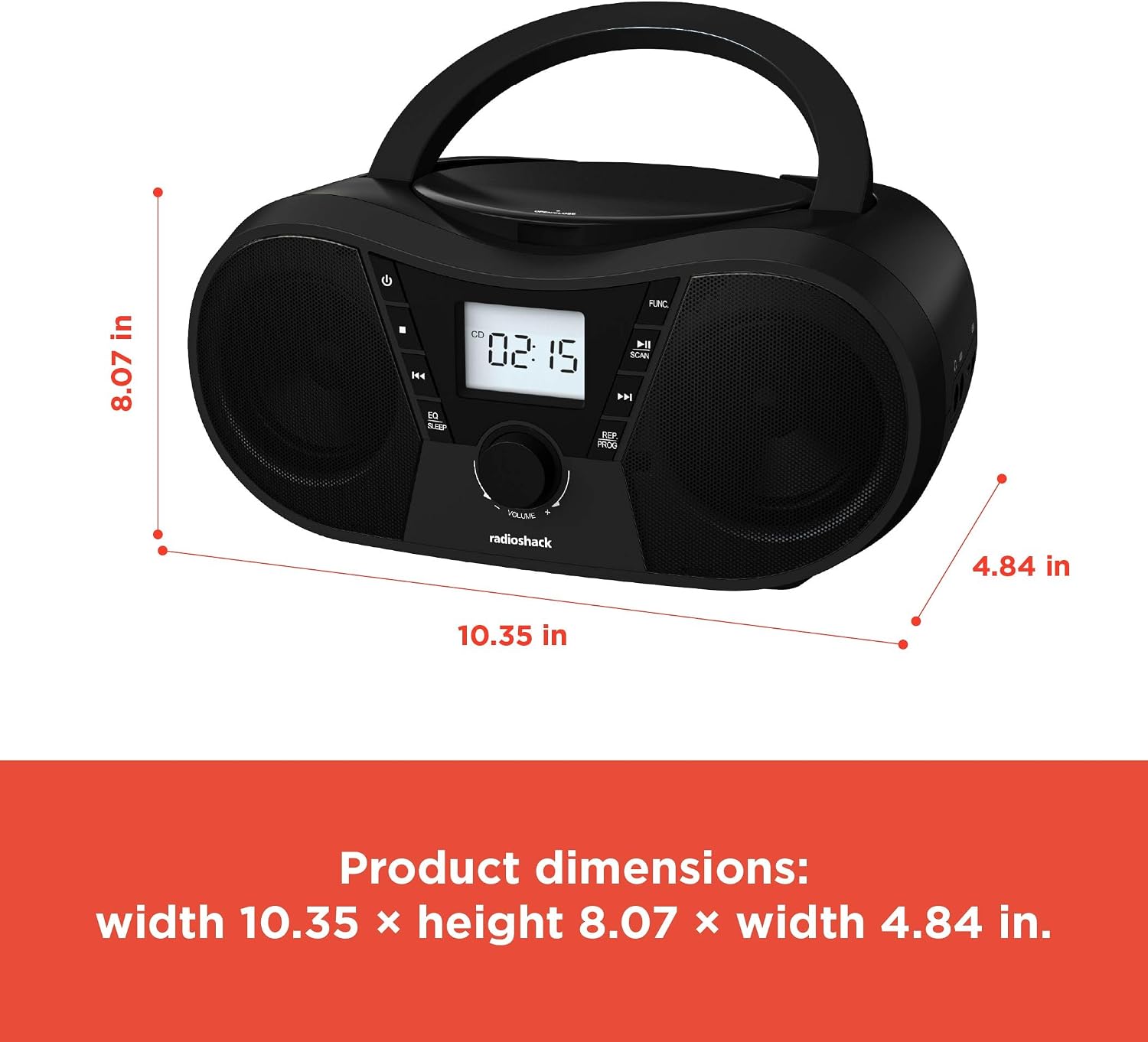
చిత్రం 6: ఉత్పత్తి కొలతలు. The boombox measures approximately 10.35 inches wide, 8.07 inches high, and 4.84 inches deep.
| ఫీచర్ | వివరాలు |
|---|---|
| మోడల్ సంఖ్య | 1402010 |
| శక్తి మూలం | AC 110V-240V ~ 50/60Hz or 4 x "C" Batteries (DC 6V) |
| మద్దతు ఉన్న మీడియా | CD, CD-R, CD-RW, CD-MP3, USB (MP3), Bluetooth, FM Radio, AUX Input |
| బ్లూటూత్ వెర్షన్ | 5.0 (Compatible) |
| FM ఫ్రీక్వెన్సీ రేంజ్ | 87.5 - 108 మెగాహెర్ట్జ్ |
| ఆడియో అవుట్పుట్ మోడ్ | స్టీరియో |
| వక్తల సంఖ్య | 2 (Built-in Stereo Speakers) |
| వాట్tage | 10 వాట్స్ |
| ఫ్రీక్వెన్సీ రెస్పాన్స్ | 20 హెర్ట్జ్ - 20000 హెర్ట్జ్ |
| కొలతలు (W x H x D) | సుమారు 10.35 x 8.07 x 4.84 అంగుళాలు |
| రంగు | నలుపు |
వారంటీ మరియు మద్దతు
This RadioShack Portable CD Player Boombox (Model 1402010) comes with a 1-సంవత్సరం పరిమిత వారంటీ కొనుగోలు చేసిన తేదీ నుండి. ఈ వారంటీ సాధారణ ఉపయోగంలో మెటీరియల్స్ మరియు పనితనంలో తయారీ లోపాలను కవర్ చేస్తుంది.
For warranty claims, technical support, or customer service inquiries, please contact RadioShack customer support through their official webసైట్ లేదా మీ కొనుగోలు డాక్యుమెంటేషన్తో అందించబడిన సంప్రదింపు సమాచారం.
దయచేసి వారంటీ ప్రయోజనాల కోసం మీ కొనుగోలు రుజువును ఉంచుకోండి.