
1. పరిచయం
This manual provides essential information for the installation, operation, and maintenance of the Generic ZV-446 / T2805310400 Electronic Delay Door Lock Interlock Switch Assembly. This component is designed as a replacement part for compatible Beko washing machines, ensuring the door remains securely locked during operation and releases safely after the cycle. Please read this manual thoroughly before installation and use.
2. భద్రతా సమాచారం
- ఏదైనా ఇన్స్టాలేషన్, నిర్వహణ లేదా మరమ్మత్తు చేయడానికి ప్రయత్నించే ముందు వాషింగ్ మెషీన్ను విద్యుత్ సరఫరా నుండి ఎల్లప్పుడూ డిస్కనెక్ట్ చేయండి.
- Installation should only be performed by qualified personnel or individuals with experience in appliance repair.
- సంస్థాపన సమయంలో చేతి తొడుగులు మరియు కంటి రక్షణ వంటి తగిన వ్యక్తిగత రక్షణ పరికరాలను (PPE) ధరించండి.
- Ensure all connections are secure and correctly made to prevent electrical hazards or malfunction.
- Do not operate the washing machine if the door lock assembly is damaged or not functioning correctly.
3. ప్యాకేజీ విషయాలు
ప్యాకేజీని తెరిచినప్పుడు అన్ని వస్తువులు ఉన్నాయని మరియు దెబ్బతినకుండా ఉన్నాయని ధృవీకరించండి.
- 1 x ZV-446 / T2805310400 Electronic Delay Door Lock Interlock Switch Assembly
4. స్పెసిఫికేషన్లు
| మోడల్ సంఖ్య | VAOYHCVWC (Compatible with ZV-446, T2805310400, T2805311700) |
| పార్ట్ రకం | Electronic Delay Door Lock Interlock Switch Assembly |
| అనుకూలత | Select Beko Washing Machine Models |
| వస్తువు బరువు | 1.76 ఔన్సులు |
| ఉత్పత్తి కొలతలు | 3.94 x 3.94 x 3.94 అంగుళాలు |
| వాల్యూమ్tage | 1 Kilovolt (as per product data, verify with appliance specifications) |
5. సెటప్ మరియు ఇన్స్టాలేషన్
This section outlines the general steps for replacing a washing machine door lock interlock switch. Specific procedures may vary depending on your washing machine model. Always refer to your appliance's service manual for detailed instructions.
5.1 తయారీ
- పవర్ డిస్కనెక్ట్ చేయండి: Unplug the washing machine from the electrical outlet. Turn off the circuit breaker if necessary.
- డోర్ లాక్ని యాక్సెస్ చేయండి: Depending on your washing machine model, you may need to remove the front panel, top panel, or the door seal to access the door lock assembly.
5.2 Removal of Old Door Lock
- Locate Mounting Screws: Identify and remove the screws securing the door lock assembly to the washing machine frame.
- వైరింగ్ను డిస్కనెక్ట్ చేయండి: Carefully disconnect the electrical connectors from the old door lock. Note the orientation of the wires if they are not color-coded or keyed.
- Remove Assembly: Gently pull the old door lock assembly out from its mounting position.
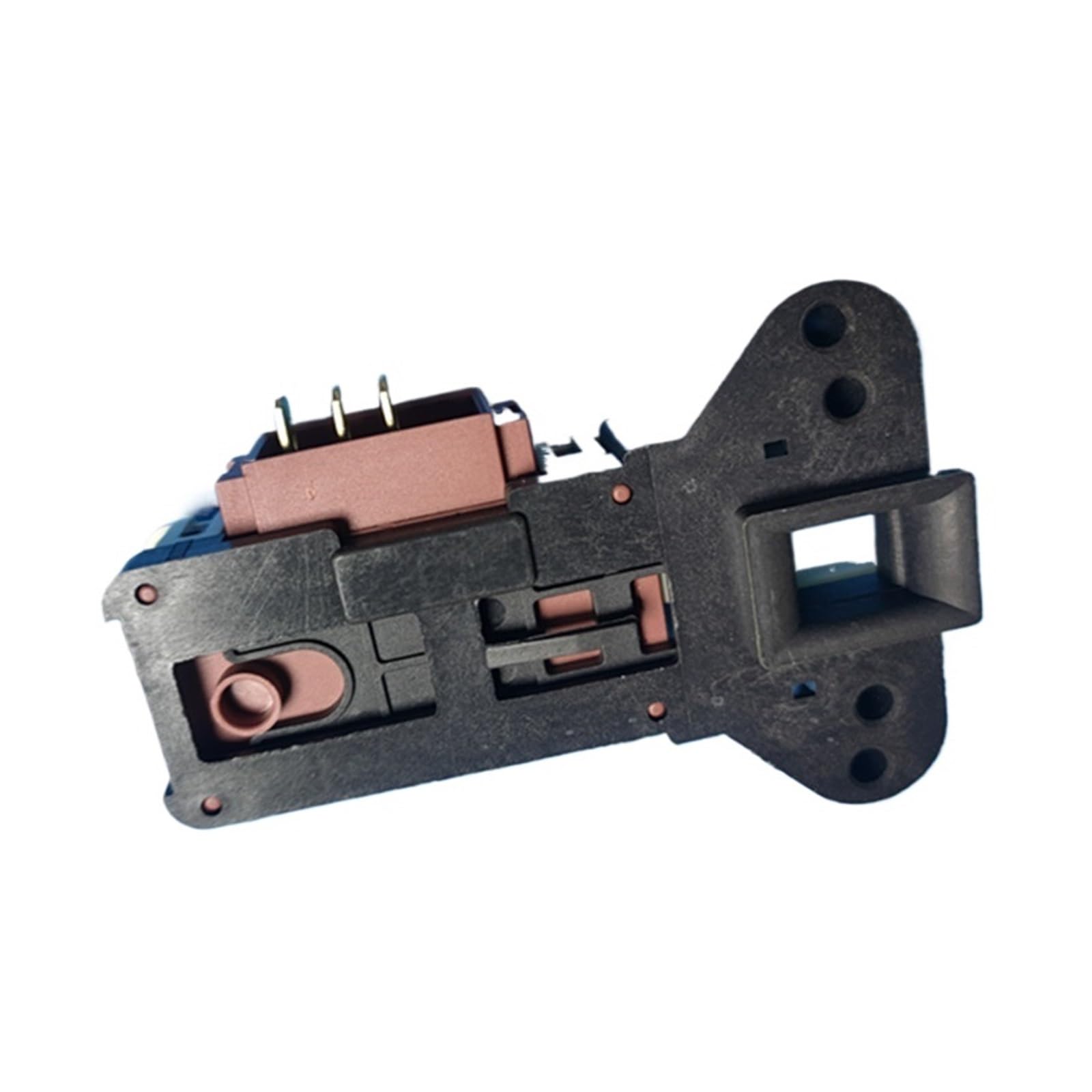
చిత్రం 1: పైగాview of the ZV-446 / T2805310400 door lock interlock switch assembly. This image shows the main body of the lock with its electrical connector and the latch mechanism.
5.3 Installation of New Door Lock
- Position New Lock: Insert the new ZV-446 / T2805310400 door lock assembly into the mounting opening. Ensure it is correctly aligned.
- సురక్షిత మౌంటు స్క్రూలు: Fasten the new door lock assembly with the mounting screws. Do not overtighten.
- వైరింగ్ కనెక్ట్ చేయండి: Reconnect the electrical connectors to the new door lock. Ensure a firm and secure connection.

మూర్తి 2: క్లోజ్-అప్ view of the 3-pin electrical connector on the door lock. Ensure proper alignment and secure connection of the wiring harness to these pins during installation.

మూర్తి 3: వైపు view of the door lock showing the T2805310400 part number. This view highlights the specific model identification for compatibility verification.
5.4 Reassembly and Testing
- ప్యానెల్లను తిరిగి అమర్చండి: Reattach any panels or the door seal that were removed to access the lock.
- శక్తిని పునరుద్ధరించండి: Plug the washing machine back into the electrical outlet or restore power at the circuit breaker.
- పరీక్ష కార్యాచరణ: Run a short wash cycle to ensure the door locks correctly at the beginning of the cycle and unlocks at the end.
6. ఆపరేటింగ్ సూచనలు
The ZV-446 / T2805310400 Electronic Delay Door Lock Interlock Switch Assembly functions automatically as part of your washing machine's control system. Its primary role is to ensure safety and proper operation.
- Door Locking: Once a wash cycle is selected and started, the electronic delay mechanism will engage, locking the washing machine door. This prevents the door from being opened during high-speed cycles or when water is present.
- Interlock Function: The interlock switch ensures that the washing machine cannot operate if the door is not properly closed and locked. This is a critical safety feature.
- తలుపు అన్లాకింగ్: After the wash cycle is complete and the machine has drained, the electronic delay will disengage, allowing the door to be opened. There may be a short delay (typically 1-3 minutes) after the cycle ends before the door unlocks.
No direct user interaction is required with the door lock assembly itself during normal operation.
7. నిర్వహణ
The ZV-446 / T2805310400 door lock assembly is designed for durability and typically requires minimal maintenance. However, periodic checks can help ensure its longevity and proper function.
- దృశ్య తనిఖీ: Periodically inspect the door lock area for any signs of wear, damage, or debris accumulation. Ensure the door latch mechanism is clean and free from obstructions.
- విద్యుత్ కనెక్షన్లు: If accessible, ensure that the electrical connections to the door lock remain secure and free from corrosion. (Only perform if comfortable and after disconnecting power.)
- డోర్ సీల్: A damaged or improperly seated door seal can affect the door's ability to close and lock correctly. Ensure your washing machine's door seal is in good condition.
Do not attempt to lubricate the internal components of the door lock assembly, as this may interfere with its electronic operation.
8. ట్రబుల్షూటింగ్
If you experience issues with your washing machine's door lock, refer to the following common problems and solutions. Always disconnect power before inspecting components.
| సమస్య | సాధ్యమైన కారణం / పరిష్కారం |
|---|---|
| తలుపు లాక్ చేయదు. |
|
| Door does not unlock after cycle. |
|
| వాషింగ్ మెషిన్ ప్రారంభం కాదు. |
|
ట్రబుల్షూటింగ్ దశలు సమస్యను పరిష్కరించకపోతే, అర్హత కలిగిన ఉపకరణాల సాంకేతిక నిపుణుడిని సంప్రదించమని సిఫార్సు చేయబడింది.
9. వారంటీ సమాచారం
This product is sold as a replacement part. For specific warranty details, please refer to the terms and conditions provided by your retailer or the manufacturer at the time of purchase. Keep your proof of purchase for any warranty claims.
10. కస్టమర్ మద్దతు
For further assistance or inquiries regarding the ZV-446 / T2805310400 Electronic Delay Door Lock Interlock Switch Assembly, please contact your original point of purchase or refer to the support resources provided by the washing machine manufacturer for model-specific guidance.