
పరిచయం
Thank you for choosing the Monster Open Ear BC300 Swimming Headphones. These bone conduction headphones are designed for comfort and versatility, offering both Bluetooth connectivity and an integrated MP3 player with 32GB storage. With an IPX8 waterproof rating, they are suitable for various activities, including swimming, running, and cycling, allowing you to stay aware of your surroundings while enjoying your audio.
ప్యాకేజీ విషయాలు
- Monster Open Ear BC300 Swimming Headphones
- మాగ్నెటిక్ ఛార్జింగ్ కేబుల్
- వినియోగదారు మాన్యువల్
ఉత్పత్తి ముగిసిందిview
Familiarize yourself with the components and controls of your BC300 headphones.
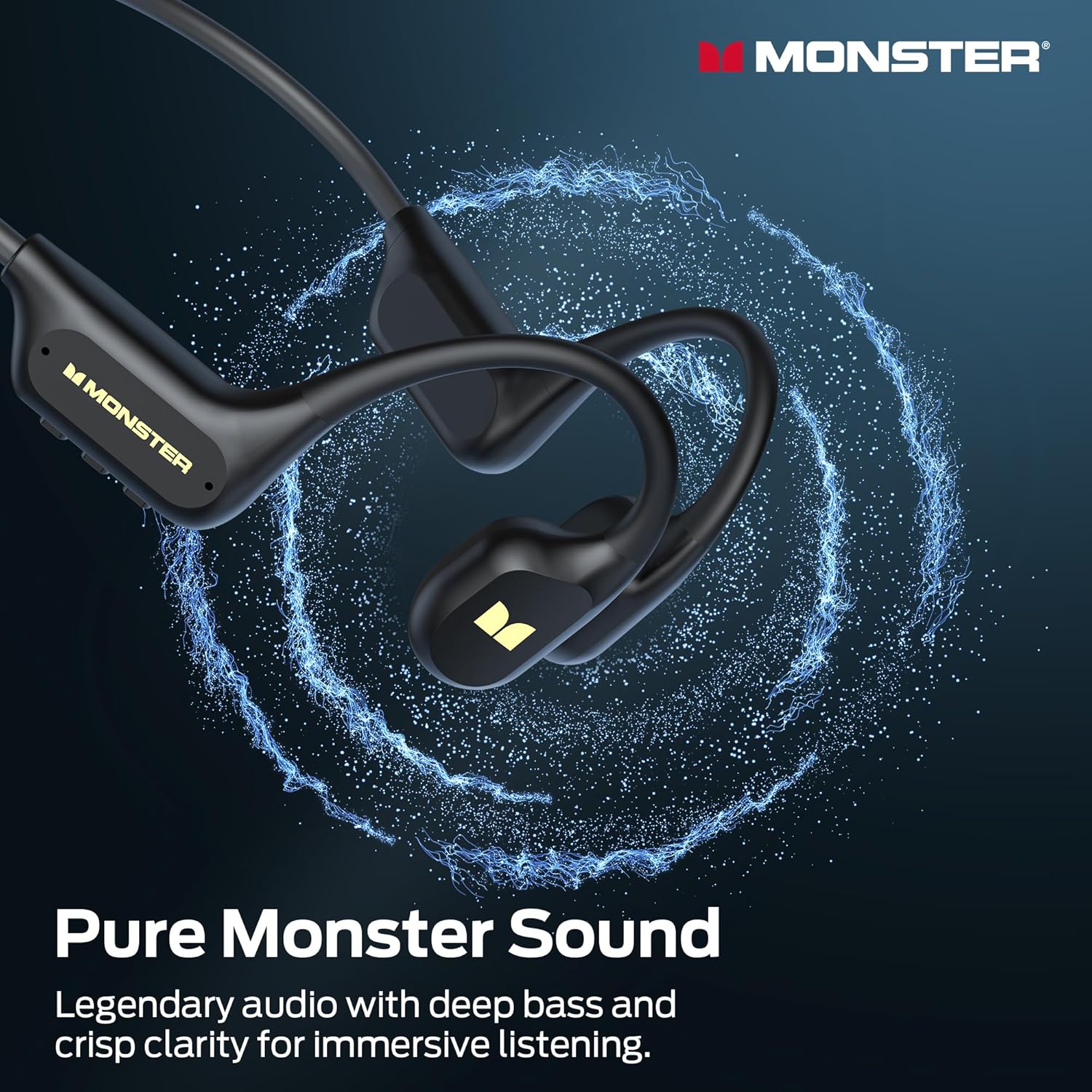
Image: The Monster BC300 headphones, showcasing their open-ear design and flexible neckband.
నియంత్రణలు మరియు సూచికలు:
- పవర్/మల్టీ-ఫంక్షన్ బటన్: Power on/off, Play/Pause, Answer/End calls.
- వాల్యూమ్ అప్ (+): వాల్యూమ్ పెంచండి, తదుపరి ట్రాక్ (ఎక్కువసేపు నొక్కి ఉంచండి).
- వాల్యూమ్ డౌన్ (-): వాల్యూమ్ తగ్గించండి, మునుపటి ట్రాక్ (ఎక్కువసేపు నొక్కి ఉంచండి).
- మోడ్ స్విచ్ బటన్: Toggle between Bluetooth mode and MP3 mode.
- మాగ్నెటిక్ ఛార్జింగ్ పోర్ట్: ఛార్జింగ్ మరియు డేటా బదిలీ కోసం.
- LED సూచిక: పవర్, ఛార్జింగ్ మరియు కనెక్షన్ స్థితిని ప్రదర్శిస్తుంది.
సెటప్
1. హెడ్ఫోన్లను ఛార్జ్ చేయడం
మొదటిసారి ఉపయోగించే ముందు, మీ హెడ్ఫోన్లను పూర్తిగా ఛార్జ్ చేయండి.
- హెడ్ఫోన్లలోని ఛార్జింగ్ పోర్ట్కు మాగ్నెటిక్ ఛార్జింగ్ కేబుల్ను కనెక్ట్ చేయండి.
- కేబుల్ యొక్క మరొక చివరను USB పవర్ అడాప్టర్ (చేర్చబడలేదు) లేదా కంప్యూటర్ యొక్క USB పోర్ట్కు కనెక్ట్ చేయండి.
- LED సూచిక ఛార్జింగ్ స్థితిని చూపుతుంది (ఉదాహరణకు, ఛార్జింగ్ చేస్తున్నప్పుడు ఎరుపు, పూర్తిగా ఛార్జ్ అయినప్పుడు నీలం).
- A full charge takes approximately 2 hours and provides up to 10 hours of playback.

Image: The Monster BC300 headphones connected to a laptop via its magnetic charging cable, illustrating the charging process and data transfer capability.
2. పవర్ చేయడం ఆన్/ఆఫ్
- పవర్ ఆన్: Press and hold the Power/Multi-function button for 3 seconds until the LED indicator flashes blue.
- పవర్ ఆఫ్: Press and hold the Power/Multi-function button for 5 seconds until the LED indicator flashes red and then turns off.
3. బ్లూటూత్ పెయిరింగ్
మీ హెడ్ఫోన్లను బ్లూటూత్-ప్రారంభించబడిన పరికరంతో జత చేయండి.
- హెడ్ఫోన్లు పవర్ ఆఫ్లో ఉన్నాయని నిర్ధారించుకోండి.
- Press and hold the Power/Multi-function button for 5-7 seconds until the LED indicator flashes red and blue alternately, indicating pairing mode.
- మీ పరికరంలో (స్మార్ట్ఫోన్, టాబ్లెట్, కంప్యూటర్), బ్లూటూత్ను ప్రారంభించి, అందుబాటులో ఉన్న పరికరాల కోసం శోధించండి.
- Select "Monster BC300" from the list.
- జత చేసిన తర్వాత, LED సూచిక నెమ్మదిగా నీలం రంగులో మెరుస్తుంది.
4. Using MP3 Mode (Internal Storage)
The headphones have 32GB of internal storage for music playback without a connected device.
సంగీతాన్ని బదిలీ చేస్తోంది Files:
- మాగ్నెటిక్ ఛార్జింగ్ కేబుల్ ఉపయోగించి హెడ్ఫోన్లను మీ కంప్యూటర్కు కనెక్ట్ చేయండి.
- హెడ్ఫోన్లు మీ కంప్యూటర్లో తొలగించగల డిస్క్ డ్రైవ్గా కనిపిస్తాయి.
- మీకు కావలసిన ఆడియోను లాగి వదలండి files (e.g., MP3 format) into the headphone's storage folder.
- కేబుల్ను డిస్కనెక్ట్ చేసే ముందు మీ కంప్యూటర్ నుండి పరికరాన్ని సురక్షితంగా బయటకు తీయండి.
MP3 మోడ్కి మారుతోంది:
- While the headphones are powered on, press the Mode Switch button to toggle between Bluetooth and MP3 modes.
- A voice prompt will indicate the current mode.
- గమనిక: MP3 mode is recommended for underwater use as Bluetooth signals do not transmit effectively through water.
ఆపరేటింగ్ సూచనలు
ప్రాథమిక నియంత్రణలు:
| ఫంక్షన్ | చర్య |
|---|---|
| పవర్ ఆన్/ఆఫ్ | Press and hold Power button (3s for On, 5s for Off) |
| ప్లే/పాజ్ చేయండి | పవర్ బటన్ను షార్ట్ ప్రెస్ చేయండి |
| వాల్యూమ్ అప్ | '+' బటన్ను షార్ట్ ప్రెస్ చేయండి |
| వాల్యూమ్ డౌన్ | '-' బటన్ను షార్ట్ ప్రెస్ చేయండి |
| తదుపరి ట్రాక్ | '+' బటన్ను ఎక్కువసేపు నొక్కి ఉంచండి |
| మునుపటి ట్రాక్ | '-' బటన్ను ఎక్కువసేపు నొక్కి ఉంచండి |
| సమాధానం/కాల్ ముగించు | పవర్ బటన్ను షార్ట్ ప్రెస్ చేయండి |
| కాల్ని తిరస్కరించండి | పవర్ బటన్ని ఎక్కువసేపు నొక్కండి |
| Switch Mode (Bluetooth/MP3) | Short press Mode Switch button |
హెడ్ఫోన్లు ధరించడం
Place the headphones with the transducers resting on your cheekbones, just in front of your ears. The neckband should rest comfortably behind your head.

Image: A person wearing the Monster BC300 headphones during a basketball game, demonstrating the secure and comfortable fit during physical activity.

Image: A person wearing the Monster BC300 headphones while cycling, showing how they fit comfortably with a helmet, maintaining open awareness of surroundings.
Underwater Use (IPX8 Waterproof)
The BC300 headphones are IPX8 rated, suitable for submersion up to 2 meters for 2 hours.
- Always switch to MP3 మోడ్ before entering water. Bluetooth signals do not transmit effectively underwater.
- Ensure the magnetic charging port is clean and dry before and after use to prevent corrosion.
- Rinse the headphones with fresh water after swimming in chlorinated or saltwater, then dry thoroughly.

Image: A person swimming underwater while wearing the Monster BC300 headphones and goggles, demonstrating their IPX8 waterproof capability for aquatic activities.
నిర్వహణ
- శుభ్రపరచడం: హెడ్ఫోన్లను సాఫ్ట్తో తుడవండి, డిamp వస్త్రం. కఠినమైన రసాయనాలు లేదా రాపిడి క్లీనర్లను ఉపయోగించవద్దు.
- ఎండబెట్టడం: After exposure to water, especially after swimming, ensure the headphones are completely dry before charging or connecting to a computer. Gently shake off excess water and wipe with a dry cloth.
- నిల్వ: హెడ్ఫోన్లను ప్రత్యక్ష సూర్యకాంతి మరియు విపరీతమైన ఉష్ణోగ్రతలకు దూరంగా చల్లని, పొడి ప్రదేశంలో నిల్వ చేయండి.
- ఛార్జింగ్ పోర్ట్: Keep the magnetic charging contacts clean and free of debris to ensure proper charging and data transfer.
ట్రబుల్షూటింగ్
| సమస్య | సాధ్యమైన పరిష్కారం |
|---|---|
| హెడ్ఫోన్లు ఆన్ కావు. | Charge the headphones fully. Ensure the Power button is pressed and held for 3 seconds. |
| బ్లూటూత్ ద్వారా జత చేయడం సాధ్యం కాదు. | హెడ్ఫోన్లు జత చేసే మోడ్లో ఉన్నాయని (ఎరుపు/నీలం రంగులో మెరుస్తున్నట్లు) నిర్ధారించుకోండి. మీ పరికరంలో బ్లూటూత్ను ఆఫ్ చేసి ఆన్ చేయండి. పరికరానికి దగ్గరగా వెళ్లండి. |
| బ్లూటూత్ మోడ్లో ధ్వని లేదు. | హెడ్ఫోన్లు మరియు కనెక్ట్ చేయబడిన పరికరం రెండింటిలోనూ వాల్యూమ్ స్థాయిలను తనిఖీ చేయండి. హెడ్ఫోన్లు సరిగ్గా జత చేయబడ్డాయని నిర్ధారించుకోండి. తిరిగి జత చేయడానికి ప్రయత్నించండి. |
| MP3 మోడ్లో శబ్దం లేదు. | Ensure headphones are switched to MP3 mode. Check if music files are properly loaded onto the internal storage. Adjust volume. |
| కంప్యూటర్ హెడ్ఫోన్లను గుర్తించలేదు. | Ensure the magnetic charging cable is securely connected. Try a different USB port or cable. Ensure headphones are powered on. |
| నీటి అడుగున ధ్వని నాణ్యత తక్కువగా ఉంది. | Ensure you are using MP3 mode for underwater listening. Bluetooth is not effective underwater. |
స్పెసిఫికేషన్లు
- మోడల్: E129
- బ్రాండ్: రాక్షసుడు
- కనెక్టివిటీ: బ్లూటూత్ 6.0
- బ్లూటూత్ పరిధి: 10 మీటర్లు
- అంతర్గత నిల్వ: 32GB (8,000 పాటలు వరకు)
- నీటి నిరోధకత: IPX8 (submersible up to 2 meters for 2 hours)
- బ్యాటరీ లైఫ్: 10 గంటల వరకు ప్లేబ్యాక్
- ఛార్జింగ్ సమయం: సుమారు 2 గంటలు
- ఛార్జింగ్ రకం: అయస్కాంత ఛార్జింగ్
- చెవి ప్లేస్మెంట్: Over Ear (Open Ear design)
- ఆడియో డ్రైవర్ రకం: బోన్ కండక్షన్ డ్రైవర్
- ఆడియో డ్రైవర్ పరిమాణం: 13 మిల్లీమీటర్లు
- నియంత్రణ రకం: బటన్ నియంత్రణ
- పార్శిల్ కొలతలు: 15.7 x 11.99 x 5.69 సెం.మీ
- బరువు: 191 గ్రా
వారంటీ సమాచారం
The Monster Open Ear BC300 Swimming Headphones come with a 1 సంవత్సరాల వారంటీ కొనుగోలు చేసిన తేదీ నుండి. ఈ వారంటీ సాధారణ ఉపయోగంలో తయారీ లోపాలు మరియు పనితనాన్ని కవర్ చేస్తుంది. దుర్వినియోగం, ప్రమాదాలు, అనధికార మార్పులు లేదా సాధారణ దుస్తులు ధరించడం వల్ల కలిగే నష్టాన్ని ఇది కవర్ చేయదు. వారంటీ క్లెయిమ్ల కోసం దయచేసి మీ కొనుగోలు రుజువును ఉంచుకోండి.
మద్దతు
For further assistance, technical support, or warranty inquiries, please contact Monster customer service through their official website or the retailer where you purchased the product. Please have your model number (E129) and proof of purchase ready.
You can visit the official Monster store for more information: మాన్స్టర్ అధికారిక స్టోర్