
మాన్స్టర్ ఎస్ 380
మాన్స్టర్ S380 బ్లూటూత్ స్పీకర్ యూజర్ మాన్యువల్
మోడల్: S380
పరిచయం
Thank you for choosing the Monster S380 Bluetooth Speaker. This manual provides essential information for setting up, operating, and maintaining your speaker. Please read it carefully before use to ensure optimal performance and longevity of your device.
The Monster S380 is a portable Bluetooth speaker designed to deliver powerful audio with clarity and deep bass. Key features include:
- Pure Monster Sound & 40W Powerful Audio: Experience room-filling sound with rich bass and clear highs.
- Advanced Bluetooth 6.0 & TWS Pairing: Enjoy stable wireless connectivity and the option to pair two S380 speakers for immersive stereo sound.
- 20H Long Playback & Portable Design: Extended battery life for all-day music and a convenient lanyard for portability.
- IPX6 Waterproof & Multi-Input Interfaces: Designed to withstand splashes and rain, with versatile connectivity options including AUX and TF card.
- Built-in Mic & Handsfree Calling: Integrated microphone for clear hands-free calls with noise-cancellation.
పెట్టెలో ఏముంది
అన్ని అంశాలు ఉన్నాయని నిర్ధారించుకోవడానికి దయచేసి ప్యాకేజీలోని విషయాలను తనిఖీ చేయండి:
- Monster S380 Bluetooth Speaker ×1
- USB-C ఛార్జింగ్ కేబుల్ × 1
- AUX-in Cable ×1
- పోర్టబుల్ రోప్ × 1
- త్వరిత ప్రారంభ మార్గదర్శి × 1

Image: Contents of the Monster S380 package.
ఉత్పత్తి ముగిసిందిview
నియంత్రణ బటన్లు

Image: Monster S380 control button functions.
- Mode Switching (M): Press to cycle through Bluetooth, AUX, and TF Card modes.
- ప్లే/పాజ్ (►►): ఆడియోను ప్లే చేయడానికి లేదా పాజ్ చేయడానికి నొక్కండి.
- Power On/Off (▮): స్పీకర్ను ఆన్ లేదా ఆఫ్ చేయడానికి నొక్కి పట్టుకోండి.
- Volume - / Previous Song (-): Press to decrease volume. Press and hold for the previous song.
- Volume + / Next Song (+): Press to increase volume. Press and hold for the next song.
ఇన్పుట్/అవుట్పుట్ పోర్ట్లు
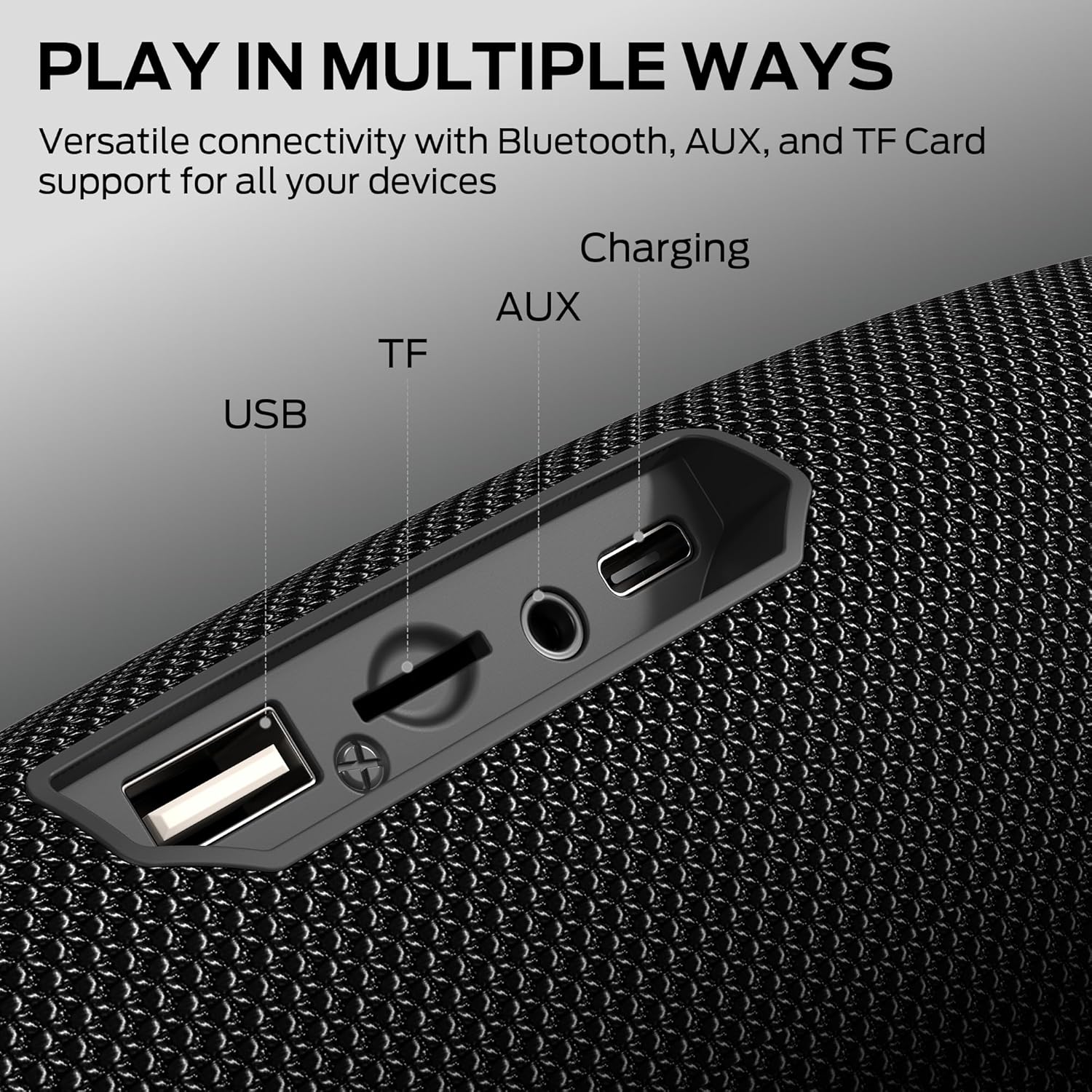
Image: Multi-input interfaces on the Monster S380 speaker.
- USB పోర్ట్: USB డ్రైవ్ ప్లేబ్యాక్ కోసం.
- TF కార్డ్ స్లాట్: TF (మైక్రో SD) కార్డ్ ప్లేబ్యాక్ కోసం.
- AUX ఇన్పుట్: 3.5mm ఆడియో కేబుల్ ద్వారా బాహ్య ఆడియో పరికరాలను కనెక్ట్ చేయడానికి.
- USB-C ఛార్జింగ్ పోర్ట్: స్పీకర్ను ఛార్జ్ చేసినందుకు.
సెటప్
1. స్పీకర్ను ఛార్జింగ్
Before first use, fully charge the speaker. Connect the provided USB-C charging cable to the speaker's USB-C port and the other end to a USB power adapter (not included) or a computer's USB port. The charging indicator will show the charging status and turn off when fully charged.
2. పవర్ చేయడం ఆన్/ఆఫ్
Press and hold the Power button (▮) for approximately 2-3 seconds to turn the speaker on or off. A sound prompt will indicate the power status.
ఆపరేటింగ్ సూచనలు
1. బ్లూటూత్ పెయిరింగ్

Image: Monster S380 with Bluetooth 6.0 indication.
- స్పీకర్ను ఆన్ చేయండి. ఇది స్వయంచాలకంగా బ్లూటూత్ జత చేసే మోడ్లోకి ప్రవేశిస్తుంది, ఇది ఫ్లాషింగ్ LED లైట్ ద్వారా సూచించబడుతుంది.
- మీ పరికరంలో బ్లూటూత్ను ప్రారంభించండి (స్మార్ట్ఫోన్, టాబ్లెట్, మొదలైనవి).
- కోసం వెతకండి "Monster S380" in your device's Bluetooth list and select it to connect.
- Once connected, the LED light will stop flashing, and you will hear a confirmation sound.
2. ట్రూ వైర్లెస్ స్టీరియో (TWS) జత చేయడం
TWS allows you to pair two Monster S380 speakers for a stereo sound experience.

Image: Two Monster S380 speakers paired for TWS connection.
- రెండు S380 స్పీకర్లు ఆన్లో ఉన్నాయని మరియు ఏ బ్లూటూత్ పరికరానికి కనెక్ట్ కాలేదని నిర్ధారించుకోండి.
- On one speaker (this will be the primary speaker), press and hold the Play/Pause button (►►) for 3 seconds until you hear a TWS pairing prompt.
- The two speakers will automatically search for and connect to each other. Once paired, you will hear a confirmation sound, and the LED on the primary speaker will flash slowly, while the secondary speaker's LED will be solid.
- ఇప్పుడు, "బ్లూటూత్ జత చేయడం" విభాగంలో వివరించిన విధంగా బ్లూటూత్ ద్వారా మీ పరికరాన్ని ప్రాథమిక స్పీకర్కు కనెక్ట్ చేయండి.
3. AUX ఇన్పుట్ మోడ్
To use the AUX input:
- Connect one end of the 3.5mm AUX cable to the speaker's AUX port and the other end to your audio device's headphone jack.
- Press the Mode button (M) on the speaker until it enters AUX mode.
- ఇప్పుడు మీ కనెక్ట్ చేయబడిన పరికరం నుండి స్పీకర్ ద్వారా ఆడియో ప్లే అవుతుంది.
4. TF కార్డ్ ప్లేబ్యాక్
To play music from a TF (MicroSD) card:
- TF కార్డును చొప్పించండి (సంగీతంతో files) స్పీకర్లోని TF కార్డ్ స్లాట్లోకి.
- The speaker will automatically switch to TF card mode, or you can press the Mode button (M) to select it.
- Music will begin playing from the TF card.
5. హ్యాండ్స్-ఫ్రీ కాలింగ్
బ్లూటూత్ ద్వారా కనెక్ట్ చేసినప్పుడు, స్పీకర్ను హ్యాండ్స్-ఫ్రీ కాల్ల కోసం ఉపయోగించవచ్చు:
- సమాధానం కాల్: Press the Play/Pause button (►►) once to answer an incoming call.
- కాల్ ముగించు: Press the Play/Pause button (►►) once during a call to end it.
- కాల్ని తిరస్కరించండి: Press and hold the Play/Pause button (►►) for 2 seconds to reject an incoming call.
నిర్వహణ
To ensure the longevity and optimal performance of your Monster S380 speaker, follow these maintenance guidelines:
- శుభ్రపరచడం: స్పీకర్ను మెత్తగా తుడవండి, డిamp వస్త్రం. రాపిడి క్లీనర్లు, ఆల్కహాల్ లేదా రసాయన ద్రావకాలను ఉపయోగించవద్దు.
- నీటి నిరోధకత: The speaker is IPX6 waterproof, meaning it can resist high-pressure water jets. However, it is not designed for submersion. Ensure the port cover is securely closed when exposed to water.
- నిల్వ: స్పీకర్ను ప్రత్యక్ష సూర్యకాంతి మరియు తీవ్రమైన ఉష్ణోగ్రతలకు దూరంగా చల్లని, పొడి ప్రదేశంలో నిల్వ చేయండి.
- బ్యాటరీ సంరక్షణ: To preserve battery life, charge the speaker regularly, even if not in use for extended periods. Avoid fully discharging the battery frequently.
- ప్రభావాలను నివారించండి: స్పీకర్ను పడవేయవద్దు లేదా బలమైన ప్రభావాలకు గురిచేయవద్దు, ఎందుకంటే ఇది అంతర్గత భాగాలను దెబ్బతీస్తుంది.
ట్రబుల్షూటింగ్
If you encounter issues with your Monster S380 speaker, refer to the following common problems and solutions:
| సమస్య | సాధ్యమైన కారణం | పరిష్కారం |
|---|---|---|
| స్పీకర్ ఆన్ చేయలేదు | బ్యాటరీ తక్కువగా ఉంది; పవర్ బటన్ సరిగ్గా నొక్కబడలేదు. | స్పీకర్ను పూర్తిగా ఛార్జ్ చేయండి; పవర్ బటన్ను 2-3 సెకన్ల పాటు నొక్కి ఉంచండి. |
| శబ్దం లేదు | వాల్యూమ్ చాలా తక్కువగా ఉంది; తప్పు ఇన్పుట్ మోడ్; పరికరం కనెక్ట్ కాలేదు. | Increase speaker and device volume; Press Mode button to select correct input; Re-pair Bluetooth device. |
| బ్లూటూత్ కనెక్షన్ అస్థిరంగా ఉంది లేదా విఫలమైంది | స్పీకర్ పరికరానికి చాలా దూరంలో ఉంది; జోక్యం; పరికరం బ్లూటూత్ సమస్య | Move speaker closer to device (within 33 feet); Avoid obstacles; Restart speaker and device Bluetooth. |
| TWS జత చేయడం విఫలమైంది | స్పీకర్లు ఇప్పటికే ఇతర పరికరాలకు కనెక్ట్ చేయబడ్డాయి; జత చేసే విధానం తప్పు. | రెండు స్పీకర్లు ఇతర పరికరాల నుండి డిస్కనెక్ట్ చేయబడ్డాయని నిర్ధారించుకోండి; TWS జత చేసే దశలను జాగ్రత్తగా అనుసరించండి. |
| AUX/TF card not working | Incorrect mode; Cable/card issue; File ఆకృతికి మద్దతు లేదు | Press Mode button to select AUX/TF mode; Check cable connection/TF card insertion; Ensure audio fileలు మద్దతు ఉన్న ఫార్మాట్లో ఉన్నాయి. |
స్పెసిఫికేషన్లు
| ఫీచర్ | వివరాలు |
|---|---|
| మోడల్ సంఖ్య | MS62153 |
| స్పీకర్ గరిష్ట అవుట్పుట్ పవర్ | 40 వాట్స్ |
| కనెక్టివిటీ టెక్నాలజీ | ఆక్సిలరీ, బ్లూటూత్, యుఎస్బి |
| వైర్లెస్ టెక్నాలజీ | బ్లూటూత్ 6.0 |
| బ్లూటూత్ రేంజ్ | 33 అడుగులు (10 మీటర్లు) వరకు |
| ఆడియో అవుట్పుట్ మోడ్ | స్టీరియో |
| జలనిరోధిత రేటింగ్ | IPX6 |
| బ్యాటరీ సగటు జీవితం | 20 గంటలు |
| శక్తి మూలం | బ్యాటరీ ఆధారితమైనది |
| నియంత్రణ పద్ధతి | పుష్ బటన్ |
| ఉత్పత్తి కొలతలు | 21 x 8 x 8 సెం.మీ |
| వస్తువు బరువు | 880 గ్రా |
| ఎన్క్లోజర్ మెటీరియల్ | ప్లాస్టిక్ |
| అనుకూల పరికరాలు | బ్లూటూత్-ఎనేబుల్డ్ పరికరాలు (స్మార్ట్ఫోన్లు, టాబ్లెట్లు, MP3 ప్లేయర్లు, టీవీలు, ల్యాప్టాప్లు) |
వారంటీ మరియు మద్దతు
వారంటీ సమాచారం
The Monster S380 Bluetooth Speaker comes with a 180-రోజుల పరిమిత వారంటీ కొనుగోలు చేసిన తేదీ నుండి. ఈ వారంటీ సాధారణ ఉపయోగంలో తయారీ లోపాలు మరియు పనితనాన్ని కవర్ చేస్తుంది. దుర్వినియోగం, ప్రమాదాలు, అనధికార మార్పులు లేదా సాధారణ అరిగిపోవడం వల్ల కలిగే నష్టాన్ని ఇది కవర్ చేయదు.
వారంటీ క్లెయిమ్ల కోసం దయచేసి మీ కొనుగోలు రుజువును ఉంచుకోండి.
కస్టమర్ మద్దతు
For technical assistance, warranty claims, or any questions regarding your Monster S380 speaker, please contact Monster customer support through their official webఉత్పత్తిని కొనుగోలు చేసిన సైట్ లేదా రిటైలర్.
Ask a question about this manual
Ask about setup, troubleshooting, compatibility, parts, safety, or missing instructions. Manuals+ will review the question and use this page’s manual context to help answer it.