పరిచయం
ధన్యవాదాలు, ధన్యవాదాలు.asing the GPX C3960 Personal CD/MP3 Player. This manual provides detailed instructions for the proper setup, operation, and maintenance of your device. Please read this manual thoroughly before use and retain it for future reference.
ప్యాకేజీ విషయాలు
ప్యాకేజీలో అన్ని వస్తువులు ఉన్నాయని నిర్ధారించుకోండి:
- GPX C3960 Personal CD/MP3 Player
- స్టీరియో ఇయర్బడ్స్
- వినియోగదారు మాన్యువల్ (ఈ పత్రం)
ఉత్పత్తి ముగిసిందిview
Familiarize yourself with the components and features of your GPX C3960 player.
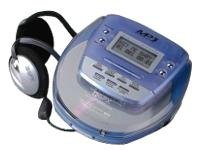
Image: The GPX C3960 Personal CD/MP3 Player, shown in a translucent blue casing, with a pair of silver over-ear headphones connected. The player features a small LCD screen and control buttons on its top surface.
ముఖ్య లక్షణాలు:
- CD-R/RW and MP3 disc playback compatibility
- Anti-skip protection: 45 seconds for audio CDs, 120 seconds for MP3 CDs
- Dynamic Bass Boost (DBB) for enhanced audio output
- 24-ట్రాక్ ప్రోగ్రామబుల్ మెమరీ
- Low battery alert indicator
- 2 AA బ్యాటరీలపై పనిచేస్తుంది
సెటప్
1. బ్యాటరీ ఇన్స్టాలేషన్
- Locate the battery compartment on the bottom of the player.
- బ్యాటరీ కంపార్ట్మెంట్ కవర్ను తెరవండి.
- Insert two (2) AA batteries, ensuring correct polarity (+ and -) as indicated inside the compartment.
- బ్యాటరీ కంపార్ట్మెంట్ కవర్ను సురక్షితంగా మూసివేయండి.
- గమనిక: Replace batteries when the low battery indicator appears on the display or when playback performance degrades.
2. హెడ్ఫోన్లను కనెక్ట్ చేస్తోంది
- Plug the stereo earbuds or your preferred headphones into the ఫోన్లు jack located on the side of the player.
ఆపరేటింగ్ సూచనలు
1. పవర్ చేయడం ఆన్/ఆఫ్
- పవర్ ఆన్ చేయడానికి, నొక్కండి PLAY/PAUSE (►/‖‖) బటన్.
- పవర్ ఆఫ్ చేయడానికి, నొక్కండి ఆపు (■) button twice, or wait for the auto-power off feature to activate after a period of inactivity.
2. Loading a CD/MP3 Disc
- నొక్కండి తెరవండి డిస్క్ కంపార్ట్మెంట్ మూతను తెరవడానికి బటన్.
- Carefully place a CD or MP3 disc onto the center spindle with the label side facing up.
- డిస్క్ సరైన స్థానంలోకి వచ్చే వరకు సున్నితంగా క్రిందికి నొక్కండి.
- Close the disc compartment lid firmly until it latches.
3. ప్రాథమిక ప్లేబ్యాక్
- ప్లే/పాజ్: నొక్కండి PLAY/PAUSE (►/‖‖) ప్లేబ్యాక్ను ప్రారంభించడానికి లేదా పాజ్ చేయడానికి.
- ఆపు: నొక్కండి ఆపు (■) ప్లేబ్యాక్ ఆపడానికి.
- ట్రాక్లను దాటవేయి: నొక్కండి ముందుకు స్కిప్ చేయండి (►►) or వెనుకకు దాటవేయి (◄◄) to move to the next or previous track.
- శోధన: నొక్కి పట్టుకోండి ముందుకు స్కిప్ చేయండి (►►) or వెనుకకు దాటవేయి (◄◄) during playback to fast-forward or rewind within a track.
4. వాల్యూమ్ నియంత్రణ
- సర్దుబాటు చేయండి వాల్యూమ్ dial located on the side of the player to increase or decrease the audio output level.
5. Dynamic Bass Boost (DBB)
- నొక్కండి DBB button to activate or deactivate the dynamic bass boost feature, which enhances low-frequency sounds.
6. Anti-Skip Protection
The GPX C3960 features electronic anti-skip protection to prevent audio interruptions during movement. This provides approximately 45 seconds of protection for standard audio CDs and 120 seconds for MP3 CDs.
7. Programming Tracks
- With the player stopped, press the PROG బటన్. ప్రోగ్రామ్ సూచిక ఫ్లాష్ అవుతుంది.
- ఉపయోగించండి ముందుకు స్కిప్ చేయండి (►►) or వెనుకకు దాటవేయి (◄◄) కావలసిన ట్రాక్ని ఎంచుకోవడానికి బటన్లు.
- నొక్కండి PROG again to add the selected track to the program memory.
- Repeat steps 2 and 3 for up to 24 tracks.
- నొక్కండి PLAY/PAUSE (►/‖‖) to start playback of the programmed sequence.
- To clear the program, open the disc compartment or press ఆపు (■) రెండుసార్లు.
నిర్వహణ
యూనిట్ శుభ్రపరచడం
- Wipe the exterior of the player with a soft, slightly damp గుడ్డ. రాపిడి క్లీనర్లు లేదా ద్రావకాలు ఉపయోగించవద్దు.
- Never open the disc compartment while the player is operating.
- Keep the lens clean. If the lens becomes dirty, use a soft camera lens brush to gently remove dust.
బ్యాటరీ సంరక్షణ
- లీకేజీని నివారించడానికి యూనిట్ ఎక్కువ కాలం ఉపయోగించబడకపోతే బ్యాటరీలను తీసివేయండి.
- పాత మరియు కొత్త బ్యాటరీలు లేదా వివిధ రకాల బ్యాటరీలను కలపవద్దు.
డిస్క్ హ్యాండ్లింగ్
- వేలిముద్రలు మరియు గీతలు పడకుండా ఉండటానికి డిస్క్లను వాటి అంచుల వద్ద పట్టుకోండి.
- ఉపయోగంలో లేనప్పుడు డిస్కులను వాటి సందర్భాలలో నిల్వ చేయండి.
- మృదువైన, మెత్తటి బట్టతో డిస్క్లను శుభ్రం చేసి, మధ్య నుండి బయటికి తుడవండి.
ట్రబుల్షూటింగ్
| సమస్య | సాధ్యమైన కారణం | పరిష్కారం |
|---|---|---|
| శక్తి లేదు | బ్యాటరీలు డెడ్ అయ్యాయి లేదా తప్పుగా చొప్పించబడ్డాయి. | బ్యాటరీలను కొత్త వాటితో భర్తీ చేయండి, సరైన ధ్రువణతను నిర్ధారించండి. |
| Disc not playing / "NO DISC" error | డిస్క్ మురికిగా ఉంది, గీతలు పడ్డాయి లేదా తప్పుగా చొప్పించబడింది. | Clean the disc. Reinsert the disc with the label side up. Try a different disc. |
| Sound skipping or distorted | Disc is dirty, scratched, or player is subjected to excessive vibration. | Clean the disc. Ensure the player is on a stable surface or reduce movement. |
| హెడ్ఫోన్ల నుండి శబ్దం లేదు | Headphones not properly connected or volume too low. | Ensure headphones are fully plugged in. Increase volume. Test with different headphones. |
స్పెసిఫికేషన్లు
- బ్రాండ్: GPX
- మోడల్: C3960
- మద్దతు ఉన్న మీడియా: CD, CD-R, CD-RW, MP3-CD
- స్కిప్ వ్యతిరేక రక్షణ: 45 seconds (CD), 120 seconds (MP3-CD)
- శక్తి మూలం: 2 x AA బ్యాటరీలు
- ప్రత్యేక ఫీచర్: పోర్టబుల్
- వస్తువు బరువు: సుమారు 726 గ్రా
- కొలతలు: Approximately 40.64 x 38.1 x 30.48 cm (Package Dimensions)
వారంటీ మరియు మద్దతు
For warranty information or technical support, please refer to the documentation included with your purchase or visit the official GPX webవారంటీ క్లెయిమ్ల కోసం మీ కొనుగోలు రుజువును ఉంచండి.


