పరిచయం
This manual provides essential instructions for the safe and efficient operation of your Thomson CS550 Compact System. Please read this manual thoroughly before using the product and retain it for future reference.
ముఖ్యమైన భద్రతా సమాచారం
- శక్తి మూలం: Ensure the unit is connected to a power supply matching the voltagఇ రేటింగ్ లేబుల్పై పేర్కొనబడింది.
- వెంటిలేషన్: వెంటిలేషన్ ఓపెనింగ్లను నిరోధించవద్దు. సరైన గాలి ప్రవాహం కోసం యూనిట్ చుట్టూ తగినంత స్థలాన్ని అనుమతించండి.
- నీరు మరియు తేమ: యూనిట్ను వర్షం, తేమ లేదా చినుకులు/స్ప్లాషింగ్ ద్రవాలకు గురిచేయవద్దు.
- వేడి: రేడియేటర్లు, హీట్ రిజిస్టర్లు, స్టవ్లు లేదా ఇతర ఉపకరణాలు (సహా) వంటి ఉష్ణ వనరుల నుండి యూనిట్ను దూరంగా ఉంచండి. ampలిఫైయర్లు) వేడిని ఉత్పత్తి చేస్తాయి.
- శుభ్రపరచడం: శుభ్రం చేయడానికి ముందు యూనిట్ను గోడ అవుట్లెట్ నుండి అన్ప్లగ్ చేయండి. పొడి గుడ్డను మాత్రమే ఉపయోగించండి.
- సర్వీసింగ్: ఈ ఉత్పత్తిని మీరే సేవ చేయడానికి ప్రయత్నించవద్దు. అర్హత కలిగిన సేవా సిబ్బందికి అన్ని సర్వీసులను చూడండి.
ప్యాకేజీ విషయాలు
క్రింద జాబితా చేయబడిన అన్ని వస్తువులు మీ ప్యాకేజీలో చేర్చబడ్డాయని ధృవీకరించండి:
- Thomson CS550 Main Unit
- రెండు స్పీకర్ యూనిట్లు
- రిమోట్ కంట్రోల్
- పవర్ కార్డ్
- FM Antenna (if applicable)
- వినియోగదారు మాన్యువల్ (ఈ పత్రం)
ఉత్పత్తి ముగిసిందిview
The Thomson CS550 is a compact audio system designed for versatile music playback. It features a 5-disc CD changer, compatibility with CD-R and CD-RW discs, a full logic drive, and a powerful audio output. The system includes an RDS radio tuner, a 5-preset equalizer, and a bass booster function for enhanced sound. The two-way bass-reflex speakers are equipped with titanium woofers.
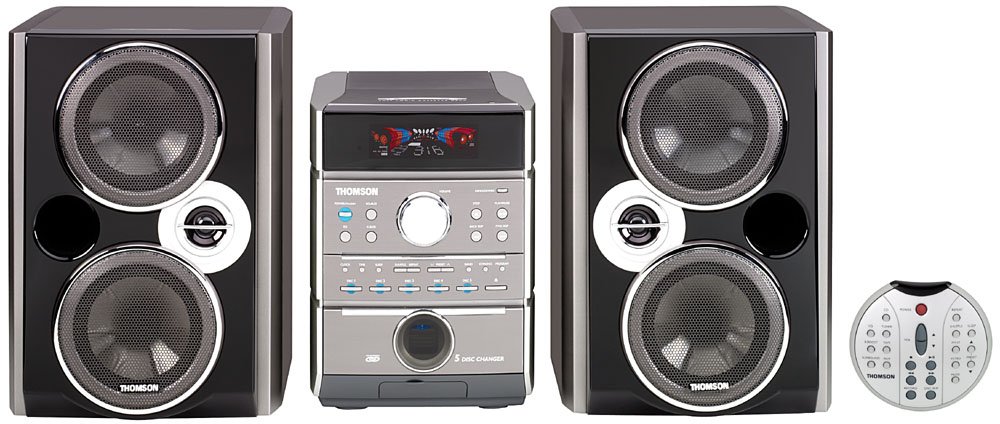
Image: The Thomson CS550 compact system, showing the central main unit with a display and controls, flanked by two black speaker units. A small silver remote control is positioned to the right.
సెటప్ సూచనలు
- అన్ప్యాకింగ్: ప్యాకేజింగ్ నుండి అన్ని భాగాలను జాగ్రత్తగా తొలగించండి.
- ప్లేస్మెంట్: ప్రధాన యూనిట్ మరియు స్పీకర్లను స్థిరమైన, చదునైన ఉపరితలంపై ఉంచండి. యూనిట్ చుట్టూ తగినంత వెంటిలేషన్ ఉండేలా చూసుకోండి.
- స్పీకర్ కనెక్షన్: Connect the speaker wires from the main unit to the corresponding terminals on the back of each speaker. Ensure correct polarity (+ to + and - to -).
- యాంటెన్నా కనెక్షన్: Connect the FM antenna (if provided) to the FM antenna terminal on the rear of the main unit. Extend the antenna for optimal reception.
- పవర్ కనెక్షన్: Plug the power cord into the AC inlet on the main unit, then plug the other end into a wall outlet.
- ప్రారంభ పవర్ ఆన్: Press the POWER button on the main unit or remote control to turn on the system.
ఆపరేటింగ్ సూచనలు
CD ప్లేబ్యాక్
- నొక్కండి CD CD మోడ్ను ఎంచుకోవడానికి బటన్.
- నొక్కండి తెరవండి/మూసివేయండి CD ట్రేని తెరవడానికి బటన్.
- Place up to five CDs onto the disc changer trays with the label side facing up.
- నొక్కండి తెరవండి/మూసివేయండి ట్రేని మూసివేయడానికి మళ్లీ బటన్.
- నొక్కండి ప్లే/పాజ్ చేయండి button to start playback. Use the దాటవేయి ట్రాక్లను నావిగేట్ చేయడానికి బటన్లు.
Radio Operation (FM/AM)
- నొక్కండి ట్యూనర్/బ్యాండ్ button to select FM or AM radio mode.
- నొక్కండి ట్యూన్ +/- స్టేషన్కు మాన్యువల్గా ట్యూన్ చేయడానికి బటన్లు.
- నొక్కి పట్టుకోండి ట్యూన్ +/- తదుపరి అందుబాటులో ఉన్న స్టేషన్కు ఆటోమేటిక్ స్కానింగ్ కోసం.
- స్టేషన్ను ప్రీసెట్ చేయడానికి, కావలసిన ఫ్రీక్వెన్సీకి ట్యూన్ చేసి, ఆపై నొక్కండి మెమరీ followed by a preset number button.
సహాయక ఇన్పుట్
Connect external audio devices (MP3 player, smartphone, PC) to the AUX IN jack on the front or rear panel using an appropriate audio cable.
- Connect your external device to the AUX IN ఓడరేవు
- నొక్కండి AUX button on the main unit or remote control to select the auxiliary input.
- మీ కనెక్ట్ చేయబడిన పరికరంలో ప్లేబ్యాక్ను ప్రారంభించండి.
ధ్వని సర్దుబాటు
- వాల్యూమ్: ఉపయోగించండి వాల్యూమ్ +/- buttons on the unit or remote control.
- సమం: నొక్కండి EQ button repeatedly to cycle through the 5 sound presets (e.g., Rock, Pop, Jazz, Classic, Flat).
- బాస్ బూస్టర్: నొక్కండి బాస్ బూస్ట్ బాస్ మెరుగుదల లక్షణాన్ని సక్రియం చేయడానికి లేదా నిష్క్రియం చేయడానికి బటన్.
నిర్వహణ మరియు సంరక్షణ
- యూనిట్ శుభ్రపరచడం: బయటి ఉపరితలాలను మృదువైన, పొడి గుడ్డతో తుడవండి. రాపిడి క్లీనర్లు, మైనపులు లేదా ద్రావకాలను ఉపయోగించవద్దు.
- CD లెన్స్ కేర్: CD లెన్స్ను తాకకుండా ఉండండి. అవసరమైతే, ప్రత్యేకమైన CD లెన్స్ క్లీనర్ డిస్క్ను ఉపయోగించండి.
- స్పీకర్ గ్రిల్స్: Gently dust the speaker grilles with a soft brush or vacuum cleaner with a brush attachment.
- నిల్వ: If storing the unit for an extended period, unplug it from the power outlet and cover it to protect against dust.
ట్రబుల్షూటింగ్
| సమస్య | సాధ్యమైన కారణం | పరిష్కారం |
|---|---|---|
| శక్తి లేదు | పవర్ కార్డ్ కనెక్ట్ కాలేదు; పవర్ అవుట్లెట్ లోపభూయిష్టంగా ఉంది | పవర్ కార్డ్ సురక్షితంగా ప్లగిన్ చేయబడిందని నిర్ధారించుకోండి; వేరే అవుట్లెట్ను ప్రయత్నించండి. |
| శబ్దం లేదు | Volume too low; Speakers not connected; Incorrect input selected | Increase volume; Check speaker connections; Select correct source (CD, Tuner, AUX). |
| CD ప్లే కావడం లేదు | CD inserted incorrectly; Disc scratched/dirty; Incorrect mode selected | Insert CD with label side up; Clean or replace disc; Select CD mode. |
| పేలవమైన రేడియో రిసెప్షన్ | Antenna not extended/connected; Weak signal | Extend and adjust antenna position; Try repositioning the unit. |
| రిమోట్ కంట్రోల్ పనిచేయడం లేదు | Batteries depleted; Obstruction between remote and unit | Replace batteries; Remove any obstructions; Ensure remote is pointed at the unit's sensor. |
స్పెసిఫికేషన్లు
- బ్రాండ్: థామ్సన్
- మోడల్: CS 550
- ఆడియో అవుట్పుట్ మోడ్: స్టీరియో
- స్పీకర్ కాన్ఫిగరేషన్: 2-way Bass-Reflex with Titanium Woofers
- CD మారకం: 5-డిస్క్
- CD అనుకూలత: CD, CD-R, CD-RW
- మద్దతు ఉన్న ఆడియో ఫార్మాట్లు: CD
- Total Music Performance: 400 వాట్స్ (పీక్)
- వాట్ రేట్ చేయబడిందిtage: 100 వాట్స్
- శక్తి మూలం: కార్డెడ్ ఎలక్ట్రిక్
- రేడియో ట్యూనర్: RDS రేడియో
- సమం: 5 Sound Presets
- బాస్ మెరుగుదల: బాస్ బూస్టర్
- కనెక్టివిటీ: సహాయక (3.5mm జాక్)
- అనుకూల పరికరాలు: MP3 Player, Smartphone, PC
- బ్లూటూత్ టెక్నాలజీ: మద్దతు లేదు
- రంగు: నలుపు
- కొలతలు (ప్యాకేజీ): 67 x 58.6 x 36.8 సెం.మీ
- బరువు (ప్యాకేజీ): 10 గ్రా
వారంటీ మరియు మద్దతు
For warranty information and technical support, please refer to the warranty card included with your product or visit the official Thomson webసైట్. ఏవైనా వారంటీ క్లెయిమ్ల కోసం మీ కొనుగోలు రుజువును ఉంచుకోండి.
Do not attempt to repair the unit yourself. Unauthorized repairs will void the warranty.


