పరిచయం
ధన్యవాదాలు, ధన్యవాదాలు.asing the Harbor Breeze Lakeside II Ceiling Fan. This 52-inch ceiling fan features a white finish, tri-mount installation options (close mount, downrod, and slope ceiling mount), 6 reversible bleached oak/white blades, and a 5-light kit with frosted glass. It is designed to enhance the comfort and aesthetics of any indoor room.
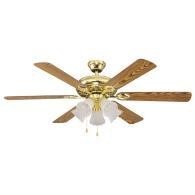
Image: The Harbor Breeze Lakeside II Ceiling Fan, showcasing its brass-colored motor housing, five wooden blades (reversible white/bleached oak), and a five-light kit with frosted glass shades. The fan is designed for indoor use and includes pull chains for operation.
భద్రతా సమాచారం
Please read and understand this entire manual before attempting to assemble, operate, or install the product. Failure to follow the instructions could result in electric shock, fire, or serious personal injury.
- ఇన్స్టాలేషన్ లేదా సర్వీసింగ్ చేసే ముందు ప్రధాన సర్క్యూట్ బ్రేకర్ వద్ద ఎల్లప్పుడూ పవర్ను డిస్కనెక్ట్ చేయండి.
- అన్ని విద్యుత్ కనెక్షన్లు స్థానిక కోడ్లు మరియు ఆర్డినెన్స్లకు అనుగుణంగా ఉన్నాయని నిర్ధారించుకోండి.
- The fan must be mounted with a minimum of 7 feet (2.1 meters) clearance from the floor to the trailing edge of the blades.
- Do not operate the fan if any part of the housing or blades is damaged.
- ఫ్యాన్ బ్లేడ్ల మార్గంలో వస్తువులను చొప్పించవద్దు.
- ఈ ఉత్పత్తి ఇండోర్ ఉపయోగం కోసం మాత్రమే ఉద్దేశించబడింది.
ప్యాకేజీ విషయాలు
Verify that all parts listed below are included in your package. If any parts are missing or damaged, contact customer service.
- ఫ్యాన్ మోటార్ అసెంబ్లీ
- Fan Blades (6 reversible: white/bleached oak)
- బ్లేడ్ బ్రాకెట్లు
- Light Kit with Frosted Glass Shades (5)
- Downrod (3/4 inch diameter x 4 inches)
- మౌంటు బ్రాకెట్
- హార్డ్వేర్ ప్యాక్ (స్క్రూలు, వాషర్లు, వైర్ నట్స్)
- గొలుసులు లాగండి
సెటప్ మరియు ఇన్స్టాలేషన్
This section provides general instructions for installing your ceiling fan. For detailed wiring diagrams and specific mounting options (close mount, downrod, slope ceiling), please refer to the included installation guide that came with your product.
1. సంస్థాపన కోసం సిద్ధం
- సర్క్యూట్ బ్రేకర్ లేదా ఫ్యూజ్ బాక్స్ వద్ద పవర్ ఆఫ్ చేయండి.
- Ensure the outlet box is securely fastened to the building structure and can support the fan's weight (at least 35 lbs).
2. Mount the Fan
- అందించిన స్క్రూలను ఉపయోగించి అవుట్లెట్ బాక్స్కు మౌంటు బ్రాకెట్ను అటాచ్ చేయండి.
- Assemble the downrod to the fan motor assembly, ensuring the set screw is tightened.
- ఫ్యాన్ అసెంబ్లీని జాగ్రత్తగా ఎత్తి మౌంటు బ్రాకెట్ నుండి వేలాడదీయండి.
3 విద్యుత్ కనెక్షన్లు
- Connect the fan's electrical wires to the household wiring according to the wiring diagram. Typically, this involves connecting ground to ground, neutral to neutral, and hot to hot. Use wire nuts to secure connections.
- అన్ని కనెక్షన్లు గట్టిగా మరియు సురక్షితంగా ఉన్నాయని నిర్ధారించుకోండి.
4. Attach Blades and Light Kit
- Attach the blade brackets to the fan motor.
- Secure the fan blades to the blade brackets. Choose either the white or bleached oak side facing down.
- Connect the light kit wiring to the fan motor wiring.
- Attach the light kit housing and install the frosted glass shades.
- Install appropriate light bulbs (not included).
ఆపరేటింగ్ సూచనలు
Your Harbor Breeze Lakeside II Ceiling Fan is operated by pull chains.
- ఫ్యాన్ స్పీడ్ కంట్రోల్: Pull the chain attached to the fan motor to cycle through fan speeds: High, Medium, Low, Off.
- కాంతి నియంత్రణ: Pull the chain attached to the light kit to turn the lights On or Off.
- రివర్సిబుల్ మోటార్: A slide switch on the fan motor housing controls the direction of blade rotation.
- కోసం warm weather (downward airflow), set the switch to the left/down position. This creates a cooling effect.
- కోసం cool weather (upward airflow), set the switch to the right/up position. This helps circulate warm air trapped near the ceiling.
నిర్వహణ
Proper maintenance ensures the longevity and optimal performance of your ceiling fan.
- శుభ్రపరచడం: ఫినిషింగ్ దెబ్బతినకుండా ఉండటానికి, ఫ్యాన్ను మృదువైన, డి-ప్యాక్తో శుభ్రం చేయండి.amp వస్త్రం మాత్రమే. రాపిడి క్లీనర్లు లేదా ద్రావకాలను ఉపయోగించవద్దు.
- బ్లేడ్ క్లీనింగ్: Dust the blades regularly to prevent dust buildup, which can affect balance and performance.
- బిగించే స్క్రూలు: Periodically check all screws, especially those on the blade attachments and mounting bracket, to ensure they are tight. Loose screws can cause wobbling or noise.
- సరళత: ఫ్యాన్ మోటార్ శాశ్వతంగా లూబ్రికేట్ చేయబడుతుంది మరియు నూనె రాయవలసిన అవసరం లేదు.
ట్రబుల్షూటింగ్
Before attempting any repairs, ensure power is disconnected at the circuit breaker.
| సమస్య | సాధ్యమైన కారణం | పరిష్కారం |
|---|---|---|
| ఫ్యాన్ స్టార్ట్ అవ్వదు | No power to the fan; Loose wire connections; Blown fuse or tripped circuit breaker. | Check power supply; Ensure all wire connections are secure; Reset circuit breaker or replace fuse. |
| ఫ్యాన్ ఊగిసలాడుతోంది | వదులైన బ్లేడ్ స్క్రూలు; అసమతుల్య బ్లేడ్లు; వదులైన మౌంటు బ్రాకెట్. | Tighten all blade screws; Check blade balance (use a balancing kit if necessary); Ensure mounting bracket is securely fastened. |
| ఫ్యాన్ శబ్దం చేస్తోంది | వదులుగా ఉన్న స్క్రూలు; మోటారు హమ్; బ్లేడ్లు అడ్డంకిని తాకడం. | Check and tighten all screws; A slight motor hum is normal; Ensure nothing is in the path of the blades. |
| లైట్లు పనిచేయడం లేదు | Loose wire connections; Faulty bulbs; Light kit switch is off. | Check light kit wiring; Replace bulbs; Ensure light pull chain is in the ON position. |
స్పెసిఫికేషన్లు
- మోడల్: LKD52WW6C
- బ్రాండ్: హార్బర్ బ్రీజ్
- ఫ్యాన్ పరిమాణం: 52 అంగుళాలు
- బ్లేడ్ కౌంట్: 6
- బ్లేడ్ ముగింపు: Reversible White / Bleached Oak
- మౌంటు ఎంపికలు: Tri-mount (Close Mount, Downrod, Slope Ceiling)
- Downrod Included: 3/4 inch diameter x 4 inches
- లైట్ కిట్: Included, 5-light with frosted glass
- మోటార్: 3-speed reversible
- శక్తి మూలం: కార్డెడ్ ఎలక్ట్రిక్
- ఇండోర్/అవుట్డోర్ వినియోగం: ఇండోర్
వారంటీ మరియు మద్దతు
The Harbor Breeze Lakeside II Ceiling Fan comes with a Limited Lifetime Warranty. For specific details regarding warranty coverage, limitations, and how to file a claim, please refer to the warranty card included with your product or visit the official Harbor Breeze webసైట్.
For technical assistance, replacement parts, or general inquiries, please contact Harbor Breeze customer support. Contact information can typically be found on the product packaging or the manufacturer's webసైట్.
గమనిక: Proof of purchase may be required for warranty claims.


