పరిచయం
This manual provides detailed instructions for the proper use and maintenance of your Royal DM2070 Electronic Organizer. Please read this manual thoroughly before operating the device to ensure safe and efficient use. Keep this manual for future reference.
భద్రతా సమాచారం
- పరికరాన్ని తీవ్రమైన ఉష్ణోగ్రతలు, ప్రత్యక్ష సూర్యకాంతి లేదా అధిక తేమకు గురిచేయవద్దు.
- పరికరాన్ని వదలడం లేదా బలమైన ప్రభావాలకు గురిచేయడం మానుకోండి.
- పరికరాన్ని మీరే విడదీయడానికి లేదా మరమ్మతు చేయడానికి ప్రయత్నించవద్దు. అన్ని సర్వీసింగ్లను అర్హత కలిగిన సిబ్బందికి సూచించండి.
- పరికరాన్ని నీరు మరియు ఇతర ద్రవాలకు దూరంగా ఉంచండి.
- భర్తీ కోసం పేర్కొన్న బ్యాటరీ రకాన్ని మాత్రమే ఉపయోగించండి.
ప్యాకేజీ విషయాలు
మీ ప్యాకేజీలో అన్ని అంశాలు ఉన్నాయని ధృవీకరించండి:
- Royal DM2070 Electronic Organizer
- Stylus (if applicable)
- త్వరిత ప్రారంభ గైడ్
- వారంటీ కార్డ్
సెటప్
1. బ్యాటరీ ఇన్స్టాలేషన్
The Royal DM2070 requires batteries for operation. Follow these steps to install them:
- పరికరం వెనుక భాగంలో బ్యాటరీ కంపార్ట్మెంట్ కవర్ను గుర్తించండి.
- కంపార్ట్మెంట్ తెరవడానికి కవర్ను జారండి లేదా ఎత్తండి.
- Insert the required batteries, ensuring correct polarity (+ and -) as indicated inside the compartment.
- బ్యాటరీ కంపార్ట్మెంట్ కవర్ను సురక్షితంగా మార్చండి.
2. ప్రారంభ పవర్-ఆన్ మరియు సెట్టింగ్లు
After installing batteries, power on your device and configure basic settings:
- నొక్కండి మరియు పట్టుకోండి శక్తి స్క్రీన్ వెలిగే వరకు బటన్ను నొక్కి ఉంచండి.
- The device may prompt you to set the date and time. Use the navigation buttons or stylus to enter the correct information.
- ప్రారంభ సెటప్ను పూర్తి చేయడానికి మీ సెట్టింగ్లను నిర్ధారించండి.
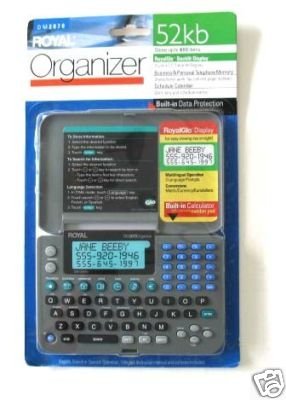
Image: Royal DM2070 Electronic Organizer. This image displays the device's front view, highlighting its screen and keypad, essential for navigation and data entry.
ఆపరేటింగ్ సూచనలు
1. నావిగేషన్
The DM2070 features a keypad and potentially a stylus for navigation. Use the arrow keys to move between menu options and press నమోదు చేయండి or a designated selection button to confirm.
2. Entering Data
To enter information such as contacts, appointments, or notes:
- Navigate to the desired application (e.g., 'Contacts', 'Calendar', 'Notes').
- Select 'New Entry' or a similar option.
- Use the alphanumeric keypad to input text. Some models may offer an on-screen keyboard via stylus.
- Save your entry before exiting the application.
3. అప్లికేషన్లను ఉపయోగించడం
The DM2070 includes various applications:
- క్యాలెండర్: View daily, weekly, or monthly schedules. Add and edit appointments.
- పరిచయాలు: Store names, phone numbers, addresses, and email information.
- గమనికలు: Create and manage text notes or memos.
- క్యాలిక్యులేటర్: ప్రాథమిక అంకగణిత గణనలను నిర్వహించండి.
- కరెన్సీ కన్వర్టర్: Convert between different currencies (requires manual update of exchange rates on some models).
నిర్వహణ
1. పరికరాన్ని శుభ్రపరచడం
To keep your DM2070 in optimal condition:
- స్క్రీన్ను తుడిచి, సి.asing with a soft, dry, lint-free cloth.
- మొండి గుర్తుల కోసం, కొద్దిగా dampగుడ్డను నీటితో తడిపివేయండి; కఠినమైన రసాయనాలు లేదా రాపిడి క్లీనర్లను నివారించండి.
- Ensure no moisture enters openings.
2. బ్యాటరీ సంరక్షణ
- తక్కువ బ్యాటరీ సూచిక కనిపించినప్పుడు వెంటనే బ్యాటరీలను మార్చండి.
- లీకేజీని నివారించడానికి పరికరం ఎక్కువ కాలం ఉపయోగించబడకపోతే బ్యాటరీలను తీసివేయండి.
ట్రబుల్షూటింగ్
If you encounter issues with your Royal DM2070, refer to the following common solutions:
| సమస్య | సాధ్యమైన కారణం | పరిష్కారం |
|---|---|---|
| పరికరం పవర్ ఆన్ చేయదు. | డెడ్ లేదా తప్పుగా ఇన్స్టాల్ చేయబడిన బ్యాటరీలు. | బ్యాటరీలను కొత్త వాటితో భర్తీ చేయండి, సరైన ధ్రువణతను నిర్ధారించండి. |
| స్క్రీన్ ఖాళీగా లేదా స్తంభించి ఉంది. | సాఫ్ట్వేర్ లోపం లేదా తక్కువ బ్యాటరీ. | Try a soft reset (refer to Quick Start Guide for specific button combination) or replace batteries. |
| Data loss. | Battery depletion or improper shutdown. | Ensure batteries are fresh. Always save data before powering off. |
| కీప్యాడ్ స్పందించడం లేదు. | Dust/debris under keys or internal issue. | Clean keypad gently. If problem persists, contact support. |
స్పెసిఫికేషన్లు
Key technical specifications for the Royal DM2070 Electronic Organizer:
| ఫీచర్ | వివరాలు |
|---|---|
| బ్రాండ్ | రాయల్ |
| మోడల్ సంఖ్య | DM2070 |
| కవర్ మెటీరియల్ | తోలు |
| ఫార్మాట్ | ఆర్గనైజర్ |
| వస్తువు బరువు | 181 గ్రా |
| అంశం కొలతలు (LxWxH) | 24.4 x 14.5 x 1 సెంటీమీటర్లు |
| టార్గెట్ ఆడియన్స్ | పెద్దలు |
వారంటీ మరియు మద్దతు
The Royal DM2070 Electronic Organizer comes with a standard manufacturer's warranty. Please refer to the warranty card included in your package for specific terms and conditions. For technical support, service, or inquiries, please contact Royal customer service through the contact information provided on the warranty card or the official Royal webసైట్.


