1. పరిచయం
This manual provides essential instructions for the safe and effective use of your Kodak EASYSHARE Z1015 Digital Camera. Please read this manual thoroughly before operating the camera and retain it for future reference.
The Kodak EASYSHARE Z1015 is a versatile digital camera featuring a 10-megapixel CCD sensor, a 28mm wide-angle lens, and a powerful 15x optical zoom. It is designed to capture both expansive landscapes and detailed close-up shots with ease.
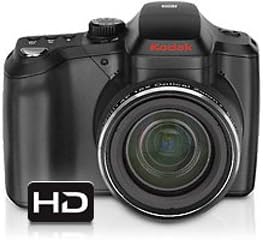
మూర్తి 1: ముందు view of the Kodak EASYSHARE Z1015 Digital Camera, showcasing దాని లెన్స్ మరియు బాడీ డిజైన్.
2. సెటప్
2.1 బ్యాటరీ ఇన్స్టాలేషన్
The camera operates using a Lithium-Ion battery. Ensure the battery is fully charged before first use.
- కెమెరా దిగువన బ్యాటరీ కంపార్ట్మెంట్ కవర్ను గుర్తించండి.
- కవర్ తెరవడానికి గడియను స్లైడ్ చేయండి.
- Insert the Lithium-Ion battery according to the polarity indicators inside the compartment.
- బ్యాటరీ కంపార్ట్మెంట్ కవర్ సరిగ్గా అమర్చబడే వరకు దాన్ని సురక్షితంగా మూసివేయండి.
2.2 మెమరీ కార్డ్ చొప్పించడం
The camera supports SD and SDHC memory cards up to 32 GB. It also has 64 MB of internal memory.
- Locate the memory card slot, typically adjacent to the battery compartment.
- Insert the SD/SDHC card with the metal contacts facing the correct direction, as indicated by the diagram near the slot.
- Push the card gently until it locks into place.
- తీసివేయడానికి, కార్డు కొద్దిగా బయటకు వచ్చే వరకు మళ్ళీ లోపలికి నెట్టి, ఆపై దాన్ని బయటకు తీయండి.
2.3 ప్రారంభ పవర్ ఆన్
After installing the battery and memory card, press the power button to turn on the camera. Follow any on-screen prompts for initial setup, such as setting the date and time.
3. కెమెరాను ఆపరేట్ చేయడం
3.1 ప్రాథమిక ఫోటోగ్రఫీ మోడ్లు
The Kodak EASYSHARE Z1015 offers various shooting modes to suit different photographic situations:
- స్మార్ట్ క్యాప్చర్ మోడ్: Automatically optimizes camera settings for the best possible shot.
- అధిక ISO మోడ్: Ideal for low-light conditions, reducing the need for flash.
- స్పోర్ట్ మోడ్: Optimizes settings for capturing fast-moving subjects.
- PASM Mode (Program, Aperture Priority, Shutter Priority, Manual): Provides advanced control over exposure settings for experienced users.
3.2 దృష్టి కేంద్రీకరించడం
The camera uses a TTL imager AF system with multiple focusing options:
- మోడ్లు: Normal, Macro (for close-ups), Infinity (for distant subjects), and Manual Focus.
- AF Zones: Multi-zone, Center zone, and Selectable zone AF (5 zones).
- Face-priority AF: Automatically detects and focuses on faces in the frame.
3.3 ఎక్స్పోజర్ నియంత్రణ
Adjust exposure settings to control the brightness of your photos:
- ISO సున్నితత్వం: Ranges from auto to 6400 (in PASM mode) to adjust light sensitivity.
- మీటరింగ్ మోడ్లు: Multi-pattern, Center-weighted, and Spot metering.
- ఎక్స్పోజర్ పరిహారం: Adjusts exposure by +/- 2.0 EV in 1/3 EV steps.
- వైట్ బ్యాలెన్స్: Auto, Daylight, Tungsten, Fluorescent, Open Shade settings to ensure accurate color reproduction.
3.4 ఫ్లాష్ వినియోగం
The built-in flash has a working distance of up to 5.0 meters (at wide, ISO 400).
- మోడ్లు: Auto, Off, Fill Flash, and Red-eye Reduction.
- పరిహారం: Adjusts flash output by +/- 1.0 EV in 1/3 EV steps.
3.5 వీడియో రికార్డింగ్
The camera supports video capture in MPEG-4 format with a resolution of up to 1080p.
- కెమెరాను వీడియో రికార్డింగ్ మోడ్కు మార్చండి.
- రికార్డింగ్ ప్రారంభించడానికి షట్టర్ బటన్ను నొక్కండి.
- రికార్డింగ్ ఆపివేయడానికి షట్టర్ బటన్ను మళ్లీ నొక్కండి.
3.6 రేviewచిత్రాలు మరియు వీడియోలను అప్లోడ్ చేయడం
Use the 3.0-inch high-resolution LCD monitor (230k dots) to review your captured photos and videos. Navigate through your media using the camera's control buttons.
4. నిర్వహణ
4.1 కెమెరాను శుభ్రపరచడం
- లెన్స్: దుమ్మును సున్నితంగా తొలగించడానికి మృదువైన, మెత్తటి బట్ట లేదా లెన్స్ బ్రష్ను ఉపయోగించండి. మరకల కోసం, లెన్స్కు నేరుగా కాకుండా, ఒక వస్త్రానికి వర్తించే ప్రత్యేకమైన లెన్స్ శుభ్రపరిచే ద్రావణాన్ని ఉపయోగించండి.
- LCD స్క్రీన్: మృదువైన, పొడి గుడ్డతో సున్నితంగా తుడవండి. కఠినమైన రసాయనాలను నివారించండి.
- కెమెరా బాడీ: Use a dry, soft cloth to wipe away dust and fingerprints.
4.2 బ్యాటరీ సంరక్షణ
- ఉపయోగంలో లేనప్పుడు బ్యాటరీలను చల్లని, పొడి ప్రదేశంలో నిల్వ చేయండి.
- బ్యాటరీ జీవితకాలం పొడిగించడానికి తరచుగా పూర్తిగా డిశ్చార్జ్ చేయడాన్ని నివారించండి.
- బ్యాటరీని ఎక్కువ కాలం ఉపయోగించకపోతే కెమెరా నుండి దాన్ని తీసివేయండి.
4.3 నిల్వ
When storing the camera for long periods, ensure it is clean, dry, and stored in a protective case to prevent dust and damage. Remove the battery and memory card.
5. ట్రబుల్షూటింగ్
This section addresses common issues you might encounter with your Kodak EASYSHARE Z1015 Digital Camera.
- కెమెరా పవర్ ఆన్ చేయదు:
బ్యాటరీ పూర్తిగా ఛార్జ్ చేయబడిందని మరియు సరిగ్గా చొప్పించబడిందని నిర్ధారించుకోండి. అందుబాటులో ఉంటే వేరే ఛార్జ్ చేయబడిన బ్యాటరీని ఉపయోగించడానికి ప్రయత్నించండి. - చిత్రాలు అస్పష్టంగా ఉన్నాయి:
Check that the lens is clean. Ensure the camera is focusing correctly; try different focus modes (e.g., single AF). Use a higher shutter speed or image stabilization in low light. - మెమరీ కార్డ్ లోపం:
Ensure the memory card is inserted correctly. Try reformatting the card (this will erase all data). If the issue persists, try a different compatible memory card. - ఫ్లాష్ వెలగడం లేదు:
Check the flash mode settings; ensure it is not set to 'Off'. Ensure the subject is within the flash's effective range. - వీడియో నాణ్యత బాగాలేదు:
Ensure sufficient lighting. Check the video resolution settings to ensure it is set to the desired quality (e.g., 1080p).
ఇక్కడ కవర్ చేయని సమస్యలను మీరు ఎదుర్కొంటే, దయచేసి మద్దతు విభాగాన్ని చూడండి లేదా కస్టమర్ సేవను సంప్రదించండి.
6. స్పెసిఫికేషన్లు
| ఫీచర్ | స్పెసిఫికేషన్ |
|---|---|
| మోడల్ పేరు | Z1015 |
| సెన్సార్ రకం | 1/2.33 inch CCD |
| ఎఫెక్టివ్ స్టిల్ రిజల్యూషన్ | 10 ఎంపీ |
| లెన్స్ రకం | Macro, Wide Angle |
| కనిష్ట ఫోకల్ లెంగ్త్ | 28 మిల్లీమీటర్లు |
| గరిష్ట ఫోకల్ పొడవు | 28 Millimeters (Note: This seems to be an error in source data, typically max focal length would be higher for 15x zoom) |
| ఆప్టికల్ జూమ్ | 15 x |
| చిత్రం స్థిరీకరణ | డిజిటల్, ఆప్టికల్ |
| కనీస షట్టర్ వేగం | 16 సెకన్లు |
| గరిష్ట షట్టర్ వేగం | 1/1000 seconds (from product description) |
| మానిటర్ పరిమాణం | 3 అంగుళాల LCD |
| డిస్ప్లే రిజల్యూషన్ | 230k dots |
| అంతర్గత మెమరీ | 64 MB |
| Supported Flash Memory | SD, SDHC (up to 32 GB) |
| వీడియో రిజల్యూషన్ | 1080p |
| వీడియో క్యాప్చర్ ఫార్మాట్ | MPEG-4 |
| బ్యాటరీ రకం | లిథియం అయాన్ |
| కనెక్టివిటీ | USB (1 port), Wi-Fi (from specifications, though not detailed in description) |
| బరువు | 30 ఔన్సులు |
7. వారంటీ మరియు మద్దతు
7.1 ఉత్పత్తి వారంటీ
Specific warranty details for the Kodak EASYSHARE Z1015 Digital Camera are typically provided with the product packaging or available on the official KODAK webవారంటీ కవరేజ్, నిబంధనలు మరియు షరతులకు సంబంధించిన సమాచారం కోసం దయచేసి ఈ వనరులను చూడండి.
7.2 కస్టమర్ మద్దతు
For further assistance, technical support, or service inquiries, please visit the official KODAK support website or contact their customer service department. Contact information can usually be found on the manufacturer's website or in the documentation included with your camera.


