పరిచయం
Welcome to the Greenlee DM-810A True RMS Digital Multimeter user manual. This document provides essential information for the safe and effective operation, maintenance, and troubleshooting of your device. The DM-810A is designed for accurate measurement of AC/DC voltage, AC/DC current, resistance, capacitance, frequency, and continuity, making it a versatile tool for electrical professionals.
భద్రతా సమాచారం
మీటర్ యొక్క సురక్షితమైన ఆపరేషన్ మరియు సేవను నిర్ధారించడానికి, ఈ సూచనలను అనుసరించండి. ఈ హెచ్చరికలను పాటించడంలో విఫలమైతే తీవ్రమైన గాయం లేదా మరణం సంభవిస్తుంది.
- Always read and understand the entire instruction manual before using the meter.
- ఏదైనా ఫంక్షన్ కోసం గరిష్ట ఇన్పుట్ పరిమితులను మించకూడదు.
- వాల్యూమ్తో పని చేస్తున్నప్పుడు జాగ్రత్త వహించండిtag30V AC RMS, 42V పీక్ లేదా 60V DC కంటే ఎక్కువ. ఈ వాల్యూమ్లుtagషాక్ ప్రమాదాన్ని కలిగిస్తుంది.
- Always use the proper terminals, function, and range for your measurements. The DM-810A features a Beep-Jack audible and visible warning to guard against improper A and mA terminal plug-in.
- Inspect test leads for damaged insulation or exposed metal before each use. Replace if damaged.
- Do not use the meter if it appears damaged or if the case is open.
- ఆపరేషన్ ముందు బ్యాటరీ కవర్ సురక్షితంగా మూసివేయబడిందని నిర్ధారించుకోండి.
- Adhere to local and national safety codes. Use personal protective equipment (PPE) such as approved safety glasses and electrically insulated gloves when necessary.
ఉత్పత్తి ముగిసిందిview
This section identifies the key parts and controls of your Greenlee DM-810A multimeter.

మూర్తి 1: ముందు view of the Greenlee DM-810A Digital Multimeter, showing the display, function selector dial, and input jacks.
- ప్రదర్శన: Large LCD for clear readings, often with dual display capability.
- Function Selector Dial: Used to select the desired measurement function (e.g., V~, V-, A~, A-, Ω, CAP, Hz, Continuity).
- ఇన్పుట్ జాక్స్:
- COM: అన్ని కొలతలకు సాధారణ (ప్రతికూల) ఇన్పుట్.
- VΩHz: Positive input for voltage, నిరోధకత, పౌనఃపున్యం మరియు కెపాసిటెన్స్ కొలతలు.
- mAμA: మిల్లీకి పాజిటివ్ ఇన్పుట్ampముందు మరియు సూక్ష్మampప్రస్తుత కొలతలు.
- A: Positive input for ampప్రస్తుత కొలతలు.
- బటన్లు:
- ఎంచుకోండి: Toggles between functions on a single dial position (e.g., AC/DC voltage, డయోడ్/కొనసాగింపు).
- RANGE: Manually selects measurement range or returns to auto-ranging.
- △: Delta function for relative measurements.
- పట్టుకోండి: ప్రస్తుత డిస్ప్లే రీడింగ్ను స్తంభింపజేస్తుంది.
సెటప్
బ్యాటరీ సంస్థాపన
The Greenlee DM-810A requires batteries for operation. Refer to the back of the meter for the battery compartment. Use a screwdriver to open the compartment, insert the specified batteries (typically AA or 9V, check the compartment label), observing correct polarity, and then securely close the cover.
టెస్ట్ లీడ్స్ కనెక్ట్ చేస్తోంది
Always ensure test leads are properly connected before taking measurements.
- బ్లాక్ టెస్ట్ లీడ్ని ఇన్సర్ట్ చేయండి COM (సాధారణ) ఇన్పుట్ జాక్.
- Insert the red test lead into the appropriate positive input jack based on the measurement you intend to make:
- వాల్యూమ్ కోసంtage, resistance, capacitance, or frequency, use the VΩHz జాక్.
- For milliampere or microampere current, use the mAμA జాక్.
- కోసం ampere current, use the A జాక్.
- The meter's Beep-Jack feature will provide an audible and visible alert if the function selector is set to a current measurement (A or mA) but the test lead is incorrectly plugged into a voltage/resistance jack, or vice-versa. This helps prevent damage to the meter and ensures correct setup.
ఆపరేటింగ్ సూచనలు
This section details how to perform various measurements with your DM-810A multimeter.
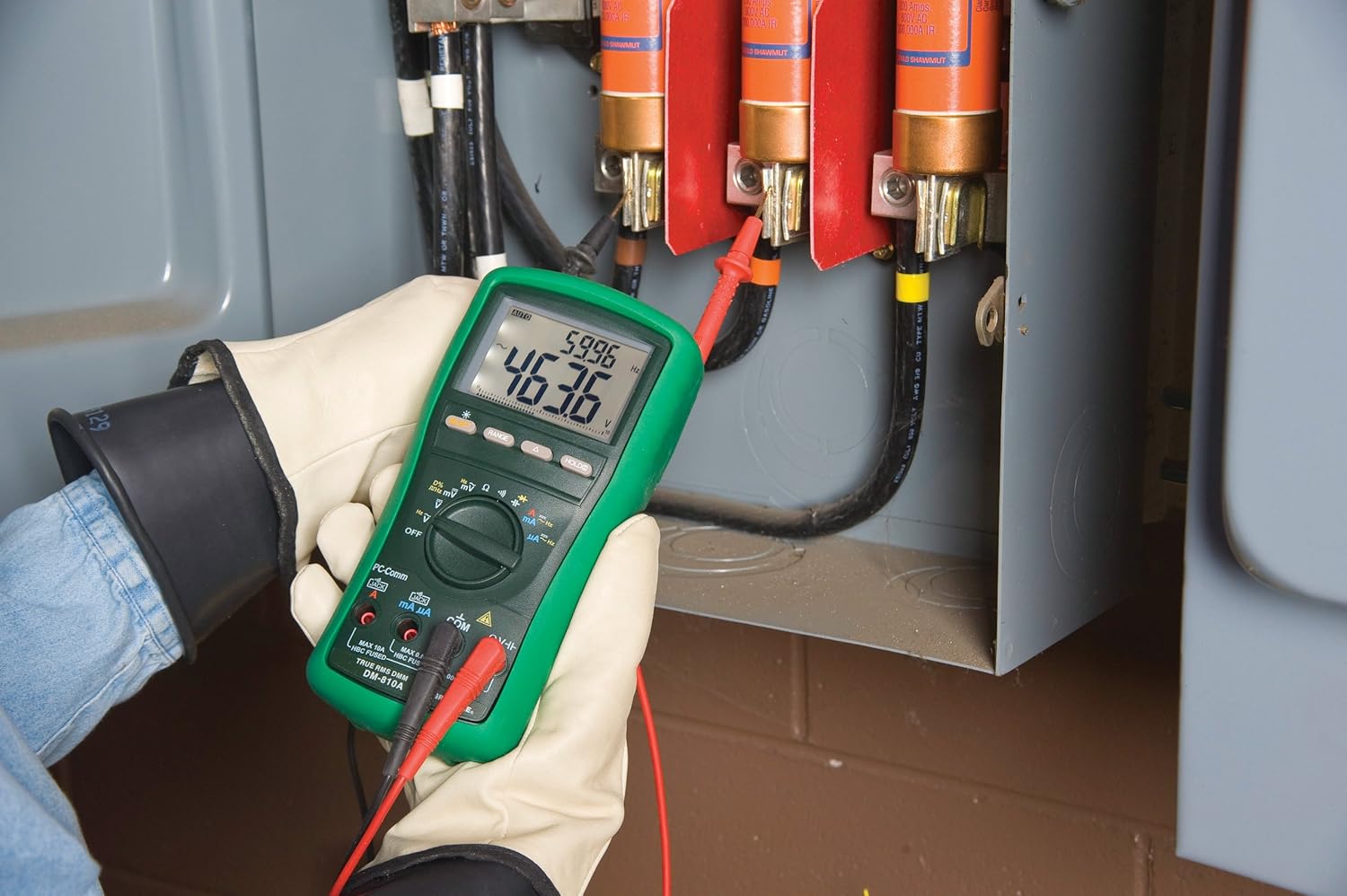
మూర్తి 2: The Greenlee DM-810A Digital Multimeter being used to take measurements within an electrical panel, demonstrating practical application.
AC/DC వాల్యూమ్ను కొలవడంtage
- Set the function selector to V~ (AC Voltage) లేదా V- (DC వాల్యూమ్tage). Use the SELECT button to toggle if both are on one position.
- బ్లాక్ టెస్ట్ లీడ్ను కనెక్ట్ చేయండి COM and the red test lead to VΩHz.
- కొలవవలసిన సర్క్యూట్ లేదా కాంపోనెంట్ అంతటా పరీక్ష ప్రోబ్లను సమాంతరంగా కనెక్ట్ చేయండి.
- సంపుటాన్ని చదవండిtagడిస్ప్లేలో ఇ విలువ.
AC/DC కరెంట్ని కొలవడం
ముఖ్యమైన: Current measurements require the meter to be connected in series with the circuit. Ensure the circuit is de-energized before connecting the meter.
- సర్క్యూట్ను డి-ఎనర్జిజ్ చేయండి.
- Set the function selector to A~ (AC Current) or A- (DC Current), or mA~ / mA-.
- బ్లాక్ టెస్ట్ లీడ్ను కనెక్ట్ చేయండి COM. Connect the red test lead to mAμA for small currents or A for larger currents (up to 10A). The Beep-Jack warning will activate if leads are in the wrong jacks for the selected function.
- Open the circuit where the current is to be measured and connect the meter in series.
- Re-energize the circuit and read the current value.
- De-energize the circuit before disconnecting the meter.
Measuring Resistance (Ω)
- De-energize the circuit or component.
- Set the function selector to Ω.
- బ్లాక్ టెస్ట్ లీడ్ను కనెక్ట్ చేయండి COM and the red test lead to VΩHz.
- పరీక్ష ప్రోబ్లను కాంపోనెంట్ అంతటా కనెక్ట్ చేయండి.
- Read the resistance value.
Measuring Capacitance (CAP)
- కొలతకు ముందు కెపాసిటర్ పూర్తిగా డిశ్చార్జ్ అయ్యిందని నిర్ధారించుకోండి.
- Set the function selector to CAP.
- బ్లాక్ టెస్ట్ లీడ్ను కనెక్ట్ చేయండి COM and the red test lead to VΩHz.
- Connect the test probes across the capacitor terminals.
- Read the capacitance value.
Measuring Frequency (Hz)
- Set the function selector to Hz.
- బ్లాక్ టెస్ట్ లీడ్ను కనెక్ట్ చేయండి COM and the red test lead to VΩHz.
- Connect the test probes across the signal source.
- Read the frequency value.
కంటిన్యుటీ టెస్ట్
- De-energize the circuit or component.
- Set the function selector to the continuity symbol (often shared with diode test, use SELECT to toggle).
- బ్లాక్ టెస్ట్ లీడ్ను కనెక్ట్ చేయండి COM and the red test lead to VΩHz.
- Connect the test probes across the circuit path or component.
- An audible beep indicates continuity (low resistance). The display will show the resistance value.
నిర్వహణ
క్లీనింగ్
Wipe the meter with a damp వస్త్రం మరియు తేలికపాటి డిటర్జెంట్. అబ్రాసివ్లు లేదా ద్రావకాలను ఉపయోగించవద్దు. ఉపయోగించే ముందు మీటర్ పూర్తిగా పొడిగా ఉందని నిర్ధారించుకోండి.
బ్యాటరీ భర్తీ
When the battery indicator appears on the display, replace the batteries immediately to ensure accurate readings. Follow the battery installation steps outlined in the Setup section.
ఫ్యూజ్ ప్రత్యామ్నాయం
If the current measurement functions cease to work, the internal fuses may need replacement. Refer to the meter's internal diagram (usually accessible by opening the battery compartment or back casing) for fuse specifications and replacement instructions. Always replace fuses with those of the specified type and rating to maintain safety and performance.
ట్రబుల్షూటింగ్
This section provides solutions for common issues encountered during the operation of your DM-810A multimeter.
| సమస్య | సాధ్యమైన కారణం | పరిష్కారం |
|---|---|---|
| డిస్ప్లే లేదు లేదా డిమ్ డిస్ప్లే లేదు | చనిపోయిన లేదా తక్కువ బ్యాటరీలు | బ్యాటరీలను భర్తీ చేయండి. |
| సరికాని రీడింగ్లు | Incorrect function/range selected; Damaged test leads; External interference | Verify function and range; Inspect and replace test leads; Move away from strong electromagnetic fields. |
| కరెంట్ కొలత పనిచేయడం లేదు | Blown fuse; Incorrect lead connection | Check and replace fuses; Ensure leads are in the correct A or mA jacks. |
| Beep-Jack warning active | Test leads connected to incorrect input jacks for the selected function | Adjust test lead connections to match the selected function on the dial. |
| కంటిన్యుటీ టెస్ట్ బీప్ కావడం లేదు | Open circuit; High resistance | Ensure the circuit is closed; Check for breaks in the circuit or component. |
సాంకేతిక లక్షణాలు
The following table outlines the key technical specifications for the Greenlee DM-810A Digital Multimeter.
| ఫీచర్ | విలువ |
|---|---|
| బ్రాండ్ | గ్రీన్లీ |
| మోడల్ | DM-810A |
| కొలత రకం | నిజమైన RMS డిజిటల్ మల్టీమీటర్ |
| శక్తి మూలం | బ్యాటరీ ఆధారితమైనది |
| శైలి | డిజిటల్ |
| వస్తువు బరువు | 16 ఔన్సులు (1 పౌండ్) |
| ఉత్పత్తి కొలతలు (L x W x H) | 10 x 10 x 12 అంగుళాలు |
| ధృవపత్రాలు | CE, CSA, UL |
| UPC | 783310087434 |
వారంటీ మరియు మద్దతు
వారంటీ సమాచారం
The Greenlee DM-810A Digital Multimeter comes with a 1-సంవత్సరం తయారీదారు వారంటీ. ఈ వారంటీ సాధారణ ఉపయోగంలో మెటీరియల్స్ మరియు పనితనంలో లోపాలను కవర్ చేస్తుంది. వారంటీ క్లెయిమ్ల కోసం దయచేసి మీ కొనుగోలు రుజువును ఉంచుకోండి.
కస్టమర్ మద్దతు
For technical assistance, warranty service, or to inquire about replacement parts, please contact Greenlee customer support. Refer to the official Greenlee webఅత్యంత తాజా సంప్రదింపు సమాచారం కోసం సైట్ లేదా ఉత్పత్తి ప్యాకేజింగ్.


