1. పరిచయం
This manual provides essential instructions for the safe and efficient operation, setup, and maintenance of your Festool OFK 700 EQ-Plus Edge Milling Machine. Please read this manual thoroughly before using the machine to ensure proper handling and to prevent injury or damage.

Figure 1: Festool OFK 700 EQ-Plus Edge Milling Machine and included accessories, neatly organized in a Systainer SYS 2 T-LOC case.
2. భద్రతా సమాచారం
Always observe general safety regulations when operating power tools. Failure to follow these instructions may result in electric shock, fire, and/or serious injury.
- Wear appropriate personal protective equipment (PPE), including eye protection, hearing protection, and dust masks.
- వర్క్పీస్ సురక్షితంగా cl అని నిర్ధారించుకోండిamped before milling.
- Keep hands and body parts clear of the milling cutter during operation.
- Disconnect the machine from the power supply before making any adjustments, changing accessories, or performing maintenance.
- Use the dust extraction connection to minimize dust exposure.
- d లో యంత్రాన్ని ఆపరేట్ చేయవద్దుamp లేదా తడి పరిస్థితులు.
3. భాగాలు మరియు ప్యాకేజీ విషయాలు
The Festool OFK 700 EQ-Plus Edge Milling Machine comes with the following standard accessories:
- OFK 700 EQ-Plus Edge Milling Machine
- Clamp Ø 8 మిమీ
- చూషణ హుడ్
- Flush cutter D 19 x 16
- Service Tools (e.g., wrench for cutter change)
- SYSTAINER SYS 2 T-LOC case for storage and transport

మూర్తి 2: వైపు view of the OFK 700 EQ-Plus, highlighting the dust extraction port and ergonomic design.
4. సెటప్
- Cutter Installation:
Ensure the machine is unplugged. Use the spindle lock mechanism for quick and easy cutter changes. Insert the desired cutter (e.g., Flush cutter D 19 x 16) into the clamp (Ø 8 mm) and tighten securely with the service tools provided.
- Dust Extraction Connection:
Attach a suitable dust extraction hose to the 27 mm dust suction connection port on the machine. This helps maintain a clean working environment and improves visibility.
- Milling Table Adjustment:
The insertable milling table provides excellent support. Adjust the table to the desired position for your application. The table is designed with a 1.5° incline for optimal milling results.
- Milling Depth Adjustment:
Adjust the milling depth with precision, up to 1/10 mm accuracy. Use the adjustment mechanism to set the vertical and horizontal milling depths as required for your task.

మూర్తి 3: వివరంగా view of the milling depth adjustment and the spring feeler, crucial for precise operations.
5. ఆపరేటింగ్ సూచనలు
The Festool OFK 700 EQ-Plus is designed for precise edge milling applications. Follow these steps for operation:
- పవర్ ఆన్:
Connect the machine to a suitable power outlet (230V AC). Turn on the machine using the power switch. The empty speed can be adjusted between 10,000 and 26,000 min⁻¹.
- స్థానం:
Position the milling machine on the edge of the workpiece. The spring feeler ensures a perfect milling surface by maintaining consistent contact.
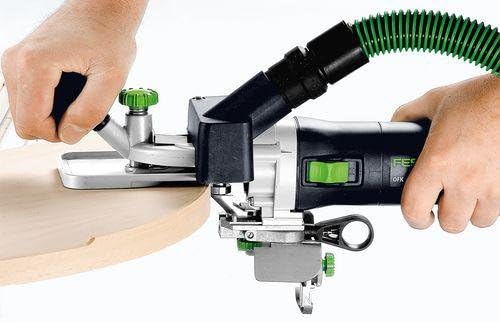
Figure 4: Demonstrating the machine in use for edge milling on a curved wooden piece, showing precise control.
- Milling Process:
Guide the machine smoothly along the edge of the workpiece. The OFK 700 EQ-Plus is suitable for various tasks:
- Creating protrusions on surfaces and edges made of plastic or wood.
- Rounding and beveling of edges.
- Milling front grooves for housing edges with PVC core.
- Flushing of laminate plates.
- Milling gluing profiles in concave and convex pieces, such as round tables or desk plates.
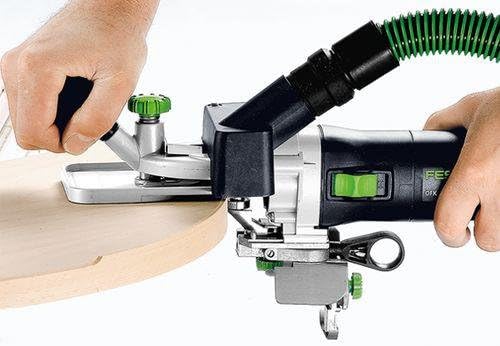
చిత్రం 5: వివరణాత్మక view of the milling operation, illustrating the clean and precise cut achieved on a wooden edge.
- పవర్ ఆఫ్:
Once milling is complete, turn off the machine and disconnect it from the power supply.
6. నిర్వహణ
Regular maintenance ensures the longevity and optimal performance of your Festool OFK 700 EQ-Plus.
- శుభ్రపరచడం: After each use, clean the machine, especially the milling table and cutter area, to remove dust and debris. Use a brush or compressed air.
- కట్టర్ తనిఖీ: Regularly inspect the milling cutter for wear or damage. Replace dull or damaged cutters immediately to ensure precise results and prevent strain on the machine.
- సరళత: Refer to the detailed service manual for specific lubrication points and schedules, if applicable.
- నిల్వ: Store the machine and its accessories in the SYSTAINER SYS 2 T-LOC case in a dry, secure location, away from direct sunlight and extreme temperatures.
7. ట్రబుల్షూటింగ్
| సమస్య | సాధ్యమైన కారణం | పరిష్కారం |
|---|---|---|
| యంత్రం ప్రారంభం కాదు | No power supply; faulty power cord; power switch off. | Check power connection; inspect power cord for damage; ensure power switch is in 'ON' position. |
| Poor milling quality | Dull or incorrect cutter; incorrect milling depth; unstable workpiece. | Replace cutter; adjust milling depth; secure workpiece firmly. |
| విపరీతమైన కంపనం | Loose cutter; damaged cutter; internal mechanical issue. | Tighten cutter securely; replace damaged cutter; contact Festool service if problem persists. |
ఇక్కడ జాబితా చేయని సమస్యల కోసం, దయచేసి ఫెస్టూల్ కస్టమర్ సపోర్ట్ను సంప్రదించండి.
8. సాంకేతిక లక్షణాలు
| ఫీచర్ | స్పెసిఫికేషన్ |
|---|---|
| విద్యుత్ వినియోగం | 720 W |
| Empty Speed | 10,000 - 26,000 min⁻¹ |
| Max. Cutter Diameter | 26 మి.మీ |
| Clamp వ్యాసం | 6-8 మి.మీ |
| Max. Vertical Milling Depth | 9 మి.మీ |
| Max. Horizontal Milling Depth | 5 మి.మీ |
| Max. Milling Width | 14 మి.మీ |
| Dust Suction Connection Ø | 27 మి.మీ |
| బరువు | 2 కిలోలు (4.4 పౌండ్లు) |
| వాల్యూమ్tage | 230V AC |
| మెటీరియల్ | ప్లాస్టిక్ |
| ఉత్పత్తి కొలతలు (L x W x H) | 6.34 x 15.51 x 3.94 అంగుళాలు |
9. వారంటీ మరియు మద్దతు
For detailed warranty information, please refer to the warranty card included with your product or visit the official Festool website. For technical support, spare parts, or service inquiries, please contact Festool customer service or visit the అమెజాన్లో ఫెస్టూల్ స్టోర్.


