1. ఉత్పత్తి ముగిసిందిview
The COMMAX WI-3SN is a wireless indoor intercom system designed for easy communication between different rooms or locations without the need for complex wiring. This system offers a convenient and reliable way to communicate within your home, office, or warehouse.
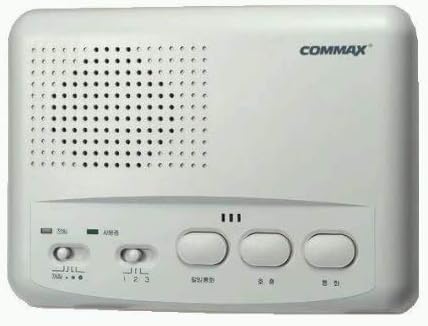
మూర్తి 1: ముందు view of the COMMAX WI-3SN Wireless Indoor Intercom unit, showing the speaker grille, control buttons, and brand logo.
Key features include plug-and-play setup, enhanced frequency output for clear communication, and the ability to monitor sounds from other rooms. It is an ideal solution for communicating with family members in distant rooms, monitoring infants, or coordinating tasks in a business environment.
2. సెటప్ మరియు ఇన్స్టాలేషన్
Setting up your COMMAX WI-3SN intercom system is straightforward and requires no special wiring or installation tools.
- యూనిట్లను అన్ప్యాక్ చేయండి: Carefully remove all components from the packaging. Each set typically includes two intercom units.
- Select Locations: Choose the rooms or areas where you wish to establish communication. Ensure there is a standard electrical outlet available at each chosen location.
- ప్లగ్ ఇన్: Insert the power plug of each intercom unit directly into a standard electrical wall outlet. The units will power on automatically.
- Initial Pairing (if necessary): The units are typically pre-paired. If communication is not established immediately, refer to the operating instructions for channel selection.
Important Note on Power Supply:
In homes equipped with a high-capacity single-phase 3-wire power system (typically 40 amps or more), the intercom units may not function correctly between certain rooms. A single-phase 3-wire system involves bringing AC200V into the distribution board and converting it to AC100V. If your home uses such a system (common for 40 amps or more), it may be necessary to consult a qualified electrician to perform a simple wiring adjustment at your distribution board to ensure proper operation of the intercoms. You can verify your power system type by checking your electricity meter box or monthly utility bill, or by contacting your local power company.
3. ఆపరేటింగ్ సూచనలు
The COMMAX WI-3SN offers various modes for effective communication.
3.1. ప్రాథమిక కమ్యూనికేషన్
- To Speak: Press and hold the "Talk" button (usually labeled with a microphone icon or "通話"). Speak clearly into the unit.
- To Listen: Release the "Talk" button. The unit will automatically switch to listen mode.
- ఛానెల్ ఎంపిక: The system features 3 channels. Use the channel selector switch (labeled "1 2 3") to choose the desired channel for communication. Ensure both communicating units are set to the same channel.
3.2. పర్యవేక్షణ ఫంక్షన్
The WI-3SN can also function as a monitor, allowing you to hear sounds from another room.
- Activate Monitoring: Locate the monitor switch (often labeled with a speaker icon or "モニター"). Toggle it to the "ON" position on the unit you wish to use for monitoring.
- వినండి: The unit will continuously transmit audio from its location to the receiving unit. This is useful for monitoring children or elderly individuals.
- Deactivate Monitoring: Toggle the monitor switch back to the "OFF" position when monitoring is no longer required.
3.3. మీ వ్యవస్థను విస్తరించడం
The COMMAX WI-3SN system is expandable up to a maximum of four units. With its 3-channel capability, you can establish communication between multiple rooms.
- To expand, purchase additional COMMAX WI-3SN units.
- By utilizing two sets (four units in total), you can communicate between three distinct rooms (or four rooms including your own, by rotating channels).
- Ensure each unit is set to the appropriate channel for the desired communication group.
4. నిర్వహణ
To ensure the longevity and optimal performance of your COMMAX WI-3SN intercom system, follow these simple maintenance guidelines:
- శుభ్రపరచడం: Wipe the exterior of the units with a soft, dry cloth. Do not use abrasive cleaners, solvents, or strong chemicals, as these can damage the surface.
- శక్తి: Always unplug the unit from the power outlet before cleaning or if it will not be used for an extended period.
- పర్యావరణం: Keep the units away from direct sunlight, excessive heat, moisture, and dust. Do not expose them to water or other liquids.
- వెంటిలేషన్: వేడెక్కకుండా నిరోధించడానికి వెంటిలేషన్ ఓపెనింగ్స్ నిరోధించబడలేదని నిర్ధారించుకోండి.
5. ట్రబుల్షూటింగ్
If you encounter issues with your COMMAX WI-3SN intercom, try the following troubleshooting steps:
| సమస్య | సాధ్యమైన కారణం | పరిష్కారం |
|---|---|---|
| ఏ పవర్/యూనిట్ ఆన్ కావడం లేదు | Unit not properly plugged in; Power outlet not active. | Ensure the unit is securely plugged into a working electrical outlet. Test the outlet with another device. |
| యూనిట్ల మధ్య కమ్యూనికేషన్ లేదు | Units on different channels; Out of range; Power supply issue (single-phase 3-wire). | Verify both units are set to the same channel. Ensure units are within effective range. Refer to the "Important Note on Power Supply" in Section 2. |
| Poor audio quality/Static | Interference from other electronic devices; Units too far apart; Environmental noise. | Move units away from other electronic devices (e.g., microwaves, large appliances). Try a different channel. Ensure units are within optimal range. |
| Monitoring function not working | Monitor switch not activated; Unit not powered. | Ensure the monitor switch is in the "ON" position on the transmitting unit. Verify both units are powered on. |
6. స్పెసిఫికేషన్లు
| ఫీచర్ | వివరాలు |
|---|---|
| బ్రాండ్ | COMMAX |
| మోడల్ సంఖ్య | WI-3SN |
| ఉత్పత్తి కొలతలు | 20.3 x 17.6 x 11.4 సెం.మీ |
| వస్తువు బరువు | 1.17 కిలోలు |
| శక్తి మూలం | AC (ప్లగిన్) |
| ఛానెల్లు | 3 ఛానెల్లు |
| విస్తరణ | 4 యూనిట్ల వరకు |
7. వారంటీ మరియు మద్దతు
For information regarding product warranty, technical support, or service, please refer to the documentation included with your purchase or visit the official COMMAX webవారంటీ క్లెయిమ్ల కోసం కొనుగోలు రుజువుగా మీ కొనుగోలు రసీదును ఉంచండి.


