1. పరిచయం
This manual provides detailed instructions for the setup, operation, maintenance, and troubleshooting of your HP Officejet 6700 Premium e-All-in-One Wireless Color Photo Printer. This device combines printing, scanning, copying, and faxing functionalities, designed for both personal and professional use.
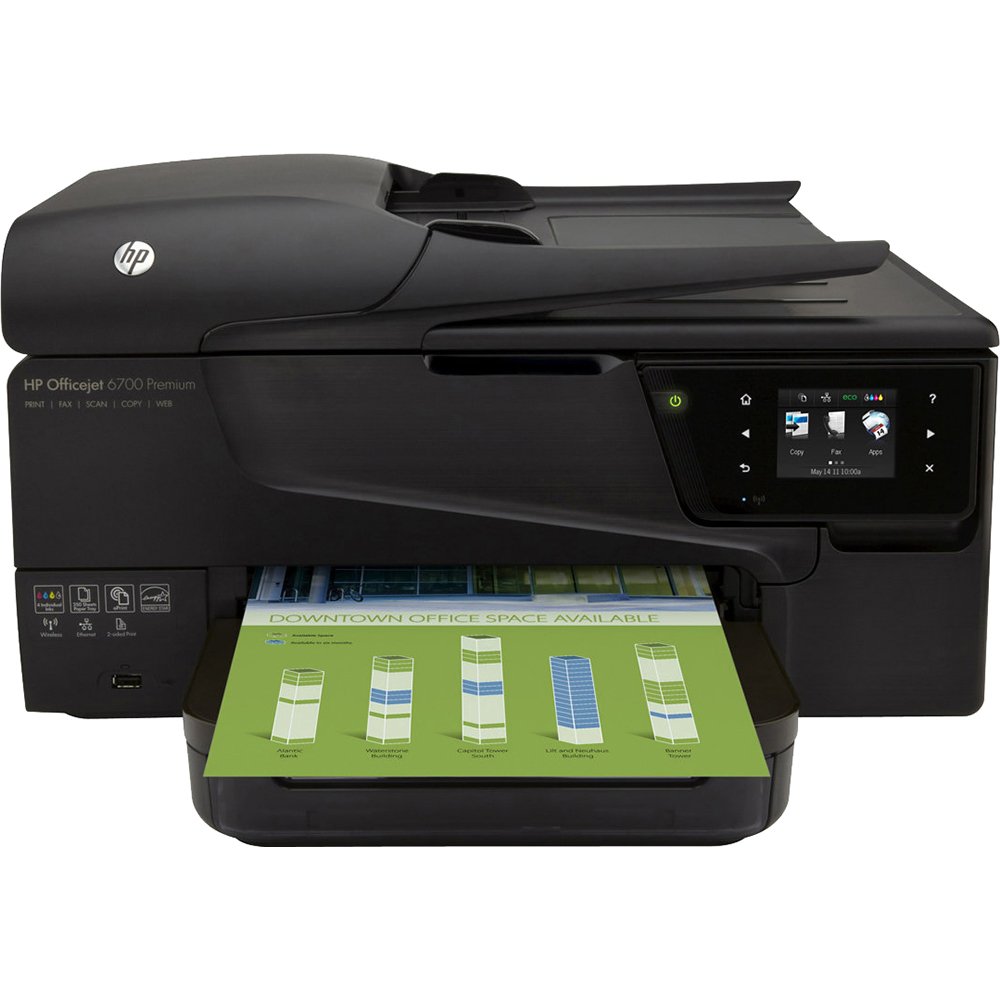
Image: HP Officejet 6700 Premium e-All-in-One Printer, showcasing దాని కాంపాక్ట్ డిజైన్ మరియు ముందు వైపు నియంత్రణ ప్యానెల్.
2. సెటప్
2.1 అన్బాక్సింగ్ మరియు ప్రారంభ ప్లేస్మెంట్
Carefully remove the printer from its packaging. Place the printer on a stable, flat surface with adequate space for paper trays and ventilation. Ensure all packing materials and protective tapes are removed before proceeding.
2.2 పవర్ కనెక్షన్
పవర్ కార్డ్ను ప్రింటర్కు కనెక్ట్ చేసి, ఆపై గ్రౌండెడ్ ఎలక్ట్రికల్ అవుట్లెట్కు కనెక్ట్ చేయండి. ప్రింటర్ను ఆన్ చేయడానికి పవర్ బటన్ను నొక్కండి.
2.3 ఇంక్ కార్ట్రిడ్జ్ ఇన్స్టాలేషన్
Open the ink cartridge access door. Install the individual color ink cartridges (Cyan, Magenta, Yellow, Black) into their respective slots. Ensure they are securely latched. The printer uses individual color inks, allowing you to replace only the color that runs out.
2.4 పేపర్ లోడ్ అవుతోంది
Load paper into the 250-sheet input tray. Adjust the paper guides to fit the paper size. The printer supports various media types and sizes, including Letter (8.5 x 11 inches) and Tabloid (11 x 17 inches).
2.5 నెట్వర్క్ కనెక్టివిటీ
The HP Officejet 6700 Premium offers wired (Ethernet) and wireless connectivity options. Follow the on-screen instructions on the 2.65-inch touchscreen to connect to your local network. For wireless printing from mobile devices, utilize HP ePrint, HP Wireless Direct, or Apple AirPrint.
For a visual guide on setting up mobile printing features, refer to the video below:
Video: Demonstrates how to use HP ePrint and HP Wireless Direct for printing from various mobile devices and locations. This video is provided by a merchant.
3. ఆపరేటింగ్ సూచనలు
3.1 ప్రింటింగ్
The printer delivers professional color prints with a maximum color print resolution of 4800 x 1200 dpi and a maximum black and white print resolution of 600 dpi. It features automatic two-sided printing (duplex) to save paper.
- ముద్రణ వేగం: Up to 34 ppm (monochrome) and 31 ppm (color) maximum. ISO speeds are 16 ppm (black) and 9 ppm (color).
- మొబైల్ ప్రింటింగ్: Use HP ePrint to send documents or photos via email to your printer from any internet-connected device. HP Wireless Direct allows direct connection from mobile devices without a network. Apple AirPrint enables printing from iPhone, iPad, and iPod Touch.
- మీడియా రకాలు: Supports various paper types, including glossy photo paper, in sizes like Letter and Tabloid.
3.2 స్కానింగ్
The flatbed scanner and 35-sheet Automatic Document Feeder (ADF) allow for efficient scanning of documents and photos. The scanner offers a resolution of 1200 x 2400 dpi, ensuring sharp details and true colors.
- Scan to PC/Email: Documents can be scanned directly to a connected PC or sent as an email attachment.
- ADF సామర్థ్యం: The Automatic Document Feeder can hold up to 35 sheets for multi-page scanning.
3.3 కాపీ చేయడం
The printer functions as a copier with a maximum copy speed of 16 ppm for black and white documents. Color copy resolution is up to 4800 x 1200 dpi, and black and white copy resolution is 600 dpi. It can also create a one-sided copy of a two-sided ID.
3.4 ఫ్యాక్సింగ్
The HP Officejet 6700 Premium includes full fax capabilities for sending and receiving documents.
3.5 నియంత్రణ ప్యానెల్
Navigate printer functions and settings using the intuitive 2.65-inch touchscreen display. Voice control is also supported for certain functions.
4. నిర్వహణ
4.1 ఇంక్ కార్ట్రిడ్జ్ భర్తీ
When an ink cartridge runs low or is empty, the printer will notify you. Replace individual cartridges as needed. Always use Original HP printer ink and toner cartridges for optimal performance and print quality. Using non-HP cartridges may lead to costly reprints and affect printer reliability.
4.2 శుభ్రపరచడం
ప్రింటర్ యొక్క బాహ్య భాగాన్ని మృదువైన, d శుభ్రపరిచే యంత్రంతో క్రమం తప్పకుండా శుభ్రం చేయండి.amp cloth. Refer to the on-screen prompts or the full user guide for instructions on cleaning the printhead or scanner glass if print quality issues arise.
4.3 శక్తి ఆదా
The printer is designed with energy efficiency in mind. You can set the printer to turn on or off automatically, potentially saving up to 40% on energy consumption.
5. ట్రబుల్షూటింగ్
If you encounter issues with your HP Officejet 6700 Premium, consider the following common troubleshooting steps:
- Wi-Fi డిస్కనెక్ట్: Ensure your printer is within range of your wireless router. Restart both the printer and your router. Check network settings on the printer's touchscreen. Update printer firmware if available.
- పేపర్ జామ్లు: Follow the on-screen instructions or refer to the full user guide for clearing paper jams from the input tray, output tray, or internal areas. Always remove jammed paper carefully to avoid tearing.
- ముద్రణ నాణ్యత సమస్యలు: Check ink levels and replace any empty or low cartridges. Perform a printhead cleaning or alignment from the printer's maintenance menu. Ensure you are using appropriate paper for your print job.
- స్కానర్ స్పందించడం లేదు: Verify the printer is properly connected to your computer (wired or wireless). Ensure printer drivers are up-to-date. Restart both the printer and your computer.
- స్లో ప్రింటింగ్: Check the print settings to ensure you are not printing at the highest quality for everyday documents, which can slow down print speed.
For more detailed troubleshooting, consult the comprehensive user manual available on the HP support webసైట్.
6. స్పెసిఫికేషన్లు
| బ్రాండ్ | HP |
| మోడల్ పేరు | 6700 |
| ప్రింటింగ్ టెక్నాలజీ | ఇంక్జెట్ |
| కనెక్టివిటీ టెక్నాలజీ | USB, Ethernet, Wireless |
| ప్రత్యేక ఫీచర్ | Auto Document Feeder, Duplex Printing |
| ప్రింటర్ అవుట్పుట్ | రంగు |
| గరిష్ట ముద్రణ వేగం (మోనోక్రోమ్) | 34 ppm |
| గరిష్ట ముద్రణ వేగం (రంగు) | 31 ppm |
| గరిష్ట రంగు ముద్రణ రిజల్యూషన్ | 4800 x 1200 dpi |
| మాక్స్ బ్లాక్ & వైట్ ప్రింట్ రిజల్యూషన్ | 600 dpi |
| స్కానర్ రకం | పత్రం |
| గరిష్ట ఇన్పుట్ షీట్ కెపాసిటీ | 250 షీట్లు (ప్రధాన ట్రే), 35 షీట్లు (ADF) |
| గరిష్ట కాపీ వేగం (నలుపు & తెలుపు) | 16 ppm |
| గరిష్ట కాపీ రిజల్యూషన్ (రంగు) | 4800 x 1200 dpi |
| గరిష్ట కాపీ రిజల్యూషన్ (నలుపు & తెలుపు) | 600 dpi |
| డ్యూప్లెక్స్ ప్రింటింగ్ | ఆటోమేటిక్ |
| నియంత్రణ పద్ధతి | Voice, Touchscreen (2.65") |
| విద్యుత్ వినియోగం | 43 వాట్స్ |
| ఉత్పత్తి కొలతలు | 11.81 x 20 x 17.05 అంగుళాలు |
| వస్తువు బరువు | 21.9 పౌండ్లు |
| మెమరీ స్టోరేజ్ కెపాసిటీ | 128 MB |
7. వారంటీ మరియు మద్దతు
Your HP Officejet 6700 Premium printer may include Accidental Damage Protection. For specific warranty details and terms, please refer to the documentation included with your product or visit the official HP support webసైట్.
For technical assistance, driver downloads, or further information, please visit the HP support website or contact HP customer service. Ensure you have your printer's model number and serial number ready when seeking support.