1. పరిచయం
This manual provides essential instructions for the installation, configuration, and operation of your ASRock H77 PRO4/MVP LGA1155 ATX Motherboard. Designed for Intel 2nd and 3rd generation Core i7/i5/i3 processors, this motherboard offers robust performance and expandability for various computing needs. Please read this manual thoroughly before proceeding with installation to ensure proper setup and to maximize the lifespan of your components.
2. పెట్టెలో ఏముంది
మీ మదర్బోర్డు ప్యాకేజీలో అన్ని అంశాలు ఉన్నాయని ధృవీకరించండి:
- ASRock H77 PRO4/MVP Motherboard
- త్వరిత సంస్థాపన గైడ్
- మద్దతు CD (డ్రైవర్లు మరియు యుటిలిటీల కోసం)
- I / O షీల్డ్
- 2 x SATA డేటా కేబుల్స్

3. సెటప్ మరియు ఇన్స్టాలేషన్
మీ మదర్బోర్డ్ మరియు భాగాల సరైన ఇన్స్టాలేషన్ కోసం ఈ దశలను అనుసరించండి:
- చట్రం సిద్ధం చేయండి: మీ కంప్యూటర్ కేసు వెనుక ఓపెనింగ్లో I/O షీల్డ్ను ఇన్స్టాల్ చేయండి.
- మదర్బోర్డ్ను ఇన్స్టాల్ చేయండి: Carefully place the motherboard into the chassis, aligning the screw holes. Secure it with screws.
- CPU ని ఇన్స్టాల్ చేయండి: Open the CPU socket lever, align the CPU with the socket (matching the golden triangle on the CPU to the triangle on the socket), gently place the CPU, and close the lever.
- CPU కూలర్ను ఇన్స్టాల్ చేయండి: తయారీదారు సూచనల ప్రకారం CPU కూలర్ను అటాచ్ చేయండి.
- ఇన్స్టాల్ మెమరీ (RAM): Open the clips on the DDR3 DIMM slots. Align the memory modules with the slots, ensuring the notch on the module matches the notch in the slot. Press firmly until the clips lock into place. This motherboard supports up to 32GB of DDR3-1600/1333/1066 memory.
- విస్తరణ కార్డులను ఇన్స్టాల్ చేయండి: Insert graphics cards into the PCI-Express 3.0 x16 or PCI-Express 2.0 x16 slots. Other expansion cards (e.g., sound cards, network cards) can be installed in the PCI-Express 2.0 x1 or PCI slots.
- నిల్వ పరికరాలను కనెక్ట్ చేయండి: Use the provided SATA cables to connect your SATA3 (6Gb/s) and SATA2 (3Gb/s) storage devices (HDDs, SSDs) to the corresponding ports on the motherboard.
- విద్యుత్ సరఫరాను కనెక్ట్ చేయండి: Connect the 24-pin ATX power connector and the 8-pin 12V power connector from your power supply to the motherboard.
- ఫ్రంట్ ప్యానెల్ కేబుల్లను కనెక్ట్ చేయండి: Connect the power button, reset button, HDD LED, power LED, and front USB/audio headers to their respective pins on the motherboard. Refer to the detailed motherboard diagram in the full manual for exact pin locations.

డ్రైవర్ ఇన్స్టాలేషన్
After installing your operating system, install the necessary drivers from the provided Support CD or download the latest versions from the ASRock official website. This includes chipset drivers, audio drivers, LAN drivers, and any other utility drivers.
General Motherboard Overview (LGA1155)
ఈ వీడియో సాధారణ వివరణను అందిస్తుందిview of an LGA1155 motherboard, demonstrating common components and connections. While not specific to the H77 PRO4/MVP model, it offers helpful visual context for users unfamiliar with LGA1155 motherboard layouts and basic handling.
4. మీ మదర్బోర్డ్ను ఆపరేట్ చేయడం
BIOS/UEFI Setup
BIOS/UEFI సెటప్ యుటిలిటీలోకి ప్రవేశించడానికి, తొలగించు key during the Power-On Self-Test (POST) sequence. The BIOS/UEFI allows you to configure system settings such as boot order, CPU parameters, memory timings, and integrated peripherals. Save your changes before exiting.
ఆపరేటింగ్ సిస్టమ్ ఇన్స్టాలేషన్
Insert your operating system installation media (USB drive or DVD) and set the boot priority in the BIOS/UEFI to boot from the media. Follow the on-screen instructions to install your preferred operating system.
5. స్పెసిఫికేషన్లు
| ఫీచర్ | వివరణ |
|---|---|
| CPU సాకెట్ | LGA1155 |
| Supported CPUs | 2nd/3rd generation Intel Core i7/i5/i3 Processors (Supports Intel Turbo Boost 2.0 Technology, Hyper-Threading Technology) |
| చిప్సెట్ | ఇంటెల్ H77 చిప్సెట్ |
| జ్ఞాపకశక్తి | 4x DDR3 DIMM Slots, Non-ECC, Unbuffered, Dual Channel, Max Capacity up to 32GB (DDR3-1600/1333/1066) |
| విస్తరణ స్లాట్లు | 1x PCI-Express 3.0 x16, 1x PCI-Express 2.0 x16 (runs at x4), 1x PCI-Express 2.0 x1, 3x PCI Slots |
| నిల్వ | 4x SATA3 Ports (6Gb/s), 4x SATA2 Ports (3Gb/s), Supports RAID 0, 1, 5, 10 |
| USB పోర్ట్లు | 10x USB 2.0 Ports (6 rear, 4 via headers), 4x USB 3.0 Ports (2 rear, 2 via headers) |
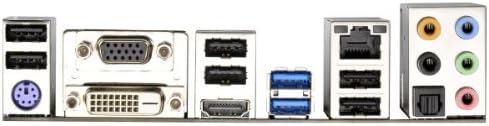
| వెనుక I/O పోర్ట్లు | 1x PS/2 Keyboard Port, 1x Optical S/PDIF Out, 1x RJ45 LAN Port, 1x HDMI Port, 1x DVI Port, 1x VGA Port, Audio I/O Jacks |
| పవర్ కనెక్టర్ | 1x 24pin ATX Power Connector, 1x 8pin 12V Power Connector |
| ఫారమ్ ఫ్యాక్టర్ | ATX |
| కొలతలు | 12 x 3 x 7.9 అంగుళాలు |
| బరువు | 3 పౌండ్లు |
6. ట్రబుల్షూటింగ్
మీరు సమస్యలను ఎదుర్కొంటే, ఈ క్రింది సాధారణ పరిష్కార ప్రక్రియ దశలను పరిగణించండి:
- శక్తి లేదు: Ensure all power cables (24-pin ATX, 8-pin 12V, and power supply to wall) are securely connected. Check the power supply unit (PSU) switch.
- ప్రదర్శన లేదు: Verify that your monitor is connected to the correct video output on your graphics card or motherboard. Reseat your graphics card and RAM modules. Test with a single RAM stick if multiple are installed.
- సిస్టమ్ అస్థిరత/క్రాష్లు: Check CPU and GPU temperatures. Ensure all drivers are up to date. Test memory modules individually.
- పరిధీయ గుర్తించబడలేదు: Ensure USB devices are connected to functional ports. Install necessary drivers for the peripheral.
- BIOS/UEFI సమస్యలు: If you cannot enter the BIOS or experience boot loops, try clearing the CMOS. This can usually be done by removing the CMOS battery for a few minutes or using a dedicated jumper on the motherboard (refer to the full manual for location).
For more detailed troubleshooting, consult the comprehensive user manual available on the ASRock support webసైట్.
7. వారంటీ మరియు మద్దతు
Your ASRock H77 PRO4/MVP Motherboard is covered by a manufacturer's warranty. For specific warranty terms, conditions, and duration, please refer to the warranty card included with your product or visit the official ASRock website. For technical support, driver downloads, and further assistance, please visit the ASRock support page:


