1. పరిచయం
This manual provides detailed instructions for the safe and efficient operation of your Vivitek Qumi Q5 Pocket DLP Projector. Please read this manual thoroughly before using the projector and retain it for future reference. The Vivitek Qumi Q5 is a compact, high-definition LED projector designed for portability and versatility, featuring 500 lumens brightness, WXGA resolution, and various connectivity options.
2. ముఖ్యమైన భద్రతా సమాచారం
ప్రొజెక్టర్ దెబ్బతినకుండా నిరోధించడానికి మరియు వినియోగదారు భద్రతను నిర్ధారించడానికి క్రింది భద్రతా జాగ్రత్తలను గమనించండి:
- వెంటిలేషన్ ఓపెనింగ్లను బ్లాక్ చేయవద్దు. ప్రొజెక్టర్ చుట్టూ తగినంత గాలి ప్రవాహాన్ని నిర్ధారించుకోండి.
- l ఉన్నప్పుడు ప్రొజెక్టర్ లెన్స్లోకి నేరుగా చూడకండిamp ఆన్లో ఉంది. ప్రకాశవంతమైన కాంతి కంటికి హాని కలిగించవచ్చు.
- ప్రొజెక్టర్తో సరఫరా చేయబడిన పవర్ అడాప్టర్ను మాత్రమే ఉపయోగించండి.
- అగ్ని ప్రమాదం లేదా విద్యుత్ షాక్ ప్రమాదాన్ని తగ్గించడానికి ప్రొజెక్టర్ను వర్షం లేదా తేమకు గురిచేయవద్దు.
- ప్రొజెక్టర్ను స్థిరమైన, స్థాయి ఉపరితలంపై ఉంచండి.
- Unplug the projector from the power outlet before cleaning or when not in use for extended periods.
- అన్ని సేవలను అర్హత కలిగిన సేవా సిబ్బందికి సూచించండి.
3. ప్యాకేజీ విషయాలు
క్రింద జాబితా చేయబడిన అన్ని వస్తువులు మీ ప్యాకేజీలో చేర్చబడ్డాయని ధృవీకరించండి:
- Vivitek Qumi Q5 Projector
- పవర్ అడాప్టర్
- Universal I/O to VGA Cable
- HDMI కేబుల్
- 3.5mm AV-in Cable
- క్యారీయింగ్ పర్సు
- రిమోట్ కంట్రోల్
- త్వరిత ప్రారంభ గైడ్
- వారంటీ కార్డ్
4. ఉత్పత్తి ముగిసిందిview
Familiarize yourself with the various components and features of your Vivitek Qumi Q5 projector.
4.1 ఫ్రంట్ View

చిత్రం 4.1: ముందు view of the Vivitek Qumi Q5 projector, showing the lens and ventilation grilles.
The front of the projector features the projection lens and air vents for cooling. Ensure these vents are not obstructed during operation.
4.2 టాప్ View

చిత్రం 4.2: టాప్ view of the Vivitek Qumi Q5 projector, highlighting the touch-sensitive control panel.
The top panel includes touch-sensitive controls for navigation and menu selection. The "Qumi" logo is also visible.
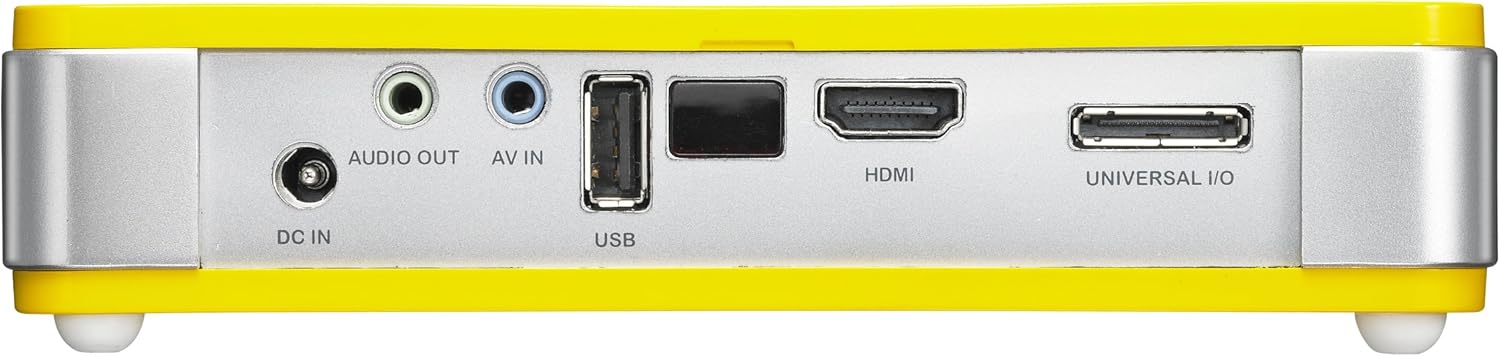
4.3 వెనుక View (Connectivity Ports)

చిత్రం 4.3: వెనుక view of the Vivitek Qumi Q5 projector, displaying all input and output ports.
The rear panel houses all essential connectivity ports:
- DC IN: పవర్ అడాప్టర్ను కనెక్ట్ చేయడానికి.
- ఆడియో అవుట్: 3.5mm jack for external speakers or headphones.
- AV IN: 3.5mm jack for composite video and stereo audio input.
- USB: USB నిల్వ పరికరాలను కనెక్ట్ చేయడానికి.
- HDMI: High-Definition Multimedia Interface for digital video and audio input.
- UNIVERSAL I/O: Multi-purpose port for VGA and other analog inputs via adapter.
5. సెటప్
Follow these steps to set up your Vivitek Qumi Q5 projector.
5.1 Powering On the Projector
- పవర్ అడాప్టర్ను కనెక్ట్ చేయండి DC IN ప్రొజెక్టర్లో పోర్ట్.
- పవర్ అడాప్టర్ను వాల్ అవుట్లెట్లోకి ప్లగ్ చేయండి.
- Press the power button on the projector or remote control to turn on the device. The power indicator light will illuminate.
5.2 ఇన్పుట్ సోర్స్లను కనెక్ట్ చేయడం
The Qumi Q5 supports various input sources:
- HDMI: Connect an HDMI cable from your source device (e.g., laptop, Blu-ray player) to the HDMI ప్రొజెక్టర్లో పోర్ట్.
- వీజీఏ: Use the supplied Universal I/O to VGA cable to connect your computer's VGA output to the UNIVERSAL I/O ఓడరేవు
- AV (కాంపోజిట్): Use the supplied 3.5mm AV-in cable to connect composite video and stereo audio devices to the AV IN ఓడరేవు
- USB: USB ఫ్లాష్ డ్రైవ్ను ఇన్సర్ట్ చేయండి USB port to play media fileనేరుగా లు.
- వైర్లెస్ (ఐచ్ఛికం): If using an optional WiFi USB dongle, insert it into the USB port for wireless connectivity. Refer to the dongle's instructions for setup.
5.3 ఫోకస్ సర్దుబాటు చేయడం
Locate the focus wheel on the side of the projector. Rotate the wheel until the projected image appears sharp and clear on your screen or wall.
చిత్రం 5.3: వైపు view of the Vivitek Qumi Q5, indicating the location of the focus adjustment wheel.
6. ప్రొజెక్టర్ను ఆపరేట్ చేయడం
6.1 మెనూను నావిగేట్ చేయడం
Use the touch-sensitive buttons on the top panel or the remote control to navigate the projector's on-screen display (OSD) menu. The menu allows you to adjust image settings, input sources, and other system configurations.
6.2 ఇన్పుట్ మూలాన్ని ఎంచుకోవడం
Press the "Source" button on the remote control or navigate through the OSD menu to select the desired input source (HDMI, VGA, AV, USB, or Wireless).
6.3 Image Adjustments
Within the OSD menu, you can adjust various image parameters:
- ప్రకాశం/కాంట్రాస్ట్: Adjust for optimal image visibility.
- రంగు/రంగు: రంగు పునరుత్పత్తిని చక్కగా ట్యూన్ చేయండి.
- కారక నిష్పత్తి: Select between 4:3, 16:9, or other available ratios to match your content.
- కీస్టోన్ దిద్దుబాటు: Correct trapezoidal distortion if the projector is not perfectly perpendicular to the screen.
6.4 Playing Media from USB
When a USB drive is inserted, the projector's media player interface will typically launch automatically. You can browse and play supported video, audio, and image files నేరుగా USB డ్రైవ్ నుండి.
6.5 3D కార్యాచరణ
The Qumi Q5 is 3D-ready via DLP Link technology. To view 3D content, you will need compatible 3D source material, a 3D-capable player, and active DLP Link 3D glasses (sold separately).
7. నిర్వహణ
సరైన నిర్వహణ మీ ప్రొజెక్టర్ యొక్క దీర్ఘాయువు మరియు సరైన పనితీరును నిర్ధారిస్తుంది.
7.1 ప్రొజెక్టర్ను శుభ్రపరచడం
- బాహ్య: కొద్దిగా మెత్తని, మెత్తని బట్టను ఉపయోగించండి dampనీరు లేదా తేలికపాటి శుభ్రపరిచే ద్రావణంతో కలుపుతారు. రాపిడి క్లీనర్లు లేదా ద్రావకాలు ఉపయోగించవద్దు.
- లెన్స్: Gently wipe the lens with a lens cleaning cloth or lens paper. Avoid touching the lens surface with your fingers.
- వెంట్స్: Use a soft brush or compressed air to clear dust from the ventilation openings.
7.2 LED లైట్ సోర్స్
The Qumi Q5 utilizes an LED light source with an estimated operational life of up to 30,000 hours, significantly reducing the need for lamp replacement compared to traditional projectors.
7.3 నిల్వ
When not in use for extended periods, store the projector in its carrying pouch in a cool, dry place, away from direct sunlight and extreme temperatures.
8. ట్రబుల్షూటింగ్
మీరు ఎదుర్కొనే సాధారణ సమస్యలకు పరిష్కారాల కోసం ఈ విభాగాన్ని చూడండి.
| సమస్య | సాధ్యమైన కారణం | పరిష్కారం |
|---|---|---|
| ఏ చిత్రం ప్రదర్శించబడలేదు. |
|
|
| చిత్రం అస్పష్టంగా ఉంది. |
|
|
| ఆడియో లేదు. |
|
|
| ప్రొజెక్టర్ వేడెక్కుతుంది లేదా ఆగిపోతుంది. |
|
|
9. స్పెసిఫికేషన్లు
Key technical specifications for the Vivitek Qumi Q5 projector:
- మోడల్: Qumi Q5
- ప్రదర్శన సాంకేతికత: DLP Pico chipset
- స్థానిక రిజల్యూషన్: WXGA (1280 x 720)
- ప్రకాశం: అప్ 500 లు
- కాంతి మూలం: LED (Estimated 30,000 hours operation)
- కనెక్టివిటీ: HDMI, Universal I/O (VGA), AV mini-jack, USB, Audio-out mini-jack, Wireless (via optional USB dongle)
- అంతర్గత మెమరీ: 4GB
- 3D సిద్ధంగా: Yes, via DLP Link
- కొలతలు: 4 x 6.3 x 1.3 అంగుళాలు (10.16 x 16.00 x 3.30 సెం.మీ.)
- బరువు: 1.1 పౌండ్లు (0.5 కిలోలు)
- విద్యుత్ సరఫరా: బాహ్య శక్తి అడాప్టర్
10. వారంటీ మరియు మద్దతు
Your Vivitek Qumi Q5 projector is covered by a limited warranty. Please refer to the included Warranty Card for specific terms and conditions, including warranty period and coverage details. For technical support, service, or further inquiries, please visit the official Vivitek webసైట్లో లేదా వారి కస్టమర్ సర్వీస్ విభాగాన్ని సంప్రదించండి. వారంటీ క్లెయిమ్ల కోసం కొనుగోలు రుజువుగా మీ కొనుగోలు రసీదును ఉంచండి.


