1. పరిచయం
ధన్యవాదాలు, ధన్యవాదాలు.asing the KLH R5100 Surround Sound Receiver. This receiver is designed to provide high-quality audio and video performance for your home entertainment system. It features multiple audio and video inputs, surround sound processing, and a powerful amplifier to deliver an immersive listening experience. Please read this manual thoroughly before operating the unit to ensure proper setup and optimal performance.
2. ముఖ్యమైన భద్రతా సమాచారం
విద్యుత్ షాక్, అగ్ని ప్రమాదం లేదా యూనిట్కు నష్టం వాటిల్లకుండా ఉండటానికి, దయచేసి ఈ క్రింది భద్రతా జాగ్రత్తలను గమనించండి:
- శక్తి మూలం: Connect the unit only to an AC 120V, 60Hz power supply.
- వెంటిలేషన్: తగినంత వెంటిలేషన్ ఉండేలా చూసుకోండి. వెంటిలేషన్ ఓపెనింగ్లను బ్లాక్ చేయవద్దు. సరైన గాలి ప్రసరణ కోసం యూనిట్ చుట్టూ తగినంత స్థలాన్ని అనుమతించండి.
- నీరు మరియు తేమ: యూనిట్ను వర్షం, తేమ లేదా అధిక తేమకు గురిచేయవద్దు. కుండీల వంటి ద్రవాలతో నిండిన వస్తువులను యూనిట్పై ఉంచవద్దు.
- వేడి: రేడియేటర్లు, హీట్ రిజిస్టర్లు, స్టవ్లు లేదా ఇతర ఉపకరణాలు (సహా) వంటి ఉష్ణ వనరుల నుండి యూనిట్ను దూరంగా ఉంచండి. ampలిఫైయర్లు) వేడిని ఉత్పత్తి చేస్తాయి.
- శుభ్రపరచడం: శుభ్రం చేయడానికి ముందు యూనిట్ను గోడ అవుట్లెట్ నుండి అన్ప్లగ్ చేయండి. శుభ్రం చేయడానికి పొడి గుడ్డను ఉపయోగించండి.
- సర్వీసింగ్: ఈ యూనిట్కు మీరే సర్వీసింగ్ చేయడానికి ప్రయత్నించవద్దు. అన్ని సర్వీసింగ్లను అర్హత కలిగిన సేవా సిబ్బందికి సూచించండి.
- కేబుల్స్: ప్రత్యేకించి ప్లగ్లు, కన్వీనియన్స్ రెసెప్టాకిల్స్ మరియు యూనిట్ నుండి నిష్క్రమించే పాయింట్ వద్ద పవర్ కార్డ్ నడవకుండా లేదా పించ్ చేయకుండా రక్షించండి.
3. ప్యాకేజీ విషయాలు
దయచేసి మీ ప్యాకేజీలో ఈ క్రింది అంశాలు ఉన్నాయో లేదో తనిఖీ చేయండి:
- KLH R5100 Surround Sound Receiver
- రిమోట్ కంట్రోల్ యూనిట్
- వినియోగదారు మాన్యువల్
- ఆడియో/వీడియో కేబుల్స్ (RCA రకం)
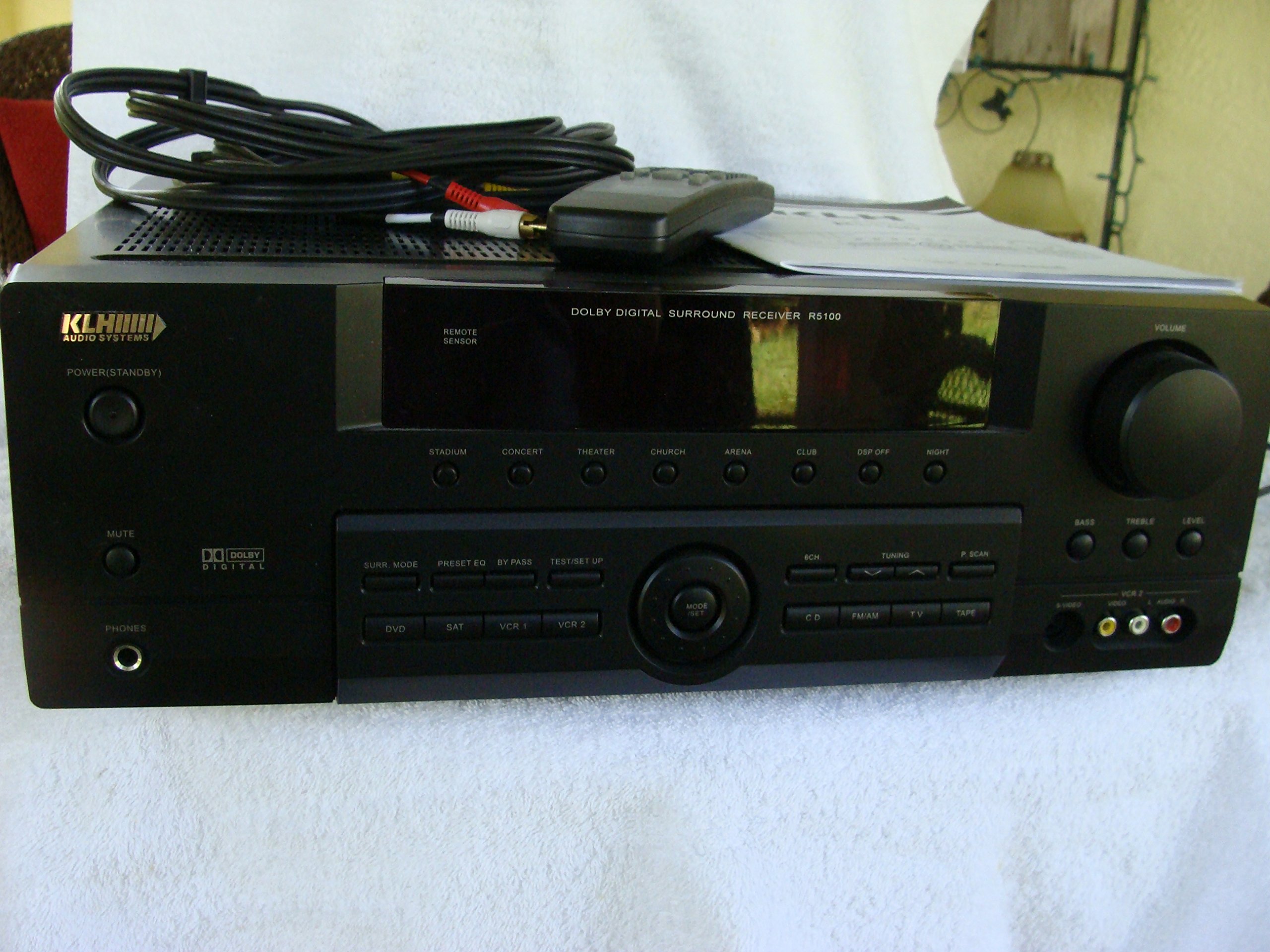
Image: The KLH R5100 receiver, its remote control, user manual, and included audio/video cables.
4. ఉత్పత్తి ముగిసిందిview
4.1 ఫ్రంట్ ప్యానెల్ నియంత్రణలు
The front panel provides access to essential controls and indicators for daily operation.

చిత్రం: వివరణాత్మక view of the receiver's front panel, highlighting the display, volume control, and input selection buttons.
- పవర్ బటన్: రిసీవర్ను ఆన్ లేదా ఆఫ్ చేస్తుంది.
- ఇన్పుట్ ఎంపికదారులు: Buttons for DVD, SAT, VCR 1, VCR 2, CD, FM/AM, TV, TAPE to choose your audio/video source.
- వాల్యూమ్ నాబ్: మొత్తం అవుట్పుట్ వాల్యూమ్ను సర్దుబాటు చేస్తుంది.
- Surround Mode Buttons: Select various sound fields like Stadium, Concert, Theater, Church, Arena, Club, DSP Off, Night.
- Bass/Treble/Level: Controls for adjusting audio tone and individual channel levels.
- హెడ్ఫోన్ జాక్: ప్రైవేట్ వినడం కోసం.
4.2 వెనుక ప్యానెల్ కనెక్షన్లు
The rear panel houses all input and output terminals for connecting your audio and video components, as well as speakers.

Image: The full rear panel of the receiver, displaying all connection ports for audio, video, and speakers.
- స్పీకర్ టెర్మినల్స్: Connections for Main (Front Left/Right), Center, and Rear (Surround Left/Right) speakers.
- Audio Inputs (RCA): For connecting CD players, tape decks, VCRs, TVs, and other stereo audio sources.
- Video Inputs/Outputs (RCA/S-Video): For connecting video sources like DVD players, VCRs, and TVs.
- డిజిటల్ ఆడియో ఇన్పుట్లు (ఆప్టికల్/కోక్సియల్): For connecting digital audio sources like DVD players or set-top boxes.
- 6CH Direct Input: For connecting external multi-channel decoders or players with 5.1 analog outputs.
- సబ్ వూఫర్ అవుట్: యాక్టివ్ సబ్ వూఫర్ను కనెక్ట్ చేయడానికి RCA అవుట్పుట్.
- యాంటెన్నా టెర్మినల్స్: For FM and AM antennas.
4.3 రిమోట్ కంట్రోల్ యూనిట్
The remote control provides convenient access to all receiver functions from your listening position.

చిత్రం: క్లోజప్ view of the remote control unit, detailing its buttons for various functions.
- పవర్ ఆన్/ఆఫ్: రిసీవర్ను ఆన్ లేదా ఆఫ్ చేస్తుంది.
- ఇన్పుట్ ఎంపికదారులు: Dedicated buttons for each input source (DVD, CD, TV, etc.).
- వాల్యూమ్ అప్/డౌన్: మాస్టర్ వాల్యూమ్ను సర్దుబాటు చేస్తుంది.
- మ్యూట్: తాత్కాలికంగా ఆడియో అవుట్పుట్ను నిశ్శబ్దం చేస్తుంది.
- సరౌండ్ మోడ్: Cycles through available surround sound modes.
- Level/Test: For adjusting individual speaker levels and running a test tone.
- ట్యూనర్ నియంత్రణలు: For FM/AM station tuning and memory functions.
5. సెటప్
5.1 మీ స్పీకర్లను కనెక్ట్ చేయడం
Ensure the receiver is unplugged from the power outlet before making any connections.
- ముందు స్పీకర్లు: Connect your main left and right speakers to the 'MAIN SPEAKERS (8Ω)' terminals. Ensure correct polarity (+ to + and - to -).
- సెంటర్ స్పీకర్: Connect your center channel speaker to the 'CENTER SPEAKER (8Ω)' terminals.
- వెనుక స్పీకర్లు: Connect your surround left and right speakers to the 'REAR SPEAKERS (8Ω)' terminals.
- subwoofer: Connect an active subwoofer to the 'SUBWOOFER OUT' RCA jack using a single RCA cable.

చిత్రం: వివరణాత్మకం view of the speaker connection terminals on the rear panel.
5.2 ఆడియో/వీడియో సోర్స్లను కనెక్ట్ చేయడం
Use appropriate cables (RCA, Optical, Coaxial) to connect your source components to the receiver.
- డివిడి ప్లేయర్: Connect the audio output of your DVD player to the 'DVD' audio input jacks (RCA) on the receiver. For digital audio, use either the 'DIGITAL IN OPTICAL' or 'DIGITAL IN COAXIAL' input. Connect the video output to the 'DVD' video input.
- CD ప్లేయర్: Connect the audio output of your CD player to the 'CD' audio input jacks (RCA).
- TV/Cable Box: Connect the audio output of your TV or cable box to the 'TV' audio input jacks (RCA). Connect video output to the 'TV' video input.
- ఇతర పరికరాలు: Use 'SAT', 'VCR 1', 'VCR 2', or 'TAPE' inputs for other audio/video components as needed.

Image: A close-up of the digital audio inputs (Coaxial, Optical) and the 6-channel direct input section on the rear panel.
5.3 యాంటెన్నా కనెక్షన్
రేడియో రిసెప్షన్ కోసం సరఫరా చేయబడిన FM మరియు AM యాంటెన్నాలను వెనుక ప్యానెల్లోని వాటి సంబంధిత టెర్మినల్లకు కనెక్ట్ చేయండి.
6. ఆపరేటింగ్ సూచనలు
6.1 ప్రాథమిక ఆపరేషన్
- పవర్ ఆన్: ముందు ప్యానెల్ లేదా రిమోట్ కంట్రోల్లోని పవర్ బటన్ను నొక్కండి.
- ఇన్పుట్ని ఎంచుకోండి: Press the desired input selector button (e.g., 'DVD', 'CD') on the front panel or remote control to choose your source.
- వాల్యూమ్ సర్దుబాటు: Turn the Volume knob on the front panel or use the Volume Up/Down buttons on the remote control.
6.2 Surround Sound Modes
The R5100 offers various sound modes to enhance your listening experience:
- స్టేడియం: Simulates the acoustics of a large stadium.
- కచేరీ: Creates a concert hall ambiance.
- థియేటర్: Optimized for movie playback, enhancing dialogue and effects.
- చర్చి: Replicates the spaciousness of a church.
- Arena: Provides a wide, open sound field.
- క్లబ్: Simulates a lively club environment.
- DSP Off: Disables digital sound processing for a direct stereo signal.
- రాత్రి: Reduces dynamic range for late-night listening without disturbing others.
Press the 'SURR. MODE' button on the remote or front panel to cycle through these modes.
6.3 టోన్ నియంత్రణ
Use the BASS and TREBLE controls on the front panel or remote to adjust the low and high frequency response. The LEVEL controls allow for fine-tuning of individual speaker output levels.
6.4 ట్యూనర్ ఆపరేషన్
To listen to radio:
- Press the 'FM/AM' input selector.
- Use the 'TUNING' buttons on the front panel or remote to find stations.
- Press 'MEMORY' to store favorite stations, and 'P.SCAN' to scan through presets.
7. నిర్వహణ
To ensure the longevity and optimal performance of your KLH R5100 receiver, follow these maintenance guidelines:
- శుభ్రపరచడం: Wipe the exterior surfaces with a soft, dry cloth. Do not use abrasive cleaners, waxes, or solvents as they may damage the finish.
- వెంటిలేషన్: Regularly check that the ventilation openings are not obstructed by dust or debris. Use a soft brush or vacuum cleaner to gently remove any build-up.
- పవర్ కార్డ్: Inspect the power cord periodically for any signs of damage. If damaged, discontinue use and contact qualified service personnel.
- నిల్వ: యూనిట్ను ఎక్కువ కాలం నిల్వ ఉంచినట్లయితే, దానిని పవర్ అవుట్లెట్ నుండి అన్ప్లగ్ చేసి, దుమ్ము నుండి రక్షించడానికి దానిని కప్పి ఉంచండి.
8. ట్రబుల్షూటింగ్
If you encounter problems with your receiver, refer to the following common issues and solutions before seeking professional service.
| సమస్య | సాధ్యమైన కారణం | పరిష్కారం |
|---|---|---|
| శక్తి లేదు | Power cord unplugged; Power outlet not active | Ensure power cord is securely plugged in; Check power outlet with another device |
| శబ్దం లేదు | Incorrect input selected; Speakers not connected properly; Volume too low; Mute function active | Select correct input source; Check speaker connections and polarity; Increase volume; Deactivate Mute |
| రిమోట్ కంట్రోల్ పనిచేయడం లేదు | Batteries depleted; Obstruction between remote and receiver; Remote sensor blocked | Replace batteries; Remove any obstructions; Ensure remote sensor on receiver is clear |
| పేలవమైన రేడియో రిసెప్షన్ | యాంటెన్నా కనెక్ట్ కాలేదు లేదా సరిగ్గా ఉంచబడలేదు | Connect antennas securely; Adjust antenna position for better reception |
| వక్రీకరించిన ధ్వని | Input signal too high; Speaker impedance mismatch; Damaged cables | Reduce source volume; Ensure speakers match 8Ω impedance; Check and replace damaged cables |
9. స్పెసిఫికేషన్లు
The following are the technical specifications for the KLH R5100 Surround Sound Receiver:
- మోడల్ సంఖ్య: R5100
- ఉత్పత్తి కొలతలు: 16.88 x 6.88 x 15.75 అంగుళాలు
- వస్తువు బరువు: 24.2 పౌండ్లు
- శక్తి మూలం: AC 120V, 60Hz
- విద్యుత్ వినియోగం: 320W
- ఆడియో అవుట్పుట్ మోడ్: చుట్టుముట్టండి
- సరౌండ్ సౌండ్ ఛానెల్ కాన్ఫిగరేషన్: 5.1
- కనెక్టివిటీ టెక్నాలజీ: RCA, 3.5mm Jack, Optical, Coaxial
- అనుకూల పరికరాలు: వక్తలు
- నియంత్రిక రకం: రిమోట్
- ప్రత్యేక ఫీచర్: Advanced Room Calibration (as per product listing, though specific details may vary)
- రంగు: నలుపు
10. వారంటీ మరియు మద్దతు
For warranty information and customer support, please refer to the documentation included with your purchase or contact KLH customer service directly. Keep your proof of purchase for any warranty claims.


