1. ఉత్పత్తి ముగిసిందిview
This manual provides instructions for the Mopar 14239 Overhead Console Map Light Wiring with Switches. This genuine Mopar part is designed to replace or upgrade the map light wiring and switches in the overhead console of specific 1999-2002 Dodge Ram vehicles. It ensures proper fit, form, and function, restoring the functionality of your vehicle's interior lighting.
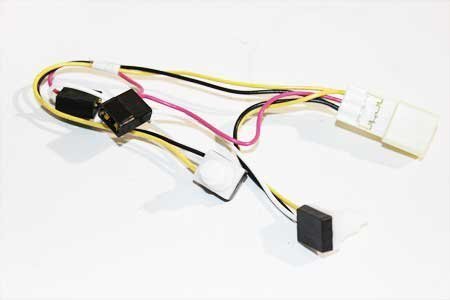
Image showing the Mopar overhead console map light wiring assembly with integrated switches.
ముఖ్య లక్షణాలు:
- Genuine Mopar part for guaranteed compatibility and quality.
- Includes wiring and integrated switches for map lights.
- Manufactured to meet original equipment specifications.
2. సెటప్ మరియు ఇన్స్టాలేషన్
Installation of the overhead console map light wiring requires careful handling and basic automotive electrical knowledge. It is recommended to consult your vehicle's service manual or a qualified technician if you are unsure about any steps.
అనుకూలత:
- Designed for 1999-2002 Dodge Ram models.
అవసరమైన సాధనాలు (చేర్చబడలేదు):
- Basic hand tools (e.g., screwdrivers, trim removal tools).
- భద్రతా అద్దాలు.
ఇన్స్టాలేషన్ దశలు:
- మొదటి భద్రత: Disconnect the negative terminal of your vehicle's battery to prevent electrical shorts or injury during installation.
- Access Overhead Console: Carefully remove the existing overhead console assembly from the vehicle's headliner. Use appropriate trim removal tools to avoid damaging the plastic tabs or surrounding trim. Refer to your vehicle's service manual for specific console removal procedures.
- Disconnect Old Wiring: Once the console is accessible, disconnect the electrical connector(s) from the old map light wiring and switch assembly.
- పాత యూనిట్ తొలగించండి: Detach the old map light wiring and switch unit from the overhead console housing.
- కొత్త యూనిట్ను ఇన్స్టాల్ చేయండి: Position the new Mopar 14239 wiring and switch assembly into the overhead console housing, ensuring it snaps securely into place.
- Connect New Wiring: Reconnect the electrical connector(s) to the new unit. Ensure connections are firm and secure.
- Reinstall Console: Carefully reattach the overhead console assembly to the vehicle's headliner, ensuring all tabs and clips are properly aligned and secured.
- బ్యాటరీని మళ్లీ కనెక్ట్ చేయండి: వాహనం యొక్క బ్యాటరీ యొక్క నెగటివ్ టెర్మినల్ను తిరిగి కనెక్ట్ చేయండి.
- పరీక్ష కార్యాచరణ: Turn on the vehicle's ignition and test the map lights to ensure they operate correctly.
జాగ్రత్త: Exercise extreme care when removing and reinstalling plastic components to prevent breakage of delicate tabs. If you encounter resistance, do not force components. Seek professional assistance if needed.
3. ఆపరేటింగ్ సూచనలు
The map light switches integrated into this wiring assembly operate the individual map lights in your overhead console.
Map Light Operation:
- Press to Turn On: Press the designated switch button for the desired map light to turn it on.
- Press to Turn Off: Press the same switch button again to turn the map light off.
- Each map light operates independently via its dedicated switch.
4. నిర్వహణ
This Mopar part is designed for durability and requires minimal maintenance. Regular inspection can help ensure continued performance.
సాధారణ నిర్వహణ చిట్కాలు:
- శుభ్రపరచడం: Use a soft, dry cloth to gently wipe the surface of the switches and console to remove dust. Avoid using harsh chemicals or abrasive cleaners.
- కనెక్షన్ తనిఖీ: Periodically, if accessible, ensure the electrical connections remain secure.
- బల్బ్ భర్తీ: If a map light bulb fails, replace it with the correct type and wattage specified for your vehicle. Ensure the vehicle's battery is disconnected before replacing bulbs.
5. ట్రబుల్షూటింగ్
If you experience issues with your map lights after installation, consider the following troubleshooting steps:
సాధారణ సమస్యలు మరియు పరిష్కారాలు:
- Map Lights Not Working:
- Verify the vehicle's battery is properly connected.
- Check the relevant fuse in your vehicle's fuse box. Consult your vehicle's owner's manual for fuse locations and ratings.
- Ensure the electrical connector to the map light assembly is fully seated and secure.
- Inspect the map light bulbs. Replace any burnt-out bulbs.
- Switches Feel Loose or Unresponsive:
- This Mopar part is designed to address common issues with original switches. If new switches feel loose, ensure the unit is properly seated within the console housing.
- If the issue persists, re-check the installation steps or consult a professional.
ట్రబుల్షూటింగ్ దశలు సమస్యను పరిష్కరించకపోతే, సర్టిఫైడ్ ఆటోమోటివ్ టెక్నీషియన్ నుండి సహాయం కోరడం మంచిది.
6. స్పెసిఫికేషన్లు
| పార్ట్ నంబర్ | 14239 |
| బ్రాండ్ | మోపర్ |
| అనుకూలత | 1999-2002 డాడ్జ్ రామ్ |
| ఆపరేషన్ మోడ్ | OEM |
| సంప్రదింపు రకం | సాధారణంగా తెరవండి |
| కనెక్టర్ రకం | OEM |
| టెర్మినల్ రకం | స్క్రూ |
| అంశం కొలతలు (L x W x H) | 5 x 5 x 2 అంగుళాలు |
| సర్క్యూట్ రకం | 1-మార్గం |
| మౌంటు రకం | ప్యానెల్ మౌంట్ |
| యాక్యుయేటర్ రకం | పుష్ బటన్ |
| సంప్రదింపు మెటీరియల్ | రాగి, ఇత్తడి |
| వాల్యూమ్tage | 12 వోల్ట్లు |
| వస్తువు బరువు | 0.96 ఔన్సులు |
7. వారంటీ మరియు మద్దతు
As a genuine Mopar part, this product is manufactured to high standards. Specific warranty terms and conditions are typically provided by Mopar or the authorized seller at the time of purchase.
వారంటీ సమాచారం కోసం:
- Refer to the documentation included with your purchase.
- Contact the authorized Mopar dealer or the seller from whom you purchased the product.
- Visit the official Mopar website for general warranty policies.
సాంకేతిక మద్దతు కోసం:
- Contact your local authorized Mopar service center.
- Consult your vehicle's service manual for detailed wiring diagrams and component locations.


