పరిచయం
This manual provides essential instructions for the proper setup, operation, and maintenance of your Tripp Lite U023-003 USB Male-to-Male Cable. Please read this manual thoroughly before using the product to ensure optimal performance and longevity.
The Tripp Lite U023-003 is designed for connecting USB-enabled devices, facilitating data transfer and communication between them. Its robust construction ensures reliable connectivity.
ఉత్పత్తి ముగిసిందిview
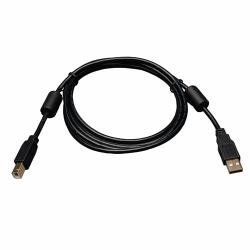
చిత్రం: The Tripp Lite U023-003 USB Male-to-Male Cable, featuring two USB-A male connectors on either end and ferrite chokes for noise reduction.
The Tripp Lite U023-003 is a high-quality USB 2.0 A-Male to A-Male cable. It is engineered to connect two USB-A compatible devices, enabling data transfer. The cable features a braided design for enhanced durability and includes ferrite chokes to reduce electromagnetic and radio frequency interference (EMI/RFI), ensuring clean signal transmission.
ఫీచర్లు
- కనెక్టర్ రకం: USB 2.0 Type-A Male to USB 2.0 Type-A Male.
- అనుకూలత: Designed for connecting computers, smartphones, tablets, and other USB-enabled devices.
- డేటా బదిలీ: Supports USB 2.0 data transfer speeds.
- Braided Design: Enhances cable durability and flexibility.
- Ferrite Chokes: Integrated ferrite beads help filter out signal noise and reduce EMI/RFI.
- రంగు: నలుపు.
సెటప్
Setting up the Tripp Lite U023-003 cable is straightforward:
- పోర్టులను గుర్తించండి: Locate the USB Type-A ports on the two devices you wish to connect. Ensure both devices have standard USB Type-A female ports.
- Connect First Device: Insert one end of the Tripp Lite U023-003 cable into the USB Type-A port of your first device (e.g., computer).
- Connect Second Device: Insert the other end of the cable into the USB Type-A port of your second device (e.g., another computer, a USB peripheral).
- కనెక్షన్ని ధృవీకరించండి: Once both ends are securely connected, your devices should recognize each other.
గమనిక: This cable is primarily for data transfer between two host devices or connecting a host to a peripheral that requires an A-Male to A-Male connection. It is not typically used for charging or connecting a peripheral to a single host in the standard way (which usually involves an A-Male to B-Male or A-Male to Micro/Mini-B cable).
ఆపరేటింగ్ సూచనలు
Once the Tripp Lite U023-003 cable is connected, its operation is dependent on the functionality of the connected devices. The cable acts as a conduit for data transfer.
- డేటా బదిలీ: ఉపయోగించండి file management system of your operating system (e.g., Windows Explorer, macOS Finder) to transfer files between the connected devices.
- Device Communication: If connecting two computers, ensure appropriate software or network settings are configured for direct communication or data sharing.
- పరిధీయ కనెక్షన్: If connecting a specific peripheral that requires an A-Male to A-Male cable, refer to the peripheral's instruction manual for specific operational steps.
Always ensure that both connected devices are powered on and properly configured for USB communication.
నిర్వహణ
To ensure the longevity and optimal performance of your Tripp Lite U023-003 cable, follow these simple maintenance guidelines:
- నిల్వ: Store the cable in a cool, dry place away from direct sunlight and extreme temperatures. Avoid tightly coiling or bending the cable at sharp angles, which can damage internal wires.
- శుభ్రపరచడం: Use a soft, dry cloth to gently wipe the cable and connectors. Avoid using harsh chemicals or abrasive cleaners.
- నిర్వహణ: Always grasp the connector housing when plugging or unplugging the cable, rather than pulling on the cable itself. This prevents strain on the connection points.
- తనిఖీ: Periodically inspect the cable for any signs of damage, such as frayed insulation, bent pins, or cracked connectors. Discontinue use if damage is observed.
ట్రబుల్షూటింగ్
If you encounter issues with your Tripp Lite U023-003 cable, consider the following troubleshooting steps:
- పరికర గుర్తింపు లేదు:
- Ensure both ends of the cable are fully and securely inserted into the respective USB ports.
- Try connecting the cable to different USB ports on your devices.
- Test the cable with different compatible devices to rule out an issue with the cable itself.
- కనెక్ట్ చేయబడిన పరికరాలను పునఃప్రారంభించండి.
- Check device drivers on your computer.
- నెమ్మది డేటా బదిలీ:
- Ensure both devices support USB 2.0 speeds. If one device is USB 1.1, transfer speeds will be limited to the slower standard.
- Avoid connecting through unpowered USB hubs, which can sometimes reduce performance.
- Ensure no other high-bandwidth USB devices are simultaneously using the same USB controller.
- అడపాదడపా కనెక్షన్:
- Check for physical damage to the cable or connectors.
- Ensure the cable is not being bent or strained during use.
- Verify that the USB ports on your devices are clean and free of debris.
If problems persist after attempting these steps, the cable may be faulty and require replacement.
స్పెసిఫికేషన్లు
| మోడల్ సంఖ్య | U023-003 |
| బ్రాండ్ | TRIPP లైట్ |
| కనెక్టర్ రకం | USB Type-A Male to USB Type-A Male |
| కేబుల్ రకం | USB 2.0 |
| అనుకూల పరికరాలు | Computer, Smartphone, Tablet, USB-enabled Devices |
| ప్రత్యేక ఫీచర్ | Braided, Ferrite Chokes |
| రంగు | నలుపు |
వారంటీ మరియు మద్దతు
For information regarding warranty coverage and technical support for your Tripp Lite U023-003 cable, please refer to the official Tripp Lite website or contact their customer service directly. Warranty terms typically cover defects in materials and workmanship under normal use.
When contacting support, please have your product model number (U023-003) and purchase information readily available.
Tripp Lite Official Webసైట్: www.tripplite.com


