1. పరిచయం
ఈ మాన్యువల్ APEX LD200RM రిమోట్ కంట్రోల్ కోసం సూచనలను అందిస్తుంది, ఇది వివిధ APEX LCD మరియు LED టెలివిజన్ మోడళ్లతో ఉపయోగించడానికి రూపొందించబడింది. ఈ రిమోట్ కంట్రోల్ మీ అనుకూల APEX టెలివిజన్ కోసం పూర్తి కార్యాచరణను అందిస్తుంది, అన్ని లక్షణాల అనుకూలమైన ఆపరేషన్ను నిర్ధారిస్తుంది.
అనుకూల APEX టీవీ మోడల్లు:
- LD3249
- LD3288, LD3288T, LD3288M
- LD4077, LE4077M యొక్క సంబంధిత ఉత్పత్తులు
- LD4088
- LD4688
- LE3212, LE3212D ద్వారా మరిన్ని
- LE4012
- LE4612
- LE3242
- LE3942
- LE40B12 పరిచయం
- LE4243
- LE4643
- LE5043
2. సెటప్
2.1 బ్యాటరీ ఇన్స్టాలేషన్
APEX LD200RM రిమోట్ కంట్రోల్ పనిచేయడానికి రెండు (2) AA బ్యాటరీలు అవసరం. బ్యాటరీలను ఇన్స్టాల్ చేయడానికి ఈ దశలను అనుసరించండి:
- రిమోట్ కంట్రోల్ వెనుక బ్యాటరీ కంపార్ట్మెంట్ కవర్ను గుర్తించండి.
- ట్యాబ్ను క్రిందికి నొక్కి, కవర్ను స్లైడ్ చేయండి.
- రెండు AA బ్యాటరీలను చొప్పించండి, పాజిటివ్ (+) మరియు నెగటివ్ (-) టెర్మినల్స్ కంపార్ట్మెంట్ లోపల ఉన్న గుర్తులతో సరిగ్గా సమలేఖనం చేయబడ్డాయని నిర్ధారించుకోండి.
- బ్యాటరీ కంపార్ట్మెంట్ కవర్ సురక్షితంగా క్లిక్ అయ్యే వరకు దాన్ని తిరిగి స్థానంలోకి స్లైడ్ చేయండి.
గమనిక: ఎల్లప్పుడూ రెండు బ్యాటరీలను ఒకే సమయంలో మార్చండి. పాత మరియు కొత్త బ్యాటరీలను లేదా వివిధ రకాల బ్యాటరీలను కలపవద్దు.
2.2 ప్రారంభ ఉపయోగం
APEX LD200RM రిమోట్ కంట్రోల్ అనేది అసలు ప్రత్యామ్నాయం మరియు సాధారణంగా దీనికి ఎటువంటి ప్రోగ్రామింగ్ లేదా జత చేయడం అవసరం లేదు. బ్యాటరీలను ఇన్స్టాల్ చేసిన తర్వాత, రిమోట్ కంట్రోల్ను మీ అనుకూల APEX టెలివిజన్ వైపు పాయింట్ చేసి ఆపరేషన్ ప్రారంభించండి.
3. ఆపరేటింగ్ సూచనలు
ఈ విభాగం మీ APEX LD200RM రిమోట్ కంట్రోల్లోని బటన్ల విధులను వివరిస్తుంది.
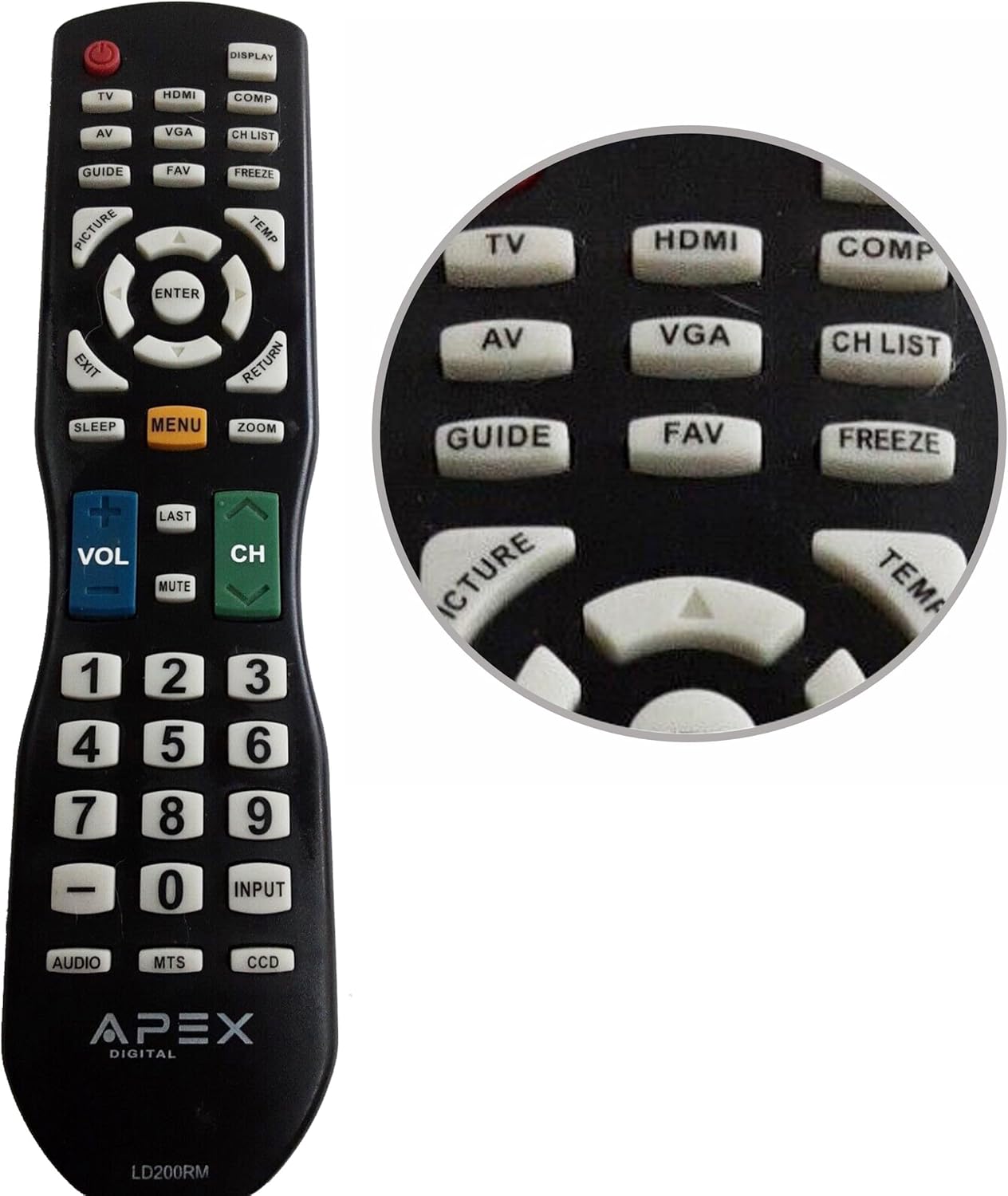
చిత్రం 1: APEX LD200RM రిమోట్ కంట్రోల్ లేఅవుట్. ఈ చిత్రం మొత్తం రిమోట్ కంట్రోల్ను ప్రదర్శిస్తుంది, పవర్, ఇన్పుట్ ఎంపిక, నావిగేషన్, వాల్యూమ్, ఛానల్ మరియు న్యూమరిక్ కీప్యాడ్తో సహా దాని వివిధ ఫంక్షన్ బటన్ల అమరికను హైలైట్ చేస్తుంది.

చిత్రం 2: APEX LD200RM రిమోట్ కంట్రోల్ టాప్ బటన్ల క్లోజప్. ఈ చిత్రం వివరణాత్మక చిత్రాన్ని అందిస్తుంది view రిమోట్ పైభాగంలో, TV, HDMI, AV, VGA, COMP, CH LIST, DISPLAY, GUIDE, FAV, FREEZE, PICTURE, TEMP, MENU, ENTER, EXIT, RETURN, SLEEP మరియు ZOOM వంటి బటన్లపై దృష్టి సారిస్తుంది.
3.1 పవర్ మరియు ఇన్పుట్ ఎంపిక
- పవర్ (ఎరుపు బటన్): టెలివిజన్ని ఆన్ లేదా ఆఫ్ చేస్తుంది.
- TV: టీవీ ట్యూనర్ ఇన్పుట్ను ఎంచుకుంటుంది.
- HDMI: HDMI ఇన్పుట్ను ఎంచుకుంటుంది.
- యొక్క: ఆడియో/వీడియో ఇన్పుట్ను ఎంచుకుంటుంది.
- వీజీఏ: VGA ఇన్పుట్ను ఎంచుకుంటుంది.
- COMP: కాంపోనెంట్ వీడియో ఇన్పుట్ను ఎంచుకుంటుంది.
- ప్రదర్శన: ఆన్-స్క్రీన్ డిస్ప్లే సమాచారాన్ని చూపుతుంది.
3.2 ఛానల్ మరియు వాల్యూమ్ నియంత్రణ
- VOL (+/-): వాల్యూమ్ స్థాయిని పెంచుతుంది లేదా తగ్గిస్తుంది.
- CH (పైకి/క్రిందికి): టెలివిజన్ ఛానెల్ని పైకి లేదా క్రిందికి మారుస్తుంది.
- చివరిది: మునుపటి స్థితికి తిరిగి వస్తుంది viewed ఛానెల్.
- మ్యూట్: టెలివిజన్ ఆడియోను మ్యూట్ చేస్తుంది లేదా అన్మ్యూట్ చేస్తుంది.
- CH జాబితా: ఛానెల్ జాబితాను ప్రదర్శిస్తుంది.
3.3 మెనూ మరియు నావిగేషన్
- మెను: టెలివిజన్ ప్రధాన మెనూను తెరుస్తుంది.
- నమోదు చేయండి: మెనూలోని ఎంపికను నిర్ధారిస్తుంది.
- బాణం బటన్లు (పైకి/క్రిందికి/ఎడమ/కుడి): మెనూ ఎంపికల ద్వారా నావిగేట్ చేస్తుంది మరియు సెట్టింగ్లను సర్దుబాటు చేస్తుంది.
- బయటకి దారి: ప్రస్తుత మెనూ లేదా ఆన్-స్క్రీన్ డిస్ప్లే నుండి నిష్క్రమిస్తుంది.
- వాపసు: మునుపటి మెను లేదా స్క్రీన్కి తిరిగి వస్తుంది.
3.4 సంఖ్యా కీప్యాడ్ మరియు ప్రత్యేక విధులు
- 0-9 (సంఖ్యా బటన్లు): నేరుగా ఛానెల్ నంబర్లను నమోదు చేస్తుంది.
- ఇన్పుట్: అందుబాటులో ఉన్న ఇన్పుట్ మూలాల ద్వారా తిరుగుతుంది.
- గైడ్: ఎలక్ట్రానిక్ ప్రోగ్రామ్ గైడ్ను ప్రదర్శిస్తుంది (అందుబాటులో ఉంటే).
- FAV: ఇష్టమైన ఛానెల్లను యాక్సెస్ చేస్తుంది.
- ఫ్రీజ్: స్క్రీన్పై ప్రస్తుత చిత్రాన్ని స్తంభింపజేస్తుంది.
- చిత్రం: చిత్ర సెట్టింగ్లను సర్దుబాటు చేస్తుంది.
- ఉష్ణోగ్రత: (ఫంక్షన్ మోడల్ను బట్టి మారవచ్చు, తరచుగా చిత్ర ఉష్ణోగ్రత లేదా నిర్దిష్ట మోడ్కి సంబంధించినది).
- నిద్ర: స్లీప్ టైమర్ను సెట్ చేస్తుంది.
- జూమ్: స్క్రీన్ జూమ్ స్థాయిని సర్దుబాటు చేస్తుంది.
- ఆడియో: ఆడియో మోడ్లు లేదా ట్రాక్లను ఎంచుకుంటుంది.
- MTS: మల్టీ-ఛానల్ టెలివిజన్ సౌండ్ (స్టీరియో/SAP).
- DCC: క్లోజ్డ్ క్యాప్షనింగ్ డిస్ప్లే.
4. నిర్వహణ
4.1 బ్యాటరీ భర్తీ
రిమోట్ కంట్రోల్ పనితీరు క్షీణించినప్పుడు లేదా అది స్పందించడం ఆపివేసినప్పుడు, బ్యాటరీలను మార్చాల్సిన సమయం ఆసన్నమైంది. వివరణాత్మక బ్యాటరీ ఇన్స్టాలేషన్ సూచనల కోసం విభాగం 2.1ని చూడండి. ఎల్లప్పుడూ తాజా AA బ్యాటరీలను ఉపయోగించండి.
4.2 శుభ్రపరచడం
రిమోట్ కంట్రోల్ శుభ్రం చేయడానికి, మృదువైన, పొడి వస్త్రాన్ని ఉపయోగించండి. మొండి ధూళి కోసం, కొద్దిగా dampనీరు లేదా తేలికపాటి, రాపిడి లేని క్లీనర్తో గుడ్డను శుభ్రం చేయండి. కఠినమైన రసాయనాలు లేదా రాపిడి పదార్థాలను ఉపయోగించకుండా ఉండండి, ఎందుకంటే ఇవి రిమోట్ యొక్క ఉపరితలం లేదా అంతర్గత భాగాలను దెబ్బతీస్తాయి.
4.3 నిల్వ
రిమోట్ కంట్రోల్ను చల్లని, పొడి ప్రదేశంలో ప్రత్యక్ష సూర్యకాంతి మరియు తీవ్రమైన ఉష్ణోగ్రతలకు దూరంగా నిల్వ చేయండి. రిమోట్ను ఎక్కువ కాలం ఉపయోగించకపోతే, లీకేజీ మరియు సంభావ్య నష్టాన్ని నివారించడానికి బ్యాటరీలను తీసివేయడం మంచిది.
5. ట్రబుల్షూటింగ్
- రిమోట్ కంట్రోల్ స్పందించడం లేదు:
- బ్యాటరీలు సరైన ధ్రువణతతో (+/-) సరిగ్గా ఇన్స్టాల్ చేయబడ్డాయని నిర్ధారించుకోండి.
- పాత బ్యాటరీలను కొత్త AA బ్యాటరీలతో భర్తీ చేయండి.
- రిమోట్ కంట్రోల్ మరియు టెలివిజన్ యొక్క ఇన్ఫ్రారెడ్ సెన్సార్ మధ్య ఏవైనా అడ్డంకులు ఉన్నాయా అని తనిఖీ చేయండి.
- మీరు టెలివిజన్ యొక్క IR రిసీవర్ యొక్క ప్రభావవంతమైన పరిధిలో ఉన్నారని నిర్ధారించుకోండి.
- కొన్ని బటన్లు పనిచేయడం లేదు:
- ఇది తక్కువ బ్యాటరీ పవర్ను సూచిస్తుంది. బ్యాటరీలను మార్చండి.
- రిమోట్ శుభ్రంగా ఉందని మరియు బటన్ల కింద ఎటువంటి చెత్తాచెదారం లేదని నిర్ధారించుకోండి.
- బటన్ ఫంక్షన్ మీ నిర్దిష్ట టీవీ మోడల్కు వర్తిస్తుందో లేదో ధృవీకరించండి. కొన్ని ఫంక్షన్లకు అన్ని అనుకూల టీవీలు మద్దతు ఇవ్వకపోవచ్చు.
- టెలివిజన్ ఆన్/ఆఫ్ చేయడం లేదు:
- టెలివిజన్ పనిచేసే పవర్ అవుట్లెట్కి ప్లగ్ చేయబడిందని నిర్ధారించుకోండి.
- టీవీ సమస్యను తోసిపుచ్చడానికి టెలివిజన్పై నేరుగా పవర్ బటన్ను ఉపయోగించి ప్రయత్నించండి.
6. స్పెసిఫికేషన్లు
| ఫీచర్ | వివరాలు |
|---|---|
| మోడల్ సంఖ్య | LD200RM ద్వారా మరిన్ని |
| బ్రాండ్ | అపెక్స్ |
| అనుకూల పరికరాలు | APEX LCD & LED టెలివిజన్లు |
| శక్తి మూలం | 2 x AA బ్యాటరీలు (చేర్చబడలేదు) |
| ఉత్పత్తి కొలతలు | 10 x 6 x 2 అంగుళాలు (సుమారుగా) |
| వస్తువు బరువు | 3.2 ఔన్సులు (సుమారుగా) |
| రంగు | నలుపు |
| ప్రత్యేక ఫీచర్ | ఎర్గోనామిక్ డిజైన్ |
7. వారంటీ సమాచారం
ఈ APEX LD200RM రిమోట్ కంట్రోల్ సాధారణంగా కొనుగోలు తేదీ నుండి 30 రోజుల వారంటీతో వస్తుంది. ఈ వారంటీ తయారీ లోపాలను కవర్ చేస్తుంది. వారంటీ క్లెయిమ్లు, రిటర్న్లు లేదా భర్తీలకు సంబంధించిన నిర్దిష్ట వివరాల కోసం, దయచేసి మీ కొనుగోలు డాక్యుమెంటేషన్ను చూడండి లేదా విక్రేతను నేరుగా సంప్రదించండి.
8. మద్దతు
ఈ మాన్యువల్లో పేర్కొనబడని సమస్యలను మీరు ఎదుర్కొంటే లేదా మరిన్ని సహాయం అవసరమైతే, దయచేసి రిటైలర్ లేదా తయారీదారు కస్టమర్ సపోర్ట్ను సంప్రదించండి. సపోర్ట్ను సంప్రదించేటప్పుడు, దయచేసి మీ ఉత్పత్తి మోడల్ నంబర్ (LD200RM) మరియు మీ టెలివిజన్ మోడల్ నంబర్ను అందుబాటులో ఉంచుకోండి.


