1. పరిచయం
The Kinesis Freestyle2 is an ergonomic keyboard designed to enhance comfort and productivity by adapting to individual body types and preferences. Its unique split design allows for adjustable separation, splay, and tenting, promoting natural hand, wrist, and forearm positions to reduce muscle tension and strain.
This keyboard features a standard Windows layout, including dedicated hotkeys for common functions like Cut, Copy, and Paste, as well as multimedia controls. An embedded numeric 10-key further supports productivity. The Freestyle2 utilizes low-force membrane key switches with tactile feedback, engineered to minimize finger fatigue and impact during typing.
The Freestyle2 is a plug-and-play device, requiring no special software or drivers for operation with Windows 7-10, Linux, and Chrome operating systems.
2. సెటప్
2.1. ప్యాకేజీ విషయాలు
- Kinesis Freestyle2 USB Wired Keyboard (Standard Windows Layout)
- Detachable Pivot Tether (for adjustable splay)
- త్వరిత ప్రారంభ గైడ్
2.2. కీబోర్డ్ను కనెక్ట్ చేస్తోంది
- మీ కంప్యూటర్లో అందుబాటులో ఉన్న USB పోర్ట్ను గుర్తించండి.
- Plug the USB cable from the Freestyle2 keyboard into the USB port.
- The keyboard is plug-and-play and should be recognized automatically by your operating system (Windows 7-10, Linux, Chrome). No additional drivers are typically required.
2.3. Adjusting Keyboard Separation and Splay
The Freestyle2 keyboard consists of two independent modules connected by a cable, allowing for flexible positioning.
- విభజన: Gently pull the two keyboard modules apart to achieve your desired separation, up to 9 inches. This allows you to position your hands and wrists in a more natural, shoulder-width alignment.
- Splay: The detachable pivot tether, located at the top center of the keyboard, allows you to adjust the splay angle of the modules. This helps to keep your wrists straight and reduce ulnar deviation. Experiment with different angles to find the most comfortable position.
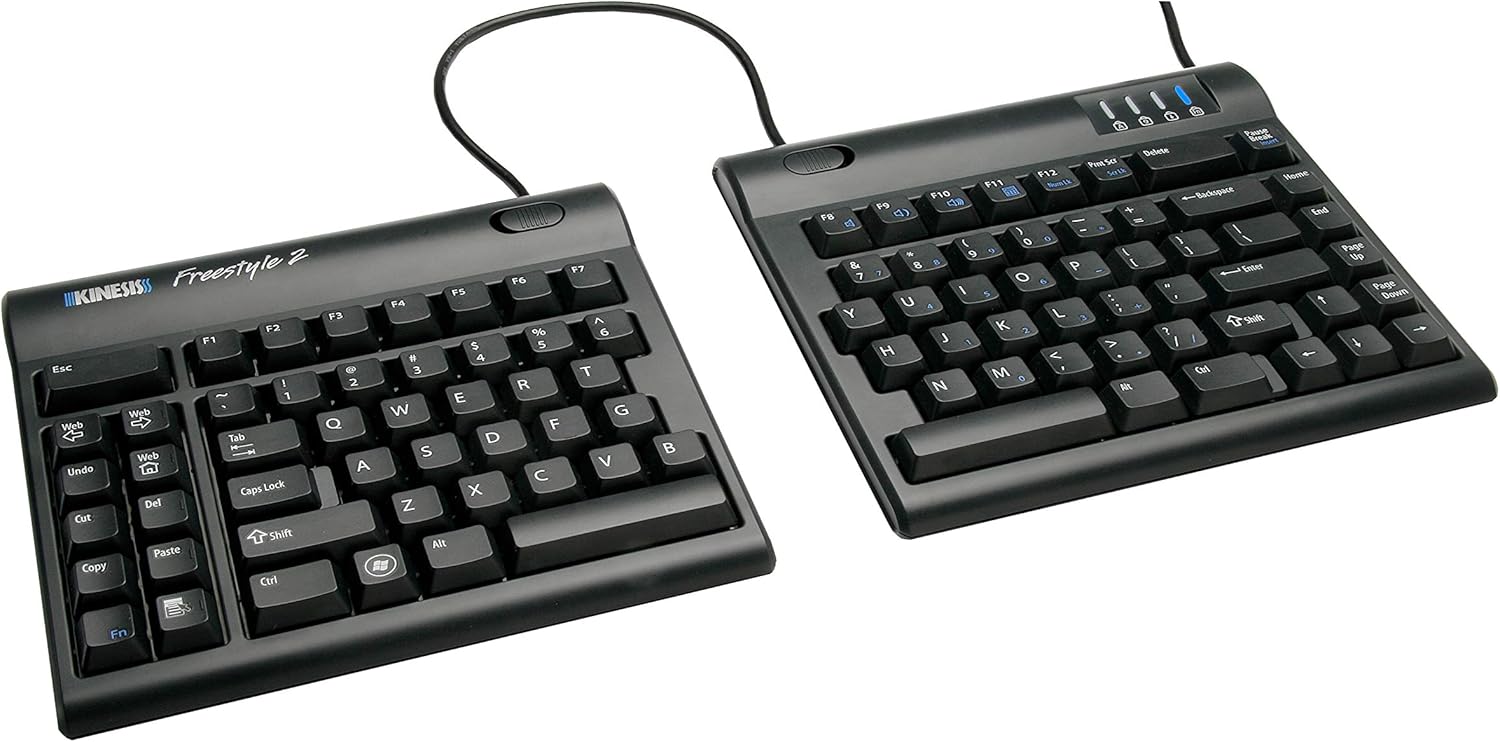
Image: The Kinesis Freestyle2 ergonomic keyboard showing its split design with 9-inch separation.

Image: The two modules of the Kinesis Freestyle2 keyboard separated on a desk, demonstrating how this positioning helps maintain straight wrists.

Image: The Kinesis Freestyle2 keyboard with optional cushioned palm supports, illustrating the adjustable splay angle using the pivot tether.
3. ఆపరేటింగ్ సూచనలు
3.1. Standard Layout and Hotkeys
The Freestyle2 keyboard features a standard QWERTY Windows layout. On the left module, dedicated hotkeys are provided for common functions:
- Web: మీ డిఫాల్ట్ను తెరుస్తుంది web బ్రౌజర్.
- చర్యరద్దు: Performs the undo action.
- కట్: Cuts selected text or items.
- కాపీ: Copies selected text or items.
- అతికించండి: Pastes copied or cut text/items.
- డెల్: Deletes characters or selected items.
The keyboard also includes multimedia keys for volume control and playback, typically accessed via the Fn key in combination with function keys (F1-F12).

చిత్రం: పై నుండి క్రిందికి view of the Kinesis Freestyle2 keyboard, highlighting its standard Windows layout and the dedicated hotkeys on the left module.
3.2. Embedded Numeric 10-Key
An embedded numeric 10-keypad is integrated into the right module of the keyboard. This allows for numerical data entry without requiring a separate keypad. Refer to the Quick Start Guide for specific key combinations to activate and use the embedded numeric keypad.

Image: A user's hands typing on the separated Kinesis Freestyle2 keyboard modules, with an optional external numeric keypad positioned between them.

Image: A close-up of a user's hands typing on the Kinesis Freestyle2 keyboard, emphasizing the low-force, tactile key switches designed to reduce finger impact and fatigue.
3.3. ఐచ్ఛిక ఉపకరణాలు
For enhanced comfort, optional accessories such as cushioned palm supports and tenting kits (e.g., VIP3 accessory) are available. These accessories can further optimize wrist and forearm positioning.

Image: The Kinesis Freestyle2 keyboard shown with the VIP3 tenting accessory (AC820), which provides adjustable tenting angles for increased comfort.
4. నిర్వహణ
4.1. శుభ్రపరచడం
To maintain the keyboard's performance and appearance:
- శుభ్రం చేయడానికి ముందు మీ కంప్యూటర్ నుండి కీబోర్డ్ను డిస్కనెక్ట్ చేయండి.
- కొద్దిగా మెత్తని, మెత్తని బట్టను ఉపయోగించండి dampఉపరితలాన్ని తుడవడానికి నీరు లేదా తేలికపాటి శుభ్రపరిచే ద్రావణంతో నానబెట్టండి.
- కఠినమైన రసాయనాలు, రాపిడి క్లీనర్లను ఉపయోగించడం లేదా కీబోర్డ్పై నేరుగా ద్రవాలను చల్లడం మానుకోండి.
- కీల మధ్య దుమ్ము మరియు శిధిలాల కోసం, సంపీడన గాలిని ఉపయోగించండి.
5. ట్రబుల్షూటింగ్
5.1. కీబోర్డ్ స్పందించడం లేదు
- USB కేబుల్ కీబోర్డ్ మరియు కంప్యూటర్ రెండింటికీ సురక్షితంగా కనెక్ట్ చేయబడిందని నిర్ధారించుకోండి.
- మీ కంప్యూటర్లోని వేరే USB పోర్ట్లోకి కీబోర్డ్ను ప్లగ్ చేసి ప్రయత్నించండి.
- మీ కంప్యూటర్ని పునఃప్రారంభించండి.
- Test the keyboard on another computer to determine if the issue is with the keyboard or the computer system.
5.2. కీలు సరిగ్గా పనిచేయకపోవడం
- Check for any debris or obstructions under the affected keys. Use compressed air to clear if necessary.
- Ensure no software conflicts are present. Try using the keyboard in a different application or a clean boot environment.
- If specific hotkeys or multimedia keys are not working, verify that the Fn key (if applicable) is being used correctly or that no software has remapped the keys.
6. స్పెసిఫికేషన్లు
| ఫీచర్ | వివరాలు |
|---|---|
| ఉత్పత్తి కొలతలు | 15.94 x 9.25 x 1.26 అంగుళాలు |
| వస్తువు బరువు | 2 పౌండ్లు |
| తయారీదారు | కినిసిస్ కార్పొరేషన్ |
| అంశం మోడల్ సంఖ్య | KIN-FS2-01US |
| కనెక్టివిటీ టెక్నాలజీ | USB |
| అనుకూల పరికరాలు | Windows 7-10, Linux, Chrome |
| కీబోర్డ్ వివరణ | Ergonomic, split-design keyboard with standard Windows layout, low-force tactile switches, embedded numeric keypad |
| సిఫార్సు చేసిన ఉపయోగాలు | కార్యాలయం |
| ప్రత్యేక ఫీచర్ | ఎర్గోనామిక్ |
| రంగు | 9 Inch Separation (Black) |
| మొదటి తేదీ అందుబాటులో ఉంది | అక్టోబర్ 3, 2010 |
7. వారంటీ మరియు మద్దతు
For warranty information and technical support, please refer to the official Kinesis Corporation website or contact their customer service directly. Details regarding product registration, warranty claims, and support resources are typically available through these channels.
తయారీదారు: కైనెసిస్ కార్పొరేషన్
మరింత సహాయం కోసం, సందర్శించండి Kinesis Store on Amazon.


