పరిచయం
The BOYA BY-VM190 is a professional directional video condenser shotgun microphone designed for use with HDSLR cameras, camcorders, and audio recorders. Its compact and lightweight design, combined with an integrated shock mount, makes it suitable for various video recording applications. This manual provides essential instructions for setting up, operating, and maintaining your BY-VM190 microphone.
పెట్టెలో ఏముంది
సెటప్తో కొనసాగడానికి ముందు అన్ని అంశాలు ఉన్నాయని దయచేసి ధృవీకరించండి.
- BY-VM190 Microphone
- ఫోమ్ విండ్షీల్డ్
- Integrated Shock Mount (attached to microphone)
- క్యారీయింగ్ పర్సు
- వినియోగదారు మాన్యువల్ (ఈ పత్రం)

Image: The BY-VM190 microphone shown with its included accessories, including a foam windshield, a furry windshield, and a carrying pouch, mounted on a DSLR camera.
సెటప్
1. బ్యాటరీ ఇన్స్టాలేషన్
The BY-VM190 microphone requires one 9V battery for operation.
- Locate the battery compartment on the underside of the microphone body.
- స్లయిడ్ బ్యాటరీ కంపార్ట్మెంట్ కవర్ తెరవండి.
- Insert one 9V battery, ensuring correct polarity (+/-).
- బ్యాటరీ కంపార్ట్మెంట్ కవర్ను సురక్షితంగా మూసివేయండి.

చిత్రం: వివరణాత్మక view of the battery compartment on the BY-VM190 microphone, illustrating the process of inserting a 9V battery.
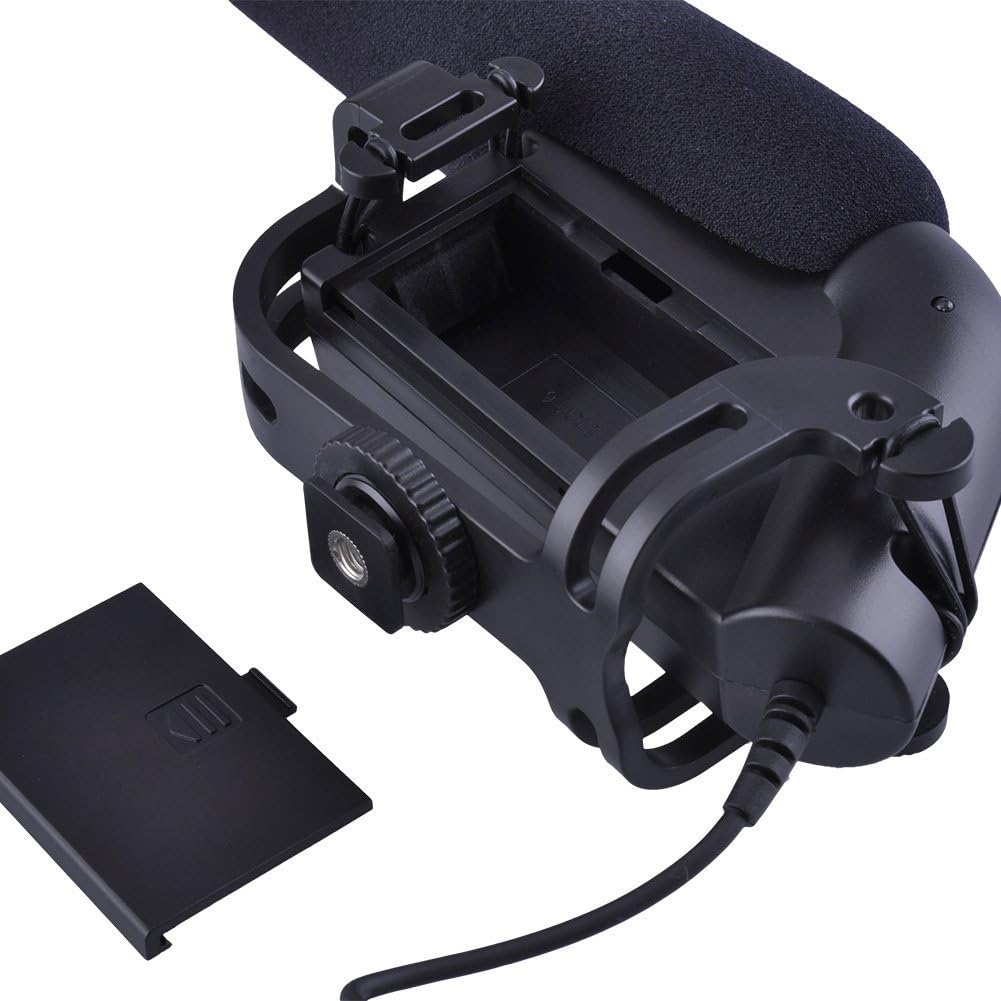
Image: An alternative perspective of the battery compartment, highlighting the 9V battery slot and its orientation.
2. మైక్రోఫోన్ను మౌంట్ చేయడం
The BY-VM190 features an integrated shock mount designed to attach to a camera's hot shoe or cold shoe.
- Slide the microphone's shoe mount into your camera's hot shoe or cold shoe.
- Tighten the locking wheel on the shoe mount to secure the microphone in place.
- For optimal audio, ensure the microphone is pointed towards your sound source.

Image: The BY-VM190 microphone securely mounted on a DSLR camera, demonstrating its typical setup for video recording.

చిత్రం: ఎ view from beneath the microphone, illustrating the integrated shock mount and the shoe mount mechanism used for attachment to a camera.
3. Connecting to Camera/Camcorder
Connect the microphone to your recording device using the integrated 3.5mm mini-pin plug.
- Plug the 3.5mm connector from the microphone into the external microphone input jack on your camera or camcorder.
- ఆడియో అంతరాయాలను నివారించడానికి కనెక్షన్ సురక్షితంగా ఉందని నిర్ధారించుకోండి.
ఆపరేటింగ్ సూచనలు
1. పవర్ చేయడం ఆన్/ఆఫ్
The microphone features a power switch to conserve battery life when not in use.
- Locate the ON/OFF switch on the side of the microphone body.
- Slide the switch to the "ON" position to power on the microphone.
- Slide the switch to the "OFF" position when the microphone is not in use to save battery.

చిత్రం: వివరణాత్మక view of the control panel on the microphone, showing the ON/OFF switch and the low-cut filter switch.
2. High-Pass Filter (Low-Cut Filter)
The BY-VM190 includes a selectable high-pass filter (also known as a low-cut filter) to reduce unwanted low-frequency noise.
- The filter has two settings: "Flat" and "80Hz".
- ఫ్లాట్: No low-frequency attenuation. Use for capturing the full frequency range.
- 80Hz: Activates the high-pass filter, cutting off frequencies below 80Hz. This is useful for reducing ambient noise such as air conditioners, traffic, or wind rumble.
- Adjust the switch according to your recording environment and desired audio quality.
3. Using the Windshield
The included foam windshield helps to reduce wind noise during outdoor recordings.
- Slide the foam windshield over the microphone capsule when recording in windy conditions.
- For more extreme wind, a furry windshield (often called a "dead cat") can be used for enhanced wind noise reduction.

Image: The BY-VM190 microphone with a furry windshield attached, demonstrating its use for reducing wind noise in outdoor recording environments.
నిర్వహణ
- శుభ్రపరచడం: Use a soft, dry cloth to clean the microphone body. Avoid using harsh chemicals or solvents.
- నిల్వ: When not in use, store the microphone in its carrying pouch in a dry, dust-free environment. Remove the 9V battery if storing for extended periods to prevent leakage.
- నిర్వహణ: Handle the microphone with care. Avoid dropping it or exposing it to extreme temperatures or moisture.
ట్రబుల్షూటింగ్
| సమస్య | సాధ్యమైన కారణం | పరిష్కారం |
|---|---|---|
| ఆడియో అవుట్పుట్ లేదు |
|
|
| ఆడియో నాణ్యత తక్కువగా ఉంది / అధిక నేపథ్య శబ్దం |
|
|
| అడపాదడపా ఆడియో |
|
|
స్పెసిఫికేషన్లు
| ఫీచర్ | వివరాలు |
|---|---|
| మైక్రోఫోన్ రకం | Condenser Microphone (Unidirectional) |
| ధ్రువ నమూనా | సూపర్ కార్డియోయిడ్ |
| ఫ్రీక్వెన్సీ రెస్పాన్స్ | 40-20000Hz |
| హై-పాస్ ఫిల్టర్ | Selectable (Flat/80Hz) |
| సున్నితత్వం | -40dB (0dB = 1V/Pa at 1 KHz) |
| సిగ్నల్-టు-నాయిస్ రేషియో (S/N) | 75dB or More (1KHz at 1Pa) |
| అవుట్పుట్ ఇంపెడెన్స్ | 200Ω or Less |
| శక్తి మూలం | 9V Lithium or Alkaline Battery (not included) |
| కనెక్టర్ | 3.5mm Mini-pin Plug |
| కొలతలు (L x W x H) | 9.84 x 5.51 x 3.15 అంగుళాలు (ఉత్పత్తి కొలతలు) |
| వస్తువు బరువు | 9.9 ఔన్సులు |
| అనుకూల పరికరాలు | క్యామ్కార్డర్, కెమెరా (DSLR) |
| మెటీరియల్ | ఫోమ్ (విండ్షీల్డ్) |
వారంటీ మరియు మద్దతు
For warranty information and technical support, please refer to the documentation provided with your purchase or visit the official BOYA webవారంటీ క్లెయిమ్ల కోసం మీ కొనుగోలు రుజువును ఉంచండి.
తయారీదారు: బోయ
మోడల్: BY-VM190


