1. పరిచయం
ధన్యవాదాలు, ధన్యవాదాలు.asing the Onkyo LS-T10 6.1-Channel 3D Surround Base System. This manual provides essential information for the safe and efficient use of your new audio system. Please read it thoroughly before installation and operation, and keep it for future reference.
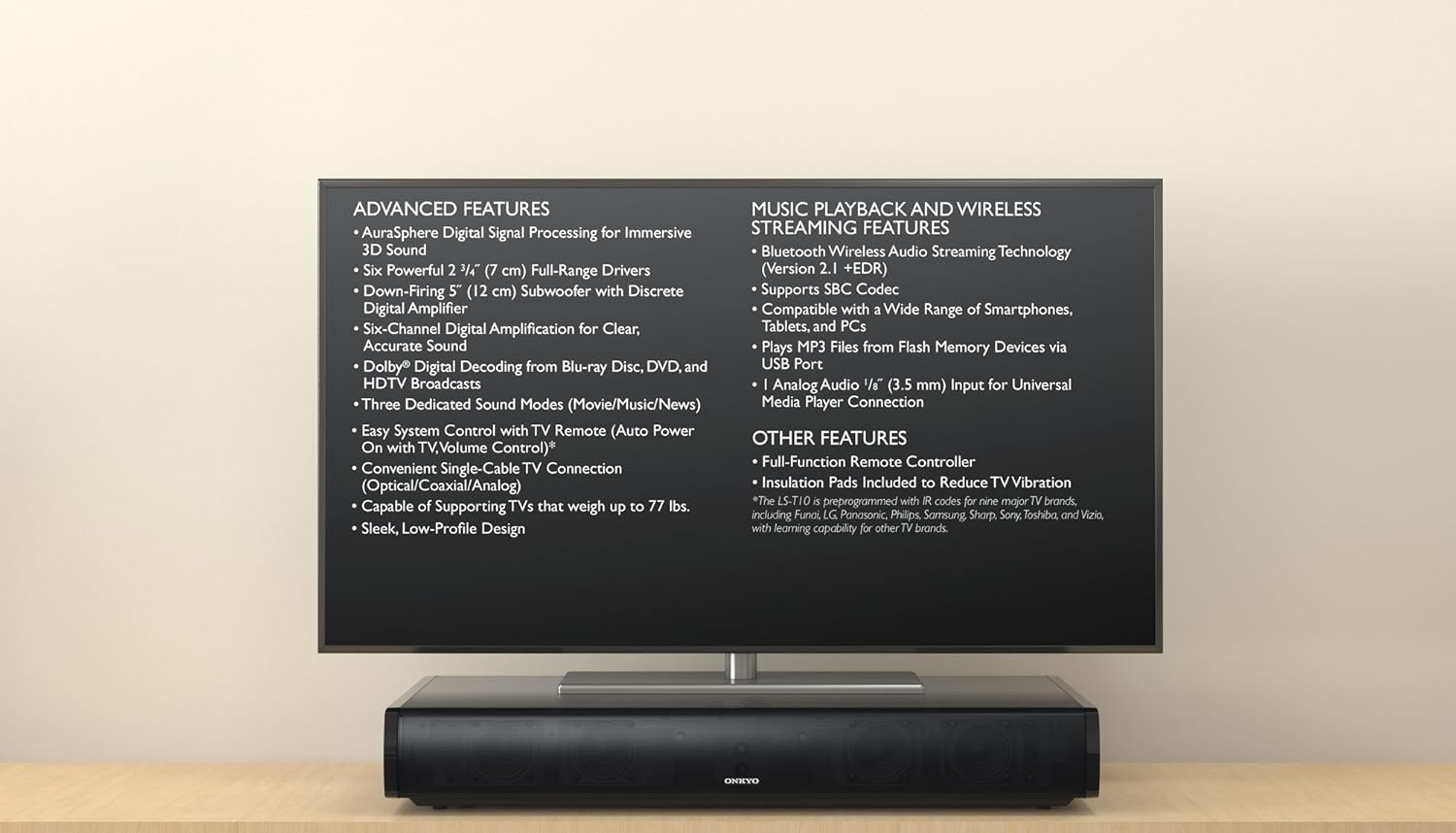
The Onkyo LS-T10 system positioned beneath a television, illustrating its compact design and listing key functionalities such as AuraSphere 3D sound, Bluetooth streaming, and various input options.
2. భద్రతా సమాచారం
సురక్షితమైన ఆపరేషన్ను నిర్ధారించడానికి మరియు నష్టాన్ని నివారించడానికి, దయచేసి ఈ క్రింది జాగ్రత్తలను గమనించండి:
- విద్యుత్ సరఫరా: వాల్యూమ్ యొక్క AC అవుట్లెట్కు మాత్రమే యూనిట్ను కనెక్ట్ చేయండి.tagఇ వెనుక ప్యానెల్లో పేర్కొనబడింది.
- వెంటిలేషన్: వెంటిలేషన్ ఓపెనింగ్లను బ్లాక్ చేయవద్దు. సరైన గాలి ప్రవాహం కోసం యూనిట్ చుట్టూ తగినంత స్థలం ఉండేలా చూసుకోండి.
- నీరు మరియు తేమ: యూనిట్ను వర్షం, తేమ లేదా అధిక తేమకు గురిచేయవద్దు. ద్రవాలతో నిండిన వస్తువులను యూనిట్పై ఉంచవద్దు.
- వేడి: రేడియేటర్లు, హీట్ రిజిస్టర్లు, స్టవ్లు లేదా ఇతర వేడిని ఉత్పత్తి చేసే ఉపకరణాలు వంటి ఉష్ణ వనరుల నుండి యూనిట్ను దూరంగా ఉంచండి.
- శుభ్రపరచడం: Unplug the unit from the wall outlet before cleaning. Use a dry, soft cloth. Do not use liquid or aerosol cleaners.
- సర్వీసింగ్: యూనిట్కు మీరే సర్వీసింగ్ చేయడానికి ప్రయత్నించవద్దు. అన్ని సర్వీసింగ్లను అర్హత కలిగిన సేవా సిబ్బందికి సూచించండి.
3. ప్యాకేజీ విషయాలు
దయచేసి మీ ప్యాకేజీలో ఈ క్రింది అంశాలు ఉన్నాయో లేదో తనిఖీ చేయండి:
- Onkyo LS-T10 3D Surround Base System Unit
- రిమోట్ కంట్రోల్
- పవర్ కార్డ్
- ఆప్టికల్ డిజిటల్ ఆడియో కేబుల్
- సూచనల మాన్యువల్ (ఈ పత్రం)
- Insulation Pads (to reduce TV vibration)
- AAA Batteries (x2) for Remote Control
4. ఉత్పత్తి లక్షణాలు
The Onkyo LS-T10 is designed to enhance your home entertainment experience with a range of advanced audio and connectivity features:
- AuraSphere Digital Signal Processing: Creates an immersive 3D sound field.
- Powerful Speaker Configuration: Features six 2 3/4" (7 cm) full-range drivers and a down-firing 5" (12 cm) subwoofer with a discrete digital amplifier for 6.1-channel sound.
- డాల్బీ డిజిటల్ డీకోడింగ్: Supports high-quality audio from Blu-ray Disc, DVD, and HDTV broadcasts.
- Dedicated Sound Modes: Optimize audio for Movie, Music, and News content.
- Easy System Control: Compatible with TV remote controls for auto power on and volume adjustment.
- Versatile TV Connection: Connects to your TV via a single optical, coaxial, or analog cable.
- బలమైన డిజైన్: Capable of supporting TVs weighing up to 77 lbs.
- Bluetooth Wireless Audio Streaming: Version 2.1 +EDR with SBC Codec for streaming from smartphones, tablets, and PCs.
- USB ప్లేబ్యాక్: MP3ని ప్లే చేయండి files directly from Flash Memory Devices via the USB port.
- అనలాగ్ ఆడియో ఇన్పుట్: Includes a 1/8" (3.5 mm) input for universal media player connection.

An inverted view of the Onkyo LS-T10 system, providing a clear perspective of the six full-range drivers and the powerful down-firing subwoofer that contribute to its 6.1-channel sound.

ఒక వివరణాత్మక view of one of the Onkyo LS-T10's integrated speaker drivers, emphasizing the quality components used for audio reproduction.
5. సెటప్
5.1 ప్లేస్మెంట్
- Place the LS-T10 on a stable, flat surface directly under your television.
- Ensure the unit is centered with your TV for optimal sound dispersion.
- Leave adequate space around the unit for ventilation.
- If your TV is heavy, ensure the surface can support both the TV and the LS-T10 (the LS-T10 supports TVs up to 77 lbs).
- Apply the included insulation pads to the bottom of the LS-T10 to reduce TV vibration.

వైపు view of the Onkyo LS-T10, demonstrating its compact and elegant design, suitable for placement under various television sizes.
5.2 కనెక్షన్లు
- టీవీకి కనెక్ట్ అవ్వండి: Use the supplied optical digital audio cable to connect the OPTICAL OUT port on your TV to the OPTICAL IN port on the LS-T10. If your TV does not have an optical output, use a coaxial digital audio cable or an analog audio cable (3.5mm stereo mini-jack).
- పవర్ కనెక్షన్: Plug the power cord into the AC IN jack on the LS-T10, then plug the other end into a wall outlet.
6. ఆపరేటింగ్ సూచనలు
6.1 ప్రాథమిక ఆపరేషన్
- పవర్ ఆన్/ఆఫ్: నొక్కండి శక్తి button on the remote control or the unit to turn the system on or off.
- వాల్యూమ్ నియంత్రణ: ఉపయోగించండి వాల్యూమ్ +/- buttons on the remote or unit to adjust the sound level.
- ఇన్పుట్ ఎంపిక: నొక్కండి ఇన్పుట్ button on the remote or unit to cycle through available inputs (Optical, Coaxial, Analog, Bluetooth, USB).
- సౌండ్ మోడ్లు: నొక్కండి సినిమా, సంగీతం, లేదా వార్తలు buttons on the remote to select the desired sound mode.
6.2 బ్లూటూత్ స్ట్రీమింగ్
- నొక్కండి ఇన్పుట్ button until "Bluetooth" is selected. The Bluetooth indicator on the unit will flash.
- మీ స్మార్ట్ఫోన్, టాబ్లెట్ లేదా PCలో, బ్లూటూత్ను ప్రారంభించి, అందుబాటులో ఉన్న పరికరాల కోసం శోధించండి.
- Select "ONKYO LS-T10" from the list of devices. Once paired, the Bluetooth indicator will glow steadily.
- Start playing audio on your device, and it will stream wirelessly to the LS-T10.

A smartphone streaming audio via Bluetooth to the Onkyo LS-T10 3D Surround Base System, showcasing its capability for streaming music, podcasts, and internet radio.
6.3 USB ప్లేబ్యాక్
- MP3 ఆడియో ఉన్న USB ఫ్లాష్ డ్రైవ్ను చొప్పించండి files into the USB port on the LS-T10.
- నొక్కండి ఇన్పుట్ button until "USB" is selected.
- The system will automatically begin playing MP3 files from the USB drive. Use the remote control to skip tracks or pause playback.
7. నిర్వహణ
- శుభ్రపరచడం: మెత్తటి, పొడి గుడ్డతో యూనిట్ను తుడవండి. రాపిడి క్లీనర్లు, మైనపులు లేదా ద్రావకాలను ఉపయోగించవద్దు.
- వెంటిలేషన్: వెంటిలేషన్ ఓపెనింగ్లు దుమ్ము లేదా చెత్తతో అడ్డుపడకుండా కాలానుగుణంగా తనిఖీ చేయండి.
- రిమోట్ కంట్రోల్ బ్యాటరీలు: Replace the AAA batteries in the remote control when its operating range decreases.
8. ట్రబుల్షూటింగ్
If you experience issues with your LS-T10, refer to the following common problems and solutions:
- శక్తి లేదు:
- పవర్ కార్డ్ యూనిట్ మరియు వాల్ అవుట్లెట్ రెండింటిలోనూ సురక్షితంగా ప్లగ్ చేయబడిందని నిర్ధారించుకోండి.
- మరొక పరికరాన్ని ప్లగ్ చేయడం ద్వారా వాల్ అవుట్లెట్ పనిచేస్తుందో లేదో తనిఖీ చేయండి.
- ధ్వని లేదు:
- Verify that the correct input source is selected on the LS-T10.
- Check the volume level on both the LS-T10 and your TV/connected device.
- Ensure audio cables are securely connected. Try a different cable if possible.
- Confirm that your TV's audio output is set to the correct format (e.g., PCM for optical if Dolby Digital is not working).
- బ్లూటూత్ కనెక్షన్ సమస్యలు:
- Ensure the LS-T10 is in Bluetooth input mode and discoverable (indicator flashing).
- Delete "ONKYO LS-T10" from your device's Bluetooth list and try pairing again.
- Move your Bluetooth device closer to the LS-T10.
- రిమోట్ కంట్రోల్ పనిచేయదు:
- Check and replace the batteries (2x AAA).
- రిమోట్ మరియు యూనిట్ సెన్సార్ మధ్య ఎటువంటి అడ్డంకులు లేవని నిర్ధారించుకోండి.
9. స్పెసిఫికేషన్లు
| మోడల్ సంఖ్య | LS-T10 |
| పవర్ అవుట్పుట్ | 100 W (6.1 channels) |
| స్పీకర్ కాన్ఫిగరేషన్ | 6 x 2 3/4" (7 cm) Full-Range Drivers, 1 x 5" (12 cm) Down-Firing Subwoofer |
| కనెక్టివిటీ | Bluetooth (Version 2.1 +EDR, SBC Codec), USB (MP3 playback), 1 x Analog Audio (1/8" / 3.5 mm) |
| TV Audio Inputs | 1 x Optical Digital, 1 x Coaxial Digital, 1 x Analog (RCA) |
| Supported TV Weight | 77 పౌండ్లు (35 కిలోలు) వరకు |
| రిమోట్ కంట్రోల్ బ్యాటరీలు | 2 x AAA (చేర్చబడింది) |
10. వారంటీ మరియు మద్దతు
Onkyo products are manufactured to high standards and are designed for reliable performance. For warranty information specific to your region, please refer to the warranty card included with your product or visit the official Onkyo webసైట్.
For technical support, service, or inquiries, please contact your authorized Onkyo dealer or the customer support center in your country. Keep your purchase receipt as proof of purchase for warranty claims.


