1. పరిచయం
This manual provides instructions for the proper use and care of your Belkin Right-Angled Aux/Auxiliary Cable. This cable is designed to connect audio devices with a 3.5mm jack, such as smartphones, MP3 players, and portable speakers, to car stereos, home stereo systems, or other compatible audio inputs. Its right-angle connector and flat design enhance durability and ease of use.
2. ఉత్పత్తి లక్షణాలు
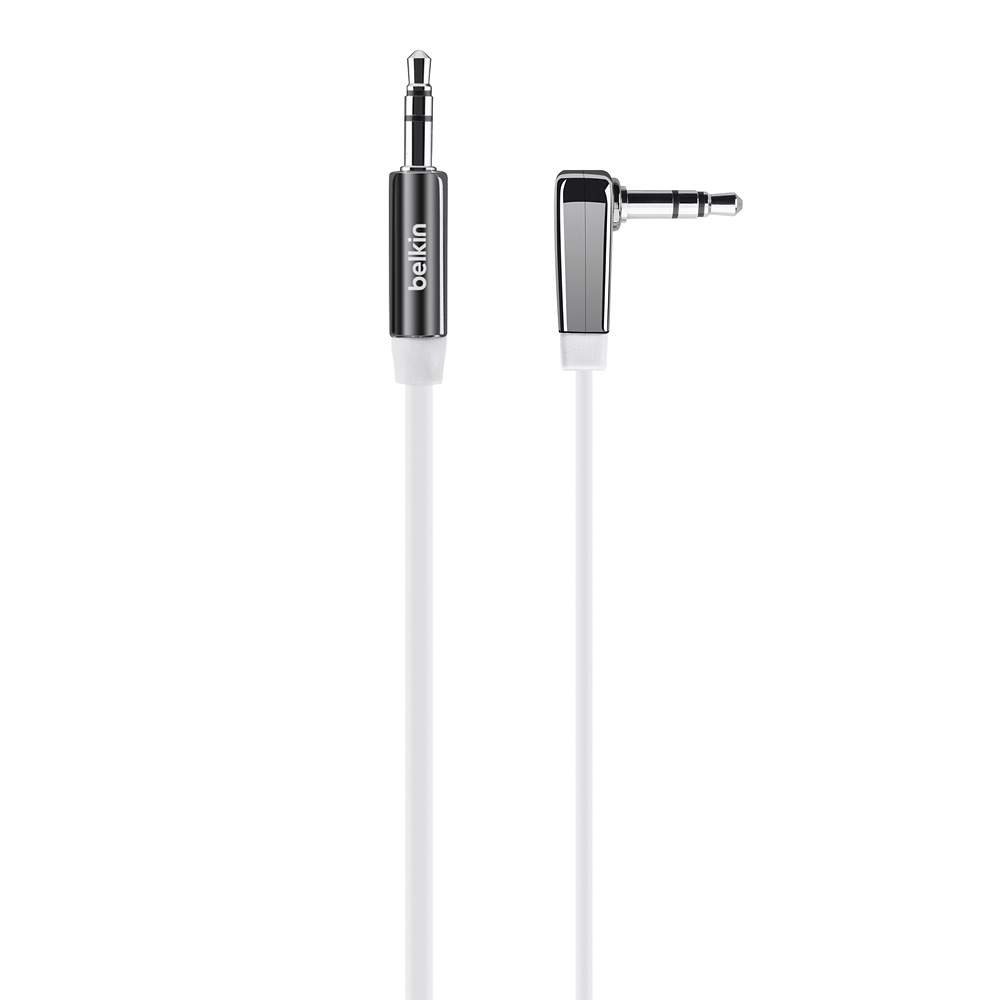
మూర్తి 1: Belkin Right-Angled Aux/Auxiliary Cable. This image shows the black, flat cable with its right-angled 3.5mm connector on one end and a straight 3.5mm connector on the other.
- Right-Angle 3.5mm Plug: Reduces stress on the cable and device port, allowing for a flush connection.
- ఫ్లాట్ డిజైన్: Prevents tangles and makes storage easier.
- Chrome-Finished Plugs and Nickel-Plated Contacts: Ensures reliable connection and optimal audio signal transfer.
- పొడవు: 6 feet (approximately 1.8 meters) for flexible placement of connected devices.
- యూనివర్సల్ అనుకూలత: Works with any device featuring a standard 3.5mm audio jack.
3. సెటప్ మరియు కనెక్షన్
Connecting your Belkin Aux/Auxiliary Cable is a straightforward process. Ensure both devices you intend to connect are powered off before making connections, if possible, to prevent any potential audio pops or damage.
- ఆడియో పోర్ట్లను గుర్తించండి: Locate the 3.5mm audio output jack on your source device (e.g., smartphone, tablet, MP3 player) and the 3.5mm audio input jack on your receiving device (e.g., car stereo, home speaker, sound card). These are typically labeled "AUX OUT," "HEADPHONE," or "LINE IN," "AUX IN" respectively.
- Connect Right-Angle End: Insert the right-angled 3.5mm connector of the cable into the audio output jack of your source device. The right-angle design is particularly useful for devices in tight spaces or where a straight connector might be prone to damage.
- Connect Straight End: Insert the straight 3.5mm connector of the cable into the audio input jack of your receiving device.
- సురక్షిత కనెక్షన్: Ensure both connectors are fully inserted into their respective ports for a secure and stable audio connection.
4. ఆపరేషన్
Once the cable is connected, follow these steps to begin audio playback:
- పవర్ ఆన్ పరికరాల: Turn on both your audio source device and your receiving audio device.
- ఇన్పుట్ని ఎంచుకోండి: On your receiving audio device (e.g., car stereo, home stereo), select the correct audio input source. This is usually labeled "AUX," "LINE IN," or similar. Refer to your receiving device's manual if you are unsure.
- ప్లేబ్యాక్ ప్రారంభించండి: Begin playing audio from your source device (e.g., music, podcast, audiobook).
- వాల్యూమ్ సర్దుబాటు: Adjust the volume on both your source device and your receiving device to a comfortable listening level. It is often recommended to set the source device's volume to about 75-80% and control the main volume from the receiving device.
5. నిర్వహణ మరియు సంరక్షణ
To ensure the longevity and optimal performance of your Belkin Aux/Auxiliary Cable, follow these maintenance guidelines:
- విపరీతమైన బెండింగ్ను నివారించండి: While the flat design helps prevent tangles, avoid sharp or excessive bends, especially near the connectors, as this can damage internal wiring.
- సరిగ్గా నిల్వ చేయండి: When not in use, coil the cable loosely. The flat design makes it easy to store without tangling.
- శుభ్రముగా ఉంచు: Periodically wipe the cable with a soft, dry cloth. If connectors appear dirty, gently clean them with a cotton swab lightly dampened with isopropyl alcohol, ensuring they are completely dry before use.
- జాగ్రత్తగా నిర్వహించండి: Always grasp the plug itself when inserting or removing the cable, rather than pulling on the cable wire.
- పర్యావరణ పరిస్థితులు: Avoid exposing the cable to extreme temperatures, direct sunlight for prolonged periods, or excessive moisture.
6. ట్రబుల్షూటింగ్
If you experience issues with your Belkin Aux/Auxiliary Cable, refer to the following common problems and solutions:
| సమస్య | సాధ్యమైన కారణం | పరిష్కారం |
|---|---|---|
| సౌండ్ లేదు |
|
|
| Poor Sound Quality (Static, Distortion) |
|
|
| Sound Only from One Channel |
|
|
7. స్పెసిఫికేషన్లు
| ఫీచర్ | వివరాలు |
|---|---|
| బ్రాండ్ | బెల్కిన్ |
| మోడల్ సంఖ్య | AV10128bt06 |
| కనెక్టర్ రకం | 3.5 మిమీ నుండి 3.5 మిమీ |
| అనుకూల పరికరాలు | Smartphone, Speaker, Car Stereo, Home Stereo |
| రంగు | నలుపు |
| కనెక్టర్ లింగం | మగ నుండి మగ |
| కేబుల్ ఆకారం | ఫ్లాట్ |
| కేబుల్ పొడవు | 6 అడుగులు (సుమారు 1.8 మీటర్లు) |
| వస్తువు బరువు | 1.62 ఔన్సులు (సుమారు 46 గ్రాములు) |
| ఉత్పత్తి కొలతలు | 1.07 x 4.04 x 6.13 అంగుళాలు (ప్యాకేజింగ్ కొలతలు) |
| ఇండోర్/అవుట్డోర్ వినియోగం | ఇండోర్, అవుట్డోర్ |
8. వారంటీ మరియు మద్దతు
For information regarding product warranty, technical support, or customer service, please visit the official Belkin webసైట్లో లేదా వారి కస్టమర్ సపోర్ట్ను నేరుగా సంప్రదించండి. ఏవైనా వారంటీ క్లెయిమ్లకు కొనుగోలు రుజువుగా మీ కొనుగోలు రసీదును ఉంచండి.
Belkin Official Webసైట్: www.belkin.com


